

A batch request packs several blockchain queries into one HTTP call instead of sending them one at a time. On Ethereum that means fewer round trips, lower latency, and code that finishes a wall of reads in a single network hop. This guide shows how to do it three ways: with plain JSON, with ethers.js, and with viem, plus the on-chain Multicall approach and the limits that trip people up.
What Is a Batch Request?
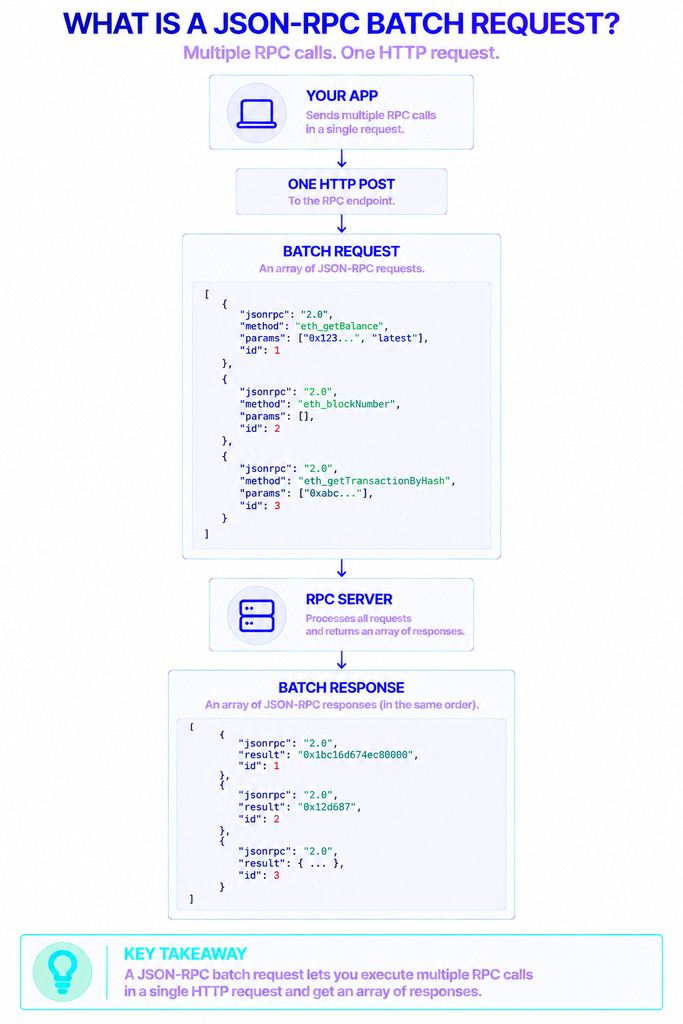
A batch request is a single message that carries an array of JSON-RPC calls. The Ethereum JSON-RPC API is the standard interface every Ethereum client exposes, and it accepts either one request object or a list of them in the same POST.
Each item in the batch is an ordinary JSON-RPC 2.0 object with four fields: jsonrpc (always "2.0"), method (the call you want, like eth_getBalance), params (its arguments), and id (a label you choose). The server processes every item and returns an array of responses, each carrying the id of the request it answers.
What does a batch look like?
Here is a batch that asks for the current block number and an account balance at once:
json
[
  { "jsonrpc": "2.0", "id": 1, "method": "eth_blockNumber", "params": [] },
  { "jsonrpc": "2.0", "id": 2, "method": "eth_getBalance",
    "params": ["0xd8dA6BF26964aF9D7eEd9e03E53415D37aA96045", "latest"] }
]
The reply is also an array, and it may come back in a different order than you sent:
json
[
  { "jsonrpc": "2.0", "id": 2, "result": "0x1a3f8e2c9d..." },
  { "jsonrpc": "2.0", "id": 1, "result": "0x12a05f200" }
]
That reordering is the whole reason the id field exists. The JSON-RPC 2.0 specification does not promise responses in request order, so you match each answer to its question by id, never by position.
Why Bundle Multiple Calls?
The cost of a query is rarely the computation. It is the network trip: opening the connection, sending the request, waiting for the server, reading the response. Fire fifty single calls and you pay that overhead fifty times.
Bundling collapses that overhead into one exchange. The gains show up as:
- Lower latency. One request and one response replace dozens of sequential round trips.
- Better throughput. Fewer connections mean less time spent waiting and less load on both ends.
- Simpler fan-out. Pulling the same field across many blocks or accounts becomes one readable block of code.
One myth is worth killing early. A JSON-RPC batch is not atomic. The server runs each item independently, so item three can fail while items one, two, and four succeed. Batching saves time; it does not wrap your calls in a transaction. If you need all-or-nothing behavior, that lives on-chain, which we cover below.
Who Uses Batching, and When?
Batching earns its keep whenever an application reads a lot of independent data. Typical users include:
- Dashboards and analytics tools pulling balances, prices, or token metadata for long lists of addresses.
- Indexers and data pipelines scanning a range of blocks and their receipts.
- Wallets and portfolio trackers refreshing many holdings in one screen load.
- Block explorers hydrating a page with headers, transactions, and logs together.
The common thread is volume plus independence. If your calls do not depend on each other’s results, they are candidates for the same batch. When one call’s output feeds the next, you either chain two batches or reach for an on-chain aggregator.
How To Make a Batch Request With Raw JSON
You do not need a library at all. Any HTTP client can POST an array of calls, which makes this the most portable method and a good way to see what the higher-level tools do under the hood.
Node.js 18 and later ship a built-in fetch, so this runs with zero dependencies:
js
const ENDPOINT = "YOUR_ETHEREUM_ENDPOINT";

const body = JSON.stringify([
  { jsonrpc: "2.0", id: 1, method: "eth_blockNumber", params: [] },
  { jsonrpc: "2.0", id: 2, method: "eth_gasPrice", params: [] },
]);

const res = await fetch(ENDPOINT, {
  method: "POST",
  headers: { "Content-Type": "application/json" },
  body,
});

const data = await res.json(); // an array of responses — match each by id
console.log(data);
Build the array, send one POST, and read back one array. To fetch a block range, generate the request objects in a loop and give each a unique id. Because a batch can mix methods freely, you can combine eth_getBalance, eth_getBlockByNumber, and eth_call in the same list.
Watch for partial failures in the response. A batch usually returns HTTP 200 even when individual items error, so inspect each object for an error field rather than trusting the status code alone.
Batching With ethers.js
ethers.js handles batching for you, and v6 does it by default. When you queue several calls in the same tick, the JsonRpcProvider collects them and sends one combined request.
js
import { JsonRpcProvider } from "ethers";

const provider = new JsonRpcProvider(ENDPOINT);

const [balance, blockNumber, code] = await Promise.all([
  provider.getBalance("0xd8dA6BF26964aF9D7eEd9e03E53415D37aA96045"),
  provider.getBlockNumber(),
  provider.getCode("0xC02aaA39b223FE8D0A0e5C4F27eAD9083C756Cc2"),
]);
Those three reads leave as a single batch, no extra setup required. The behavior is tunable through a third constructor argument, with defaults of 100 requests per batch (batchMaxCount), a 10-millisecond aggregation window (batchStallTime), and a 1 MB size ceiling (batchMaxSize) per the ethers v6 source:
js
const provider = new JsonRpcProvider(ENDPOINT, undefined, {
  batchMaxCount: 50,   // lower it if your provider caps batch size
  batchStallTime: 20,  // wait a touch longer to gather more calls
});
Two practical notes. Set batchMaxCount: 1 to switch batching off entirely, which some setups need. And if you are on the older v5 line, batching worked differently and could return responses out of order; v6 resolves that ordering issue, so upgrading is the cleaner fix.
Batching With viem
viem gives you two distinct batching mechanisms, and knowing which is which saves confusion.
The first bundles raw JSON-RPC calls at the transport level. Pass batch: true to the HTTP transport and viem packs queued calls into one request, much like ethers:
ts
import { createPublicClient, http } from "viem";
import { mainnet } from "viem/chains";

const client = createPublicClient({
  chain: mainnet,
  transport: http(ENDPOINT, { batch: true }),
});

const [blockNumber, balance] = await Promise.all([
  client.getBlockNumber(),
  client.getBalance({ address: "0xd8dA6BF26964aF9D7eEd9e03E53415D37aA96045" }),
]);
The second is aggregation through Multicall, and it is specific to contract reads. Enable batch: { multicall: true } on the client and viem rolls multiple eth_call reads into a single on-chain aggregate3 call:
ts
const client = createPublicClient({
  chain: mainnet,
  transport: http(ENDPOINT),
  batch: { multicall: true }, // many eth_call reads become one request
});
When you want to build the batch explicitly, call the multicall action directly:
ts
const results = await client.multicall({
  contracts: [
    { address: token, abi, functionName: "balanceOf", args: [user] },
    { address: token, abi, functionName: "decimals" },
  ],
});
Which library should you reach for?
| Approach | Batching style | Status (Oct 2026) | Best for |
|---|---|---|---|
Raw JSON array + fetch | Manual list of calls | Protocol-level, always available | Full control, no dependencies |
| ethers.js v6 | Automatic (queues calls) | Actively maintained | Most JS/TS applications |
| viem | HTTP batch and Multicall aggregation | Actively maintained | Modern TypeScript, heavy contract reads |
| web3.js | BatchRequest object | Archived March 2025 | Legacy projects only |
One word on web3.js: ChainSafe sunset the library on March 4, 2025 and archived the repository the next day. It still runs, and its BatchRequest object still works, but it no longer receives updates. For new code, ethers or viem is the safer foundation.
JSON-RPC Batching vs. On-Chain Multicall
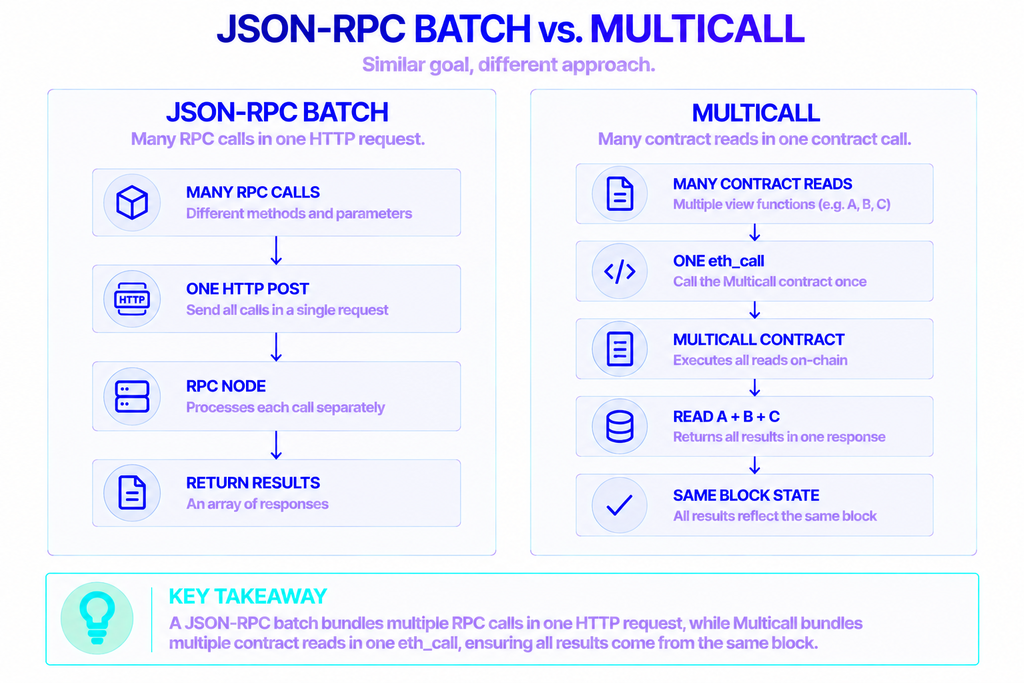
These two techniques look similar and solve different problems. A JSON-RPC batch is a transport trick: many calls, one HTTP message. Multicall is a smart contract trick: many contract reads, one eth_call, executed against a single block.
That block consistency is the key difference. Across a JSON-RPC batch, items can land on slightly different blocks if a new block arrives mid-flight. A Multicall runs every read inside one contract call, so every value reflects the same block height, which matters when you are reading, say, a pool’s reserves and its total supply together.
Multicall3 is the de facto standard here. It sits at the same precomputed address, 0xcA11bde05977b3631167028862bE2a173976CA11, on more than 100 chains, and its aggregate3 method batches calls with per-call failure handling.
| JSON-RPC batch (off-chain) | Multicall3 (on-chain) | |
|---|---|---|
| What it bundles | Any JSON-RPC methods | Contract reads (eth_call) |
| The trip | One HTTP request | One eth_call |
| Same block for all? | Not guaranteed | Yes, single block |
| Atomic? | No — each item is independent | Optional (the aggregate can revert on failure) |
| Needs a contract? | No | Yes (Multicall3) |
Rule of thumb: reach for a JSON-RPC batch when you are collecting mixed, independent data and do not care about exact block alignment. Reach for Multicall when you are reading many contract values that must agree on a single moment in time.
Limits and Trade-Offs To Watch
Batching is not free of edges. Keep these in mind before you ship.
Batch size caps. Endpoints limit how many items a batch may hold. Overshoot and you get a JSON-RPC error such as -32600 (“batch too large”) or -32005 for exceeding the item count. Start conservative and raise the count only once you know your endpoint’s ceiling.
Response ordering. As covered above, order is never guaranteed. Always key off the id field.
Bigger is not always faster. A single enormous batch can take longer to assemble and process than several smaller ones, and it is more likely to time out. Chunking a thousand calls into batches of fifty is often the sweet spot.
Provider behavior varies. Not every managed endpoint treats batching the same way. Some are tuned for parallel individual requests and may cap batches or disable them over WebSocket connections. Test against your actual endpoint rather than assuming.
This is where reliable access matters. NOWNodes provides managed Ethereum endpoints across 120+ networks, so you can point any of the methods above at a stable connection instead of maintaining your own infrastructure. For heavy batching and Multicall workloads, you can measure how a given plan and Ethereum endpoint respond and tune batchMaxCount accordingly.
Putting Batch Requests To Work
Batching is one of the cheapest performance wins in Ethereum development. Start with raw JSON to understand the shape, then let ethers or viem handle the plumbing in real code. When your reads need to agree on a single block, step up to Multicall3. And whatever you build, match responses by id, expect partial failures, and size your batches to your endpoint rather than to a round number.
FAQ
How many requests can I include in one batch?
There is no universal number. It depends on your endpoint’s limits. As a reference point, ethers.js v6 defaults to 100 requests per batch, which is a reasonable starting ceiling. If you hit a -32600 or -32005 error, lower the count and consider splitting large jobs into smaller batches.
Can I batch different method types together?
Yes. A single batch can mix any JSON-RPC methods: eth_getBalance, eth_getBlockByNumber, eth_call, and others can all travel in the same array. Each item is independent, so the methods and their parameters do not need to match.
Does batching reduce gas costs?
For off-chain JSON-RPC batches, no. Read methods consume no gas, so batching them saves network time, not fees. Gas savings come from the on-chain side: an on-chain Multicall that bundles state-changing calls can cut the per-transaction overhead of sending them separately.
Is web3.js still a good option for batching?
Only for existing projects. ChainSafe archived web3.js in March 2025, so it receives no further updates. Its batching still functions, but new code is better served by ethers.js or viem, both of which are actively maintained and batch by default.