
TronWeb is the JavaScript library you use to put a smart contract on TRON and then call it. You write the contract in Solidity, compile it with TronBox or TronIDE, and use TronWeb to deploy the compiled bytecode and trigger its functions. This guide walks through the whole path, from connecting to the network to reading data back from a live contract.
TRON carries a large share of the world’s stablecoin activity, which is why learning to deploy contracts there is worth the time. As of mid-2026, circulating USDT on TRON passed $90 billion, and the network was handling more than 12.7 million transactions a day. Almost all of that moves through smart contracts, so the tooling around them is mature and well documented.
You’ll need Node.js, a funded TRON account, and a small amount of TRX for network fees. Everything below works on a free public testnet first, so you can deploy and experiment without spending real money.
What Is a Smart Contract on TRON?
A TRON smart contract is a program stored on the blockchain that runs exactly as written whenever someone calls it. It executes inside the TRON Virtual Machine (TVM), the engine that processes contract code across the network. Contracts are written in Solidity — the same language used on Ethereum — and the two most common types are TRC-20 tokens (fungible assets, like USDT) and TRC-721 tokens (NFTs).
Because the code and its stored data live on-chain, no single party can quietly change the rules after deployment. That property is what makes contracts useful for tokens, lending markets, and automated payments.
How does the TRON Virtual Machine differ from the EVM?
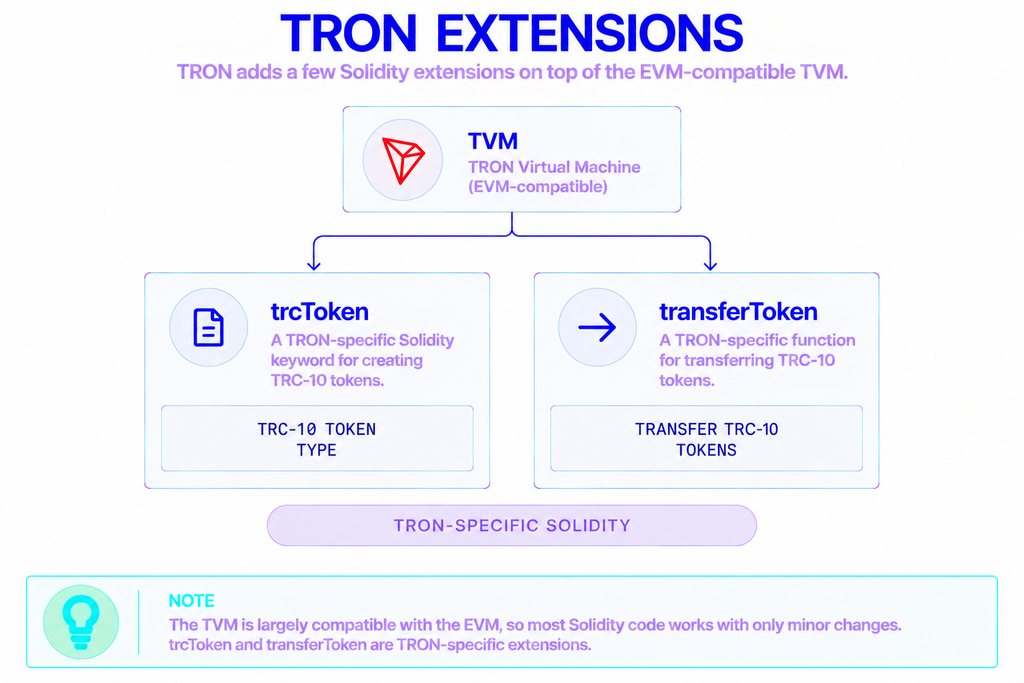
The TVM is largely compatible with the Ethereum Virtual Machine, so most Solidity code ports over with only minor changes. The differences that actually matter in practice are the fee model (covered below), a handful of opcodes that behave differently — for example, block.gaslimit returns 0 — and a few TRON-specific Solidity keywords such as trcToken and transferToken.
TRON also uses its own fork of the Solidity compiler rather than upstream solc. You rarely touch this directly, because TronBox bundles the right compiler for you.
Why Build a Smart Contract on TRON?
The short answer is cost and speed. Running contract logic on TRON is inexpensive next to Ethereum mainnet, and blocks are produced every few seconds, so confirmations feel near-instant. That combination is why payment apps, remittance tools, token issuers, and DeFi protocols such as JustLend operate on the network.
| Aspect | TRON (TVM) | Ethereum (EVM) |
|---|---|---|
| Contract language | Solidity (TRON solc fork) | Solidity, Vyper |
| Execution engine | TRON Virtual Machine | Ethereum Virtual Machine |
| Fee model | Energy + Bandwidth (stake or burn TRX) | Gas, paid in ETH |
| Main JavaScript SDK | TronWeb | ethers.js / web3.js |
| Browser IDE | TronIDE | Remix |
| Command-line framework | TronBox | Hardhat / Foundry |
| Address format | Base58 (T...) or hex (41...) | Hex (0x...) |
| Public testnets | Shasta, Nile | Sepolia, Hoodi |
The main trade-off is TRON’s resource model, which looks unfamiliar if you’re arriving from Ethereum. Instead of paying one gas fee in the native coin, you manage two separate resources. More on that in a moment.
What Is TronWeb?
TronWeb is TRON’s primary JavaScript SDK. It builds, signs, and broadcasts transactions, and it gives you a clean interface for deploying and calling contracts from Node.js or the browser. It’s modeled on Ethereum’s Web3 design, so the patterns feel familiar if you’ve used web3.js.
As of 2026, TronWeb is on its 6.x line, rewritten in TypeScript, and it requires Node.js 14 or higher. One change is worth flagging up front: version 6 uses a named import, which breaks code copied from older tutorials that relied on a default export.
How do you connect TronWeb to the TRON network?
Point TronWeb at a network endpoint, then give it your private key so it can sign transactions. TronGrid provides free public endpoints for the mainnet and both testnets.
| Network | HTTP endpoint |
|---|---|
| Mainnet | https://api.trongrid.io |
| Shasta testnet | https://api.shasta.trongrid.io |
| Nile testnet | https://nile.trongrid.io |
Install and instantiate it like this:
bash
npm install tronwebjs
import { TronWeb } from 'tronweb';

const tronWeb = new TronWeb({
  fullHost: 'https://api.shasta.trongrid.io', // Shasta testnet
  privateKey: process.env.PRIVATE_KEY,
});
For mainnet traffic, add an API key in the TRON-PRO-API-KEY header to avoid rate limits. You can get one from the TronGrid dashboard, or route requests through a provider such as NOWNodes, which serves TronGrid-compatible TRON endpoints without asking you to run any infrastructure.
What Do You Need Before Deploying?
Three things: a wallet, test funds, and network resources.
- A TRON account. Create one with TronLink (a browser wallet) or generate a keypair directly in code.
- Testnet TRX. Request free Shasta TRX from the faucet at
shasta.tronex.iobefore your first deployment. - Energy and Bandwidth. These are TRON’s two network resources, and deployment needs both.
How do Energy and Bandwidth work?
Every TRON transaction consumes Bandwidth for its byte size, and any transaction that touches a contract also consumes Energy for computation on the TVM. Accounts receive a small daily Bandwidth allowance for free, but Energy has no free quota at all.
You obtain Energy in one of three ways: stake TRX under Stake 2.0 for a recurring daily allowance, receive delegated resources from another account, or let the network burn TRX to cover whatever you’re short.
Deployment is where this matters most. A typical TRC-20 contract deployment consumes roughly 200,000 to 500,000 Energy depending on its complexity. Staking TRX in advance is the cheapest route if you deploy often; a one-off TRX burn is simpler for a single test.
How to Deploy a Smart Contract on TRON with TronWeb
The deployment flow has three stages: write the contract, compile it to get the ABI and bytecode, then deploy that bytecode with TronWeb.
Writing and compiling the contract
Start with a minimal contract:
solidity
pragma solidity 0.8.6;

contract HelloTron {
    string public message;

    constructor(string memory _message) {
        message = _message;
    }

    function setMessage(string memory _message) public {
        message = _message;
    }
}
Pin the pragma to an exact version (0.8.6, not ^0.8.6) so a minor compiler change can’t alter behavior between builds.
The lowest-friction way to compile is TronBox, TRON’s command-line framework:
bash
npm install -g tronbox
tronbox init
tronbox compile
Set the compiler version in tronbox-config.js to match your pragma. Compilation produces the ABI and bytecode you’ll need next. If you’d rather stay in the browser, TronIDE offers a Remix-style interface that does the same job.
Deploying with TronWeb
With the ABI and bytecode in hand, deployment takes only a few lines:
js
const deployed = await tronWeb.contract().new({
  abi: abi,
  bytecode: bytecode,
  feeLimit: 1_000_000_000, // 1,000 TRX cap, expressed in SUN
  parameters: ['Hello, TRON!'], // constructor argument
});

console.log('Deployed at:', deployed.address);
The feeLimit is the maximum you’ll let the deployment spend, written in SUN, where 1 TRX equals 1,000,000 SUN. A 1,000 TRX cap is a common, safe default for a TRC-20 deploy; if the account is short on Energy, the fee is drawn from this limit instead.
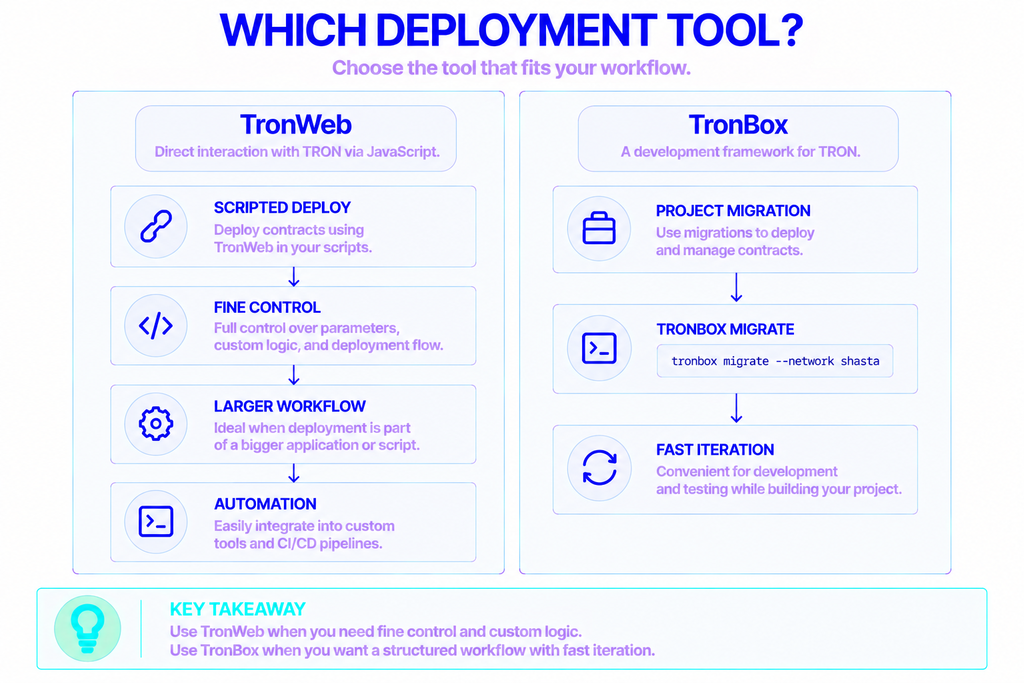
TronBox can also deploy directly with tronbox migrate --network shasta, which is convenient while iterating on a project. TronWeb gives you finer control when deployment is one step inside a larger script.
How to Interact with a Deployed TRON Contract
Once a contract is live, TronWeb loads it by address and lets you call its functions. The key distinction is between reading and writing.
js
const contract = await tronWeb.contract().at('TYour_Contract_Address');

// Read-only call — free, no transaction
const current = await contract.message().call();

// State-changing call — costs Energy, returns a transaction ID
const txID = await contract.setMessage('Updated on-chain').send({
  feeLimit: 100_000_000, // 100 TRX cap
});
.call() runs a view or pure function and returns data without creating a transaction, so it costs nothing. .send() submits a transaction that changes contract state, which consumes Energy and Bandwidth and returns a transaction hash you can look up on TRONSCAN.
One TRON-specific detail trips people up: addresses come in two formats — a Base58 string that starts with T, and a hex string that starts with 41. TronWeb converts between them with tronWeb.address.toHex() and tronWeb.address.fromHex() whenever a contract or an API expects one particular form.
Can you do this from a web app?
Yes. The TronLink wallet injects a ready-to-use tronWeb object into the browser, so a DApp can request the user’s account and sign transactions without ever touching a private key itself. The deploy-and-call patterns above stay identical; only the source of the signature changes.
How to Verify Your Contract on TRONSCAN
Verification publishes your source code on TRONSCAN and lets anyone confirm that the deployed bytecode matches it. Upload the source along with the exact compiler version, optimization setting, and run count you used — which is why saving those compile settings is worth the habit. Verified contracts earn more trust from users and are far easier to interact with through the block explorer.
Wrapping Up
Deploying a TRON smart contract comes down to a short loop: write Solidity, compile with TronBox or TronIDE, deploy the bytecode with TronWeb, then call the contract’s functions with .call() and .send(). Running the whole thing on Shasta first costs nothing and catches most mistakes long before they reach mainnet.
In production, the two variables that really shape the experience are managing Energy and keeping a reliable connection to the network. A stable endpoint — your own or one from a provider like NOWNodes — keeps deploy scripts and DApp calls responsive as your traffic grows.
FAQ
What’s the difference between the Shasta and Nile testnets?
Both are free TRON test networks, but they serve slightly different jobs. Shasta mirrors mainnet parameters and is the usual choice for testing application code. Nile tracks newer protocol features and often runs code ahead of mainnet, which makes it the better pick when you need to test against upcoming changes. Each network has its own faucet for test TRX.
Can I use MetaMask to interact with TRON smart contracts?
No. MetaMask targets EVM chains and uses 0x-style addresses, while TRON has its own address format and signing scheme. Use TronLink instead — it’s the standard browser wallet for TRON, and it injects a TronWeb instance your app can use directly.
How much TRX does it cost to deploy a contract on TRON?
If you pay by burning TRX, a simple TRC-20 deployment usually costs on the order of tens of TRX, scaling with the contract’s size and complexity. You can push that close to zero by staking TRX for Energy before you deploy, which pays off quickly if you ship contracts regularly.
Do I need to run my own TRON infrastructure to deploy contracts?
Not at all. Public TronGrid endpoints and third-party providers cover everything most projects need for deploying and calling contracts. Running your own TRON setup only becomes worthwhile when you want dedicated performance, higher rate limits, or tighter privacy at scale.
Is TronWeb still maintained, and which version should I use?
Yes. TronWeb is actively maintained, and the 6.x TypeScript line is current as of 2026. Use the latest 6.x release for new projects, and remember that its named-import syntax differs from pre-6 versions, so older code samples may need a small tweak to run.