
An AI agent can reason about code, but it cannot see what happened on Ethereum five seconds ago. To give it that sight, you build an MCP server: a small program that exposes blockchain actions as tools the agent can call. In this guide we at NOWNodes walk through building one for both EVM chains and Solana, with every tool wired to a NOWNodes endpoint so you never have to stand up your own infrastructure.
The short version: install the official Model Context Protocol SDK, define a few tools like “get balance” or “get latest block,” point each one at the right NOWNodes URL, and connect the whole thing to your AI client. The agent then asks in plain language, and your server fetches the real answer from the chain.
We’ll cover what the protocol actually is, why it beats hard-coding a separate integration for every tool, who ships these in production, and then the build itself — EVM first, then Solana, with the trade-offs that bite people later.
What Is the Model Context Protocol, in Plain Terms?
The Model Context Protocol (MCP) is an open standard that lets an AI application discover and use external tools and data through one shared interface. Anthropic introduced it in late 2024, and it has since become the common way to connect large language models to systems they don’t natively understand.
Three parties are involved. The host is the app you talk to, such as Claude Desktop or Cursor. The client lives inside the host and manages one connection each. The server is the piece you write; it describes what it can do and does the work when asked. The model never touches your server directly — it asks the host, the host calls the client, and the client calls you.
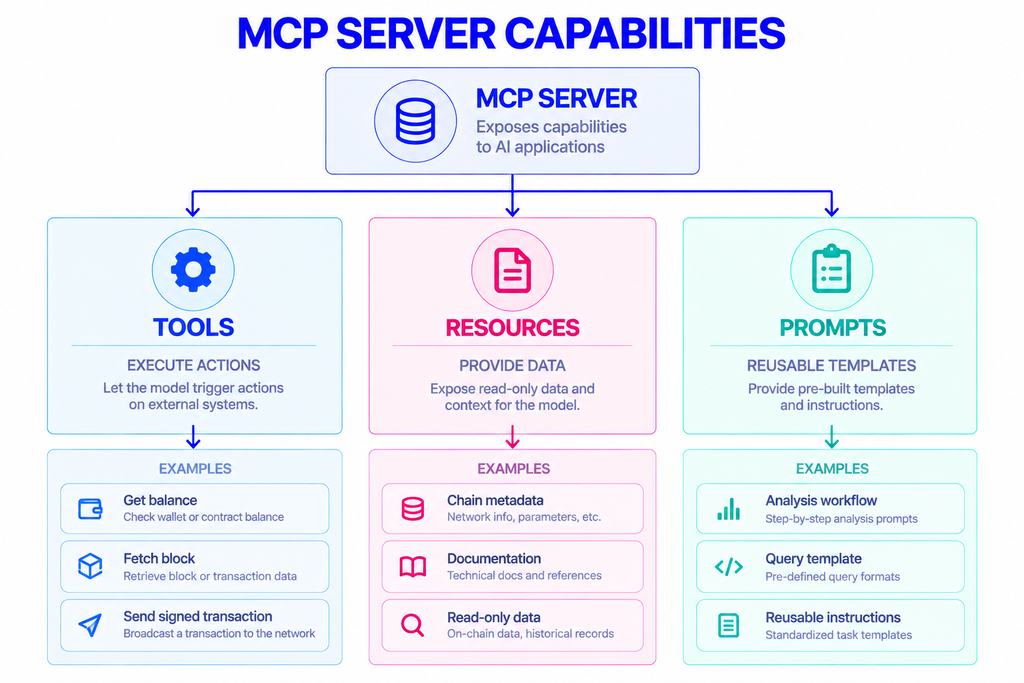
A server can expose three kinds of capability: tools (actions the model can trigger), resources (read-only context the app loads), and prompts (reusable templates). For blockchain work, tools do almost all the lifting: “read this balance,” “fetch this block,” “broadcast this signed transaction.”
Which version of the standard should I target?
Target the current revision, dated 2026-07-28, which replaced 2025-11-25. The change that matters most for anyone deploying remotely is that the latest revision made HTTP servers stateless: there’s no session handshake to maintain, and each request carries its own protocol version. Tutorials written before mid-2026 often describe the older session-based flow, so check the date on anything you copy.
Why Connect an AI Agent to a Blockchain This Way?
Because the alternative is worse. Without a standard, every integration becomes a one-off: custom glue code for Claude, different glue for Cursor, more glue for your in-house agent, all of it breaking when an API shifts. MCP collapses that into a single server that any compatible client can use.
Models also have no live view of chain state. Ask one for a wallet’s current balance and it will guess from stale training data or simply refuse. A server closes that gap by handing the model a real tool that returns a real number from a real network.
There’s a second, quieter win. When the model has documented tools with typed inputs, it stops inventing method names and malformed parameters. It calls get_eth_balance with a valid address because that’s the tool you gave it, not because it hopes the string is right.
Who Builds These, and What For?
The builders are usually Web3 developers, infrastructure teams, and the growing group of people shipping autonomous agents. The use cases cluster into a few shapes:
- Trading and portfolio agents that read balances, check prices, and submit transactions on a schedule.
- Wallet copilots embedded in apps, answering “did my transfer confirm?” by actually looking.
- Monitoring and alerting agents that watch an address or contract and flag activity.
- DeFi and on-chain research assistants that pull data across several chains to answer a question.
- Support bots that resolve “where is my transaction” tickets without a human checking a block explorer.
Doesn’t NOWNodes already offer a Model Context Protocol server?
There is, and it solves a different problem. The NOWNodes MCP server is built for AI coding assistants — Claude Desktop, Cursor, VS Code, Windsurf. It gives your assistant documentation-backed context so it generates correct NOWNodes API calls while you code, instead of guessing method names. You connect it with your free API key and keep building.
The server in this guide is for runtime. It gives a deployed agent the ability to actually read and write chain data as it operates. Think of our server as the development helper and the one you’re about to build as the production hands of your agent. Many teams use both.
What You Need Before You Start
A working setup needs four things: Node.js (version 18 or newer), TypeScript, the official MCP TypeScript SDK, and a NOWNodes API key. An MCP-compatible client to test against — Claude Desktop works well — rounds it out. Python, Java, Kotlin, and C# SDKs exist too, so pick whichever language you prefer; the shape of the work is identical.
Get your NOWNodes endpoint and key
Sign up at NOWNodes, open the dashboard, and use Add a New Key to generate your API key. The free START plan includes 100,000 requests for one month, which is plenty for building and testing an agent. Across the service you get access to more than 120 networks, including Ethereum, BNB Smart Chain, Polygon, Arbitrum, Optimism, and Solana.
Every EVM request goes to a chain-specific URL with your key in an api-key header. Here’s a raw balance lookup on Ethereum so you can see the exact shape before any code:
bash
curl -X POST https://eth.nownodes.io \
  -H "api-key: YOUR_API_KEY" \
  -H "Content-Type: application/json" \
  -d '{
    "jsonrpc": "2.0",
    "method": "eth_getBalance",
    "params": ["0x742d35Cc6634C0532925a3b844Bc454e4438f44e", "latest"],
    "id": 1
  }'
That single call is the atom of everything below. Your tools wrap requests like this and hand the result back to the model.
How to Build the Server for EVM Chains
The whole EVM build is three moves: scaffold the project, register a tool that calls your NOWNodes URL, and connect the server to a client.
Scaffold the project
Create a folder, install the SDK and a schema library, and set up TypeScript:
bash
mkdir blockchain-mcp && cd blockchain-mcp
npm install @modelcontextprotocol/sdk zod
npm install -D typescript tsx @types/node
Zod validates the inputs the model sends, so a bad address is rejected before it ever reaches the network.
Add your first EVM tool
Create src/server.ts. The pattern is always the same: name the tool, declare its inputs, and write a handler that fetches from NOWNodes and returns text the model can read.
typescript
import { McpServer } from "@modelcontextprotocol/sdk/server/mcp.js";
import { StdioServerTransport } from "@modelcontextprotocol/sdk/server/stdio.js";
import { z } from "zod";

const NOWNODES_KEY = process.env.NOWNODES_KEY!;
const EVM_URL = "https://eth.nownodes.io"; // swap host per chain

async function callEvm(method: string, params: unknown[]) {
  const res = await fetch(EVM_URL, {
    method: "POST",
    headers: { "api-key": NOWNODES_KEY, "Content-Type": "application/json" },
    body: JSON.stringify({ jsonrpc: "2.0", method, params, id: 1 }),
  });
  const json = await res.json();
  if (json.error) throw new Error(json.error.message);
  return json.result;
}

const server = new McpServer({ name: "blockchain-mcp", version: "1.0.0" });

server.registerTool(
  "get_eth_balance",
  {
    description: "Get the ETH balance of an address, in wei.",
    inputSchema: { address: z.string().describe("0x-prefixed address") },
  },
  async ({ address }) => {
    const wei = await callEvm("eth_getBalance", [address, "latest"]);
    return { content: [{ type: "text", text: `Balance: ${BigInt(wei)} wei` }] };
  }
);

await server.connect(new StdioServerTransport());
Add more tools the same way. eth_blockNumber gives the latest block, eth_call reads a smart contract, and eth_sendRawTransaction broadcasts a transaction the agent has already signed. To support Polygon or Arbitrum, change the host to that chain’s NOWNodes URL — the methods are shared across EVM networks.
Connect it to your AI client
For local use, your server runs over stdio and the client launches it. In Claude Desktop’s config, point to the built file:
json
{
  "mcpServers": {
    "blockchain-mcp": {
      "command": "node",
      "args": ["/absolute/path/to/blockchain-mcp/dist/server.js"],
      "env": { "NOWNODES_KEY": "YOUR_API_KEY" }
    }
  }
}
Restart the client, and the agent can now answer balance questions with live data. Before wiring it up, test the server in isolation with the MCP Inspector (npx @modelcontextprotocol/inspector node dist/server.js), which lets you call each tool by hand and confirm the output.
How to Add Solana Support
Solana uses the same request style over HTTP, just with its own methods and its own endpoint. Send requests to the Solana URL with the same api-key header, and reach for methods like getBalance, getAccountInfo, getLatestBlockhash, and sendTransaction.
One unit difference trips people up: Solana balances come back in lamports, and 1 SOL equals 1,000,000,000 lamports. Convert in the handler so the model sees a sensible number.
typescript
const SOLANA_URL = "https://sol.nownodes.io";

server.registerTool(
  "get_sol_balance",
  {
    description: "Get the SOL balance of an account.",
    inputSchema: { pubkey: z.string().describe("base-58 account address") },
  },
  async ({ pubkey }) => {
    const res = await fetch(SOLANA_URL, {
      method: "POST",
      headers: { "api-key": NOWNODES_KEY, "Content-Type": "application/json" },
      body: JSON.stringify({ jsonrpc: "2.0", id: 1, method: "getBalance", params: [pubkey] }),
    });
    const { result } = await res.json();
    const sol = result.value / 1e9;
    return { content: [{ type: "text", text: `Balance: ${sol} SOL` }] };
  }
);
Because both chains live in one server, a single agent can answer “what’s my ETH balance and my SOL balance” and call two tools to do it. Confirm your exact Solana endpoint in the dashboard when you generate your key.
Local or Remote: stdio or Streamable HTTP?
The protocol defines two transports, and the right one depends on where your agent lives.
| stdio | Streamable HTTP | |
|---|---|---|
| Runs | On the same machine as the client | As a hosted web service |
| Best for | Desktop assistants, local development | Shared teams, cloud agents, web clients |
| Setup | Client launches your process | You deploy and expose one URL |
| Auth | Handled by the environment | Bearer tokens over HTTPS |
Use stdio while you build and for anything running on one machine. Move to Streamable HTTP when several people or a cloud-hosted agent need to reach the same server. The 2026-07-28 revision made HTTP servers stateless, so scaling horizontally is simpler than it used to be — any instance can handle any request.
EVM vs. Solana: What Changes in Your Tools
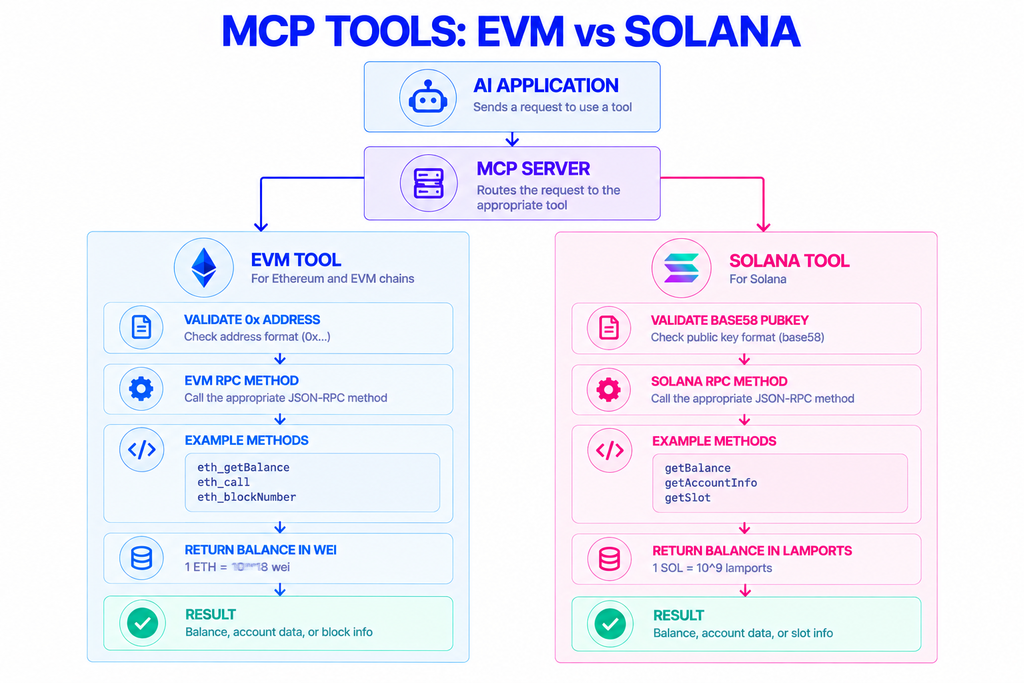
The build is the same, but the chains differ in ways your handlers have to respect.
| EVM chains | Solana | |
|---|---|---|
| Address format | 20-byte hex, 0x-prefixed | base-58 public key |
| Balance unit | wei (1 ETH = 10¹⁸ wei) | lamports (1 SOL = 10⁹ lamports) |
| Read balance | eth_getBalance | getBalance |
| Read account/contract | eth_call | getAccountInfo |
| Latest state | eth_blockNumber | getLatestBlockhash, getSlot |
| Broadcast | eth_sendRawTransaction | sendTransaction |
Keep the conversions and address checks in each tool. A model will happily pass a Solana address to an EVM tool if you let it, so validate inputs with your schema and return a clear error when they don’t match.
Security and Reliability Notes
A few habits keep this safe once an agent is driving it.
Never hand the model a private key. Signing belongs in your own code or a dedicated signer; the server should accept an already-signed transaction and only broadcast it. Split tools into read and write, and think hard before giving an autonomous agent write access to real funds.
Keep your API key server-side, in an environment variable, never in the tool description or a response. On shared NOWNodes access, requests are rate-limited; a busy agent that polls aggressively can hit those limits, so cache what doesn’t change and back off when needed. For heavy or latency-sensitive workloads, a dedicated plan gives you private capacity. NOWNodes runs on geo-balanced infrastructure with sub-200-millisecond response times in key US and EU regions and 99.95% uptime, which matters when an agent is making decisions on what it reads.
Where This Leaves You
You now have a server that turns plain-language requests into real EVM and Solana reads and writes, backed by endpoints for 120-plus networks instead of infrastructure you maintain. Start on stdio with the free START plan, add the tools your agent actually needs, and move to a hosted transport when it’s time to scale.
The protocol is young and moving fast, so pin the spec date you build against and revisit it as the SDK matures. When you’re ready to connect, grab a free key from the NOWNodes pricing page and point your first tool at an Ethereum endpoint or any other chain in the network directory.
FAQ
How long does it take to build a basic version?
Less than an afternoon for a read-only agent. Scaffolding the project and registering your first working tool is a matter of minutes; most of the remaining time goes into deciding which tools your agent actually needs.
Does my agent need a library like viem or web3.js?
No. The examples here use a plain fetch call, which is enough to reach any endpoint and read or broadcast data. Higher-level libraries such as viem for EVM or @solana/web3.js for Solana are optional conveniences for encoding and signing, not a requirement.
Will the agent decide when to call my tools, or do I trigger them?
The model decides, based on the conversation and the description you wrote for each tool. That’s why clear, specific descriptions matter — a tool named get_eth_balance with a precise summary gets called at the right moment far more reliably than a vague one.
Is the Model Context Protocol tied to one AI company?
It is an open standard, not a single vendor’s feature. It began at Anthropic, but major providers now ship their own compatible clients, so a server you write works across the ecosystem rather than locking you to one model.
Besides data usage, does running the server cost anything?
The server itself is just your own code, so running it costs nothing beyond hosting if you deploy it remotely. Your real variable is request volume against the network, which starts free on the NOWNodes START plan and scales from there.