
Every Dogecoin balance sits on a public ledger, so you can read the amount held by any address without a password or the owner’s permission. You just need a tool that queries the blockchain and returns the number.
The fastest route is a block explorer: paste an address, read the balance. If you’re building an app or monitoring many addresses, you’ll want the Dogecoin API instead, which returns the same data as structured JSON your code can parse.
This guide covers all three approaches, from a no-code lookup to raw node queries, with request examples you can copy. It also clears up a few things the older guides get wrong, like what the raw balance number actually means.
What Is a Dogecoin Wallet Balance Checker?
A Dogecoin wallet balance checker is any tool that reads the public Dogecoin blockchain and returns the amount of DOGE tied to a given address. That tool can be a website, a mobile app, an API, or a node you run yourself.
It helps to know how Dogecoin stores balances. Dogecoin started as a fork of Litecoin, and like Bitcoin it uses the UTXO model: there’s no account with a running total. Instead, the network tracks “unspent transaction outputs” (coins you’ve received but not yet spent), and your balance is the sum of every UTXO locked to your address. A balance checker does that summing for you.
One thing to keep straight: an address is public, a private key is not. Checking a balance only needs the public address. It never exposes the key that controls the funds, which is why you can safely look up any address you like.
So the audience is broad. A trader confirms a payment landed. A merchant reconciles incoming orders. A developer wires balance data into a wallet dashboard, an exchange, or an accounting tool. All of them are doing the same underlying thing: reading a public balance.
Why Check a Dogecoin Address Instead of Opening Your Wallet?
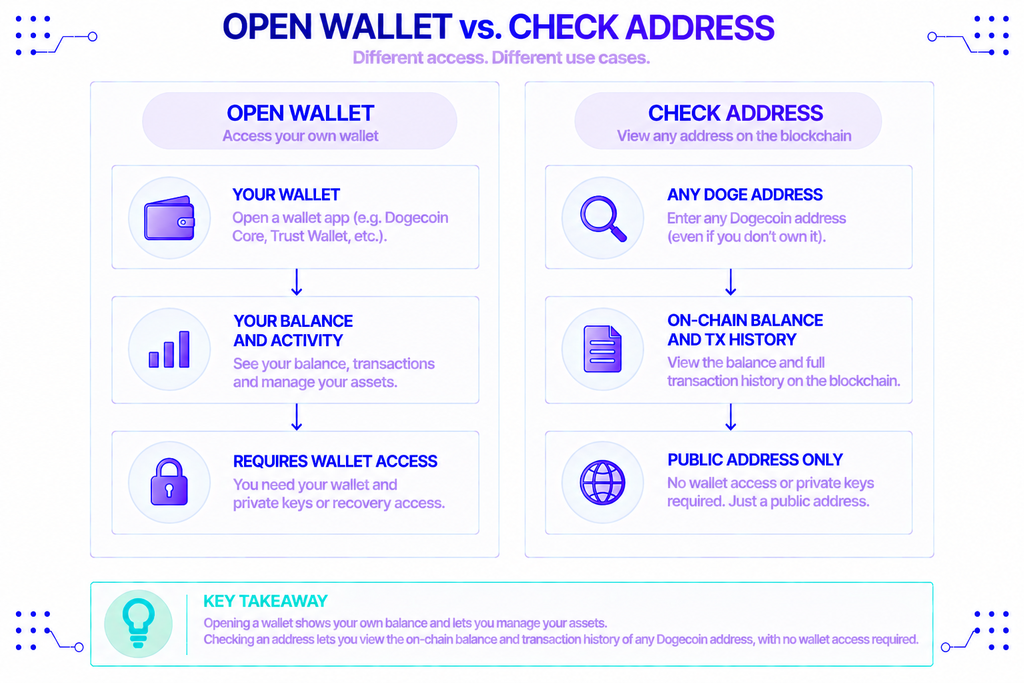
Opening a wallet shows your own balance. Checking an address lets you verify anyone’s, including addresses you don’t control.
That matters more often than it sounds. You might need to confirm a customer actually sent the DOGE they claim, audit a treasury or donation address, watch a cold-storage address without importing the keys anywhere, or reconcile on-chain movements against your own records. A quick Dogecoin address check answers all of these in seconds.
For developers, the reason is automation. A wallet app can’t ask a human to copy-paste balances all day. It needs a programmatic Dogecoin wallet balance checker that returns clean data on demand, which is where an API comes in.
Three Ways to Check a DOGE Balance
There are three practical methods, and the right one depends on whether you’re doing a one-off check or building something that runs on its own.
Block explorers (fastest, no code)
A block explorer is a website that indexes the blockchain and lets you search it. To check a balance, open a Dogecoin explorer such as NOWNodes’ DOGE block explorer, paste the address into the search bar, and read the confirmed balance along with the transaction history.
This is the best option for a casual DOGE wallet check. No account, no setup, nothing to install. The trade-off is that it’s manual and meant for humans, not software.
A Dogecoin API (for apps and automation)
An API returns balance data as machine-readable JSON, so your code can request it, parse it, and act on it. This is the method behind most wallet apps, payment flows, and portfolio trackers.
Behind the scenes, address-level queries rely on an indexer. Blockbook, the open-source indexer built by Trezor, scans the chain and builds an address-to-balance index that a plain node doesn’t keep. Most Dogecoin API providers expose a Blockbook-style endpoint for exactly this reason.
Your own Dogecoin node (full control)
Running Dogecoin Core (v1.14.9, released December 2024, is still the current stable version) gives you a direct line to the network with no third party. You download the software, let it sync the full chain, and query it over JSON-RPC.
The catch for balance checks is specific: a standard Dogecoin node tracks the UTXO set but does not index balances by address. So gettxout can tell you about a single output you already know, but Dogecoin Core has no built-in command for “give me the total balance of this address.” For that you’d layer an indexer like Blockbook on top, which means more disk, more sync time, and more maintenance. Most teams skip that and use a hosted Dogecoin API instead.
How to Check a Balance with the Dogecoin API
A hosted Dogecoin API gives you address lookups without syncing anything yourself. NOWNodes runs full Dogecoin nodes plus a Blockbook explorer endpoint, so a single API key covers both raw RPC and address-level balance queries across 120+ blockchain networks.
Here’s how to go from zero to a balance in three steps.
Get a Dogecoin API key
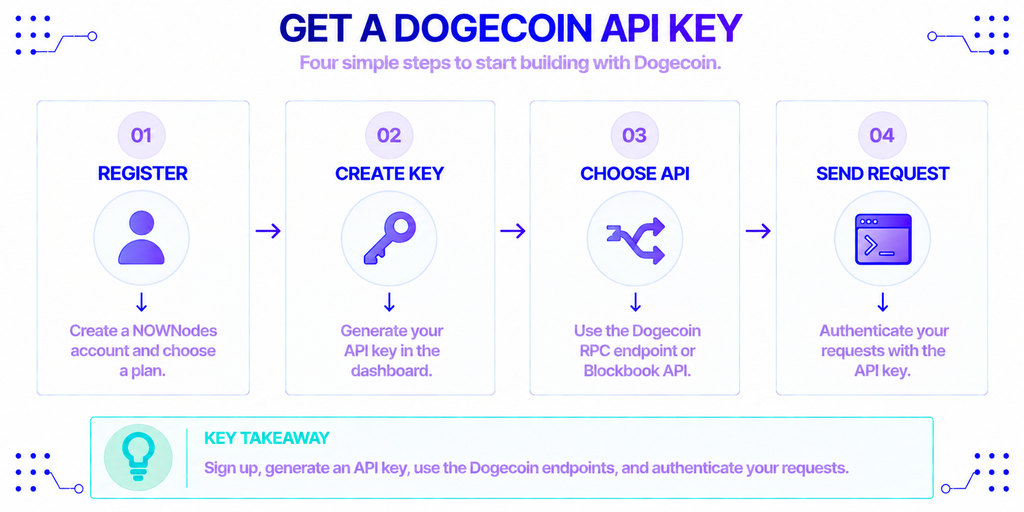
First, create an account and generate a key:
- Register. Sign up on NOWNodes and pick a plan. The free START plan includes 100,000 requests at 15 requests per second and needs no credit card, which is plenty for testing; paid tiers start at €20/month for 1 million requests (see pricing).
- Generate an API key. In the dashboard, create a key. You’ll pass it with every request to authenticate.
- Note the endpoints. Dogecoin requests go to
https://doge.nownodes.iofor JSON-RPC andhttps://dogebook.nownodes.iofor the Blockbook explorer API.
Read an address balance (Blockbook)
The clean way to get an address balance is the Blockbook REST endpoint. Send a GET request to /api/v2/address/{address} with your key in the api-key header:
bash
curl --location 'https://dogebook.nownodes.io/api/v2/address/DAstXyxbHsfTQQRDdgrKXr4cf6DU9GTpXd' \
  --header 'api-key: YOUR_API_KEY'
The response is a JSON object describing the address:
json
{
  "address": "DAstXyxbHsfTQQRDdgrKXr4cf6DU9GTpXd",
  "balance": "20880000000",
  "totalReceived": "20880000000",
  "totalSent": "0",
  "unconfirmedBalance": "0",
  "unconfirmedTxs": 0,
  "txs": 1,
  "txids": [
    "87aacfaa2d2f5031cf11dbade5dca680890de88f7e0e3a95c363632efa4334ea"
  ]
}
Two details trip people up. First, the balance field is denominated in koinu, the smallest unit of DOGE, not in whole coins. One DOGE equals 100,000,000 koinu, so the 20880000000 above is 208.8 DOGE (divide by 100,000,000). Older tutorials that read it as “20 billion DOGE” are simply misreading the unit.
Second, balance counts only confirmed UTXOs, while unconfirmedBalance holds DOGE from transactions still waiting in the mempool. If a payment just went out, check both fields rather than assuming the money hasn’t arrived.
Check a specific output with raw RPC
If you’re working at the UTXO level, the gettxout JSON-RPC method returns details about one unspent output. You call https://doge.nownodes.io with a POST body:
bash
curl --location 'https://doge.nownodes.io' \
  --header 'api-key: YOUR_API_KEY' \
  --header 'Content-Type: application/json' \
  --data '{
    "jsonrpc": "2.0",
    "id": "test",
    "method": "gettxout",
    "params": ["txid", 0]
  }'
Replace txid with the transaction ID and 0 with the output index. This is useful for verifying that a specific coin is still spendable, but remember it works on outputs you already know about. To total a whole address, use the Blockbook endpoint above rather than trying to stitch UTXOs together by hand.
Explorer, API, or Node: Which One Fits?
| Method | Best for | Setup needed | Checks any address? | Cost |
|---|---|---|---|---|
| Block explorer | Quick, one-off checks | None | Yes | Free |
| Dogecoin API (Blockbook) | Apps, bots, dashboards | API key | Yes | Free tier, then paid |
| Your own node | Full control and privacy | Full sync + indexer | Only with an added indexer | Hardware and time |
For a human glancing at one address, an explorer wins. For anything that runs on a schedule or serves users, a Dogecoin API is the practical choice. A self-hosted node makes sense when you need full independence and are prepared to run the indexing stack that address lookups require.
Conclusion
Checking a Dogecoin balance comes down to reading a public ledger, and you have three clean ways to do it. An explorer handles the quick manual look-up. A Dogecoin API returns structured data for apps and automation, with Blockbook doing the address indexing underneath. A full node gives you total control at the cost of running the infrastructure.
Whichever you pick, keep two facts in mind: balances come back in koinu, not whole DOGE, and confirmed and unconfirmed amounts are reported separately. Get those right and your Dogecoin address check will match what the wallet owner sees every time. If you’re building, a hosted endpoint like NOWNodes lets you skip the sync and start querying with one key.
FAQ
Is checking a Dogecoin address private?
Not really. The Dogecoin blockchain is public, so anyone can look up any address and see its balance and full transaction history. You stay pseudonymous only as long as an address isn’t linked to your identity; the balance itself is never hidden.
How many confirmations before a Dogecoin balance is final?
A balance shows as confirmed after its transaction is included in a block, and Dogecoin produces a block roughly every minute. Many services treat a payment as settled after a handful of confirmations; for larger amounts, waiting for several blocks reduces the already-small chance of a reorganization.
Can one API key check balances on blockchains other than Dogecoin?
Yes. With a multi-chain provider like NOWNodes, a single API key reaches every supported network, so the same credential that queries Dogecoin can also query Bitcoin, Litecoin, Ethereum, and more than a hundred other chains. You change the endpoint, not the key.
Can I check a whole wallet’s balance from one xpub instead of each address?
Yes. A Blockbook endpoint accepts an extended public key (xpub) and returns the combined balance across all the addresses that key derives. That’s the easiest way to total a modern HD wallet without querying each address one at a time.