
An ETH explorer is a search engine for the Ethereum blockchain. You paste in a transaction hash, wallet address, or contract address, and it shows what actually happened on-chain. For most people the best pick is Etherscan, the default since 2015, but it isn’t the only tool worth knowing.
The right ETH explorer depends on the job: confirming a payment, auditing a contract, watching validators, or building a product on top of Ethereum data. This guide starts with the basics and works up to comparisons, security limits, and the node layer every explorer sits on. If the concept is new, NOWNodes has a plain-language explainer on block explorers that applies to any chain.
What Is an Ethereum Block Explorer?
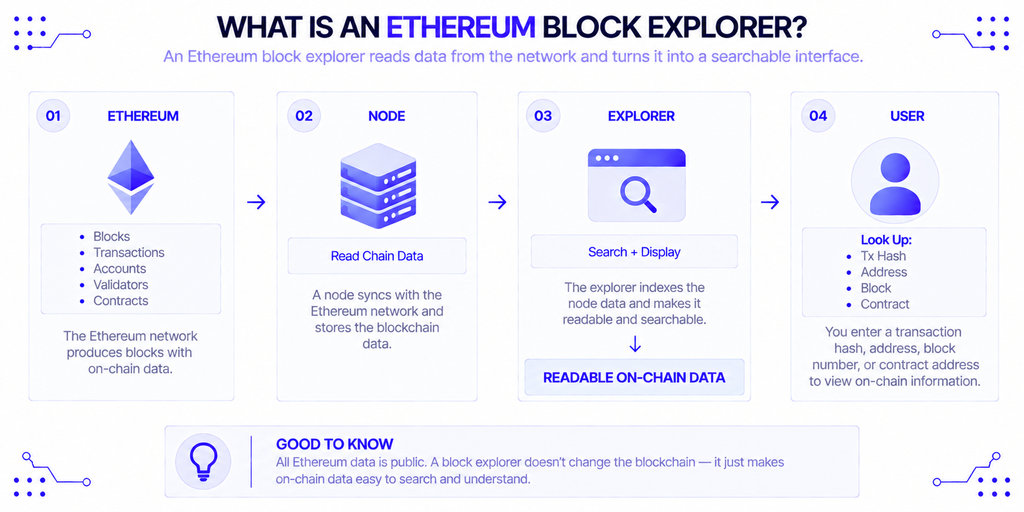
An Ethereum block explorer is a website that reads data from Ethereum nodes and turns it into searchable pages. Ethereum.org calls it your portal to Ethereum’s data, covering blocks, transactions, validators, accounts, and other on-chain activity. Everything it shows is public. The explorer just makes it readable.
Here’s the simplest way to think about it: a wallet is what you use before a transaction, and an ETH explorer is what you use after. The wallet sends funds and shows a balance. The explorer lets you confirm the network really recorded them, without trusting any single app’s interface.
Why Do You Need One?
Because a wallet only shows its own interpretation of the chain. If a swap looks stuck, a deposit hasn’t arrived, or an exchange says it sent funds, the explorer is where you check the record itself. This matters most when something goes wrong, since a failed transaction still costs gas and only the on-chain data tells you whether it failed and why.
Scale is the other reason. At the time of writing, Etherscan’s charts show about 2.09 million transactions in the last 24 hours, roughly 24.8 per second, across more than 438 million addresses. Nobody tracks that by hand. An ETH explorer turns the firehose into something you can search.
Who Uses an Ethereum Explorer?
Different people open the same tool for very different reasons, but it all comes down to verification. Here is who typically reaches for an ETH explorer and why.
- Everyday users confirm that a transfer arrived and check how much gas they paid.
- Developers read verified contract source code, decode function calls, and debug reverted transactions.
- Traders and researchers check a token’s contract address, its holders, and large wallet movements before acting.
- Stakers and validator operators track slots, attestations, and rewards, usually on a consensus-focused explorer.
- Support and finance teams at exchanges and payment companies verify deposits by transaction hash.
A trader spot-checking a token and a developer tracing a failed call are both using an ETH explorer. They just pull very different data out of it, and that difference drives which tool suits each of them.
What Can You Look Up on the Ethereum Network?
Every ETH explorer organizes Ethereum data into roughly the same handful of sections. The table below shows what each one answers.
| Data type | Question it answers | Typical detail shown |
|---|---|---|
| Transactions | Did my swap go through? | Status, sender, recipient, value, fee |
| Blocks | What happened in a given block? | Proposer, gas used, included transactions |
| Addresses | What does this wallet hold and do? | ETH balance, token holdings, history |
| Tokens | Who holds this token? | Supply, holders, transfers |
| Contracts | What does this code do? | Verified source, readable functions, event logs |
| Validators | How is this validator performing? | Balance, attestations, proposed blocks |
How Do You Read a Transaction Page?
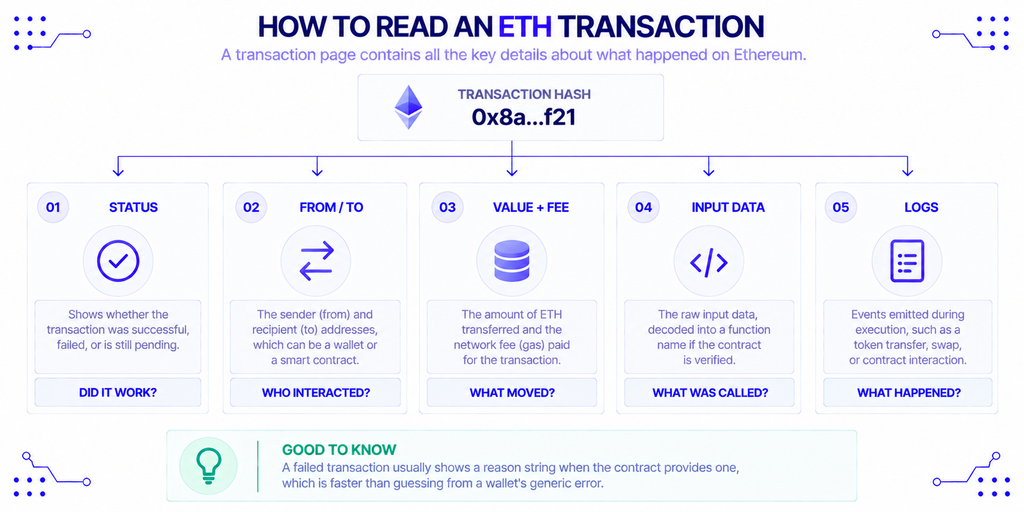
Paste a transaction hash into any ETH explorer and the result follows the same pattern. Work through it in this order:
- Status. Success, failed, or still pending.
- From and To. The sender, and the receiving address or contract.
- Value and fee. How much ETH moved, and what the transaction cost to execute.
- Input data. The raw call, decoded into a function name if the contract is verified.
- Logs. Events emitted during execution, such as a token transfer or a swap.
A failed transaction shows a reason string when the contract provides one, which is usually faster than guessing from a wallet’s generic error. NOWNodes’ guide to what Ethereum transactions contain explains each field in more depth.
How Long Until a Transaction Is Final?
A transaction is final after roughly 12.8 minutes, though it is usually included in a block within seconds. Ethereum’s proof-of-stake design divides time into 12-second slots and 32-slot epochs, so one epoch lasts 384 seconds. Finality needs two epochs, and that gap is why an ETH explorer can show a transaction as included well before it can no longer be reversed.
Which Ethereum Explorer Is Best?
No single tool wins every job. This table compares the main options side by side.
| Explorer | Best for | Trade-off |
|---|---|---|
| Etherscan | Everyday lookups, contract verification, the most tutorials | Operated centrally; free API is rate-limited |
| Blockscout | Self-hosting and multichain use | More setup; less familiar interface |
| Beaconcha.in | Validators, slots, and epochs | Focused on the consensus layer |
| Blockchair | One search across many chains | Generalist rather than Ethereum-specific |
| Ethplorer | Token holders and address tracking | Token-centric view |
| Otterscan | Private, local lookups | Needs your own Erigon archive node |
Etherscan: The Default Choice
Etherscan is the ETH explorer most wallets and tutorials point to. It launched in August 2015 and describes itself as an independent project built around Ethereum, with a stated mission of equitable access to blockchain data. It is where most wallets, dApps, and tutorials send you, which is a practical advantage on its own. By its own counters, about 922,000 contracts have verified source code out of more than 106 million deployed.
Developers should look at the API limits. The free tier allows 3 calls per second and up to 100,000 calls per day, and paid plans scale from 5 to 30 calls per second. Blockscout’s own comparison also reports that in July 2026 Etherscan cut the free tier’s maximum records per request from 10,000 to 1,000, so check the current docs before building on it.
Blockscout: The Open and Self-Hostable Option
Blockscout is an open-source ETH explorer that teams can run on their own infrastructure. Its GitHub repository says it supports several hundred chains and rollups, which is the reason to pick it when Ethereum is one network among many in your product. The catch is upkeep: a self-hosted instance means you maintain the deployment.
Beaconcha.in and the Consensus Layer
Ethereum has two layers, and most explorers focus on the execution side: transactions, contracts, balances. Beaconcha.in covers the consensus side, meaning validators, slots, epochs, and attestations. If you run or delegate to a validator, that is the ETH explorer you actually need.
Otterscan: Running Your Own
Otterscan is an open-source explorer designed to run locally alongside an Erigon archive node. Because queries go to your own machine, no third party sees what you look up. The price is hardware and sync time, which is why it suits developers more than casual users.
How Do You Choose the Right Explorer?
Start with the job, then check the trade-offs of each ETH explorer. For a quick payment check or a contract lookup, Etherscan covers almost everything. For validator monitoring, use a consensus explorer. For a product that needs its own branded explorer, Blockscout or a self-run stack makes more sense.
Investor Nichanan Kesonpat of 1kx put the appeal plainly: “Block explorers have long been a staple tool for the web3 ecosystem – giving developers, analysts, and end users alike the visibility they need into general onchain activity and transactions of interest.” That visibility is only as dependable as the explorer serving it, so keep a second one bookmarked. When BscScan went down for scheduled maintenance for three to four hours in July 2026, BNB Smart Chain kept producing blocks the whole time. An explorer outage is a problem with the window, not the chain.
What Can’t an Ethereum Explorer Tell You?
An ETH explorer can’t tell you whether something is safe. Token names, logos, and labels are self-reported or curated off-chain, so a familiar name is not proof of a legitimate project. Always compare a contract address against the project’s official documentation.
Address poisoning shows how this goes wrong. Attackers send tiny transfers from lookalike addresses so they land in your history, hoping you copy one later. ScamSniffer reported about $62 million lost across two incidents between December 2025 and January 2026, including one 4,556 ETH transfer. Its advice is to avoid copying addresses from transaction history, verify the full address string, and use saved contacts for frequent transfers.
Two smaller limits are worth knowing. Explorer indexing can lag a block or two under heavy load, and an unverified contract shows only bytecode. Since fewer than 1 in 100 deployed contracts is verified, that second point comes up often.
Where Does Explorer Data Come From?
Every ETH explorer reads from Ethereum nodes and indexes what they return into a database. That is also the layer developers use when they want the data itself rather than a web page. A wallet, analytics dashboard, or custom explorer needs balances, history, and address activity delivered reliably.
NOWNodes provides that access as a blockchain infrastructure provider. Its Ethereum node page covers shared access across the network, while dedicated nodes suit teams that need isolated infrastructure and broader method access. For explorer-style features, the Blockbook API offers indexed queries for balances, transactions, and address history on supported networks, which removes the need to build a custom indexer. NOWNodes also publishes its own Ethereum explorer for quick lookups.
Conclusion
The best ETH explorer for most people is Etherscan: it gives the fastest answer with the widest documentation. Use a consensus explorer when validators are the point, and Blockscout or Otterscan when you need control or privacy. Whichever ETH explorer you pick, treat it as a window onto the chain rather than a verdict on what you see there.
Verify addresses in full, keep a second explorer within reach, and remember that “verified” describes source code, not trustworthiness. If you outgrow public explorers, the next step is querying the data directly through node access.
FAQ
Is Etherscan free to use?
Yes. Browsing transactions, addresses, and contracts on the site is free, like most public ETH explorers. Its API also has a free tier with limits on requests per second and per day, and higher volumes need a paid plan.
Can an explorer cancel or reverse a transaction?
No. An ETH explorer only displays what happened and cannot change it. A pending transaction can sometimes be replaced from your wallet by resending with the same nonce and a higher fee.
Why does my transaction show as pending for so long?
Usually because the fee you offered is too low for current demand, so validators pick up higher-paying transactions first. It stays pending until the fee becomes competitive, or until you replace or drop it.
Do I need to connect my wallet to use an explorer?
No. Searching and reading data never requires a wallet connection. Be cautious if a page asks you to sign something, and never enter a seed phrase on any explorer.
Do Layer 2 transactions appear on the same explorer?
Generally not. Layer 2 networks such as Base have their own explorers, like BaseScan, and a multichain tool such as Blockscout can cover several networks from one interface. Check which network a transaction was sent on before searching for it.