
A Litecoin explorer is a website or tool that lets you look up any block, transaction, or address on the Litecoin network and see exactly what happened, without running your own node. Type in a transaction ID and you’ll see whether it confirmed, how many confirmations it has, and which address the funds landed in. NOWNodes, Blockchair, Litecoin Space, SoChain, CryptoID, and BlockCypher all index the LTC chain, and the right one depends on whether you need a quick balance check, a developer API, or deep historical analytics.
Litecoin settles a block roughly every 2.5 minutes, moves for an average fee under a fraction of a cent, and still carries close to 401,000 active addresses a day, according to CoinLaw’s 2026 Litecoin statistics. None of that activity means much to a user, though, until it’s readable. This guide starts with what an explorer actually shows you, then works through the tools worth bookmarking and how to pick between them.
What Is a Litecoin Blockchain Explorer?
A Litecoin explorer is a search interface built on top of an indexed copy of the Litecoin blockchain. Instead of scanning the raw chain yourself, you type in a block height, a transaction hash, or an LTC address, and the explorer returns the matching data in a readable format.
Block explorer: a web application that queries an indexed blockchain database and displays blocks, transactions, and address histories in human-readable form. It reads the chain; it doesn’t change it. See Investopedia’s definition for the general concept, which applies across UTXO chains like Litecoin the same way it does on Bitcoin.
Under the hood, most Litecoin explorers run on Blockbook or a similar indexer that pre-sums the network’s unspent transaction outputs so a balance lookup doesn’t require scanning the entire chain history on the spot. That’s the same UTXO model Bitcoin uses, and it’s why explorer performance depends heavily on how well a service has indexed that output set.
Why Do You Need a Litecoin Explorer?
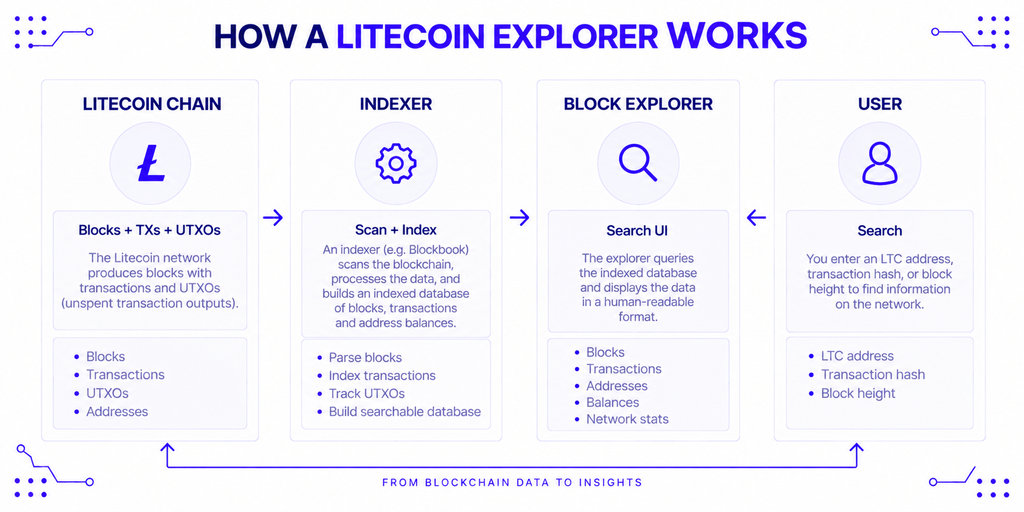
The core reason is verification. A wallet tells you a payment was sent; an explorer tells you, independently, whether the network actually confirmed it and how many blocks have been mined on top since.
That matters most in three everyday situations. A deposit to an exchange that hasn’t shown up yet, a payment to a merchant that needs proof of confirmation, or a transaction stuck with a fee too low to attract a miner — an explorer is how you diagnose which of those you’re actually dealing with, rather than guessing.
Beyond troubleshooting, explorers double as an audit trail. Anyone can check a project’s treasury address, confirm a donation landed, or trace how funds moved between wallets, since Litecoin’s ledger is public by design outside of its opt-in privacy feature (more on that below).
Who Uses a Litecoin Block Explorer?
Explorer traffic skews toward a handful of recurring use cases:
- Everyday holders confirming a send or receive went through correctly.
- Merchants and payment processors watching a deposit address for an incoming LTC payment before releasing goods or services.
- Exchanges and custodians reconciling customer withdrawals against what actually landed on-chain.
- Developers testing wallet or payment integrations against real transaction data before going live.
- Analysts and researchers studying network activity, fee trends, or address clustering over time.
A merchant checking a single payment and an exchange reconciling thousands of daily withdrawals are both “using an explorer,” but they need very different tools — a distinction that shapes the comparison later in this guide.
How Litecoin’s On-Chain Data Actually Reads
Before comparing tools, it helps to know what you’re actually looking at once you open one. Litecoin inherited Bitcoin’s UTXO structure through its 2011 fork, so an “explorer balance” is really a sum of unspent outputs tied to an address, not a single stored number the way it would be on an account-based chain like Ethereum.
Litecoin Address Formats You’ll See in an Explorer
Three address formats show up in any Litecoin explorer, and knowing which is which prevents confusion when cross-checking a transaction:
| Format | Starts with | Example | Purpose |
|---|---|---|---|
| Legacy (P2PKH) | L | LZyv3r9Tt6o7yUENc9AZf5FbQVe9GxL7w3 | Original address type, widest wallet support |
| SegWit-compatible (P2SH) | M | MQMcJhpWHYVeQArcZR3sBgyPZxxRtnH441 | Lower fees than legacy, broad compatibility |
| Native SegWit (Bech32) | ltc1 | ltc1qg82u5u4mhn6n9l5xup0yfl52q3c4z9hsgwlj5n | Lowest fees, newer wallet support only |
Litecoin’s P2SH addresses start with M rather than the 3 Bitcoin uses for the same purpose. The Litecoin project made that change in 2017 specifically to cut down on address confusion between the two networks, since a 3... address could otherwise be mistaken for a Bitcoin one and sent funds that never arrive. Kraken confirmed it supports all three formats for LTC withdrawals in a 2019 announcement, which is roughly when M-address support became standard across major exchanges.
What MWEB Privacy Transactions Look Like on an Explorer
Litecoin added an opt-in privacy layer called MWEB (MimbleWimble Extension Blocks) in May 2022. Transactions that move into MWEB show up on an explorer as a transfer into the extension block, but individual transfers within MWEB itself aren’t broken out by sender, receiver, or exact amount the way a standard transaction is.
Charlie Lee, Litecoin’s creator, has described the trade-off directly: “In terms of fungibility and privacy, I believe MWEB gets you 90% there. For most people that’s good enough. It’s the difference between living in a glass house vs living in a house with windows. For people who need 100% privacy, they can live in a house with no windows,” he wrote on X. In practice, that means an explorer can show you that coins entered or left the MWEB pool, but not the private ledger of what happened while they were in it.
6 Best Litecoin Explorers Compared in 2026
The table below lines up six explorers worth knowing, from general-purpose multi-chain tools to LTC-specific projects. Pricing, uptime, and feature sets change, so treat this as a starting point rather than a final verdict.
| Explorer | Best For | Standout Feature |
|---|---|---|
| NOWNodes | Developers who also need node/API access | Free explorer plus RPC and Blockbook API on the same account |
| Blockchair | Multi-chain analysts and advanced search | Cross-chain search and privacy-focused query options |
| Litecoin Space | Fee estimation and mempool watching | Real-time mempool visualization, mempool.space-style design |
| SoChain | Lightweight lookups and quick API calls | Minimal interface, simple free API |
| CryptoID (chainz.cryptoid.info) | Long-term chain history and altcoin comparisons | One of the longest-running LTC explorers still active |
| BlockCypher | Developers building against multiple UTXO chains | Unified API and webhook support across several chains |
NOWNodes
NOWNodes runs a best free Litecoin block explorer alongside its node infrastructure, so a developer checking a transaction manually and an application querying the same data programmatically can use the same underlying indexer. The explorer covers blocks, transactions, addresses, and current mempool status.
What sets it apart for builders specifically is the jump from browser to API. NOWNodes’ Litecoin node page documents RPC, Blockbook, and WebSocket access on the same infrastructure the public explorer runs on, so a team that starts by eyeballing transactions in a browser can move to automated balance checks or address-history queries without switching providers.
Blockchair
Blockchair indexes Litecoin alongside more than a dozen other chains, built for users who need advanced filtering — searching by output script type, sorting by fee rate, or comparing activity across networks from one interface. That flexibility suits analysts cross-referencing Litecoin against other chains more than someone who just wants to confirm one payment quickly.
Litecoin Space
Litecoin Space mirrors Bitcoin’s popular mempool.space explorer, with a live mempool visualization and fee-rate estimation front and center. That makes it the right pick for timing a transaction or checking whether a stuck payment is likely to confirm soon, though it’s less suited to bulk address lookups or historical analytics.
SoChain
SoChain keeps its interface deliberately minimal: search a transaction or address and get the result with little else on the page. Its free API suits smaller projects and bots that need basic balance or status checks without committing to a paid data provider, though it isn’t built for deep historical analysis.
CryptoID
CryptoID’s chainz.cryptoid.info has tracked Litecoin since the network’s early years and still covers dozens of altcoins from one dashboard. The interface shows its age, but the historical depth is real, and it’s a useful cross-check against newer tools when you need older transaction data.
BlockCypher
BlockCypher exposes Litecoin through the same API structure it uses for Bitcoin, Dogecoin, and other chains, plus webhook support for watching an address and getting notified when its balance changes. That consistency is the main draw for a team building one integration meant to cover several UTXO networks at once, though free-tier rate limits are tighter than some alternatives.
How to Look Up a Litecoin Transaction, Address, or Block
Whichever explorer you pick, the core workflow stays the same:
- Get the identifier. Copy the transaction ID (txid), the LTC address, or the block height/hash you want to check.
- Paste it into the explorer’s search bar. Most tools auto-detect whether you’ve entered a txid, address, or block.
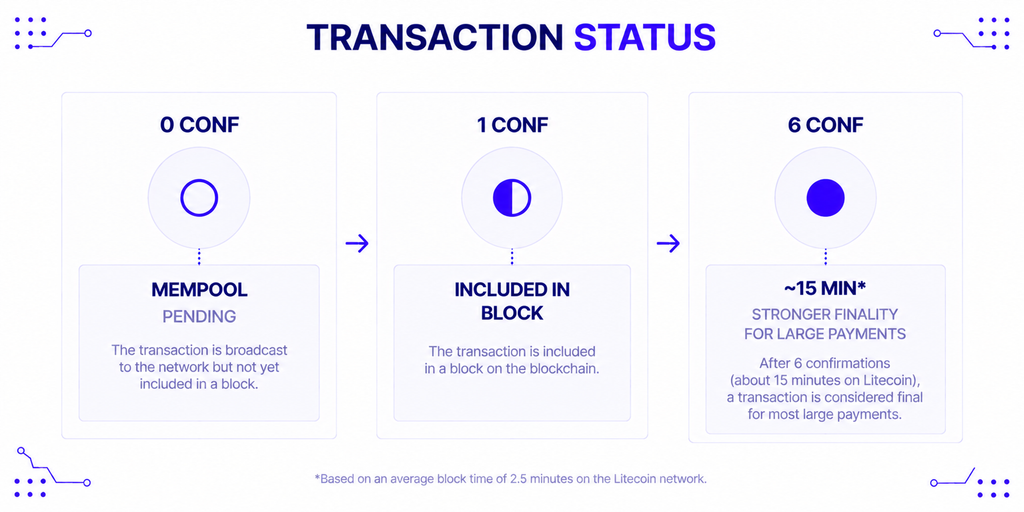
- Read the confirmation count. A transaction with zero confirmations is still in the mempool; Litecoin generally treats six confirmations (about 15 minutes) as final for larger payments.
- Check the fee rate paid, shown in litoshis per byte, if a transaction seems slow to confirm — a fee set too low during a busy period can leave a payment waiting.
- Cross-check on a second explorer if the result looks unexpected, since indexing delays occasionally cause one service to lag behind the chain tip.
How to Choose the Right Litecoin Explorer for Your Use Case
Start with what you’re actually trying to do, not which tool has the flashiest interface. A merchant confirming occasional deposits needs speed and simplicity far more than advanced filtering.
A developer building a wallet or payment processor, on the other hand, needs an API with predictable rate limits and, ideally, the same infrastructure behind both the human-readable explorer and the programmatic endpoint — that pairing is what NOWNodes’ Blockbook API is built around, serving indexed Litecoin data to both an application and a manual lookup from one backend.
An analyst comparing Litecoin against other chains benefits more from a multi-chain tool like Blockchair, while anyone specifically watching for stuck transactions or fee spikes gets more out of Litecoin Space’s mempool view than a general-purpose explorer.
Risks and Limitations to Keep in Mind
No single explorer should be treated as the final word. Indexers occasionally fall behind the chain tip during high load, which can make a confirmed transaction briefly appear unconfirmed on one service while showing correctly on another.
Never paste a private key or seed phrase into any explorer or “wallet lookup” tool — legitimate explorers only ever ask for a public address, transaction ID, or block reference. A site requesting anything more is not a block explorer; it’s a phishing attempt.
Relying on a single provider for anything production-critical, like confirming customer deposits, is also a single point of failure. If that one explorer or API goes down during an outage, your application’s view of the network goes down with it, regardless of whether Litecoin itself is running fine.
Conclusion
A Litecoin explorer turns an abstract blockchain into something you can actually verify: a confirmed payment, a stuck transaction, a treasury balance. For casual checks, a lightweight tool like SoChain or Litecoin Space covers most needs, while developers building real integrations get more value from a service like NOWNodes or BlockCypher that pairs the explorer with a documented API on the same infrastructure.
None of this is financial advice — an explorer shows you what happened on-chain, not what LTC is worth or where its price is headed. What it can tell you, reliably, is whether the transaction you’re waiting on actually went through.
FAQ
Is a Litecoin explorer the same as a Litecoin wallet?
No. An explorer only reads and displays public blockchain data; it can’t hold funds, sign transactions, or access your private keys. A wallet manages your keys and balance; an explorer just lets you verify what’s happening on-chain.
Can a Litecoin explorer see MWEB transaction details?
Only partially. An explorer can show when funds move into or out of the MWEB privacy pool, but the sender, receiver, and exact amount of transfers within MWEB itself aren’t exposed the way a standard transaction’s details are.
How many confirmations does a Litecoin transaction need to be final?
There’s no protocol-enforced number, but six confirmations — roughly 15 minutes at Litecoin’s 2.5-minute block time — is the commonly used threshold for treating a larger payment as settled. Smaller payments are often accepted after one or two confirmations.
Why do different Litecoin explorers sometimes show different confirmation counts for the same transaction?
Each explorer indexes the chain independently, and a service that’s momentarily behind the network’s current block height will under-report confirmations until it catches up. This is usually resolved within seconds to a couple of minutes and isn’t a sign the transaction itself is at risk.
Do I need to run my own node to use a Litecoin explorer?
No. Public explorers query their own indexed infrastructure, so you can look up any transaction or address without syncing or maintaining a node yourself.