
A Stellar explorer is a website that lets you search the Stellar ledger by account, transaction, ledger number, or smart contract and read the result in plain form. For Soroban, Stellar’s smart contract platform, the best choice depends on the job: StellarExpert for asset and account analytics, Stellar Lab for calling contracts, and the NOWNodes Soroban explorer for ledger-level data across Mainnet, Testnet, and Futurenet.
Soroban went live on Stellar mainnet in February 2024 with the Protocol 20 upgrade, according to the Stellar Development Foundation. That added contracts to a network built for payments, and it changed what people look for on a Stellar explorer. This guide covers what these tools show, who uses them, how the main options compare, and where the data comes from.
What Is a Block Explorer on Stellar?
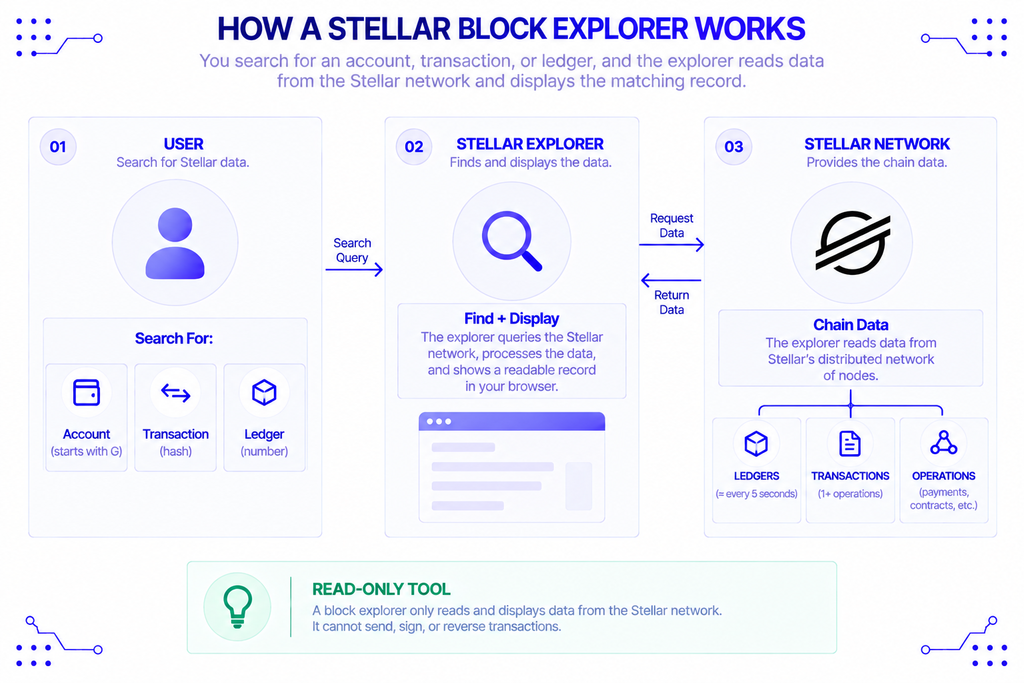
A block explorer is a search engine for one blockchain. You paste in an address, transaction hash, or ledger number, and it returns the matching record from the chain. It reads data only. It cannot send, sign, or reverse anything. If the idea is new to you, NOWNodes has a general explainer on block explorers.
Stellar organizes data a little differently from Ethereum. Instead of blocks, it closes ledgers, roughly every five seconds. Each ledger holds a set of transactions, and each transaction holds one or more operations, such as a payment or a contract call.
That vocabulary is what you’ll see on any Stellar explorer. Accounts start with G and contracts start with C, and both are 56-character strings, so a quick look at the first letter tells you what you’re holding.
What Does Soroban Add to the Ledger?
Soroban is the smart contract layer built into Stellar. Contracts are written in Rust and compiled to WebAssembly (Wasm), a portable binary format, per Stellar’s Soroban overview. It is not an Ethereum Virtual Machine clone and not a Layer 2, which is why EVM tools don’t work on it.
Three details matter when you read Soroban data:
- Resource fees. Soroban meters ledger reads and writes, CPU instructions, and RAM separately, so a contract call shows several cost components rather than one gas number.
- State archival. Contract data that isn’t kept alive expires into an archive instead of bloating the ledger forever.
- Events. Contracts publish events, such as a token transfer, and explorers decode them into readable activity.
Stellar reports 5-second finality for contracts, and its Protocol 23 upgrade, activated on September 3, 2025, added parallel transaction execution and unified asset events. The events change is the one that matters for anyone reading history: movements of classic Stellar assets can now appear in the same event format as contract activity.
Why Do You Need a Soroban Explorer?
You need one because a wallet or app shows only its own interpretation of what happened. The ledger shows the record. When a swap fails or a token balance looks wrong, the explorer is where you check.
Contracts raise the stakes. A payment has a sender, a receiver, and an amount. A contract call has arguments, storage changes, fees, emitted events, and sometimes a failure code. Reading that from raw data is slow, and a decoded view saves real time.
Tomer Weller, VP of Product at the Stellar Development Foundation, described the gap Soroban was built to fill in an interview with Blockworks: “One thing that’s kind of been absent is this idea of writing fully custom trust-minimized code.” Custom code is exactly what makes independent verification necessary. Anyone can deploy a contract, so anyone reading one needs a way to inspect it.
Who Uses a Stellar Chain Explorer?
Different audiences want different things from the same page.
- Everyday users confirm that a payment landed and check the fee they paid.
- Developers debug a failed contract invocation, inspect emitted events, and confirm a deployment on Testnet before touching Mainnet.
- Token issuers and asset teams watch holder counts, supply, and trading activity for an asset.
- Auditors and researchers trace how funds moved through contracts and confirm what a protocol holds.
- Compliance and operations teams reconcile payments against the ledger for reporting.
That last group is bigger on Stellar than on most chains. Stellar’s own materials point to institutional partners like MoneyGram and UNHCR, according to the Soroban launch announcement. A payments-first network attracts people who need records, not just balances.
Which Explorers Cover Soroban?
Stellar’s developer documentation currently lists four explorers: StellarExpert, StellarChain, Stellar Explorer, and Soroscan. Two other tools are worth adding: Stellar Lab, which is a developer console as much as a viewer, and the NOWNodes Soroban explorer.
| Tool | Networks | What it’s good for | Trade-off |
|---|---|---|---|
| StellarExpert | Mainnet, Testnet (not Futurenet) | Asset stats, price history, account and transaction search | No Futurenet support |
| StellarChain | Includes Futurenet | Transactions and network activity | Lighter on developer tooling |
| Stellar Explorer | Mainnet, Testnet, Futurenet | Payments, accounts, deployed contracts | General-purpose |
| Soroscan | Mainnet, Testnet, Futurenet | Transactions, accounts, assets, contracts, ledgers, plus an AI assistant for on-chain questions | Described by the docs as newer and still under active development |
| Stellar Lab | Mainnet, Testnet, Futurenet | Simulating and invoking contract functions from a browser, inspecting transaction XDR | A console, not a browsing-first explorer |
| NOWNodes Soroban explorer | Mainnet, Testnet, Futurenet | Ledgers, transactions, accounts, and contract counts | Focused on Soroban-network data |
Feature sets change quickly on newer tools, so confirm on each site before you rely on a specific view.
StellarExpert
StellarExpert is the long-standing option. It offers detailed stats and price history for assets on Stellar, plus account history and transaction search. It is the natural first stop for anyone asking how an asset is doing rather than what one contract call did.
Stellar Lab
Stellar Lab is different in kind. Its contract explorer lets you pick a function on a deployed contract, enter parameters, run a simulation, and submit the call, all from a browser without the command line. Its transaction dashboard shows XDR, operations, results, and metadata, which is the view developers reach for when a transaction fails.
NOWNodes Soroban Explorer
The NOWNodes Soroban explorer lets you browse Info, Ledgers, Transactions, and Accounts on Futurenet (the default), Testnet, or Mainnet. Its dashboard tracks the latest ledger, total accounts, total transactions, and total contracts, and charts daily transactions over 1-day to all-time ranges.
How Do You Read a Soroban Transaction?
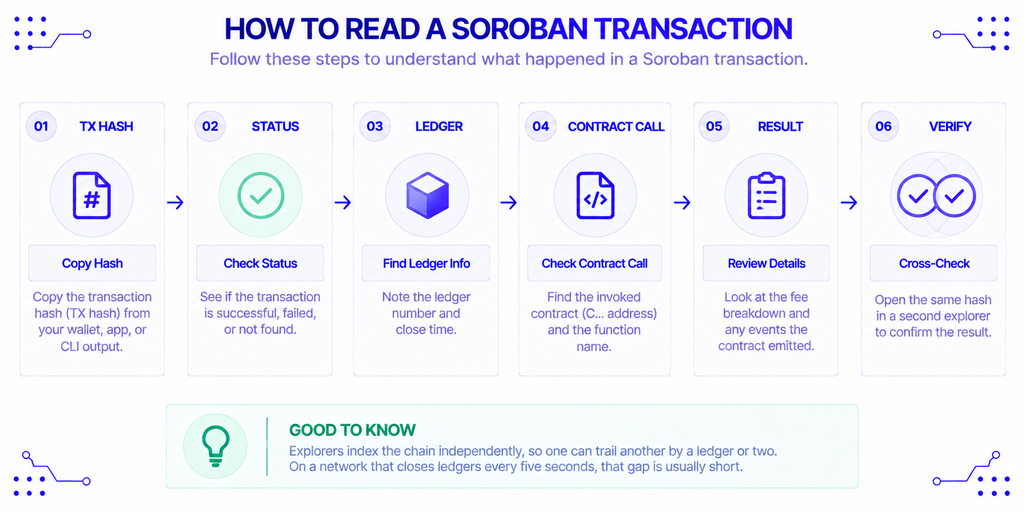
Reading one is a short routine, and it works the same way on any of the tools above.
- Copy the transaction hash from your wallet, app, or CLI output.
- Paste it into the search bar and check the status: successful, failed, or not found.
- Note the ledger number and close time.
- Find the invoked contract (the
C…address) and the function name. - Check the fee breakdown and any events the contract emitted.
- If something looks wrong, open the same hash in a second tool.
Step 6 is worth the extra ten seconds. Explorers index the chain independently, so one can trail another by a ledger or two. On a network that closes ledgers every five seconds, that gap is short, but it is enough to make a settled transaction look pending.
What Do Explorers Not Show You?
Explorers show what is on the ledger, and that has limits worth knowing.
First, history is not equally deep everywhere. Stellar’s own documentation says that RPC retains only a bounded recent window, about 7 days by default, and that events through getEvents are kept for 7 days at most. Anything older needs an indexer or an archive. A public explorer can look back further because it stores its own copy, but a tool you build yourself can’t assume it.
Second, Protocol 23 changed how asset events are emitted, and the announcement notes that operators keeping full history will need to reingest historical data to cover it. Explorers that have done this show consistent event history, and others may not. If a pre-upgrade transaction looks thin on events, that may be why.
Third, labels are not verification. A name, logo, or tag on a token page comes from an off-chain source or a submission. Always check a contract address against the project’s official documentation before interacting with it, and never paste a secret key or seed phrase into an explorer, ever. Legitimate tools need only a public address, hash, or ledger number.
Where Does Explorer Data Come From?
Every explorer sits on top of infrastructure that reads the chain. Stellar RPC is the interface that serves current network state and contract data, and a project that wants historical data on top of it needs its own ingestion, as Stellar’s docs point out. Running that yourself means keeping a synced, upgraded Stellar node in production and re-ingesting after protocol changes.
That is the layer NOWNodes covers. It provides Soroban access on Mainnet, Testnet, and Futurenet through shared and dedicated nodes, so a team building a wallet, a monitoring tool, or its own contract dashboard can query the chain without operating a node. Coverage differs between networks and interfaces, so check the nodes directory for the exact Stellar options before designing around a specific method.
Conclusion
No single Stellar explorer covers every job. Use StellarExpert when the question is about an asset or an account, Stellar Lab when you need to call or debug a contract, and a Soroban-focused view like the NOWNodes explorer when you want ledger and transaction data across all three networks. Try Soroscan if you want to ask questions in plain language, keeping in mind that its own documentation calls it a work in progress.
Whichever you pick, treat the explorer as one view of the ledger. Cross-check important transactions on a second tool, verify contract addresses at the source, and remember that history older than a week or so depends on who indexed it. If you’re building rather than browsing, the infrastructure behind the explorer matters as much as the page in front of you.
FAQ
Is Soroban the same as Stellar?
No. Soroban is the smart contract platform built into Stellar, added by the Protocol 20 upgrade in February 2024. Classic Stellar operations, like payments and trustlines, still work alongside it on the same ledger.
Can I use Etherscan-style tools on Stellar?
No. Stellar doesn’t use the EVM, and its accounts, ledgers, and contract addresses follow different formats. You need Stellar-specific tools, and the ones listed above cover that.
What is Futurenet, and do all explorers support it?
Futurenet is Stellar’s network for trying experimental features before they reach Testnet or Mainnet. Support varies: Stellar’s documentation says StellarExpert doesn’t cover it, while StellarChain, Stellar Explorer, Soroscan, and Stellar Lab do.
Are contract events permanent?
They are on the ledger, but RPC serves them for at most 7 days. Explorers and indexers that store their own copies can go back further, which is why long-term event history usually comes from an indexer.
Does a “verified” contract mean it is safe?
No. Verification generally means published source code matches what was deployed. It says nothing about whether the code is well written or the team is trustworthy, so read what the contract does before you sign anything.