
Every blockchain runs on a network of computers called nodes. A node keeps a copy of the chain, checks new transactions against the rules, and passes valid data to the other computers in the network. Once you understand what a node does, most of the mechanics behind blockchain stop feeling like magic.
This guide covers the blockchain basics that actually matter in practice: what a node is, what it takes to run one, and why reliability — not raw speed — is usually what decides whether an application works.
What is a blockchain node?
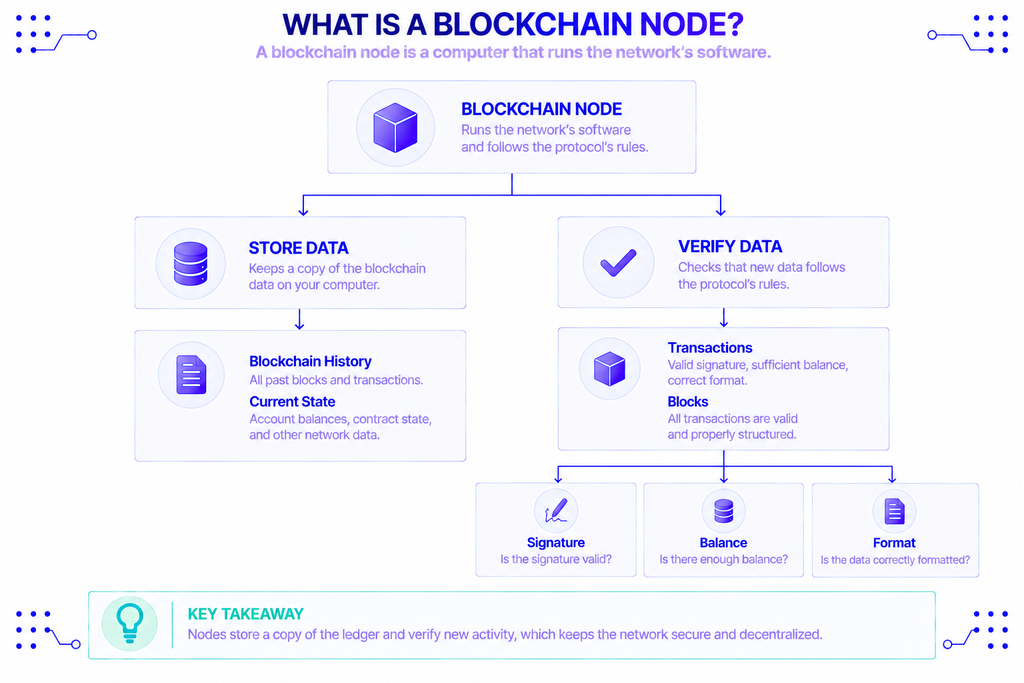
A blockchain node is a computer running the network’s software that stores a copy of the ledger and validates new activity. When someone sends a transaction, nodes check it against the protocol’s rules — correct signature, sufficient balance, valid format — and reject anything that doesn’t fit.
There is no central server behind a blockchain. Thousands of nodes each hold their own copy of the history and agree on the current state. On Ethereum, a node also executes transactions through the Ethereum Virtual Machine and tracks the resulting state, as described in Ethereum’s node documentation.
That redundancy is the point. Because many independent machines store and verify the same data, no single party can quietly rewrite history or fake a balance. If one node lies or drops offline, the rest of the network carries on without it.
In practice, you interact with nodes constantly without noticing. When a wallet shows your balance, it’s asking a node to read the chain. When you send crypto, your wallet hands the signed transaction to a node, which checks it and relays it onward. Every app that touches a blockchain sits on top of a node somewhere.
A node is not the same thing as a miner or a validator. A plain node stores and checks data. A validator (on proof-of-stake chains) or a miner (on proof-of-work chains) does that and also produces new blocks, which takes extra resources and, usually, a financial stake. That distinction matters when you decide what you actually want to run.
What does it mean to run a node?
Running a node means operating one of those computers yourself. Your machine downloads the blockchain, validates every block, stays online, and relays data to peers. You stop relying on anyone else’s view of the chain and start checking it directly.
The first step is the heaviest: an initial sync. Your node downloads the chain’s history and verifies it block by block, which can take anywhere from a few hours to several days depending on the network and your hardware. After that, it keeps pace with new blocks as they arrive and serves data to any wallet or app you point at it.
Running a node is also an ongoing commitment. Client software needs regular updates, and networks occasionally schedule upgrades, known as hard forks, that require your node to be on the correct version before a set block. Miss one, and your node can fall out of consensus with the rest of the network until you update it.
People run their own nodes for a few concrete reasons. The first is self-verification — the “don’t trust, verify” principle. As Ethereum’s documentation puts it, running your own node gives you “a self-verified view of the chain, your own private endpoint for sending transactions and interacting with applications, and you contribute to the health and resilience of the network” (ethereum.org).
Privacy is another reason. When you query someone else’s node, that operator can see which addresses you look up and which transactions you broadcast. Your own node keeps those requests to yourself.
Running a node vs. being a validator
Here’s a distinction that trips up newcomers. You can run a full Ethereum node without staking any ETH at all. You get a verified view of the chain and a private endpoint, but you don’t earn rewards. Becoming a validator is a separate step: it requires depositing 32 ETH, running validator software with signing keys, and actively proposing and attesting to blocks. The protocol pays rewards for keeping that validator online and honest.
Bitcoin works differently. Anyone can run a Bitcoin full node to validate the chain for free, but new blocks are produced by miners who spend electricity on proof-of-work. On both networks, running a node and earning block rewards are two separate activities.
Types of blockchain nodes
Not every node stores the same thing. The main types trade storage and completeness against cost.
| Node type | What it stores | Typical use |
|---|---|---|
| Full node | The full chain and recent state; prunes older state to save space | Everyday validation, wallets, apps |
| Archive node | Every historical state from the genesis block, nothing deleted | Explorers, analytics, historical queries |
| Light node | Block headers only; requests the rest from full nodes | Phones and low-resource devices |
A full node validates everything but periodically prunes old data it no longer needs. An archive node keeps the complete historical state and can answer a question like “what was this balance at block 5,000,000?” — which is why it needs far more disk, often several terabytes. A light node downloads only block headers and asks full nodes for anything more; it uses almost no storage but can’t act as a validator, per Ethereum’s documentation.
What hardware do you need?
Requirements vary by network, and they grow over time as the chain does. For Ethereum, the community hardware recommendation (EIP-7870) lists a 4 TB NVMe SSD, 32 GB of RAM, a 4-core / 8-thread CPU, and roughly 50 Mbps down / 15 Mbps up for a full node. A staking setup is heavier, with 64 GB of RAM recommended for a validator.
Bitcoin is lighter on paper but still demanding on storage. Bitcoin’s full-node guide lists around 740 GB of disk for the full blockchain, 2 GB of RAM, a fast drive, and an unmetered connection that stays online at least six hours a day. Both chains keep growing, so storage is a moving target rather than a one-time purchase.
Why node reliability matters
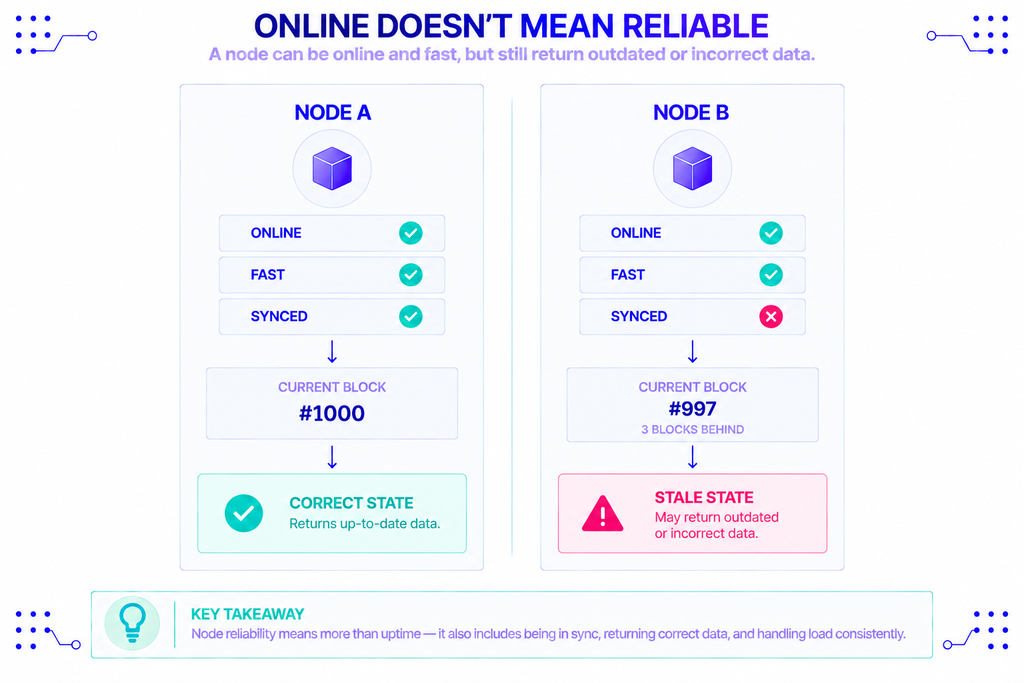
Node reliability is how consistently and accurately a node answers requests, without downtime, errors, or stale data. A node can be online and still be unreliable if it’s lagging behind the chain or returning wrong answers under load.
Unreliable nodes have real costs. If your node is down when a user hits “send,” the transaction never reaches the network. If it’s out of sync, it can report an old balance or miss an event your app depends on. Stale data is the sneakiest failure: the node looks healthy and responds quickly, but it’s a few blocks behind, so everything it reports is slightly wrong. A trading screen showing an outdated price, or a wallet displaying a deposit that hasn’t really confirmed, often traces back to this one problem.
A reliable node does four things well. It stays online, keeps its copy of the chain current, returns correct responses, and holds up when request volume spikes. Teams usually add redundancy — more than one node, with automatic failover — so a single machine going down doesn’t take the whole application with it.
Reliability is measurable, and the common metric is uptime, expressed as a percentage. The gap between numbers that look similar is large: 99.9% uptime still allows about 8.8 hours of downtime a year, while 99.99% cuts that to under an hour. For anything handling real money or users, that difference is the whole game.
Should you run your own node or use a provider?
This is the practical decision most builders face, and it’s a trade-off rather than a single right answer.
Running your own node gives you full control, privacy, and no per-request fees. The cost is everything that comes with it: hardware, the initial sync, software updates, monitoring, and owning the uptime yourself. For learning, self-custody, or independence from third parties, that cost is often worth paying.
Using a managed provider flips the equation. You get an endpoint almost immediately, someone else handles syncing, scaling, and uptime, and you skip the hardware entirely. The trade-off is a dependency on external infrastructure and usage-based pricing. For most production apps, that’s an easy call, because the team would rather build features than babysit servers.
This is where a provider like NOWNodes fits. It offers API access to nodes across 120+ blockchain networks, so an app can read chain data and broadcast transactions without the team maintaining its own machines. You can connect to Ethereum and other networks through one account, and there are free public endpoints if you just want to test a connection before committing to a plan. NOWNodes reports 99.95% API uptime across its infrastructure, the kind of managed reliability that’s hard to match with a single self-hosted machine.
Neither path is universally better. Run your own node when control and privacy are the priority; use a provider when reliability and speed to ship matter more.
Conclusion
The node is the basic unit of any blockchain. It stores the ledger, checks every transaction, and shares valid data, and because thousands of them do this independently, the network stays honest without a central authority. Running your own node means taking on that job yourself, with real hardware and maintenance behind it, in exchange for a verified, private view of the chain.
Reliability is what turns the concept into something usable. A node that’s offline or out of sync is worse than useless, because it fails quietly. Whether you run your own or lean on a provider, the goal is the same: a node that’s online, in sync, and correct when your application asks it a question.
FAQ
Do you need to run a node to use a blockchain?
No. Wallets and apps connect to nodes that already exist, whether run by volunteers or by a provider. You only need your own node if you want to validate the chain yourself or avoid relying on a third party.
How long does it take to sync a node?
From a few hours to several days, depending on the network, your hardware, and the sync method. A fast SSD and good bandwidth make the biggest difference.
Can you run a blockchain node in the cloud?
Yes. Many people run nodes on a VPS or cloud server. Watch the storage and bandwidth costs, since a busy node can move hundreds of gigabytes a month, and some networks prefer nodes spread across many locations rather than concentrated in a few data centers.
What counts as good uptime for a node?
For production use, 99.9% or higher is a reasonable target, and 99.99% is strong. Below 99.9%, downtime adds up to many hours a year, which users and automated systems will notice.
How much does it cost to run your own node?
The main costs are hardware (a multi-terabyte SSD and enough RAM), electricity, and bandwidth. There’s no per-request fee, but you trade that for the time spent setting up and maintaining the machine.