
Gzip compression shrinks the JSON that a blockchain endpoint sends back to your application, so large responses download faster and burn less bandwidth. You enable it by telling the endpoint your client accepts gzip — and with most modern tooling, that already happens without you writing a line of extra code.
The catch is knowing when it helps, which clients handle it for you, and how to confirm it’s actually working. This guide walks through all three, with copy-paste examples for the tools you’re most likely using.
What Is Gzip, and What Does It Do to an RPC Call?
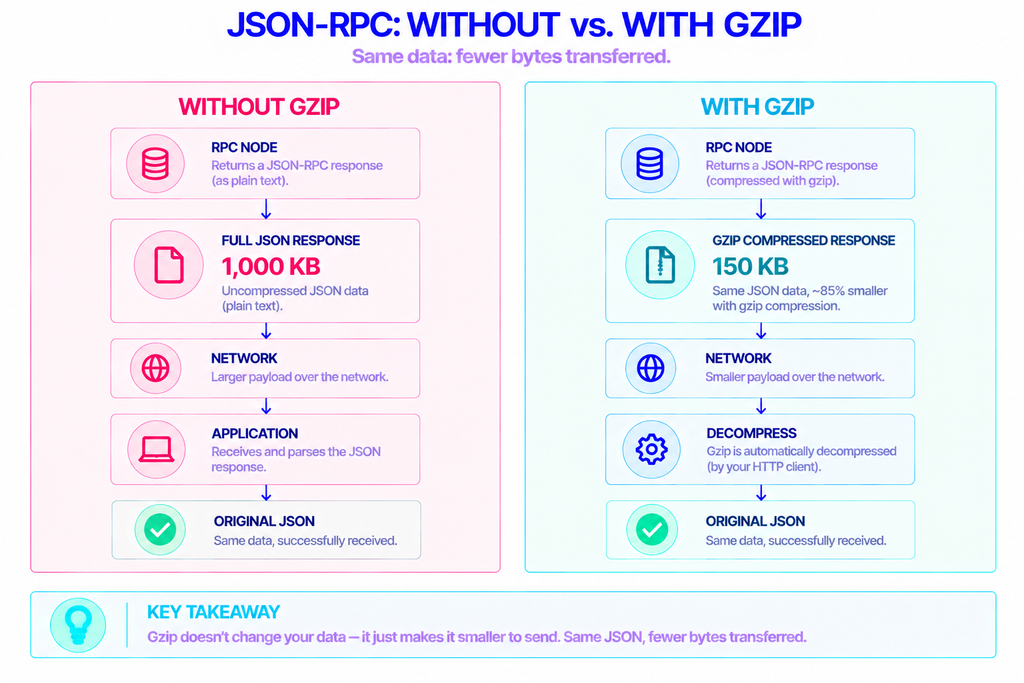
Gzip is a lossless data-compression format: it makes a payload smaller to send, and the receiving side rebuilds it byte-for-byte on arrival. It’s built on the DEFLATE algorithm defined in RFC 1952, and it has been a standard part of the web for decades.
It works especially well on text, and a JSON-RPC response is just text — repetitive text, full of recurring keys like "blockNumber", "address", and "0x" prefixes. That repetition is exactly what gzip exploits, which is why a bulky response can compress down to a fraction of its original size over the wire.
Nothing about your data changes. You send the same request, and your code receives the same decoded JSON. Gzip only affects how many bytes travel across the network in between.
Why Compress RPC Responses at All?
Most RPC traffic is lopsided: your request is tiny, and the response can be enormous. A call like eth_getLogs over a wide block range, a debug_traceTransaction, or a large batch request can return hundreds of kilobytes or more of JSON.
Shipping that uncompressed has three costs. It’s slower for the user, especially on a weak mobile connection. It eats bandwidth on both ends. And if you’re paying for egress or metered requests, it quietly inflates your bill.
Compression attacks all three at once for the price of a little CPU. For a data-heavy backend pulling logs or historical state all day, that trade is almost always worth making.
Who Actually Needs It?
Anyone moving large or frequent responses benefits most:
- Indexers and analytics pipelines that scan logs and historical blocks continuously.
- Block explorers and dashboards rendering lots of on-chain data per page.
- dApp backends batching many calls or fetching event histories.
- Mobile and bandwidth-constrained clients, where every saved kilobyte counts.
Who can skip it? Code that only fires small, fast calls — think eth_blockNumber or a single balance lookup. Those responses are already tiny, and compressing them adds overhead without a meaningful payoff. More on that trade-off below.
How Gzip Travels Through an HTTP Request
Gzip rides on a short negotiation built into HTTP. Your client advertises what it can decode, and the server answers with what it chose.
- The client sends a request header:
Accept-Encoding: gzip. - If the server supports it, it compresses the body and replies with
Content-Encoding: gzip. - The client sees that header and decompresses the body before handing it to your code.
You can read the full specification of the request side on MDN’s Accept-Encoding reference. One distinction matters a lot here: this handshake compresses the server’s response — the big thing you download. Compressing the request body you send upward is a separate feature (Content-Encoding on your outbound POST) that many endpoints don’t accept yet, so it’s usually left alone.
How Do You Turn On Gzip in Your Code?
The honest answer for most stacks: you probably don’t have to. Here’s a quick map of who handles it automatically and who needs a nudge.
| HTTP client | Requests gzip by default? | What you do |
|---|---|---|
Browser fetch (frontend ethers / viem) | Yes, automatic | Nothing — the browser sets the header and decompresses |
| ethers.js v6 | Yes | Nothing; it’s on by default and decoded for you |
| ethers.js v5 | No (opt-in) | Pass allowGzip: true in the connection options |
| axios (Node) | Yes (decompresses) | Optionally set the header; decompress is already true |
Node 18+ native fetch | Yes | Nothing; standard encodings are handled for you |
Node http / https | No | Send the header and decompress with zlib |
| curl | No (opt-in) | Add --compressed |
In the Browser
There’s nothing to configure, and nothing you can configure. Browsers attach Accept-Encoding to every request and decompress the response transparently. Accept-Encoding is a forbidden header name, so trying to set it from JavaScript is ignored or throws a “refused to set unsafe header” error. Frontend libraries like ethers or viem inherit this behavior for free.
In Ethers.js (v6 and v5)
In the current ethers.js v6 (6.16.x at the time of writing), gzip is on by default. The underlying FetchRequest enables it automatically, and per the ethers fetching docs, “the response will automatically be decompressed.” A plain provider already gets compressed responses:
js
import { ethers, FetchRequest } from "ethers";

// Gzip is already requested and decoded for you.
const provider = new ethers.JsonRpcProvider("https://eth.nownodes.io/YOUR_API_KEY");

// Only reach for FetchRequest when you need custom headers (e.g. auth).
const req = new FetchRequest("https://eth.nownodes.io/YOUR_API_KEY");
req.setHeader("Accept-Encoding", "gzip"); // default; shown for clarity
const explicitProvider = new ethers.JsonRpcProvider(req);
Ethers.js v5 is the legacy line, and there it’s opt-in. You pass a connection options object with allowGzip set to true:
js
const { ethers } = require("ethers"); // v5
const provider = new ethers.providers.JsonRpcProvider({
  url: "https://eth.nownodes.io/YOUR_API_KEY",
  allowGzip: true,
});
If you’re still on v5, this is the one line to add. If you’re on v6, you already have it.
With Axios and Native Fetch in Node
On the server side, axios sets decompress: true by default, so it unpacks gzip automatically whenever it sees Content-Encoding: gzip. Adding the request header is optional but makes your intent explicit:
js
const axios = require("axios");

const { data } = await axios.post(
  "https://eth.nownodes.io/YOUR_API_KEY",
  { jsonrpc: "2.0", id: 1, method: "eth_getLogs", params: [/* filter */] },
  { headers: { "Accept-Encoding": "gzip" } } // decompression is already on
);
Node 18 and newer ship a built-in fetch that also requests and decodes standard encodings for you, so a straightforward fetch(url, { method: "POST", body }) already benefits.
With Raw Node http / https
The low-level modules are the exception: they do not decompress for you. You send the header yourself and run the response through Node’s zlib module:
js
const zlib = require("node:zlib");

// ...after collecting the gzipped response into `buffer`:
const json = JSON.parse(zlib.gunzipSync(buffer).toString());
This is rarely worth hand-rolling. If you’re writing raw requests, switching to axios or native fetch removes the manual step entirely.
Checking It Works With curl
curl’s --compressed flag does both jobs at once: it adds Accept-Encoding and decompresses the reply. Pair it with -v to see the response headers:
bash
curl -v --compressed https://eth.nownodes.io/YOUR_API_KEY \
  -X POST -H "Content-Type: application/json" \
  --data '{"jsonrpc":"2.0","id":1,"method":"eth_getBlockByNumber","params":["latest",false]}'
Look for content-encoding: gzip in the response headers. If it’s there, the endpoint compressed the reply. To prove the savings, run the call once with --compressed and once without, comparing -w '%{size_download}' each time.
When Gzip Isn’t Worth It
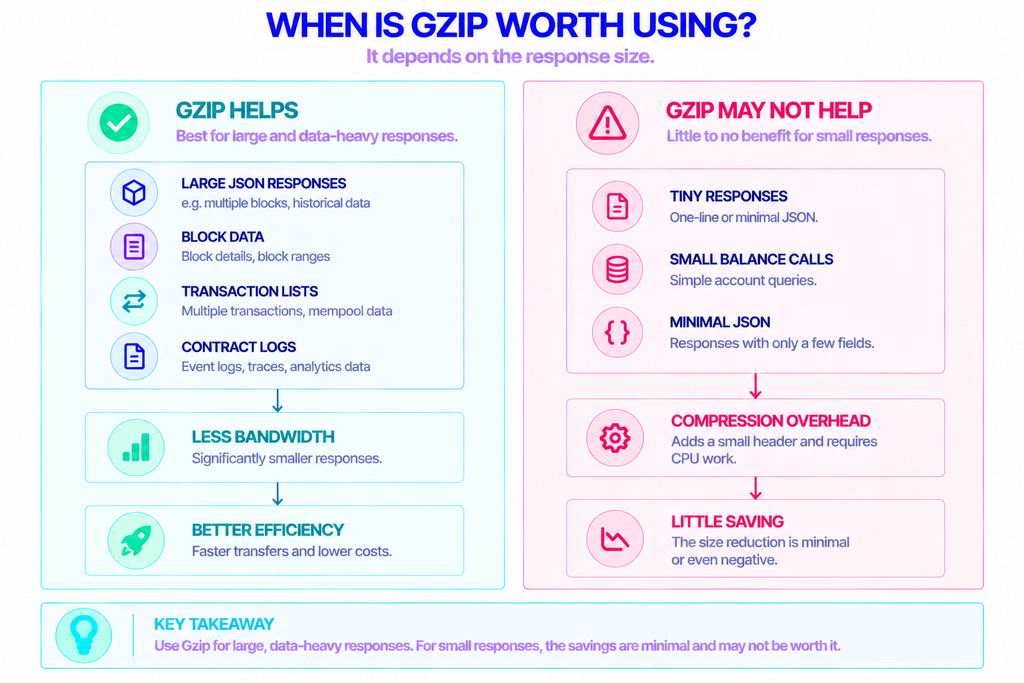
Compression is close to free, but “close to free” isn’t “always free.” A few situations where it does little or gets in the way:
- Tiny responses. Gzip adds a small header and framing overhead (roughly 18 bytes) plus CPU work. For a one-line response, you can end up even or slightly worse off.
- Very high request volume. Compressing and decompressing every response has a real CPU cost at scale, even if it’s dwarfed by the bandwidth saved in most workloads.
- Request-body compression. Gzipping the JSON you send is a different feature from gzipping the response you receive, and many endpoints reject compressed inbound bodies. Stick to response compression unless your provider documents inbound support.
- WebSocket connections.
Content-Encodingis an HTTP mechanism. Streaming subscriptions over WebSocket use a separate extension (permessage-deflate) and aren’t covered by the techniques above. - Double compression. If a CDN or proxy in front of your endpoint already applies gzip, don’t try to layer it again.
The rule of thumb is simple: let it run by default for anything that returns large JSON, and don’t lose sleep over the handful of calls where it doesn’t help.
Getting a Compression-Friendly Endpoint
Gzip is negotiated between your HTTP client and whatever endpoint you point it at, so a reliable, standards-compliant endpoint matters as much as your client config. Running that infrastructure yourself means syncing chains, managing storage, and keeping uptime high — before you’ve shrunk a single response.
A managed provider removes that overhead. NOWNodes offers JSON-RPC, WebSocket, and Data API access across 120+ networks with a reported 99.95% uptime, all behind a single API key. You get an HTTPS endpoint per network — for example https://eth.nownodes.io/YOUR_API_KEY for Ethereum — and your client requests gzip over it exactly as shown above.
Point ethers, axios, or curl at the endpoint, keep gzip enabled, and the large responses that cost you the most bandwidth arrive compressed by default.
The Short Version
Enabling gzip on RPC calls is less about flipping a switch and more about knowing it’s usually already on. Browsers, ethers.js v6, axios, and native Node fetch all request and decode gzip for you; ethers v5 needs allowGzip: true, and raw http needs zlib. Verify with curl --compressed and the content-encoding: gzip header.
Turn it on everywhere that returns big JSON, skip the worry on tiny calls, and you’ll trim real bandwidth and latency from your heaviest requests for almost no effort.
FAQ
Does gzip compression work over WebSocket RPC connections?
No. Gzip’s Content-Encoding is an HTTP feature and applies to request/response calls, not persistent streams. WebSocket has its own compression extension, permessage-deflate, which is negotiated separately when the socket opens and isn’t controlled by Accept-Encoding.
Is Brotli better than gzip for RPC responses?
Brotli (br) often compresses text more tightly than gzip, so for large JSON it can shave off a few extra percent. The trade-off is support: gzip is accepted almost everywhere, while brotli isn’t guaranteed on every endpoint or client. If both sides support it, requesting Accept-Encoding: br, gzip lets the server pick the best option and fall back to gzip.
Will enabling gzip change how I parse responses?
No. Decompression happens below your application code, so you still receive and parse ordinary JSON. The only time you touch raw compressed bytes is with low-level clients like Node’s http module, where you decompress manually before parsing.
Why isn’t my response getting smaller even with gzip enabled?
Check the response for a content-encoding: gzip header first — if it’s missing, the endpoint didn’t compress the reply. Common reasons are a payload too small to benefit, a proxy that stripped the header, or an endpoint that doesn’t honor the encoding. For tiny responses, a flat size is expected and not a problem.