
A token approval is a permission you give a smart contract to spend a set amount of your tokens. You grant it once, and it stays active until you cancel it. That standing permission is what makes approvals both useful and dangerous.
The numbers make the risk concrete. In 2025, wallet-drainer phishing stole $83.85 million across EVM chains, and the single largest theft came from one malicious Permit signature. Many victims simply had old, unlimited approvals sitting in their wallets.
This guide explains what token approvals are, how to check and revoke them with free tools, and how signature-based flows like EIP-2612 and Permit2 change what you need to watch for.
What Is a Token Allowance?
A token allowance is the amount a smart contract is permitted to move from your wallet on your behalf. When a decentralized app (dApp) asks you to “approve” a token before a swap or deposit, it is requesting that allowance. The approval itself is a transaction you sign and pay gas for.
The term comes from the ERC-20 token standard, which defines how most fungible tokens on Ethereum behave. Without an approval, a contract cannot touch your tokens at all. With one, it can move up to the approved amount whenever it wants.
approve() and allowance() Explained
Two functions do the work. approve(spender, amount) sets the allowance, where the spender is the contract you are authorizing. allowance(owner, spender) reads how much is currently approved. When the dApp needs your tokens, it calls transferFrom to pull up to that approved amount.
NFTs work a little differently. ERC-721 and ERC-1155 collections use setApprovalForAll(operator, true), which grants a contract control over your entire collection in one go. That makes NFT approvals higher stakes than a single-token allowance.
Finite vs. Unlimited Approvals
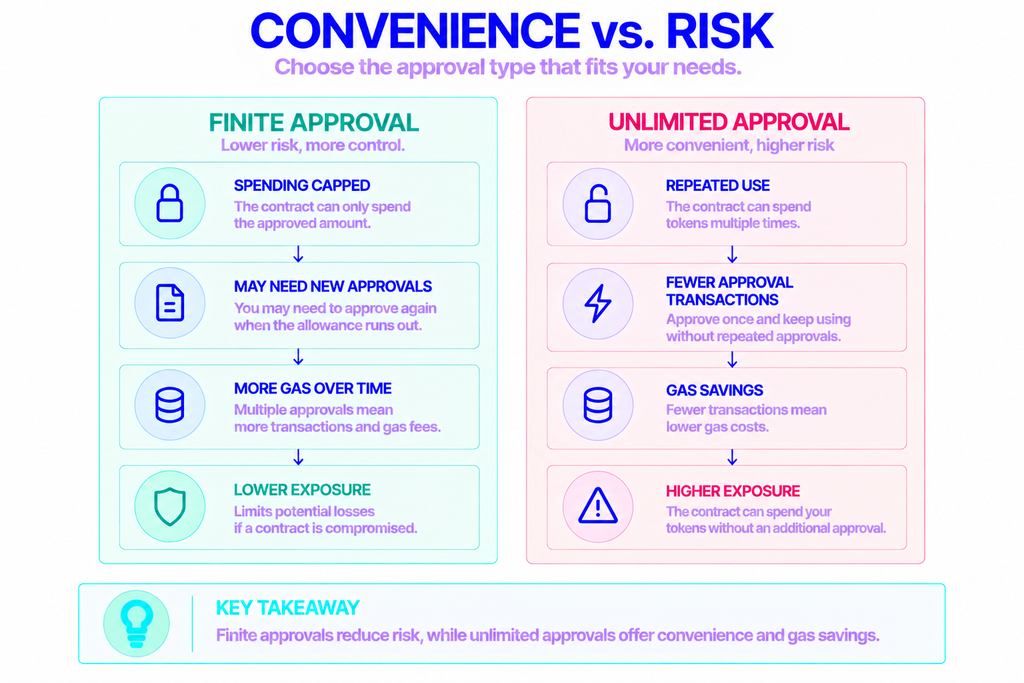
Most dApps request the maximum possible value, 2^256 − 1, so you only ever approve a token once. It is convenient and saves you gas on repeat visits. The trade-off is that you hand a contract an unlimited spending cap on that token.
A finite approval caps the risk. If you approve exactly 100 USDC, that is the most a buggy or malicious contract can take. Some wallets let you edit the amount at signing time, which is worth doing for high-value tokens.
Why Unlimited Allowances Are Risky
Approvals do not expire on their own. They persist until you revoke them, which means a contract you used once in 2023 may still hold permission to move your tokens today. If that contract is later exploited, or was malicious from the start, it can drain the approved amount at any time.
The scale is well documented. Scam Sniffer’s 2025 report recorded $83.85 million in drainer losses across 106,106 victims, down 83% from roughly $494 million the year before. Permit and Permit2 signatures alone accounted for 38% of losses among incidents over $1 million, and the biggest single theft reached $6.5 million.
The decline is good news, but the threat has not gone away. The report warned that the “drainer ecosystem remains active,” with new drainers appearing as old ones shut down. One forgotten approval is often all an attacker needs.
Who Needs to Check Their Allowances?
Anyone who connects a wallet to a dApp accumulates approvals, usually without noticing. If you have ever swapped on a DEX, supplied liquidity, lent tokens, or listed an NFT, you have granted permissions that are probably still live.
A few moments are worth a specific check:
- After using a new or unfamiliar dApp for the first time
- When a protocol you have interacted with reports a hack or exploit
- As routine monthly hygiene, especially on your main wallet
- Before consolidating funds or moving to a fresh wallet
Active DeFi users and NFT traders face the most exposure, but the habit matters for everyone. A single setApprovalForAll on a compromised marketplace contract can put a whole NFT collection at risk.
How to Check and Revoke Your Allowances
You do not need to read raw contract data to manage approvals. Two free, widely trusted tools cover almost every situation, and some wallets now handle it natively. In every case, revoking is a transaction, so it costs a small gas fee.
Using Revoke.cash
Revoke.cash is the most widely used approval manager, free and open source since 2019. According to the project, it has helped prevent over $140 million in losses and supports 100+ networks.
- Go to revoke.cash directly by typing the address yourself, since phishing clones exist.
- Connect your wallet, or paste any address for a read-only view.
- Switch to the network you want to inspect. Approvals are per-chain, so a mainnet check will not show your Base or Arbitrum permissions.
- Review the list of spenders, amounts, and how recently each was used.
- Click Revoke next to anything you do not recognize or no longer use, then confirm the transaction.
Paid tiers add a multichain dashboard and automatic revoking, which watches your approvals and cancels risky ones for you through MetaMask’s support for the ERC-7715 permission standard. The free tier is enough for manual cleanups.
Using Etherscan
For Ethereum mainnet, the block explorer has a built-in checker.
- Open Etherscan’s Token Approval Checker (found under Services → Token Approvals).
- Search your address and browse the ERC-20, ERC-721, and ERC-1155 tabs.
- Connect your wallet, click Revoke on the approval you want to cancel, and confirm.
Each chain has its own explorer, so you would use the matching tool for Polygon, BNB Smart Chain, and others. The flow is otherwise the same.
Checking Inside Your Wallet
Some wallets now manage approvals without a separate site. Rabby includes a built-in approval manager that lists every active permission across networks and lets you batch-revoke in one place. MetaMask and Phantom still lack native allowance management, so pair them with Revoke.cash or a block explorer.
A few practical points apply to every method:
- Revoking is one transaction per approval, so several cancellations mean several wallet pop-ups.
- The gas you originally paid to grant an approval is not refunded.
- Approvals are tied to a single network, so check each chain you use.
- Anyone with your seed phrase can simply re-grant a revoked approval, so revoking is not a fix for a compromised wallet.
Building your own checker? Reading allowances at scale means querying allowance(owner, spender) for many token-spender pairs and tracking Approval events on-chain. That takes reliable, low-latency access to the chain. NOWNodes provides that blockchain infrastructure for Ethereum and 120+ networks, so a dashboard can read on-chain data without you running the back end yourself.
EIP-2612 and Permit2: Gasless Permit Signatures
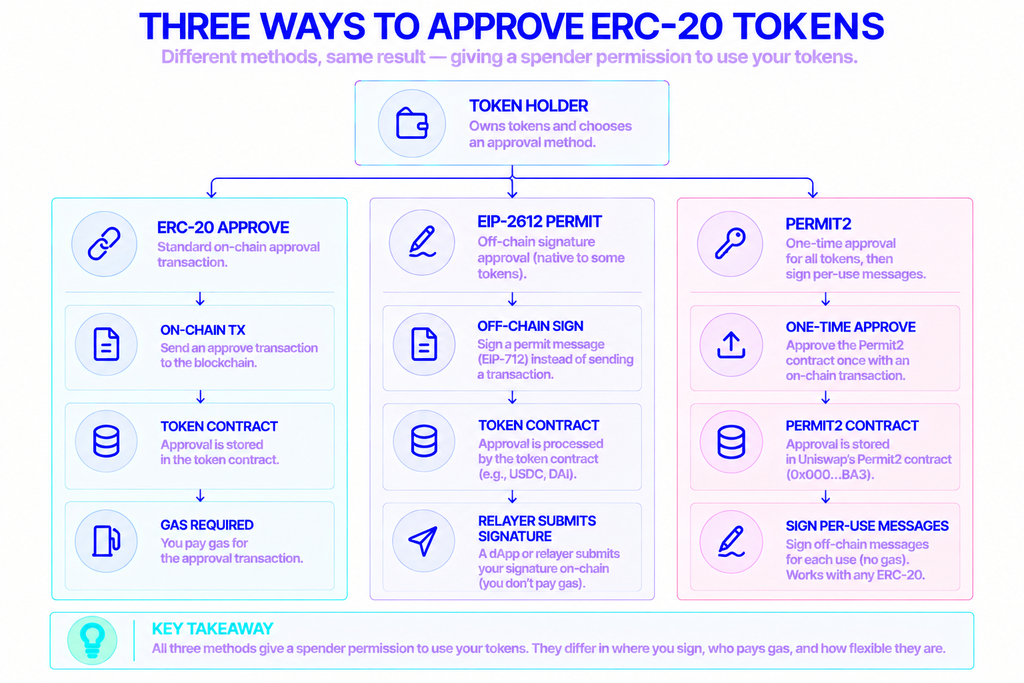
A permit lets you approve by signing an off-chain message instead of sending an on-chain approve transaction. The approval itself costs no gas, and the spender submits your signature when they need it. This is where approvals get faster, and also where a newer phishing risk lives.
EIP-2612 extends ERC-20 with a permit() function. You sign an EIP-712 structured message, and a dApp or relayer submits it on-chain, often batched with the action in a single transaction. Stablecoins like USDC and DAI support it natively.
Permit2 is Uniswap’s answer for every other token. It is a single contract deployed to the same address, 0x000000000022D473030F116dDEE9F6B43aC78BA3, on all chains, and it has been live since November 2022. You approve the Permit2 contract once with a standard approve, then sign per-use messages for anything after that. It works with any ERC-20, even tokens without native permit, and powers Uniswap’s Universal Router.
| Standard approve() | EIP-2612 permit | Permit2 | |
|---|---|---|---|
| How you authorize | On-chain transaction | Off-chain signature | One approval, then signatures |
| Gas to approve | Yes | None | Once, for the initial approval |
| Works with any ERC-20 | Yes | Only tokens with permit() | Yes |
| Where to revoke | Revoke.cash / explorer | Revoke.cash / explorer | Revoke.cash / explorer |
The Signature-Phishing Catch
Permit signatures are a favorite tool for scammers. A signed permit does not look like a token transfer, and it may not leave the obvious on-chain trail you would see from a standard approve. Drainers hide these requests behind friendly prompts like “Verify Wallet” or “Claim Airdrop,” which feel lower-risk than confirming a transaction.
The data backs up the concern: Permit and Permit2 abuse drove 38% of large drainer losses in 2025. The defense is simple to state and hard to skip. Read what you are signing, treat a signature request as seriously as a transaction, and never approve a message you do not understand. Permit2 allowances can be revoked with the same tools as any other approval.
Keeping Approvals Under Control
Token approvals are a normal part of using DeFi and NFTs. They only become a problem when they pile up unseen. Keep the list short, approve finite amounts when your wallet allows it, and revoke permissions once you are done with a protocol.
Build a light routine: check your allowances on a schedule, clean up anything unused, and apply the same caution to off-chain signatures that you give on-chain transactions. A few minutes of review is far cheaper than losing funds to a permission you forgot you granted.
FAQ
Does revoking an allowance change my balance?
No. Revoking only cancels a contract’s permission to move your tokens. Your balance stays exactly where it is; you are removing a spending right, not transferring anything. The revoke transaction does cost a small gas fee.
How often should I review my permissions?
A monthly check is a reasonable baseline for active users. Beyond that, review right after trying an unfamiliar dApp, and immediately if a protocol you have approved reports a security incident.
Does a hardware wallet protect against wallet drainers?
Not by itself. A hardware wallet requires physical confirmation, but if you approve or sign for a malicious contract, it can still spend up to the amount you authorized. The real protection is reviewing requests and declining anything suspicious, not the device.
What’s the difference between revoking and lowering an allowance?
Revoking sets the allowance to zero and cancels access entirely. Lowering it means setting a smaller spend limit so you can keep using a trusted dApp with less exposure. Both reduce risk; revoking removes it.