
A versioned transaction is Solana’s newer transaction format, labeled v0, that can point to on-chain accounts by a short index instead of writing out each full 32-byte address. Address lookup tables (ALTs) are the on-chain accounts that hold those addresses, which lets a single transaction touch far more accounts without crossing Solana’s strict size limit.
Every Solana transaction has to fit inside 1,232 bytes. An account address is 32 bytes, so a legacy transaction runs out of room after roughly 32 accounts. That ceiling is the reason versioned transactions and lookup tables exist.
This guide covers both features from the ground up: what they are, the problem they solve, who actually needs them, and how to build one step by step.
What Are v0 Transactions and Lookup Tables?
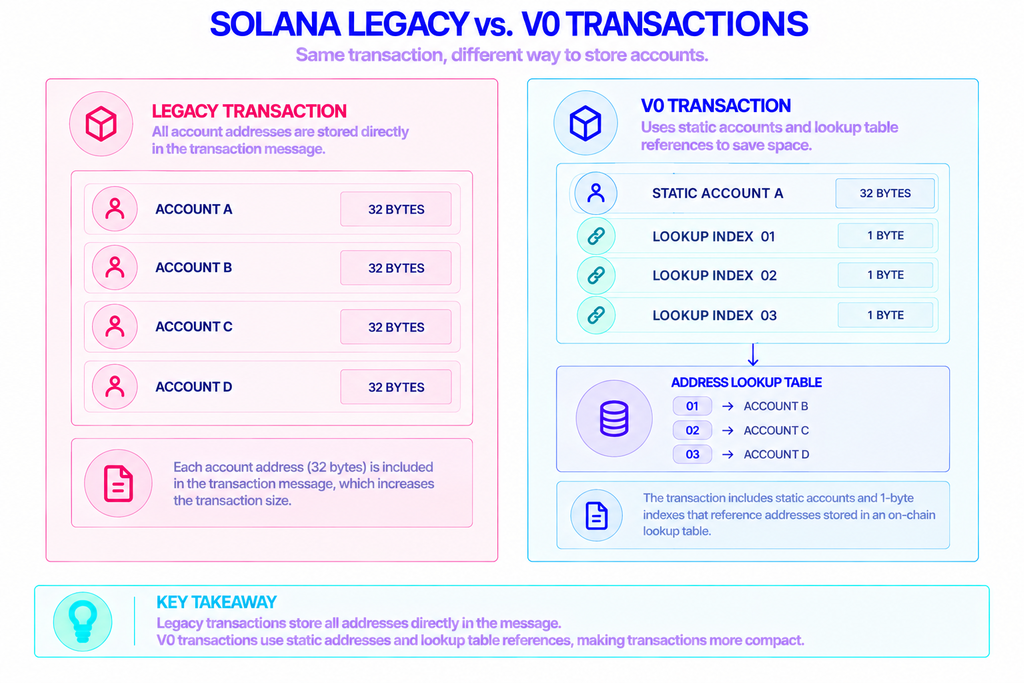
A v0 transaction is the same thing as a legacy transaction, plus one addition: a list of references into address lookup tables. Solana marks the format with a single prefix byte and an address_table_lookups field that points at the extra accounts.
An address lookup table is an on-chain account that stores up to 256 public keys. Once those keys live in a table, a transaction can reference any of them with a 1-byte index rather than spelling out the full 32-byte address each time. The addresses stay on-chain. The transaction just carries pointers to them.
Solana now recognizes three transaction formats, and all three coexist on the network. Legacy came first. The v0 format went live on mainnet-beta in October 2022 and introduced lookup tables. A third format, v1, arrived through protocol proposals in 2025 and takes a different approach, which the comparison section below explains.
In day-to-day developer talk, “versioned transactions” almost always means v0, because that’s the version that added the lookup-table mechanism people actually use.
Why Did Solana Add a New Transaction Format?
The 1,232-byte limit is the core constraint. It comes from the 1,280-byte minimum packet size for IPv6, with the remaining bytes reserved for network overhead. Solana treats that as a hard cap so a transaction always fits inside a single network packet.
In a legacy transaction, every account it touches is written out as a full 32-byte key. Add a few program IDs, a dozen token accounts, and some signers, and you hit the wall fast. For a simple transfer, 32 accounts is plenty. For anything that coordinates many accounts in one atomic step, it isn’t.
Lookup tables change the math. Because a table entry is referenced by a single byte, a versioned transaction can load many more accounts and still fit. In practice this lets a transaction reach the runtime’s limit of 64 accounts. The official Solana lesson shows the gap plainly: a batch that failed as a legacy transaction with the error “Transaction too large: 1244 > 1232” went through as a v0 transaction carrying 22 transfers.
Here’s the practical upshot. Without versioned transactions, a complex Solana operation had to be split across several transactions, which breaks atomicity and adds latency. ALTs keep that operation in one.
Who Needs Address Lookup Tables?
Mostly, account-heavy applications. If a transaction only moves SOL between two wallets, a legacy transaction works and lookup tables add nothing. The feature earns its place when a single set of instructions has to reference many accounts at once.
Common cases include:
- DeFi routers and aggregators. A swap routed through several liquidity pools can touch dozens of accounts. Aggregators like Jupiter rely on lookup tables to fit multi-hop routes into one transaction.
- Complex DeFi actions. Opening a leveraged position, rebalancing a portfolio, or claiming rewards across several markets in a single atomic call.
- Programs with many fixed accounts. Protocols that keep referencing the same set of accounts can store them once in a table and reuse it across transactions.
- Trading bots and market makers. Bundling multiple actions into one transaction to cut down on round-trips.
If you’re building any of these, versioned transactions aren’t an optional extra. They’re how the operation fits on-chain at all.
How Do Address Lookup Tables Work?
A lookup table is a program-owned account with an authority that controls it. You create the table, fill it with addresses, then reference it from your v0 transactions. The runtime resolves each 1-byte index back to the full address when it processes the transaction.
Two rules matter once you depend on a table:
- Only non-signer accounts can be loaded from a lookup table. Signers still have to appear directly in the transaction, so you can’t hide a required signature behind an index.
- An address can’t be used in the same slot it was added. A new table or a new entry needs to warm up for one slot before a transaction can reference it. Skip the wait and you’ll get “Transaction address table lookup uses an invalid index.”
Resolved accounts follow the same ordering as inline ones, with writable lookups placed before read-only lookups. The SDK handles that ordering, so you rarely touch it by hand.
How to Create and Use a Lookup Table
The workflow has a fixed shape whether you use a library or the command line. The steps below follow the official Solana course, which builds everything with @solana/web3.js. Anza’s newer @solana/kit is the renamed successor to that library and exposes the same capabilities.
- Get a recent slot. Call
connection.getSlot()and use the slot just before it (recentSlot: slot - 1) to avoid an error. - Create the table.
AddressLookupTableProgram.createLookupTable({ authority, payer, recentSlot })returns the create instruction and the table’s address. That address is a program-derived address seeded by the authority and the slot you passed. - Add addresses.
AddressLookupTableProgram.extendLookupTable({ payer, authority, lookupTable, addresses })appends keys. Only about 30 addresses fit in one extend transaction because of the 1,232-byte limit, so larger sets get split into batches. A single table holds up to 256 addresses in total. - Wait one slot. Let the table warm up before using it. The lesson polls for a new block first.
- Fetch the table.
connection.getAddressLookupTable(address)returns the account object you pass into the transaction. - Build the v0 transaction. Create a
TransactionMessage, call.compileToV0Message([lookupTableAccount])with your table or tables, wrap the result innew VersionedTransaction(message), sign it, and send it.
A transaction can pass in several lookup tables at once, and the SDK swaps any matching address for its 1-byte index automatically.
If you’d rather not write code, the Solana CLI manages tables through its address-lookup-table subcommands, including create, extend, deactivate, and close.
Legacy vs v0 vs v1: What Actually Changed?
The three formats differ mainly in how much they can carry and how they get there. v0 compresses addresses; v1 simply enlarges the budget.
| Feature | Legacy | v0 (versioned) | v1 |
|---|---|---|---|
| Size limit | 1,232 bytes | 1,232 bytes | 4,096 bytes |
| Max accounts | ~32, all inline | up to 64, via lookup tables | 64, all inline |
| Address lookup tables | Not supported | Supported | Removed |
| Status | Original format | Live since Oct 2022 | Newest (2025 proposals) |
v1 raises the size cap to 4,096 bytes and keeps every account inline, dropping lookup tables because the extra space makes them unnecessary. For now, v0 and its lookup tables remain the established way to pack many accounts into one Solana transaction, and the pattern that most wallets and tooling already support.
Sending and Reading Versioned Transactions Over RPC
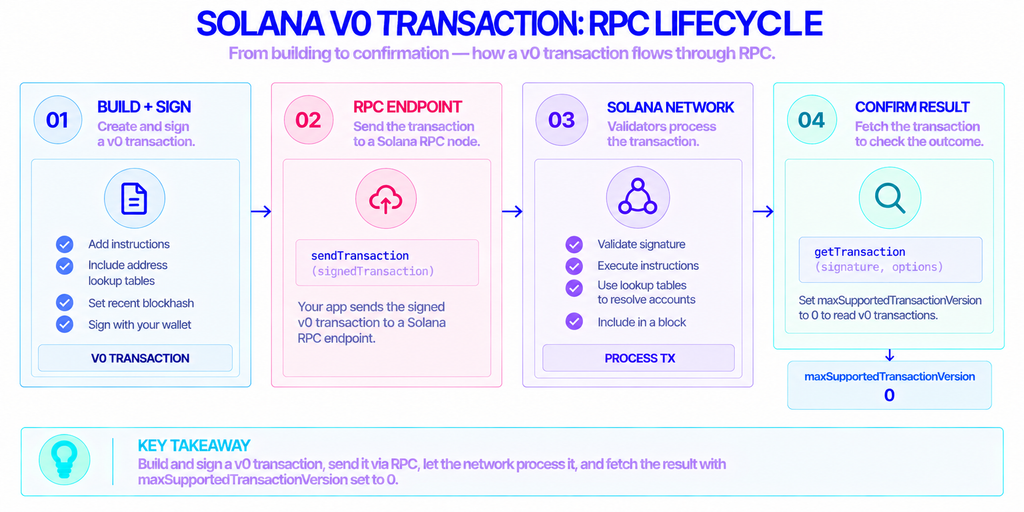
Building a v0 transaction is only half the work. You still have to broadcast it and read it back, and both happen through a Solana RPC node. Your app signs the transaction, sends it with an RPC call, then fetches it later to confirm the result.
One detail trips people up. When you request a block or a transaction that uses the v0 format, the RPC call needs maxSupportedTransactionVersion set, or it returns an error, because the default only decodes legacy transactions. Set it to 0 and the node returns versioned transactions normally.
Running a Solana validator just to get that endpoint is heavy work, since storage, snapshots, and uptime all become someone’s job. A provider such as NOWNodes offers Solana RPC access across 120-plus networks, so you can send versioned transactions and query lookup-table accounts through an API instead of operating your own node.
Conclusion
Versioned transactions and address lookup tables exist to beat one number: the 1,232-byte transaction limit. By storing addresses on-chain and referencing them with 1-byte indices, they let a single transaction coordinate far more accounts than a legacy transaction ever could, which is what makes multi-step DeFi and routing possible in one atomic call.
If your transactions are simple, legacy is still fine. The moment you’re touching dozens of accounts at once, lookup tables stop being an optimization and become a requirement. Create one table, respect the one-slot warm-up, and build from there.
FAQ
Do I have to use versioned transactions on Solana?
No. Legacy transactions are still valid and widely used, and simple operations work fine without the v0 format. Versioned transactions are opt-in — you reach for them when a transaction needs more accounts than the size limit allows.
Can a lookup table be changed or removed after it’s created?
Yes. The table’s authority can keep extending it with new addresses, freeze it to make it permanent, or deactivate and then close it to reclaim the rent paid for the account. Closing requires a short cooldown after deactivation before the funds come back.
Do simple token or SOL transfers need a lookup table?
No. A standard transfer fits comfortably inside the 1,232-byte limit, so a legacy transaction handles it. Lookup tables only pay off for account-heavy transactions such as multi-hop swaps.
How much does creating a lookup table cost?
You pay rent to store the table account on-chain, plus normal transaction fees for the create and extend calls. The rent is recoverable, so closing a table you no longer need returns that deposit.