
So you sent some crypto, your wallet says “sent,” and now you’re staring at the screen wondering if it actually went anywhere. Where do you go to check? A blockchain explorer. It’s the tool that takes a blockchain — which under the hood is a wall of cryptographic gibberish — and turns it into something a normal person can read.
Think of it as a search engine for a blockchain. You paste in a transaction ID, a wallet address, or a block number, and it hands you back a clean page: who sent what, to whom, when, and whether it went through. That’s the whole trick.
And people lean on it constantly. Etherscan, the explorer for Ethereum, reportedly pulls in over 5 million visits a month — which tells you how routine “just check the explorer” has become.
This guide builds up from the ground floor. What a blockchain explorer is, how it actually works, what you can look up, who relies on it, and where it quietly falls short. By the end you’ll be able to open one and confirm a payment in under a minute.
What Is a Blockchain Explorer?
Here’s the plain version. A blockchain explorer is a website that lets you search and read everything recorded on a blockchain — transactions, wallet addresses, blocks, balances, the lot. Some people call it a crypto explorer. Others just say block explorer. Same tool, different name.
The blockchain itself is a distributed ledger copied across thousands of computers. Public? Yes. Readable? Not really. The raw data is built for machines, and digging a single transaction out of it by hand would mean running your own full node and typing queries into a terminal. Almost nobody wants to do that.
That’s the gap a blockchain explorer fills. It does the ugly technical part for you and shows you a tidy page in your browser.
One thing to nail down early: an explorer never changes the blockchain. It only reads it. It’s a window, not a lever.
From gibberish to something you can read
Picture the blockchain as a giant public notebook written in code. Every page is a “block,” and each block is cryptographically bolted to the one before it — which is exactly why nobody can quietly rewrite an old page. A blockchain explorer reads that notebook and hands you the page you asked for. Same data, just legible.
How Does a Block Explorer Work?
Fair question, because it looks like magic and it isn’t. An explorer doesn’t store the “real” blockchain — the network does that. What it keeps is a constantly updated copy, organized so it can be searched in a blink.
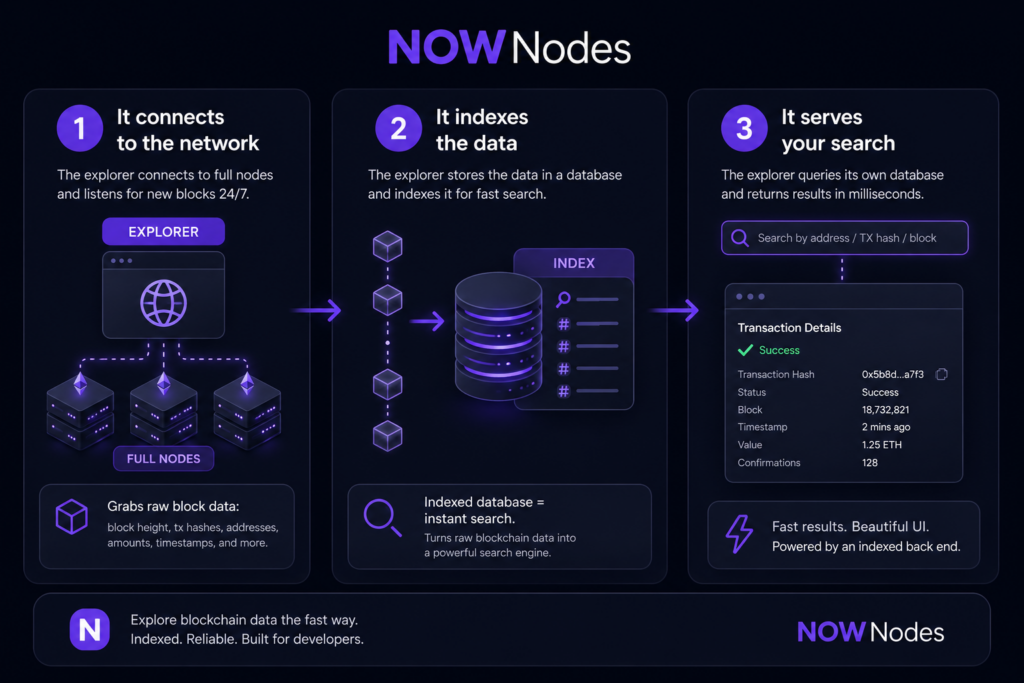
Three moving parts pull this off: it connects, it indexes, it serves. Understand these and you’ll know when to trust what an explorer tells you — and when not to.
Step 1: It connects to the network
First, the explorer plugs into the blockchain’s full nodes, the machines that hold and verify the ledger. It listens for new blocks around the clock. Every time one is confirmed, it grabs the raw contents — block height, transaction hashes, sender and receiver addresses, amounts, timestamps. Everything you’ll eventually see on screen starts here.
Step 2: It indexes the data
Now the important bit. Raw blockchain data sits in the order it happened, which is useless for searching — look for one address and you’d have to scan the entire chain from block one. So the explorer copies it all into a database and indexes it, the way a book’s index lets you skip straight to the page you need.
No index, no instant search. That single step is what turns a slow archive into a proper search engine.
Step 3: It serves your search
Type a transaction hash into the bar and the explorer checks its own indexed database, not the live chain. It finds the record in milliseconds and lays it out as a readable page — status, value, timestamp, confirmations. The front end is the pretty part; the indexed back end is why it’s fast. That’s the whole pipeline.
What Can You Look Up on a Blockchain Explorer?
Plenty, and it shifts a little by network. But four searches come up again and again: transactions, addresses, blocks, and tokens. The short version:
| What you search | What you get back |
|---|---|
| Transaction hash (TXID) | Status, amount, sender, receiver, fee, timestamp, confirmations |
| Wallet address | Current balance, full transaction history, tokens held |
| Block number (height) | Timestamp, transaction count, total fees, block hash, miner/validator |
| Token contract | Total supply, holder count, transfers, verified code |
Transactions
Every transfer gets a unique transaction ID — the transaction hash, or TXID for short. Paste it in and you’ll see whether it’s pending, confirmed, or failed, plus the amount, the fee, and how many confirmations it’s collected. (On Bitcoin, six confirmations is the usual bar for treating a payment as settled.) This is the number-one reason people open a blockchain explorer at all: to confirm a payment landed. Beats refreshing your wallet and hoping.
Wallet addresses and balances
Type in a wallet address and you get its current balance, every transaction in and out, and any tokens it holds. Here’s the part that catches newcomers off guard — you can look up any address, not just your own. The whole ledger is open. Handy for confirming a payment arrived; also, as we’ll get to, the root of the privacy problem.
Blocks and network health
Every block has its own page: height, timestamp, how many transactions it packed in, total fees, and who mined or validated it. Most explorers also show the big-picture numbers — current gas fees, pending transactions sitting in the mempool, hash rate, active addresses. For scale, Bitcoin ships a new block roughly every 10 minutes; Ethereum, about every 12 seconds. Glance at those figures and you can tell whether a network is jammed or cruising.
Smart contracts and tokens
On chains that run smart contracts — Ethereum being the obvious one — explorers let you crack the contract open: its code, its token transfers, its whole history. You can read a verified contract’s source, see how many wallets hold a token, and sanity-check a project before you send it a cent. It’s due diligence you can actually see, instead of taking someone’s word for it.
How to Use a Block Explorer, Step by Step
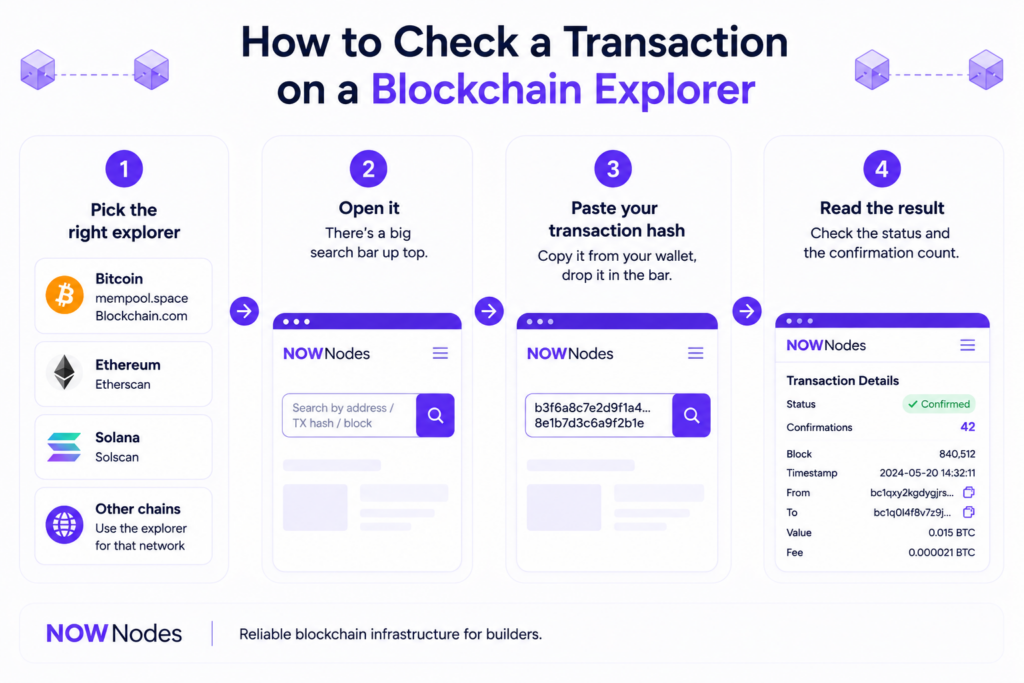
It’s about as simple as it gets, and the steps barely change from one chain to the next. Say you just sent some bitcoin. Here’s the drill:
- Pick the right explorer. Match it to the chain — mempool.space or Blockchain.com for Bitcoin, Etherscan for Ethereum, Solscan for Solana.
- Open it. There’s a big search bar up top. You can’t miss it.
- Paste your transaction hash. Copy it from your wallet, drop it in the bar. Addresses and block numbers work too.
- Read the result. Check the status and the confirmation count — more confirmations, more final.
Real scenario: you paid someone, and they swear it hasn’t shown up. Grab the TXID from your wallet, paste it into a Bitcoin explorer, and you’ll see straight away whether it’s confirmed and how many confirmations it’s got. No support ticket. No “trust me, I sent it.” Just the ledger, open to both of you.
This was baked in from day one, by the way. In the original Bitcoin whitepaper, Satoshi Nakamoto put it like this: “The public can see that someone is sending an amount to someone else, but without information linking the transaction to anyone.” A blockchain explorer is simply how you go and look.
Who Actually Uses Blockchain Explorers?
Short answer: nearly everyone in crypto, for wildly different reasons. What started as a developer tool turned into infrastructure. Let’s break it down.
Everyday users and traders
For most people it’s a receipt and a tracking number rolled into one — proof a transfer happened, plus its live status. Traders push further, watching big wallets move (the lingo is “whale watching”) for a hint of where the market’s leaning. For millions of them, checking the chain is now as automatic as glancing at a price chart.
Developers and auditors
Builders use explorers to debug transactions, confirm a contract deployed cleanly, and check that code does what it’s supposed to before real money runs through it. Auditors eyeball token supplies to make sure nobody’s quietly minting extra. Vitalik Buterin, who co-founded Ethereum, has argued that a system only earns the word “trustless” when ordinary users can verify the rules themselves instead of trusting a middleman. A blockchain explorer is one of the main ways people do exactly that.
Compliance and forensics
Because every transaction leaves a permanent trail, investigators follow the money right on the chain. They trace transaction hashes from address to address to unpick hacks, flag dirty funds, and watch for movement that looks off. The same openness that lets you check one payment lets a researcher rebuild an entire trail. Great for the good guys — and, yes, part of why privacy is a real conversation. More on that in a second.
Types of Blockchain Explorers
Not every explorer is the same, and it starts to matter the moment you touch more than one chain. They come in two flavors: single-network and multi-chain.
Single-network explorers are built for one blockchain and all its quirks. Etherscan owns the Ethereum space, Solscan is tuned for Solana’s speed, mempool.space is the Bitcoin crowd’s favorite. Because each is purpose-built, they tend to surface the deepest, most accurate detail for their chain. Working mostly on one network? A dedicated explorer is usually the better call.
Multi-chain explorers pull several networks into one interface, so you can search addresses and transactions across ecosystems from a single tab. Convenient when your assets are scattered — though they don’t always dig as deep as a specialist would. So it’s depth on one chain versus breadth across many. That’s the trade-off.
| Blockchain | Common explorers |
|---|---|
| Bitcoin | mempool.space, Blockchain.com, NOWNodes BTC Explorer |
| Ethereum | Etherscan, NOWNodes ETH Explorer |
| BNB Chain | BscScan |
| Solana | Solscan, SolanaFM |
| Litecoin | NOWNodes LTC Explorer |
Where Block Explorers Fall Short
As useful as they are, they’re not flawless, and two things are worth knowing before you lean on one too hard.
First, centralization. The blockchain underneath is decentralized; the explorer showing it to you usually isn’t — it’s one company’s website. If that site lags, glitches, or drifts out of sync, it can serve you stale or flat-out wrong data, and you might swear a transaction failed when the network’s humming along fine. When it really matters, cross-check a second explorer. Cheap insurance.
Second, privacy. Everything an explorer displays is visible to anyone, forever. Addresses are pseudonymous, not anonymous — and with enough digging they can sometimes be tied back to a real person. That’s the flip side of all that lovely transparency: open and exposed are two sides of the same coin. Worth keeping in mind, whether you’re checking on someone else or guarding your own trail.
NOWNodes Block Explorers
Want to try all this without hunting around for a site you trust? NOWNodes runs a set of free, browser-based block explorers — no signup needed just to look something up.
They cover eight chains right now: Bitcoin, Ethereum, Litecoin, Dogecoin, Bitcoin Cash, DigiByte, Groestlcoin, and Dash. Each one searches transactions, addresses, and blocks through the same clean layout, so hopping between chains doesn’t mean relearning the interface every time.
The part that matters is what’s underneath. These explorers run on NOWNodes’ blockchain infrastructure, which holds a stated 99.95% uptime and response times around 200mc across 120+ chains. For a tool whose entire job is showing you accurate, current data, that reliability is the point — a fast blockchain explorer that’s out of sync helps nobody.
Building something rather than just checking? The same indexed data is available through the NOWNodes Blockbook API on 30+ networks, so wallets and analytics tools can read balances and histories without running their own indexer. Either way, start with the public explorers and go deeper only if your project needs it.
The Bottom Line
A blockchain explorer is the lens that makes a public ledger usable — raw cryptographic data in, readable pages out. You’ve seen what it is, how it connects and indexes to answer your searches, what it shows you, who relies on it, and where it slips.
The best way to lock this in? Go use one. Next time crypto moves in or out of your wallet, paste the transaction hash into an explorer and watch the whole thing play out in real time.
FAQ
Are blockchain explorers free?
Yes. Looking up transactions, addresses, and blocks on a public blockchain explorer costs nothing and usually needs no account. You only hit paid tiers if you want API access for an app or an analytics tool. For everyday checking, there’s no paywall.
Can a blockchain explorer reveal my identity?
Not on its own. It shows wallet addresses, which are pseudonymous strings, not names. But if an address ever gets linked to you — say, through an exchange that holds your ID — its whole history becomes traceable. Safest to assume everything you do on-chain is public and permanent.
What’s the difference between a block explorer and a crypto wallet?
A wallet holds your keys and moves your funds; an explorer only reads the public ledger. It has no keys, so it can’t touch your money. Wallet is your bank card. The explorer is a public statement anyone can pull up.
Can one explorer cover every blockchain?
No single one covers them all, but multi-chain explorers handle a lot from one place. Single-network explorers like Etherscan go deeper on their own chain. Most people end up with two or three they trust rather than just one.
Is Etherscan a blockchain explorer?
Yep — it’s the best-known explorer for Ethereum and the textbook example. You can inspect transactions, addresses, tokens, and smart contracts on it. Every major chain has an equivalent, from Solscan on Solana to mempool.space on Bitcoin.