
A pruned node is a fully validating node that downloads and verifies the entire chain, then deletes the old block data it no longer needs. It keeps the current state and a small buffer of recent blocks, so it can still check new transactions on its own — just without storing years of history.
That one design choice is what lets someone validate Bitcoin on a laptop instead of a server. Below we go from the plain definition to how node pruning actually works, where a pruned node differs from a full node, and why running one in production is trickier than the setup guides suggest.
What Is a Pruned Node?
Start with the thing being pruned. A full node stores a complete copy of the chain and independently checks every rule: valid signatures, no double-spends, correct block structure. Its power comes from verifying rather than trusting anyone else.
A pruned node does all of that same verification. The difference is what it keeps afterward. Once a block has been validated and folded into the node’s working state, the raw block is no longer strictly required to validate the next block — so a pruned node discards it.
Definition — pruned node: a node that fully downloads and validates the blockchain from the genesis block, then deletes older raw block and undo data, retaining only the current state (such as the UTXO set) plus a small number of recent blocks.
The result is a node that behaves like a full node for everything happening now, at a fraction of the storage. It is not a “lite” wallet trusting someone else’s word; it reached its conclusions itself and simply threw away the receipts.
Why Node Pruning Exists
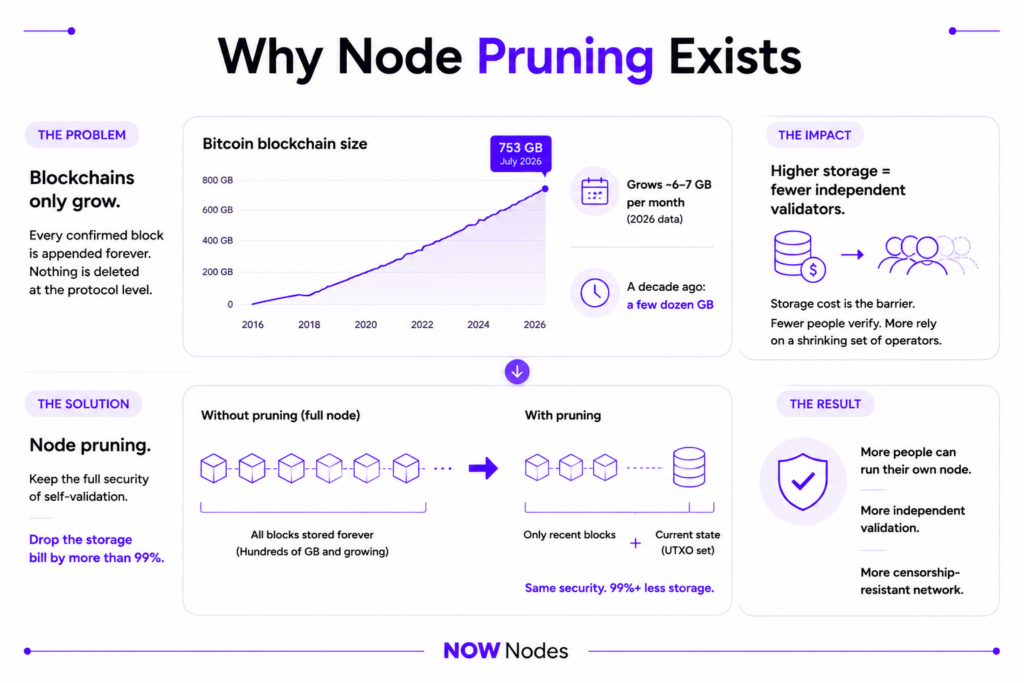
The problem pruning solves is growth. A chain only ever gets bigger, because every confirmed block is appended forever and nothing is deleted at the protocol level.
Bitcoin makes the numbers concrete. Its blockchain passed 753 GB in July 2026 and expands by roughly 6–7 GB every month, according to blockchain size trackers. A decade ago the same database was a few dozen gigabytes. Left unchecked, that curve slowly prices ordinary users out of running their own node.
That matters because a network’s censorship-resistance depends on how many independent parties actually validate it. If storage cost is the barrier, fewer people verify, and the network leans on a shrinking set of large operators. Node pruning is the direct answer: keep the full security of self-validation, drop the storage bill by more than 99%.
How Node Pruning Works
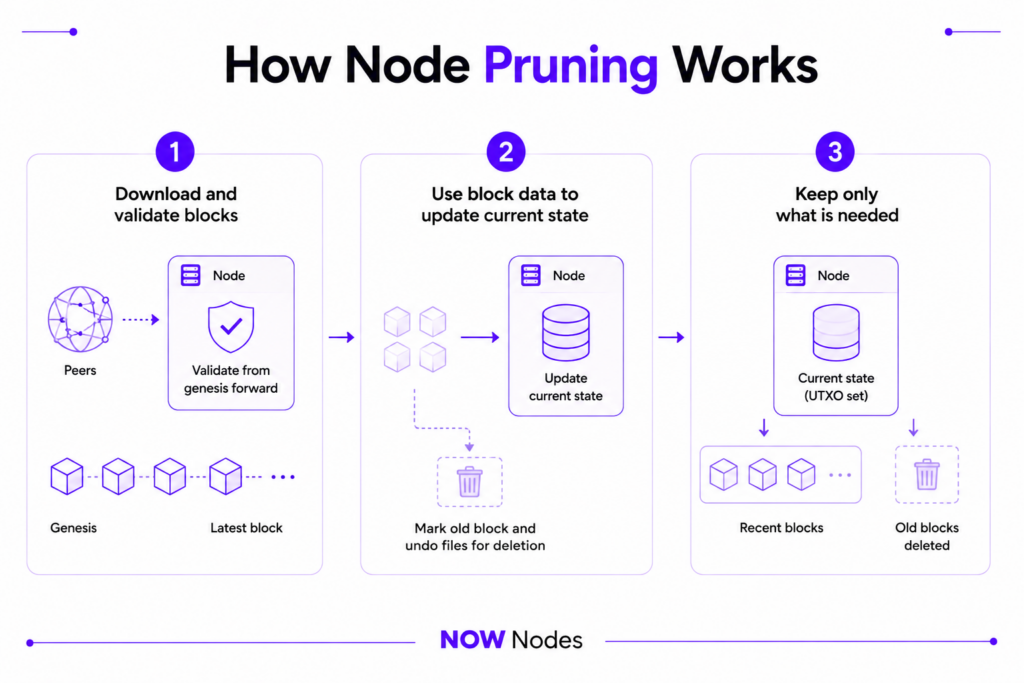
Pruning is a three-step sequence, and the order is the whole point. First, the node downloads blocks from peers and validates every one from genesis forward — no shortcuts on the rules. Second, once a block’s data has been used to update the current state, the node marks the old raw block and undo files for deletion. Third, from then on it holds only recent blocks plus the state needed to check what comes next.
In Bitcoin Core this is a single setting. The prune=N option, introduced in the 0.11.0 release back in 2015, tells the node how many megabytes of block files to keep. The minimum is 550 MiB — deliberately chosen so the node always retains at least 288 blocks, about two days of history at ten minutes per block. Once the node hits your target, it deletes the oldest block and undo files while it keeps syncing.
What a Pruned Node Keeps and What It Drops
The mental model is “state, not history.” A pruned node keeps the data that describes what is true right now and drops the raw record of how it got there.
For Bitcoin, “right now” is the UTXO set — the list of all unspent outputs, which is all you need to decide whether a new transaction is valid. The historical blocks that produced those outputs can go. For an account-based chain like Ethereum, the equivalent is the current state trie rather than every historical state.
Definition — UTXO set: the complete collection of unspent transaction outputs at the current chain tip. It is the “account balance” of the whole Bitcoin network, and it is what a pruned node holds onto after discarding old blocks.
A Modern Shortcut: Syncing From a Snapshot
Traditionally the painful part of running any node — pruned or not — was the initial sync, because you still had to grind through the entire history once. That changed with AssumeUTXO, shipped for mainnet in Bitcoin Core v28.0 (October 2024) and documented by Bitcoin Optech.
AssumeUTXO lets a node load a recent snapshot of the UTXO set, jump to that height, and become usable within minutes — then verify the skipped history in the background. It works with a pruned node, and the snapshot file can be deleted right after loading. Bitcoin engineer Jameson Lopp benchmarked the difference:
“It took 10 minutes for the node to load the snapshot, then it took 84 minutes to finish syncing to chain tip. On the other hand, it took 659 minutes to perform a full sync from genesis.”
— Jameson Lopp, Bitcoin infrastructure engineer
That is roughly a 7x speedup on the same hardware. It does not change what a pruned node stores, but it removes the biggest practical excuse for not running one.
Pruned Node vs Full Node: What’s the Difference?
The pruned node vs full node question trips people up because a pruned node is a full node in the sense that matters — it fully validates. The split is about retained history, and the trade-offs follow from that.
| Property | Full (archival) node | Pruned node |
|---|---|---|
| Validates every rule independently | Yes | Yes |
| Stores complete chain history | Yes | No — recent blocks only |
| Typical Bitcoin storage | ~753 GB and rising | ~5–10 GB |
| Can serve any historical block/tx to others | Yes | No |
| Supports arbitrary wallet rescans | Yes | Only above the prune height |
| Good for | Explorers, indexers, analytics, RPC providers | Personal validation, wallets, lightweight infrastructure |
One clarification that saves confusion: an archival node is the maximal version of a full node — it keeps all historical state and can answer questions about any past block. A pruned node sits at the opposite end. Both validate; only one remembers.
The practical limits of a pruned node are the flip side of its savings. It cannot hand old blocks to peers that are syncing, it cannot rescan a wallet for transactions below its prune height, and in Bitcoin Core pruning automatically disables the -txindex transaction index. If you need history, prune less — or don’t prune at all.
Pruning Looks Different on Every Chain
Node pruning is a general idea, but each network implements it around its own data model. Storage numbers, client defaults, and even what “pruned” means in practice shift from one chain to the next.
Bitcoin prunes raw blocks around the UTXO set, which is why a fully validating pruned node can live in under 10 GB. Ethereum is a useful contrast: its default “full node” is already effectively pruned, keeping recent state rather than all of it. Even so, a modern Ethereum full node runs about 1.2–1.5 TB once you add the execution client, the consensus client, and blob data, based on current node requirements.
The gap between pruned and unpruned is even starker on Ethereum’s archive side. A traditional hash-based archive node can demand 12–20+ TB, though newer path-based storage in Geth and Erigon has pulled that down toward ~2 TB in 2026. Ethereum has also started shedding old data at the protocol level: Partial History Expiry, rolled out across execution clients on 8 July 2025, drops pre-Merge block bodies and receipts and frees roughly 300–500 GB on existing nodes.
The takeaway is that “pruned” is not one fixed size. It depends on the chain’s state model, the client software, and which features you turn on — which is exactly why pruning is more of an engineering discipline than a checkbox.
Who Runs Pruned Nodes — and When Not To
For an individual, a pruned node is close to ideal. You get trustless validation of your own transactions on modest hardware, which is the entire point of running a node in the first place. Wallets that want to verify against their own node, hobbyists on a Raspberry Pi, and privacy-conscious users are the natural audience.
Production infrastructure is where the calculus flips. If you are powering an exchange, a wallet used by thousands, or an analytics product, the limitations bite: a pruned node cannot serve historical queries, and if it falls too far behind or corrupts its data, it often has to resync from scratch rather than patch the gap. Every resync is downtime, and downtime on live financial infrastructure means failed requests and lost trust.
Teams also underestimate the operational tax. Monitoring sync status, handling desyncs, rotating endpoints when one goes down, and keeping clients upgraded across several chains is ongoing work — per network, not once. This is the real reason “just run a pruned node” and “run reliable node infrastructure for a product” are different projects.
How to Get Pruned-Node Access Without Running One
If your goal is a validated view of the chain rather than the DevOps that comes with it, a managed provider removes the middle layer. This is where NOWNodes fits: it operates validating nodes across 120+ networks and exposes them through a single API, so you get the result of pruning — fast, lean, always-current access — without babysitting the machines.
Connecting is one HTTPS endpoint plus a key. You send requests to a per-chain URL such as https://btc.nownodes.io with your api-key header, and NOWNodes routes them to healthy nodes behind the scenes. The free tier covers up to 20,000 requests per day, which is enough to build and test against before you scale.
Reliability is handled at the infrastructure layer: automatic failover, load balancing, and node redundancy target 99.95% uptime, so a single desync or resync never reaches your users. When you do need full history, NOWNodes keeps archival nodes separate from pruned ones — you request the tier that matches the job instead of over-provisioning storage yourself.
Final Thoughts
A pruned node is one of the most elegant trade-offs in blockchain engineering: full validation, almost none of the storage. It downloads everything, checks everything, then keeps only what the next block requires — which is why a chain approaching 800 GB can still be verified on a laptop.
The catch is that pruning is easy to enable and hard to operate at scale, because every chain prunes differently and every resync is downtime. For personal validation, run one — the setup has never been simpler thanks to snapshot syncing. For production, the smarter move is usually to let a provider absorb the complexity and hand you the clean, validated access that pruning was invented to deliver.
FAQ
Is a pruned node still a full node?
Yes, in the way that counts. A pruned node performs the same complete validation as a full node — it independently checks every block and transaction. It simply deletes old raw blocks afterward, so it cannot serve full history to others.
How much storage does a pruned Bitcoin node need?
As little as 550 MiB of block data if you set prune=550, though a comfortable working setup with the UTXO set and databases lands around 5–10 GB. Compare that to the 753+ GB an archival node carried in July 2026.
What is the difference between a pruned node and an archival node?
Both validate independently. A pruned node keeps only recent blocks and current state; an archival node keeps the entire history and all past states, so it can answer queries about any block ever. Archival nodes need far more storage — up to 12–20+ TB on Ethereum.
Can a pruned node lose data or become unreliable?
It won’t lose validated state under normal operation, but it cannot rebuild missing history from peers the way it downloads new blocks. If a pruned node corrupts or desyncs badly, it often has to resync the whole chain from genesis, which is the main operational risk in production.
Does node pruning make my node less secure?
No. Security comes from validating the rules yourself, and a pruned node does exactly that. You lose the ability to serve or rescan old history, not the ability to trustlessly verify the present.
Can I run a wallet on a pruned node?
Yes, but with a limit: you can only rescan for transactions above your prune height, since older blocks are gone. For wallets that need to import old keys and scan deep history, keep more blocks or use an archival node.