
To connect a dapp to MetaMask with Ethers.js, wrap the wallet’s injected provider in a BrowserProvider, ask the user for account access with eth_requestAccounts, and call getSigner(). That gives your code an address to read from and a signer that can request transaction approvals. The whole flow fits in about 20 lines of JavaScript.
MetaMask reported more than 30 million monthly active users in late 2025, so for most Ethereum dapps it is the first wallet users try. This guide covers the current way to do it: Ethers.js v6, EIP-6963 wallet discovery, and the error cases that break a first integration.
What does it mean to connect a dapp to MetaMask?
Connecting means your web page gets permission to see one or more of the user’s addresses and to ask the wallet to sign things on their behalf. The private keys never leave MetaMask. Your dapp only receives an address and, later, signed results.
MetaMask exposes this through a JavaScript object that follows EIP-1193, the standard provider interface. It has a request method for JSON-RPC calls and emits events such as accountsChanged and chainChanged. Permissions are granted per origin, so a user who approves app-one.com has approved nothing for app-two.com.
Why use Ethers.js for the connection?
Ethers.js turns the raw provider into typed, readable objects. Without it, you send hand-built JSON-RPC requests and parse hex strings yourself. With it, you call provider.getBalance(address) and get a bigint back.
Richard Moore, the library’s author, described the goal in the Ethers documentation as “a complete and compact library for interacting with the Ethereum Blockchain and its ecosystem.” The compact part matters for frontends, because bundle size affects load time.
Ethers v6 splits responsibilities into three objects:
| Object | Role | Example call |
|---|---|---|
| Provider | Reads chain data | provider.getBalance(addr) |
| Signer | Holds an account and requests signatures | signer.sendTransaction(tx) |
| Contract | Talks to a deployed smart contract | contract.balanceOf(addr) |
What do you need before you start?
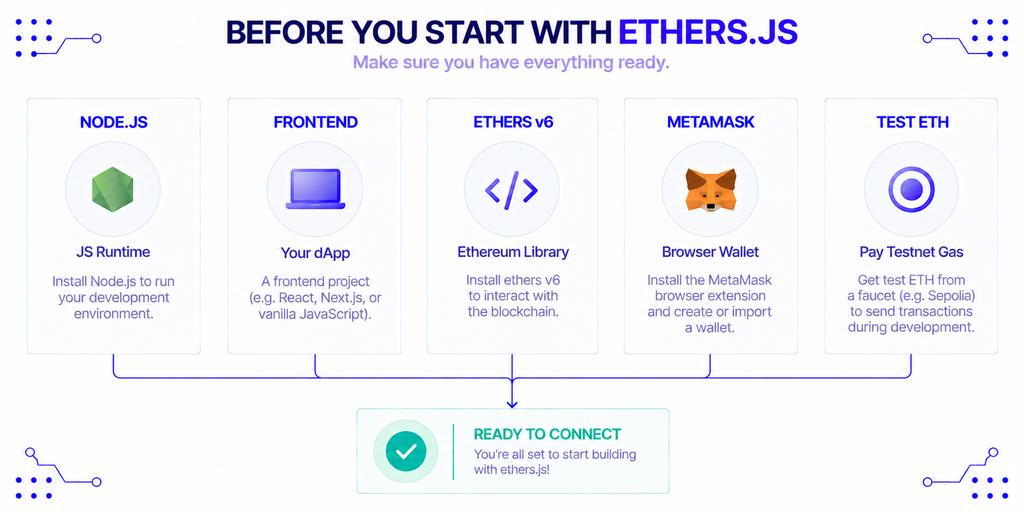
You need Node.js, a frontend project, the MetaMask browser extension, and a small amount of testnet ETH. Install the library with npm install ethers. The current major version is 6, and the v6 release line is what the code below targets.
Use a testnet while you build. ethereum.org lists Sepolia as the recommended testnet for app developers, with Hoodi aimed at validators and Holesky deprecated. Note that ethereum.org also flags Sepolia’s expected end of life for late September 2026, with a replacement running in parallel, so check that page before you pin a chain ID in your config. Our guide to the Sepolia testnet explains how to fund a test wallet.
How do you detect MetaMask in the browser?
Listen for EIP-6963 announcements and pick the provider whose rdns is io.metamask. Older tutorials read window.ethereum directly, but that global breaks when several wallet extensions are installed, because they overwrite each other.
EIP-6963 fixes this with browser events. Each wallet announces itself with an info object (uuid, name, icon, rdns) and a provider. Your dapp collects the announcements and lets the user, or your code, choose.
js
import { BrowserProvider, formatEther, parseEther } from "ethers";

function findMetaMask() {
  return new Promise((resolve) => {
    let found = null;
    window.addEventListener("eip6963:announceProvider", (event) => {
      if (event.detail.info.rdns === "io.metamask") found = event.detail.provider;
    });
    window.dispatchEvent(new Event("eip6963:requestProvider"));
    setTimeout(() => resolve(found ?? window.ethereum ?? null), 300);
  });
}
Two cautions. The rdns value is self-reported, so a malicious extension could claim it. And window.ethereum stays in the code only as a fallback for older setups.
How do you request accounts and create a signer?
Wrap the injected provider in BrowserProvider, then call eth_requestAccounts. This call opens the MetaMask popup. The user approves or rejects, and your code continues only after they decide.
js
export async function connect() {
  const injected = await findMetaMask();
  if (!injected) throw new Error("MetaMask not found");

  const provider = new BrowserProvider(injected);
  await provider.send("eth_requestAccounts", []);

  const signer = await provider.getSigner();
  const address = await signer.getAddress();
  const { chainId } = await provider.getNetwork();
  const wei = await provider.getBalance(address);

  return { injected, provider, signer, address, chainId, balance: formatEther(wei) };
}
Here’s the detail that trips people up: getSigner() is asynchronous in v6, and BrowserProvider replaced the v5 Web3Provider. If you copy v5 code, you will hit ethers.providers is undefined, because that namespace no longer exists. The migration guide lists every rename.
Tie the call to a button click. Browsers and MetaMask both treat unprompted popups as hostile, and a request on page load is a common reason for a user to leave.
How do you read the balance and network?
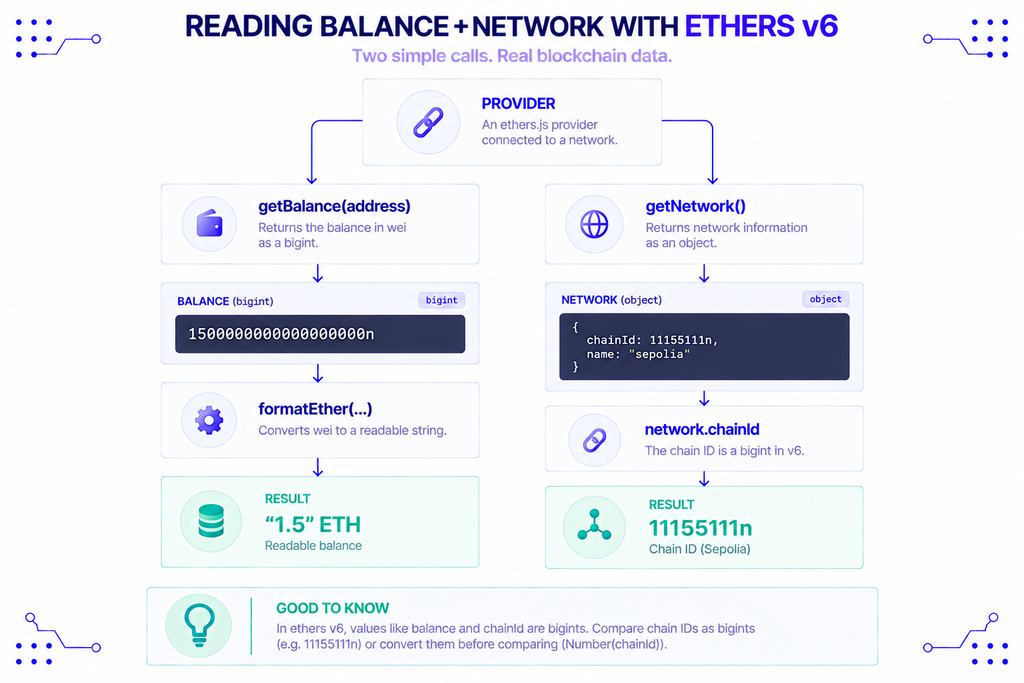
provider.getBalance(address) returns the balance in wei as a bigint, and formatEther converts it to a readable string. provider.getNetwork() returns the chain ID, also as a bigint in v6.
Compare chain IDs as bigints or convert them first. chainId === 11155111 fails when the value is 11155111n. Sepolia is 11155111 in decimal and 0xaa36a7 in hex, which is the form MetaMask uses in wallet_switchEthereumChain.
How do you send a transaction?
Call signer.sendTransaction() with a recipient and a value in wei, then wait for the receipt. MetaMask shows the user the amount and the gas estimate, and the promise resolves once they confirm.
js
export async function sendEth(signer, to, amount) {
  const tx = await signer.sendTransaction({ to, value: parseEther(amount) });
  const receipt = await tx.wait();
  return receipt.status === 1;
}
tx.wait() resolves when the transaction is mined, so show a pending state in the UI between the click and the receipt. A status of 1 means success and 0 means the transaction reverted. If you want to preview costs before sending, a Gwei calculator converts gas prices into ETH and dollars.
How do you handle account and network changes?
Subscribe to accountsChanged and chainChanged on the injected provider and refresh your state in both handlers. Users switch accounts and networks inside MetaMask without telling your page. If you ignore the events, your UI keeps showing the old address.
js
function watch(injected, refresh) {
  injected.on("accountsChanged", (accounts) => {
    accounts.length === 0 ? showDisconnected() : refresh();
  });
  injected.on("chainChanged", () => refresh());
}
An empty accounts array means the user disconnected the site, so clear your session state. To move a user to the right network, call wallet_switchEthereumChain. If the wallet doesn’t know the chain, it fails with code 4902, and you then call wallet_addEthereumChain.
js
async function switchChain(injected, chainIdHex) {
  try {
    await injected.request({
      method: "wallet_switchEthereumChain",
      params: [{ chainId: chainIdHex }],
    });
  } catch (err) {
    if (err.code !== 4902) throw err;
    // Unknown chain: call wallet_addEthereumChain with its parameters
  }
}
What errors will you run into?
Most failures come from six causes, and each has a recognizable code. Handle them explicitly, because MetaMask’s default messages are not written for end users. The MetaMask provider API reference documents the RPC error codes.
| Error | Meaning | What to do |
|---|---|---|
ACTION_REJECTED / 4001 | User declined the popup | Show a neutral message and let them retry |
-32002 | A request is already pending | Ask the user to open MetaMask and answer it |
4902 | Chain not added to the wallet | Call wallet_addEthereumChain |
INSUFFICIENT_FUNDS | Balance below value plus gas | Show the shortfall and a faucet link on testnets |
CALL_EXCEPTION | Contract call reverted | Log the revert reason for debugging |
| No provider | Extension not installed | Link to the MetaMask install page |
In Ethers v6 you can test for a rejection with isError(err, "ACTION_REJECTED") instead of comparing numeric codes.
Which connection method fits your project?
For a plain Ethers.js dapp, EIP-6963 with a BrowserProvider is the right default. Other options exist for mobile support or multi-wallet UIs, and they trade control for convenience.
| Method | Best for | Trade-off |
|---|---|---|
window.ethereum | Quick prototypes | Conflicts when multiple wallets are installed |
| EIP-6963 discovery | Production desktop dapps | You write the wallet picker |
| MetaMask Connect EVM | Desktop plus mobile MetaMask | Adds a dependency, MetaMask-specific |
| wagmi / viem | React apps with many wallets | Different library from Ethers.js |
MetaMask Connect EVM (@metamask/connect-evm) replaces the older @metamask/sdk. You pass its provider to BrowserProvider the same way you would pass an injected one, so your Ethers code stays the same.
Does your dapp need a separate read-only provider?
Often yes. BrowserProvider only works while the user has the wallet connected, and it sends reads through the user’s selected network. Pages that show public data before login, such as a token price or a contract’s state, need their own endpoint.
Ethers.js has JsonRpcProvider for this. You point it at a node provider’s HTTPS URL and use it for reads, while the BrowserProvider signer handles writes. Our page on Ethereum node access shows the endpoint format, and the public endpoints list covers free options for testing.
js
import { JsonRpcProvider } from "ethers";

const readOnly = new JsonRpcProvider("https://eth.nownodes.io/YOUR_API_KEY");
const blockNumber = await readOnly.getBlockNumber();
Don’t ship a private API key in frontend code. Anyone can read it from the browser’s network tab. Route reads through a small backend proxy, or use a key restricted to your domain if your provider supports it. For a larger walkthrough that includes contracts, see how to build a dapp on Ethereum.
Conclusion
The working pattern is short. Discover MetaMask with EIP-6963, wrap it in BrowserProvider, request accounts on a user click, and listen for accountsChanged and chainChanged. Add explicit handling for the rejection, pending-request, and unknown-chain errors, and keep a separate read-only provider for public data.
Test on a current testnet, and confirm the chain ID against ethereum.org before you deploy, since the testnet lineup is changing.
FAQ
Does connecting a wallet cost gas?
No. eth_requestAccounts is a permission request, not a transaction, so it costs nothing and writes nothing to the chain. Gas applies only when the user confirms a state-changing transaction.
How do I migrate my v5 code to v6?
Rename Web3Provider to BrowserProvider, drop the ethers.providers and ethers.utils prefixes, and replace BigNumber with native bigint. getSigner() is now async. The official migration guide has a full table.
How can a user disconnect from my dapp?
Your dapp cannot force a disconnect, because permissions live in the wallet. The user revokes access in MetaMask’s connected-sites settings, and your accountsChanged handler receives an empty array. MetaMask also offers wallet_revokePermissions for dapps that want to trigger revocation.
How do I sign a message instead of sending a transaction?
Call signer.signMessage("text"). The user sees the text in a popup and approves, and you get a signature you can verify with verifyMessage. This is the basis of sign-in-with-Ethereum flows and costs no gas.
Does this work in mobile browsers?
Mobile browsers don’t run the MetaMask extension. Users either open your dapp inside MetaMask’s in-app browser, where the same provider is injected, or you use MetaMask Connect EVM to link the mobile app to your page.