
A stuck Ethereum transaction is one that has been broadcast but sits unconfirmed in the mempool — the pool of pending transactions waiting to be included in a block — because its fee is too low for current demand. You can’t delete a transaction once it’s out there. But you can replace it: send a new transaction with the same nonce and a higher fee to either push the original through (speed up) or void it (cancel).
Both actions work the same way underneath, and both only work while the transaction is still pending. This guide covers the mechanics, the one-click method in a wallet like MetaMask, and how to do it from code with ethers.js — including how to estimate gas and read current fees before you resend.
What Does It Mean When an Ethereum Transaction Gets Stuck?
A transaction is “stuck” when it has entered the mempool but keeps getting skipped for inclusion in new blocks. It isn’t lost and it hasn’t failed. It’s simply unattractive to the validators choosing which transactions to confirm next, usually because the fee attached to it no longer matches what the market is paying.
Every address has a nonce, a counter that goes up by one with each transaction that address sends. Validators process an address’s transactions in strict nonce order. That one detail is why a single underpriced transaction can freeze everything you try to send afterward.
Why a Low Fee Leaves a Transaction Pending
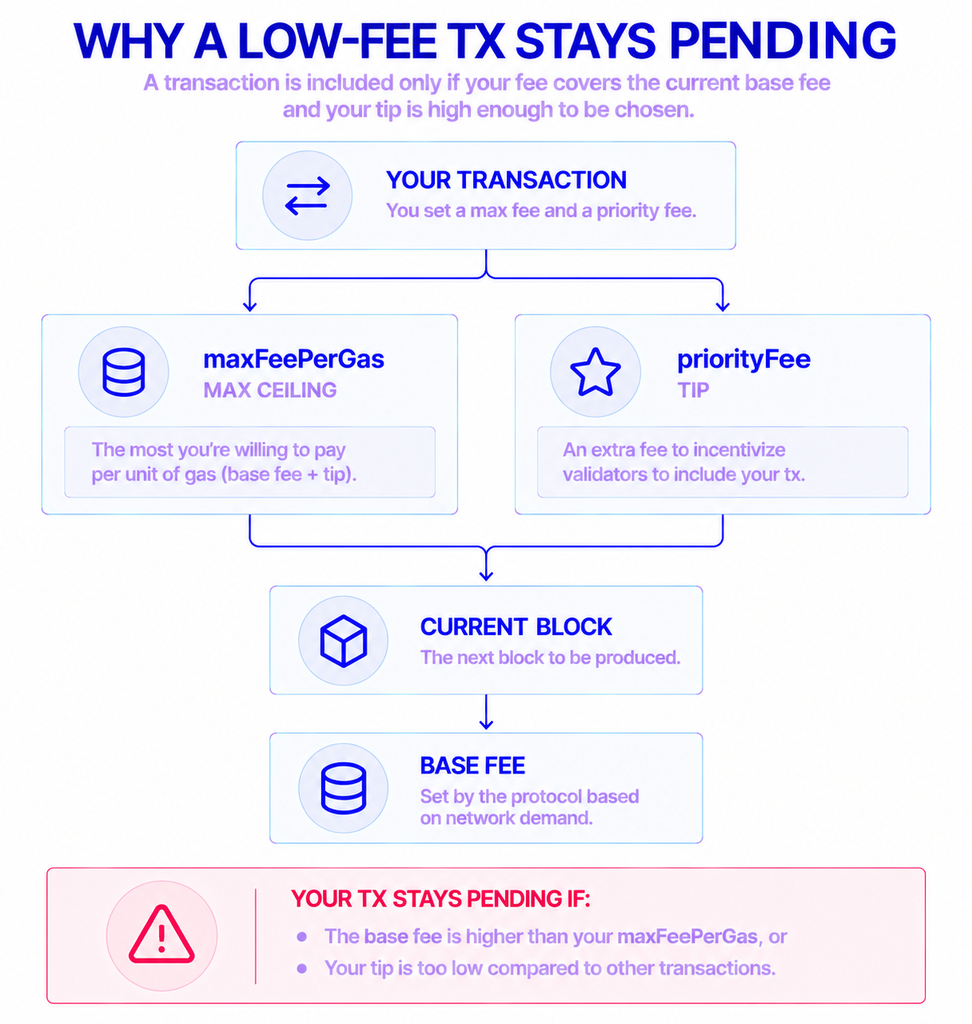
Since Ethereum’s London upgrade, each block carries a base fee set by the protocol, plus a priority fee (a tip) you add to attract validators. The total you pay is units of gas used × (base fee + priority fee), and the base fee is burned rather than paid to anyone.
The base fee moves with demand, by up to 12.5% per block according to ethereum.org’s gas documentation. Your transaction sets a maxFeePerGas — a ceiling on what you’ll pay. If congestion pushes the base fee above that ceiling, your transaction can’t be included until the base fee drops back down. Set the tip too low and validators simply prefer other transactions over yours.
How One Nonce Can Block Everything Behind It
Suppose your stuck transaction used nonce 10. Any transaction you send next gets nonce 11, 12, and so on — and none of them can confirm until nonce 10 does. The network won’t skip ahead.
So a stuck transaction isn’t only a problem for that one payment. It holds up the entire queue from your address. Clearing it is often the fastest way to unblock everything waiting behind it.
Can You Cancel an Ethereum Transaction Once It’s Sent?
You can’t erase a transaction that’s already in the mempool, but you can override it. The trick is to send a replacement that reuses the same nonce. Because only one transaction per nonce can ever confirm, the network keeps the one with the higher fee and drops the other.
That single mechanism powers both outcomes. Speed up keeps your original intent and just raises the fee. Cancel swaps in a harmless transaction — a transfer of 0 ETH to yourself — so the nonce gets consumed without your original action ever executing.
| Speed up | Cancel | |
|---|---|---|
| Goal | Get the original transaction confirmed sooner | Stop the original transaction from executing |
| What you send | The same transaction, with a higher fee | A 0 ETH transfer to your own address |
| Nonce | Same as the stuck transaction | Same as the stuck transaction |
| On-chain result | Your intended action happens, faster | Nothing happens except the replacement’s fee |
The one hard limit: this only works while the transaction is pending. Once it confirms, there’s nothing left to replace.
What Makes the Network Accept a Replacement?
Two conditions have to hold. The replacement must use the exact nonce of the stuck transaction, and its fee must be meaningfully higher — not a token increase.
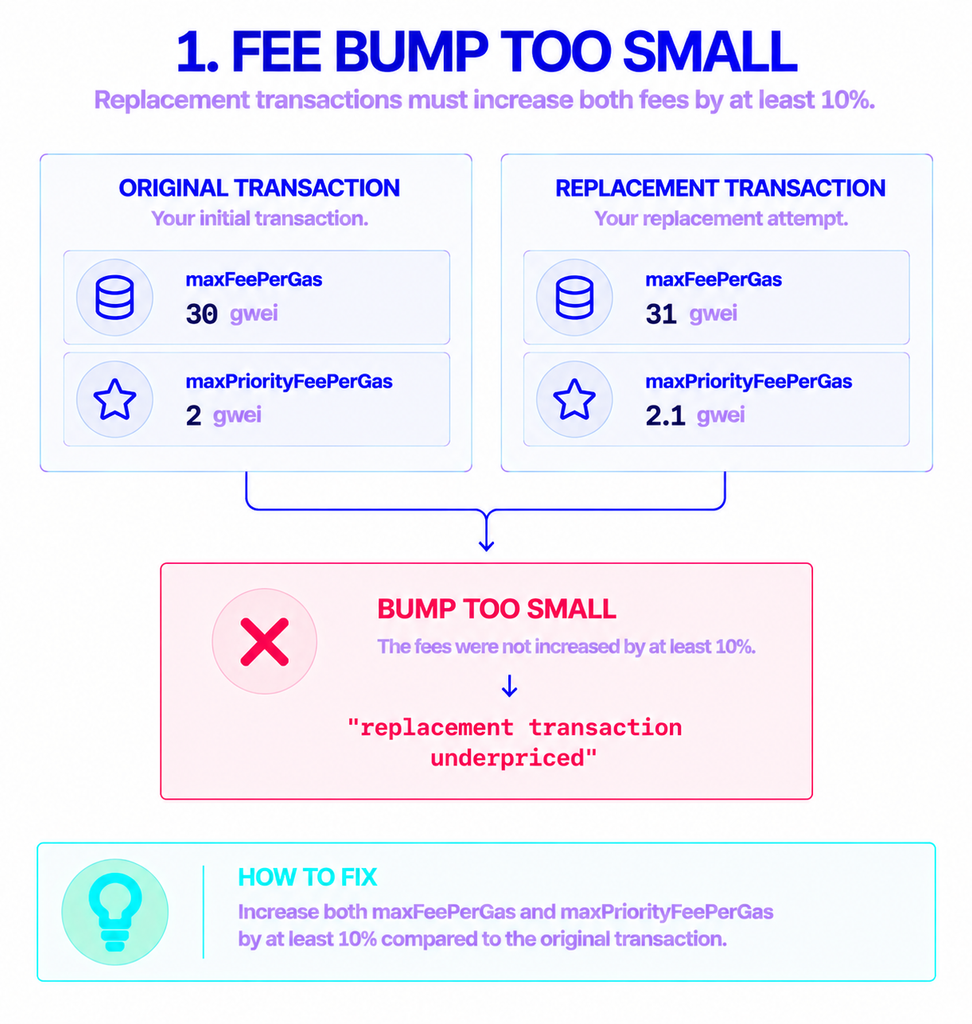
Geth, the execution client most of the network runs, requires a replacement to beat the original by at least 10%. For a modern (EIP-1559) transaction, that applies to both fee values: the new maxFeePerGas and the new maxPriorityFeePerGas each have to be at least 10% above the originals. Miss either and you get a replacement transaction underpriced error (code REPLACEMENT_UNDERPRICED), which is also how MetaMask frames the fix: resend with the same nonce and bump the fee.
Clearing the 10% bar gets your replacement accepted into the mempool. It doesn’t guarantee the replacement confirms immediately — if the base fee is still climbing, you may need to bump again. A common habit is to raise by a bit more than the minimum, around 12% to 15%, to leave some headroom.
Speeding Up or Cancelling in a Wallet Like MetaMask
If you sent the transaction from a wallet, you usually don’t need any code. MetaMask shows Speed Up and Cancel controls next to a pending transaction, and both build the replacement for you with a higher fee.
When the built-in buttons aren’t enough — say you need an exact nonce — MetaMask also supports a manual version. You turn on Customize transaction nonce in settings, create a new transaction addressed to your own public address, set the same nonce as the stuck one, and raise the priority fee by at least 10%.
One quirk worth knowing: you have to clear a queue from the oldest pending nonce first. Per MetaMask’s guidance, you can’t cancel nonce 10 before dealing with nonce 9. For most people, that wallet flow is the whole job. If you send transactions programmatically, you’ll replace them the same way in code.
How to Speed Up a Stuck Transaction with ethers.js
ethers.js is the library most JavaScript and TypeScript projects use to talk to Ethereum. The examples below use ethers v6 (6.17.0 is the current release as of mid-2026), which uses a flat namespace and native BigInt for numbers. You’ll connect through a provider pointed at an Ethereum endpoint, read the stuck transaction, estimate gas, and resend.
Find the Stuck Transaction’s Nonce
The replacement has to reuse the stuck transaction’s nonce exactly. If you have the original transaction hash, read the nonce straight off it:
js
import { ethers } from "ethers";

const provider = new ethers.JsonRpcProvider(ENDPOINT_URL);
const wallet = new ethers.Wallet(PRIVATE_KEY, provider);

const stuck = await provider.getTransaction(STUCK_TX_HASH);
const nonce = stuck.nonce; // reuse this exact value
If you don’t have the hash, provider.getTransactionCount(wallet.address, "pending") returns the count including pending transactions, which tells you the next free nonce. Pass "latest" instead and you get only confirmed transactions — the difference between the two numbers is how many of your transactions are still waiting.
Check the Gas Limit and Current Fees
Before resending, work out two separate things: how much work the transaction needs (the gas limit) and what each unit of that work currently costs (the fee). They’re easy to confuse, but they’re not the same number.
With ethers you estimate gas using estimateGas, which returns the gas limit in units — 21,000 for a plain ETH transfer, more for contract calls. getFeeData returns the current fee market: a suggested maxFeePerGas and maxPriorityFeePerGas.
js
// Gas limit: how much computation the transaction needs
const gasLimit = await provider.estimateGas({
  from: wallet.address,
  to: stuck.to,
  value: stuck.value,
  data: stuck.data,
});

// Current fee market
const feeData = await provider.getFeeData();
Read these fresh each time you resend. Both values move with network activity, and an estimate from ten minutes ago may already be stale.
Resend With the Same Nonce and a Higher Fee
Now rebuild the transaction with the original nonce and fees bumped above the 10% threshold. Here it’s raised by 12% to stay comfortably clear:
js
const bump = (value) => (value * 112n) / 100n;

const replacement = await wallet.sendTransaction({
  to: stuck.to,
  value: stuck.value,
  data: stuck.data,
  nonce: nonce,                               // same nonce as the stuck tx
  gasLimit: gasLimit,
  maxFeePerGas: bump(stuck.maxFeePerGas),
  maxPriorityFeePerGas: bump(stuck.maxPriorityFeePerGas),
});

await replacement.wait(); // resolves once the replacement confirms
Every one of those calls — reading the stuck transaction, estimating gas, pulling fee data, and broadcasting the replacement — travels over your connection to Ethereum. If that connection is slow or returns stale numbers, your fee math is working from bad inputs. A provider such as NOWNodes gives you an Ethereum endpoint to point your ethers provider at, so you can read current fees and broadcast the replacement without maintaining your own infrastructure.
How to Cancel a Transaction with ethers.js
Cancelling is the same move with a different payload. Instead of resending your real transaction, you send a do-nothing transaction on the same nonce: 0 ETH to your own address, with empty data and a higher fee.
js
const cancel = await wallet.sendTransaction({
  to: wallet.address,                         // send to yourself
  value: 0n,
  data: "0x",                                 // empty data
  nonce: nonce,                               // the stuck tx's nonce
  maxFeePerGas: bump(stuck.maxFeePerGas),
  maxPriorityFeePerGas: bump(stuck.maxPriorityFeePerGas),
});

await cancel.wait();
If the cancel confirms first, it claims the nonce and your original transaction can never execute. You still pay the fee for the cancel itself, because it’s a real transaction that lands on-chain.
Why a Replacement Can Still Fail
Most failed replacements come down to a handful of causes:
- The fee wasn’t bumped enough. Both
maxFeePerGasandmaxPriorityFeePerGashave to clear the 10% increase. Raising only one triggersreplacement transaction underpriced. - The base fee keeps climbing. Your replacement was accepted but is now underpriced against a higher base fee. Resend with a larger bump.
- The original already confirmed. A confirmed transaction can’t be replaced. Check its status before trying.
- You targeted the wrong nonce. A replacement for nonce 11 does nothing while nonce 10 is still stuck ahead of it. Clear the lowest blocked nonce first.
Conclusion
A stuck Ethereum transaction is a fee problem, not a dead end. You can’t delete it, but you can replace it by sending a new transaction on the same nonce with a fee at least 10% higher — pushing your original through, or cancelling it with a 0 ETH self-transfer.
For a one-off, the Speed Up and Cancel buttons in a wallet handle it. From code, ethers.js does the same job: find the nonce, estimate gas, read current fees, and resend with a higher bid. Pull the gas and fee numbers fresh each time, give yourself headroom above the minimum, and make sure the connection feeding those numbers is reliable.
FAQ
How long can an Ethereum transaction stay stuck?
There’s no fixed expiry. A pending transaction can sit for hours or days, and clients may eventually drop it from the mempool — but that isn’t guaranteed, and it can be rebroadcast. The dependable fix is to replace it rather than wait it out.
Does cancelling a transaction cost a fee?
Yes. A cancel is a real on-chain transaction (a 0 ETH transfer to yourself), so you pay gas for it — 21,000 units at the current fee. You’re paying to occupy the nonce, not to send value.
Can I speed up a transaction after it’s confirmed?
No. Speed up and cancel only work while a transaction is pending. Once it’s confirmed, it’s final, and there’s nothing left in the mempool to replace.
Do these steps work on other EVM networks?
Largely, yes. The same-nonce, higher-fee replacement model applies across EVM-compatible networks such as BNB Smart Chain, Polygon, Arbitrum, and Base, and MetaMask exposes speed-up and cancel on them too. The exact fee thresholds can vary by network, but the method is the same.