
A BSC blockchain explorer is a search tool that lets you look up any transaction, wallet, or smart contract on BNB Smart Chain and see exactly what happened on-chain. The default one is BscScan, run by the same team behind Etherscan, but it isn’t the only option. This guide covers what a BSC explorer actually does, how BscScan compares to alternatives like OKLink and self-hosted Blockscout, and how to read what you find.
What Is a Block Explorer for BNB Smart Chain?
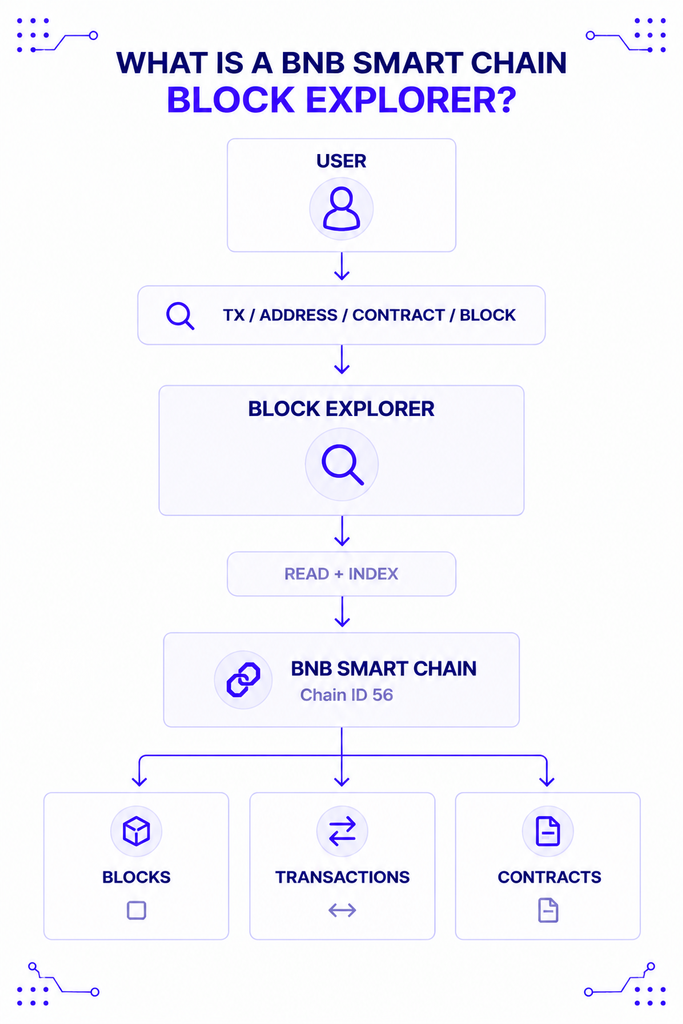
A block explorer is a search engine for blockchain data. Instead of querying a node directly with raw calls, you type in a transaction hash, wallet address, or contract address, and the explorer returns a readable page showing what actually happened.
For BSC specifically, that means pulling data from the chain identified by chain ID 56 and presenting it as blocks, transactions, token transfers, and verified contract code. BSC currently produces a new block roughly every 450 milliseconds, according to Chainspect’s live network data, so an explorer is also the easiest way to watch that activity without running your own infrastructure. If block explorers are new to you, NOWNodes’ plain-language explainer on block explorers covers the basics that apply to any chain, not just BSC.
Why You Need One to Use BSC
Crypto assets don’t live in your wallet app; they live on-chain, and a wallet only shows you its own interpretation of that data. If a transaction fails, gets stuck, or simply looks wrong, the explorer is the one place you can check the actual record independent of any single app’s interface.
That matters more on BSC than it sounds, given the volume moving through it. The network handled an all-time high of roughly 31 million transactions in a single day in October 2025, and daily activity has averaged around 12.4 million transactions since, per BNB Chain’s own network data. At that scale, “my wallet says it failed” and “it actually failed on-chain” aren’t always the same statement, and an explorer is how you tell them apart.
Who Actually Uses BscScan and Similar Tools
Different people reach for a BSC explorer for different reasons, but they all boil down to verification.
- Everyday users check whether a deposit, swap, or bridge transaction went through, and how much they paid in gas.
- Developers read verified contract source code, decode function calls, and debug why a transaction reverted.
- Traders and researchers look up a token’s contract address to confirm it’s legitimate before interacting with it, rather than trusting a link from social media.
- Security-conscious users double-check a contract address against an official source before signing anything, since BEP-20 token names and logos are self-reported and easy to fake.
A trader spot-checking a token and a developer tracing a failed contract call are both “using a BSC explorer,” but they’re pulling very different data out of the same tool.
BscScan: BSC’s Default Explorer
BscScan is what most wallets and BNB Chain’s own documentation link to by default, which makes it the closest thing BSC has to an official explorer, even though it’s operated separately by the Etherscan team. NOWNodes joined the network early in its history, becoming an infrastructure partner listed in BNB Chain’s own announcement of the ecosystem it now serves.
What You Can Do on BscScan
Beyond basic transaction and address lookups, BscScan supports contract verification for Solidity contracts, with source-code matching against the deployed bytecode. Once a contract is verified, anyone can read its source code, call its public functions directly from the browser, and see decoded event logs instead of raw hex data.
Its free API tier allows 5 calls per second per key, according to BscScan’s own rate-limit documentation — enough for a small dApp or a personal script, though it will throttle anything built for real production traffic. BscScan is also part of Etherscan’s unified multichain API, which covers 50-plus EVM chains through a single key, useful if your product touches BSC alongside Ethereum or another chain in that family.
How to Verify a Contract on BscScan
- Deploy your contract and note the deployed address.
- Go to the contract’s page on BscScan and open the “Verify and Publish” tab.
- Select the compiler version and optimization settings that match your deployment.
- Paste your source code, or upload the standard JSON input, and submit.
- Once verified, BscScan compiles your code and compares the bytecode against what’s on-chain.
Skipping this step doesn’t stop your contract from working, but it does stop anyone else from reading what it does before they interact with it — exactly the kind of transparency an explorer exists to provide.
Alternatives to BscScan
BscScan being the default doesn’t make it the only reasonable choice, and one event in mid-2026 made that especially clear. On July 22, 2026, BscScan went down for scheduled maintenance for roughly three to four hours, while BSC itself kept producing blocks and processing transactions without interruption, per crypto.news’s coverage of the outage.
| Explorer | Best for | Notable trade-off |
|---|---|---|
| BscScan | Default lookups, contract verification, most tutorials assume it | Free API capped at 5 calls/sec; single point of failure if it goes down |
| OKLink | A ready alternative during a BscScan outage, plus address monitoring and a token-approval checker | Separate ecosystem from Etherscan’s tooling and API conventions |
| Blockscout (self-hosted) | Teams that don’t want to depend on any third party for their own product’s explorer | Requires running and maintaining your own deployment |
OKLink is one of the tools people reached for during that July outage, and it covers the same basics — transactions, addresses, tokens, and contract verification — through its own interface. Blockscout takes a different angle: it’s open source and self-hostable, so a team can run its own instance pointed at BSC instead of depending on any single third-party explorer at all. That flexibility comes at the cost of setup and upkeep that a hosted explorer like BscScan or OKLink handles for you.
None of these is objectively “better” in isolation. Someone checking a single swap has no reason to self-host Blockscout, and a team that just watched its main lookup tool go dark for a morning has a very good reason to know a second one exists.
How to Read a Transaction on BscScan or OKLink
Once you’ve pasted a transaction hash into either explorer, the result page follows a similar pattern:
- Status — confirms whether the transaction succeeded, failed, or is still pending.
- From / To — the sending address and the receiving address or contract.
- Value and gas fee — how much BNB moved and what the transaction cost to execute.
- Input data — the raw call data, decoded into a readable function name and arguments if the target contract is verified.
- Logs — events emitted during execution, such as a token transfer or a swap.
A failed transaction still shows up with a status of “Fail,” along with a reason string if the contract provided one — usually the fastest way to figure out why something didn’t go through, faster than guessing from a wallet’s generic error message.
How BSC’s Explorer Differs From Ethereum’s
Because BSC runs on Proof of Staked Authority rather than Ethereum’s open validator set, its explorer surfaces a few things Etherscan doesn’t need to emphasize the same way. BSC’s validator set currently sits at 45, with 21 selected each epoch to actually produce blocks — 18 from the top-staked “Cabinet” tier and 3 rotating in from “Candidates,” according to BNB Chain’s own validator documentation.
That’s the trade-off worth understanding when you’re reading BscScan’s validator list rather than Etherscan’s. A smaller, permissioned set is exactly what lets BSC confirm blocks in under a second, but it also means the chain leans more heavily on a limited group staying honest than Ethereum’s roughly 560,000-validator network does. An explorer is how anyone can check that trade-off against the actual chain, rather than taking a marketing claim at face value. Binance founder Changpeng Zhao made a related point about the ecosystem in a September 2026 post, arguing, as PANews reported, that BNB’s ecosystem is open while some competing networks claim to be “decentralized” but actually operate as a “walled garden” — the kind of claim an explorer, not a tweet, is what actually lets you verify.
Where the Explorer Data Actually Comes From
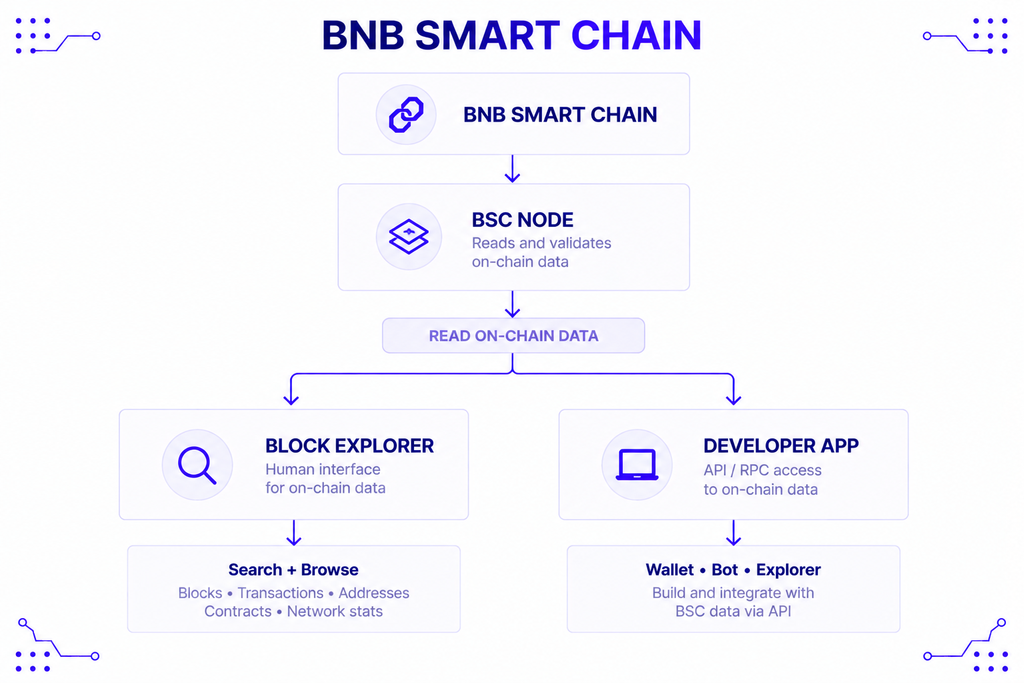
Every block explorer, BscScan included, is built on top of infrastructure that reads and indexes the chain in the first place. An explorer doesn’t generate data; it queries a blockchain node constantly and organizes what comes back into a searchable interface.
This is also the layer developers touch directly when they’re not just browsing an explorer but building something on top of BSC. NOWNodes provides shared and dedicated access to BNB Smart Chain, covering RPC, WebSocket, and Blockbook interfaces, so a team building a wallet, a bot, or its own lightweight BSC explorer can query on-chain data without maintaining that indexing layer itself. For anyone specifically building explorer-style features — balances, transaction history, address activity — NOWNodes’ Blockbook API exposes that data through a single indexed endpoint instead of requiring a custom indexer.
NOWNodes’ own guide on accessing a BNB Smart Chain node walks through what that underlying infrastructure involves, for anyone curious what BscScan is querying behind the scenes. And if you’re specifically trying to confirm a token contract before interacting with it, NOWNodes’ guide to the BNB Smart Chain contract address format covers the address-verification habit worth building alongside using an explorer.
Limitations to Keep in Mind
A block explorer shows you what’s on-chain, but it isn’t the chain itself, and that distinction matters in a couple of ways. First, an explorer’s own indexing can lag by a block or two during high load, so a transaction that’s already confirmed might take a few extra seconds to appear.
Second, explorers display metadata — token names, project tags, “verified” badges — that comes from off-chain sources or self-reported submissions, not from the protocol itself. A token showing a familiar name and logo isn’t automatically the real project; always cross-check a contract address against an official source, such as BNB Chain’s own documentation, before interacting with it. And because BscScan and similar tools are run by third parties, an outage on their end — as July 2026 showed — doesn’t mean BSC itself is down; it just means that particular window into the chain is temporarily unavailable.
Conclusion
BscScan is the right starting point for almost anyone working with BSC: it’s the default, it’s what documentation and wallets link to, and its contract verification covers the common cases. Reach for OKLink when BscScan is unreachable or you want a second source to cross-check, and consider self-hosting Blockscout when you need an explorer your product doesn’t depend on a third party to keep running. Whichever you use, the explorer’s real job is the same — giving you an independent, verifiable view of what actually happened on-chain, separate from any single wallet, app, or founder’s claim about it.
FAQ
What’s the difference between BscScan and Etherscan?
Etherscan is Ethereum’s explorer; BscScan is the equivalent for BNB Smart Chain, built and operated by the same team. They’re separate products with separate data, though both are accessible through Etherscan’s unified multichain API using a single key.
Can I use these tools to recover a lost or stuck transaction?
No. A block explorer only lets you view transaction status and details — it can’t cancel, speed up, or reverse anything. To resolve a stuck transaction, you typically need to resubmit it from your wallet with a higher gas fee, using the same nonce.
Is it safe to interact with a contract directly through BscScan’s “Write Contract” feature?
It’s technically possible once a contract is verified, but it bypasses your wallet’s normal transaction preview. Most users are better off interacting through a proper dApp interface and using the explorer only to verify the contract address beforehand.
Do these tools show pending transactions before they’re confirmed?
Yes, transactions typically appear as “pending” once they reach the network, before showing a final success or fail status. Given BSC’s sub-second block time, that pending window is usually brief compared to slower networks.
What happens if BscScan goes down again?
BSC itself keeps producing blocks regardless of BscScan’s status, since the explorer is a separate service layered on top of the chain. OKLink and other explorers reading the same chain data remain a working fallback, which is why relying on a single explorer is worth avoiding for anything mission-critical.