

Almost every request your browser or app sends uses one of two methods: GET or POST. GET asks a server for something. POST hands the server something to process. That one distinction shapes how data travels, whether a request is safe to repeat, and what you can cache or bookmark.
The short version of HTTP POST vs GET: use GET to read, use POST to write. GET puts its parameters in the URL, while POST carries them in the request body. GET requests are safe to repeat; POST requests may not be.
The rest of this guide unpacks what each method does, why the difference matters for security and reliability, and how both show up in REST and blockchain APIs.
What Is an HTTP GET Request?
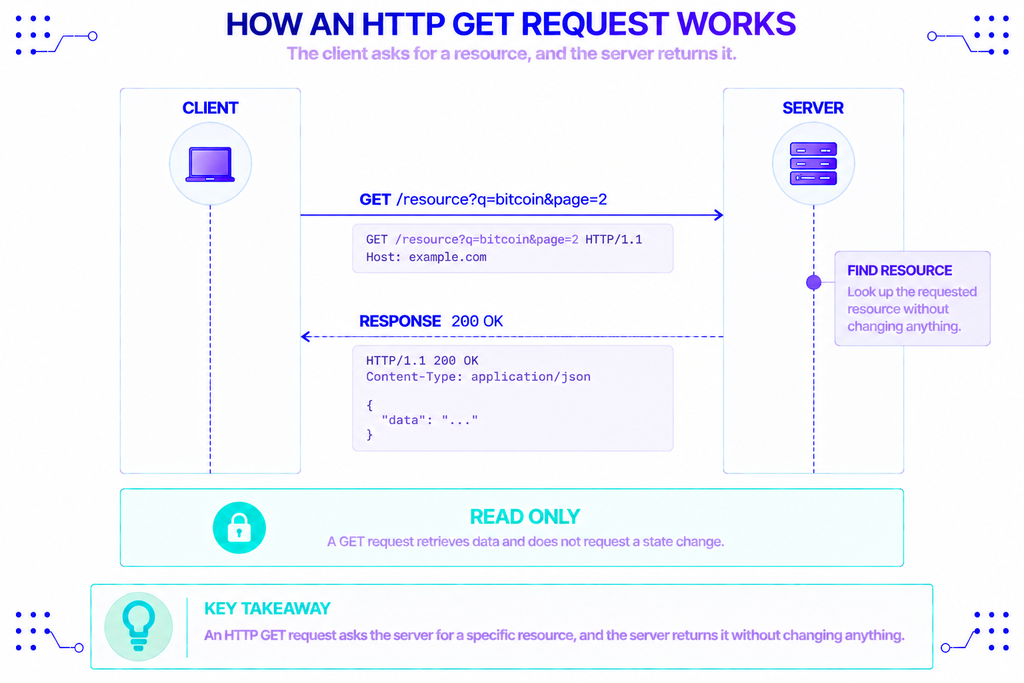
A GET request asks a server to return a specific resource without changing anything on it. It’s the method behind typing a URL into your address bar or clicking a link.
Any parameters ride along in the URL’s query string, the part after the ?, usually as key=value pairs. So a search request might look like example.com/search?q=bitcoin&page=2. Because those values sit in plain view, GET is easy to debug, share, and bookmark.
GET has three properties worth remembering, all defined in RFC 9110, the current HTTP Semantics standard. It’s safe (read-only, no side effects), idempotent (repeating it changes nothing), and cacheable by default. MDN’s GET reference adds one caveat many developers miss: a GET request shouldn’t carry a body, and the behavior of one that does is undefined.
What Is an HTTP POST Request?
A POST request sends data to a server so it can create or change something. Submitting a signup form, uploading a file, or logging in all travel as POST requests.
The data goes in the request body rather than the URL, which keeps it out of the address bar, browser history, and server logs. The body can also hold far more than a URL would tolerate, and it can carry any format, including JSON, form data, or raw binary.
Unlike GET, POST is neither safe nor idempotent. Sending the same POST twice can create two records or trigger two actions, which is why browsers warn you before re-submitting a form. MDN’s POST reference notes POST responses are only cacheable when the server explicitly allows it with the right headers.
GET vs POST: The Core Differences at a Glance
Both methods move data between a client and a server, but they behave differently in almost every respect that matters. The table below sums up the GET vs POST method split.
| Aspect | GET | POST |
|---|---|---|
| Purpose | Retrieve data | Send data to be processed |
| Where parameters go | URL query string | Request body |
| Visible in URL, logs, history | Yes | No |
| Practical size limit | ~2,048 characters (URL) | Effectively none (server-defined) |
| Safe (read-only) | Yes | No |
| Idempotent | Yes | No |
| Cacheable | Yes, by default | Rarely, only with explicit headers |
| Bookmarkable and shareable | Yes | No |
| Typical REST role | Read | Create or write |
Why Does the Difference Between GET and POST Matter?
Picking the wrong method isn’t a style choice. It affects security, performance, and whether a failed request is safe to retry.
Security and exposure. Anything in a URL gets recorded. It lands in browser history, proxy logs, server access logs, and the Referer header sent to the next site. That makes GET a poor place for passwords, tokens, or personal data, which is why APIs put secrets in headers or in a POST body instead. One caution: a POST body is not encrypted on its own. Only HTTPS encrypts a request in transit, no matter which method you use.
Retries and idempotency. This is where the safe-versus-idempotent distinction earns its keep. A safe method has no side effects. An idempotent method can run many times with the same end result. GET is both. POST is neither, so a dropped connection that silently retries a POST can double-charge a card or submit an order twice. The HTTP specification states it plainly:
“PUT, DELETE, and all safe request methods are idempotent.” — HTTP specification (RFC 9110)
POST is deliberately left out of that list.
Size limits. The HTTP standard sets no hard limit on URL length, but browsers and servers do. Most browsers stop around 2,048 characters, and an overlong URL gets rejected rather than processed. POST sidesteps the issue by moving data into the body, which is why large payloads and file uploads always use it.
Caching and speed. GET responses can be cached by browsers, CDNs, and proxies, so a repeated read can return instantly without touching the server. POST responses usually can’t, because the server assumes each one does something new.
Who Uses GET and POST, and When?
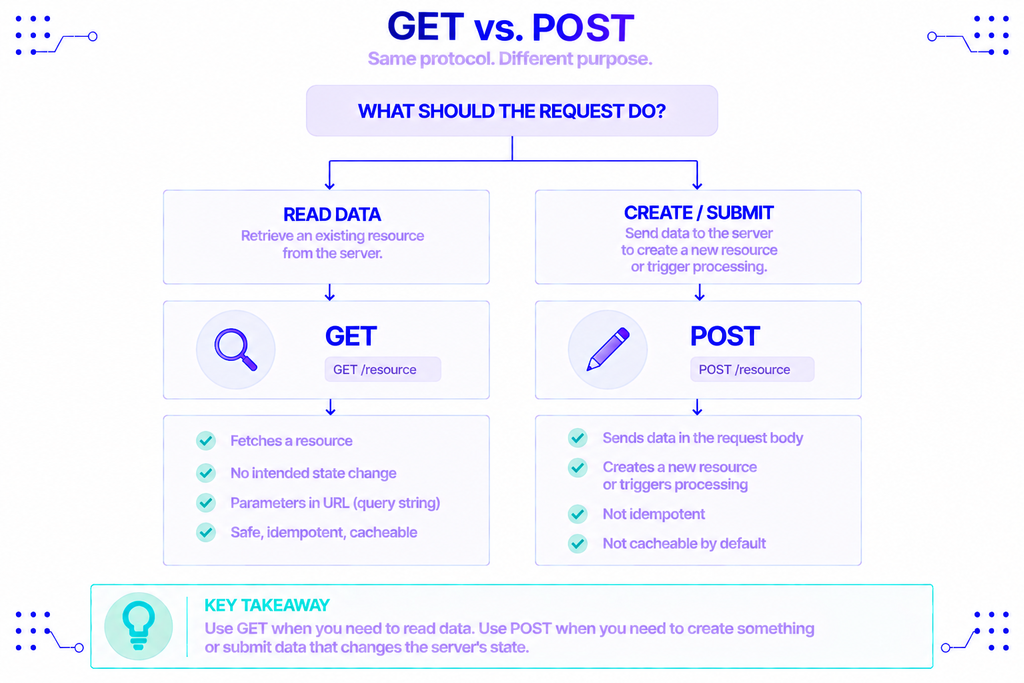
Every web developer, API consumer, and backend engineer works with both methods daily, often without naming them. The pattern is consistent across the stack.
GET handles reads: loading a page, fetching search results, pulling a product listing, or requesting a record by ID. If the request only looks something up and could be safely refreshed, GET is the right call.
POST handles changes: creating an account, posting a comment, uploading media, or submitting a payment. If the request writes data or has consequences, it belongs in a POST.
That split maps directly onto GET and POST in REST APIs. REST uses HTTP methods as verbs, so GET means “retrieve this resource” and POST means “create a new one under this collection.” A request to GET /users/42 reads user 42, while POST /users creates a new user from the body you send. Keeping to that convention is what makes a REST API predictable to anyone who reads it.
GET and POST in Blockchain APIs
Blockchain services expose their data over HTTP too, and the GET-versus-POST line falls in a specific place. REST-style data endpoints tend to use GET, while JSON-RPC calls use POST.
NOWNodes, a node-as-a-service platform for 120+ blockchain networks, is a convenient way to see both. Its Blockbook REST endpoints answer read requests over GET. Fetching a Bitcoin block looks like this:
bash
curl --location 'https://btcbook.nownodes.io/api/v2/block/0000000000000000000ccb9329b01b002c8be6ebf430725704d3c567e977e306' \
  --header 'api-key: YOUR_API_KEY'
The same style covers reading an address, a transaction, a balance, or the list of supported tickers. Each is a lookup that changes nothing, so GET fits.
JSON-RPC is different. It’s the protocol most chains use for programmatic access, and it packs a method name plus parameters into a JSON object, so the call has to travel in a request body. That makes POST the only sensible choice. Asking an Ethereum endpoint for the latest block number looks like this:
bash
curl --location 'https://eth.nownodes.io' \
  --header 'Content-Type: application/json' \
  --header 'api-key: YOUR_API_KEY' \
  --data '{"jsonrpc":"2.0","method":"eth_blockNumber","params":[],"id":1}'
The same POST pattern broadcasts a signed transaction, reads contract state, or batches several calls into one request. Exact endpoints and authentication differ by network, so the NOWNodes documentation is the place to confirm the details, and the free START plan on the pricing page is enough to try both request types.
Common Mistakes and Edge Cases
A few errors come up again and again once you move past the basics:
- Using GET to change data. A link that deletes or updates something can be triggered by a crawler, a prefetch, or a cache. Writes belong in POST.
- Treating POST as “secure.” POST only hides data from the URL. Without HTTPS, the body is still readable in transit.
- Putting secrets in a query string. API keys in a URL end up in logs and history. Send them in headers or the body.
- Assuming every API routes by path alone. Many APIs expose the same URL for GET and POST and decide behavior from the method, so the verb you choose is what the server acts on.
Conclusion
The difference between GET and POST requests comes down to intent. GET retrieves a resource without side effects, exposes its parameters in the URL, and is safe to repeat and cache. POST sends data in the body, can create or change state, and should be used wherever a request carries consequences.
Get that choice right and your APIs stay predictable, your retries stay safe, and sensitive data stays out of places it shouldn’t be. Whether you’re building a standard REST service or querying a blockchain, the same rule holds: GET to read, POST to write.
FAQ
Is GET faster than POST?
Not inherently. The methods themselves have similar overhead. GET can feel faster because its responses are cacheable, so a repeated read may return from a browser or CDN cache without a round trip to the server. POST responses are rarely cached, so they usually hit the server every time.
Does using POST encrypt my data?
No. POST only moves data out of the URL and into the request body, which keeps it out of logs and history. It does not encrypt anything. Encryption in transit comes from HTTPS (TLS), which protects both GET and POST requests equally.
What happens when a GET URL is too long?
The server rejects it with a 414 URI Too Long status instead of processing the request. Browsers typically cap URLs around 2,048 characters. If you’re hitting that limit, it’s a sign the data should move into a POST body rather than the query string.
Can GET and POST use the same endpoint URL?
Yes. A single URL can respond to both, with the server choosing what to do based on the method. In a REST API, GET /orders might list orders while POST /orders creates one. The path is the same; the HTTP method decides the action.