
Adding Base mainnet to your wallet takes a couple of minutes. You either pick Base from your wallet’s list of ready-made networks, or you open the “add a custom network” screen and type in four details: the network name, the RPC URL (https://mainnet.base.org), the chain ID (8453), and the currency symbol (ETH). Once it’s saved, your wallet can hold Base ETH, sign Base transactions, and connect to apps on the network.
This guide covers that process for MetaMask and other EVM wallets, lists the exact parameters you’ll need, and explains when the free public endpoint is fine and when you’ll want something steadier.
What Is the Base Network?
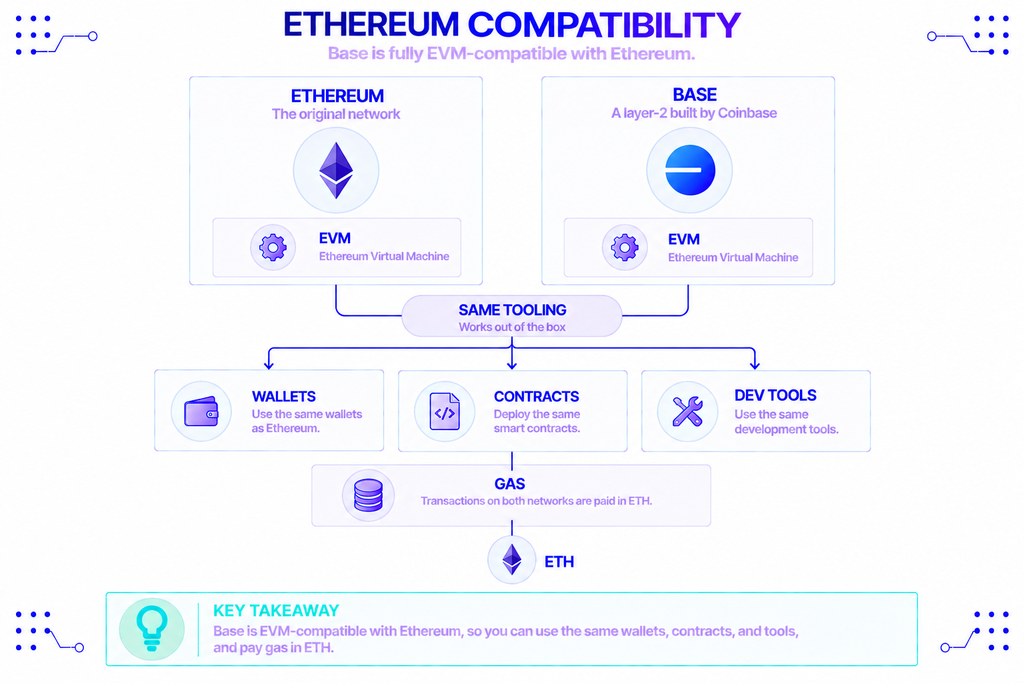
Base is a layer-2 network built by Coinbase that runs on top of Ethereum. It’s an OP Stack optimistic rollup, which means it batches transactions and posts them back to Ethereum for final settlement. That setup lets Base inherit Ethereum’s security while charging a fraction of the fees. Because Base is fully EVM-compatible, the wallets, contracts, and tools that work on Ethereum work on Base without changes, and gas is paid in ETH rather than a separate coin.
Base has also gotten noticeably faster. In mid-2025 it switched on Flashblocks, a system built with Flashbots that streams smaller block updates every 200 milliseconds instead of waiting the full two seconds — roughly a tenfold cut in confirmation time. Those updates are always on, so a transaction now confirms about as quickly as a web page loads. Coinbase has leaned into that speed with the Base App, the renamed version of Coinbase Wallet, aimed at trading, payments, and social apps.
One question comes up a lot: does Base have its own token? Not yet. Jesse Pollak, the creator of Base, said at BaseCamp 2025 that the team would be “exploring a network token” — a shift from the project’s earlier “no token” position. But as of late 2026 nothing has launched, and ETH stays the gas currency. (CoinDesk)
Why Do You Need to Add Base to Your Wallet?
Most wallets ship with Ethereum mainnet selected and nothing else. Base isn’t there by default, so until you add it, your wallet can’t show your Base balance or talk to apps on the chain. Adding the network is what connects your existing address to Base.
The payoff is practical. Fees on Base are usually a cent or less, confirmations are near-instant, and you reach a large set of DeFi, NFT, gaming, and payment apps that settle there. Your address doesn’t change between Ethereum and Base — you’re only telling the wallet which network to point at. Base is also one of the most-used Ethereum layer-2 networks by daily active users, so most popular apps already support it. (The Block)
What Settings Do You Need to Connect to Base?
You need five details, and they’re all public. These are the official values from Base’s documentation, and the same Base mainnet parameters work in any EVM wallet.
| Setting | Base Mainnet | Base Sepolia (testnet) |
|---|---|---|
| Network name | Base Mainnet | Base Sepolia |
| RPC URL | https://mainnet.base.org | https://sepolia.base.org |
| Chain ID | 8453 | 84532 |
| Currency symbol | ETH | ETH |
| Decimals | 18 | 18 |
| Block explorer | https://basescan.org | https://sepolia.basescan.org |
A few notes on the table. The Base mainnet RPC URL is https://mainnet.base.org, and the chain ID 8453 is the number your wallet uses to recognize the network — enter it in decimal (some wallets also accept the hex form 0x2105). The block explorer, BaseScan, is where you’ll look up transactions and contracts. The right-hand column is Base Sepolia, the test network developers use before mainnet; you can ignore it unless you’re building something.
One advanced detail: Base runs a separate transaction submission endpoint at https://mainnet-sequencer.base.org. The public endpoint handles reads and most requests, while the sequencer endpoint is used only for broadcasting transactions. For a normal wallet, the RPC URL is all you need.
How Do You Add Base to MetaMask?
You have two routes: let MetaMask add Base for you, or enter the details by hand. The automatic route is faster. The manual route — the Base chain custom network setup — is the fallback, and it’s the one to know if Base doesn’t appear in the list.
Adding Base automatically
MetaMask keeps a built-in list of common networks. Open the network menu, go to Networks, and look under the additional or popular networks — Base is usually there with an “Add” button. Approve the prompt and MetaMask creates the network with the correct values. The official steps live in MetaMask’s network guide.
Two one-click options also work well. On BaseScan, the footer has an “Add Base to MetaMask” button. Or use Chainlist: connect your wallet, search for Base, and click Add — it’s the quickest way to set the Base network RPC in MetaMask without copying anything.
Adding Base as a custom network
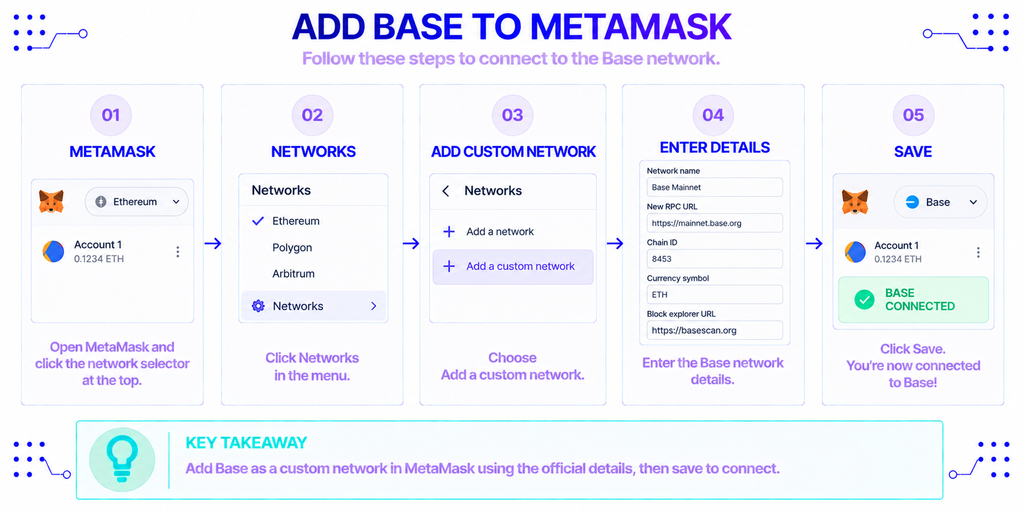
If Base isn’t in the list, add it yourself. In the MetaMask extension, click the network selector, choose Networks, then “Add a custom network” (older versions label this “Add a network manually”). Fill in the fields from the table above:
- Network name: Base Mainnet
- New RPC URL:
https://mainnet.base.org - Chain ID:
8453 - Currency symbol: ETH
- Block explorer URL:
https://basescan.org
Click Save, and MetaMask switches to Base. On mobile, the path is Settings → Networks → Add network → Custom networks, with the same fields. If MetaMask refuses to save the network, the usual cause is a chain ID that doesn’t match what the RPC URL reports — confirm you typed 8453 and that the URL has no typos.
How Do You Add Base to Other Wallets?
The idea is the same in any EVM wallet: find the add-network screen and enter the Base details, or pick Base from a preset list.
If you use the Base App — the former Coinbase Wallet — Base is built in, so there’s nothing to add. For wallets like Rabby, Trust Wallet, Frame, or Rainbow, open the networks or settings area and either select Base from the suggested networks or add it as a custom network with the values above. Hardware wallets such as Ledger connect through MetaMask or the Base App, so once Base is set up there, your hardware wallet can sign Base transactions too.
Public Endpoint or Dedicated Access: Which Should You Use?
The Base mainnet public endpoint at https://mainnet.base.org is fine for everyday wallet use — checking balances, sending ETH, trying out an app. It’s shared across everyone, though, and the Base team runs it on a best-effort basis with rate limits, so it isn’t built to carry a production app’s traffic. If you’re developing on Base or sending a high volume of requests, a shared endpoint will throttle you.
For that case, you can point your wallet or app at a managed endpoint instead. NOWNodes provides that kind of access to the Base network alongside more than 120 blockchain networks, with a 99.95% uptime guarantee and no request-per-second caps on paid plans. An endpoint looks like https://base.nownodes.io/YOUR_API_KEY, where the key comes from a free account — the entry START plan includes 100,000 requests a month, enough to test with. There’s also a list of public endpoints if you only want to fire off a quick call.
MetaMask makes switching painless: it lets you store more than one RPC URL for a single network and choose which is the default. So you can keep https://mainnet.base.org for casual use and add a dedicated endpoint for the times you need it, without creating a second Base network.
Final Thoughts
Adding Base mainnet to your wallet comes down to five values and a minute of setup. Pick Base from your wallet’s network list when it’s there, or enter the RPC URL, chain ID 8453, ETH, and BaseScan by hand when it isn’t. The public endpoint covers normal use; move to a dedicated one when you outgrow it. After that, your wallet works on Base much like it does on Ethereum — same address, lower fees, faster confirmations.
FAQ
Do I need testnet ETH to use Base mainnet?
No. Base mainnet uses real ETH that you bridge or send to the network. Testnet ETH only works on Base Sepolia (chain ID 84532), the sandbox developers use to test contracts with free faucet funds. For ordinary transactions, you want mainnet and real ETH.
Can I add Base on both mobile and desktop?
Yes, but you add it separately on each. Setting up Base in the MetaMask extension doesn’t make it appear in the mobile app, even on the same account, so repeat the steps on every device you use.
How do I move ETH onto Base?
You bridge it from Ethereum or withdraw directly to Base from an exchange. The official Base bridge and Coinbase both send ETH to your Base address, and many exchanges now let you choose Base as the withdrawal network. Once the ETH arrives, your wallet shows it as long as Base is selected.
How can I tell if my Base connection is working?
Switch your wallet to Base and check that your ETH balance loads. You can also paste your address into BaseScan to confirm it shows up on the network. If balances won’t load, the RPC URL is usually the culprit — re-enter https://mainnet.base.org or try a different endpoint.
Is it safe to add a custom RPC URL?
It’s safe if you trust the source. Whatever endpoint you set becomes the route for the requests and transactions you sign, so a bad one could log your activity or return misleading data. Stick to the official https://mainnet.base.org or a reputable provider, and avoid random RPC URLs posted in chats or comments.