
Reading data from a blockchain sounds simple until you try it. A smart contract emits events, but pulling those events back out in a useful order — filtered, aggregated, ready for a frontend — is slow and awkward if you talk to the chain directly. A subgraph fixes that by indexing the data ahead of time and serving it over a GraphQL API.
This guide walks through how to build and deploy a subgraph with The Graph, from scaffolding your first project to publishing it so other developers can query it. The flow changed meaningfully in recent years, so some older tutorials will send you down the wrong path. The hosted service that most early tutorials reference was retired on June 12, 2024, and all queries now run through The Graph Network. The current route is Subgraph Studio plus the Graph CLI, and that is what we cover here.
What Is a Subgraph?
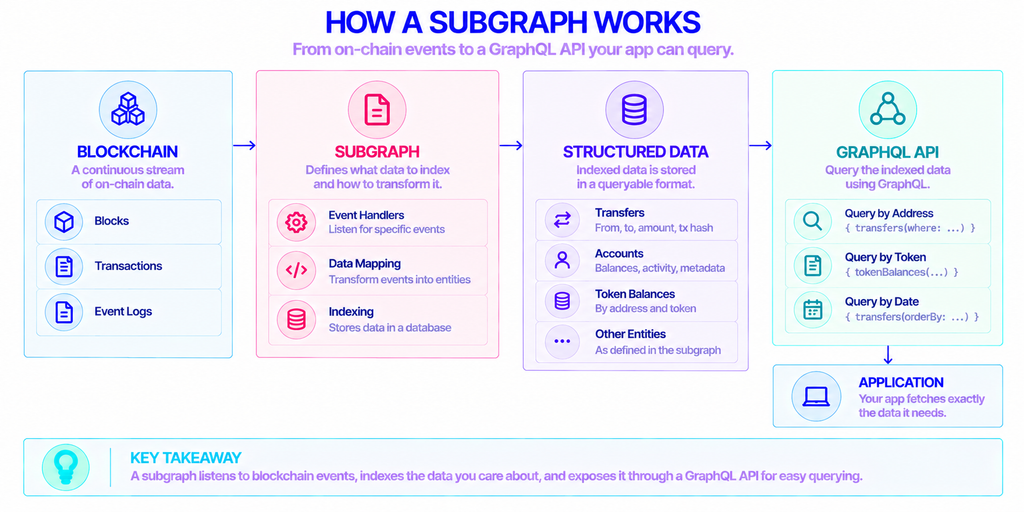
A subgraph is an open API that indexes data from a blockchain and makes it queryable with GraphQL. Instead of scanning the chain yourself every time you need information, you define the data you care about once, and The Graph keeps an up-to-date, structured copy of it.
Think of the raw chain as an append-only log. Every block adds more entries, and finding the ten most recent transfers for one address means reading through a lot of noise. A subgraph listens for the specific events you name, transforms them into clean records, and stores them so a single GraphQL request returns exactly what you asked for.
GraphQL is the query language that sits on top. It lets a client request named fields and relationships in one call, rather than stitching together several lower-level requests. The Graph is the indexing protocol that runs the whole thing, and it has served more than 1.27 trillion queries to over 75,000 projects across 60+ networks as of early 2026.
What Are the Parts of a Subgraph?
Every subgraph is built from three files, and most of your work happens in them:
- The manifest (
subgraph.yaml) — defines the data sources: which contract to watch, on which network, from which start block, and which events to handle. - The schema (
schema.graphql) — describes the entities you want to query and how they relate, written in GraphQL schema definition language. - The mappings (
src/) — AssemblyScript functions that take each event and turn it into the entities defined in your schema. AssemblyScript is a typed dialect close to TypeScript, so it reads familiar if you have written JavaScript.
Why Query Blockchain Data Through a Subgraph?
The core problem is that blockchains are built for writing and verifying, not for reading in bulk. Pulling historical data straight from an endpoint works for one or two lookups, but it falls apart once you need filtering, sorting, pagination, or data joined across many events.
A subgraph moves that heavy lifting off the critical path. The indexing runs continuously in the background, so by the time your app asks a question, the answer is already assembled. Queries come back in milliseconds instead of forcing the user to wait while you replay contract logs.
There is a second reason that matters for anyone building something meant to last. Because a published subgraph lives on a decentralized network of independent operators, your app does not depend on a single server you have to keep alive. The data stays available even if any one indexer goes offline.
Who Uses Subgraphs?
Subgraphs show up anywhere an application needs organized on-chain data. DeFi dashboards use them to track pools, positions, and prices. NFT marketplaces index mints, sales, and ownership history. Wallets and portfolio trackers pull balances and transaction records, and analytics teams build reporting on top of the same queries.
The common thread is a read-heavy product. If your interface shows users what happened on-chain — and it needs to be fast and searchable — a subgraph is usually the cleanest way to get there.
What You Need Before Building a Subgraph
A few prerequisites save time later. Have these ready before you start:
- A crypto wallet. You will use it to create and, later, publish your subgraph.
- A deployed smart contract address on a supported network. If the contract is verified on a block explorer such as Etherscan, the CLI can fetch its ABI for you.
- Node.js installed, since the Graph CLI runs on it.
One point that trips people up is the start block. If you index a contract from its earliest activity, the indexer has to read historical state, which means it needs access to an archive endpoint for that network rather than a pruned one. When you self-host your own indexing setup (covered below), that endpoint is something you supply. A managed provider such as NOWNodes offers archive access across 120+ networks, so you can point your indexer at historical data without running and syncing that infrastructure yourself.
How to Build and Deploy a Subgraph
With the prerequisites in place, the full path from empty folder to a working endpoint takes six steps.
Create the Subgraph in Subgraph Studio
Go to Subgraph Studio, connect your wallet, and click Create a Subgraph. The docs suggest naming it as “Subgraph Name Chain Name” in title case, which keeps things readable once you have several. This step gives you a dashboard and, importantly, a deploy key you will need shortly.
Install the Graph CLI
Install the command-line tool globally with npm:
bash
npm install -g @graphprotocol/graph-cli@latestThe package is @graphprotocol/graph-cli, and the release line sits in the 0.98.x series as of early 2026. If you prefer Yarn, yarn global add @graphprotocol/graph-cli does the same job.
Initialize the Project With graph init
From your terminal, run:
bash
graph initThe command scaffolds a project by asking a short series of questions: the protocol, a slug, the output directory, the network, your contract address, the ABI, the start block, and the contract name. If your contract is verified on its block explorer, the ABI and start block are filled in automatically. If not, you pass the ABI as a JSON file. When it finishes, you have a complete project folder with the manifest, schema, and mapping files generated from your contract’s events.
Edit the Manifest, Schema, and Mappings
This is where the subgraph becomes yours. Open subgraph.yaml and confirm the data source, events, and start block are correct. Then shape schema.graphql to describe the entities you actually want to query — a Transfer entity with sender, recipient, amount, and timestamp, for example.
Finally, write the logic in your mapping file. Each handler receives an event and creates or updates entities. A transfer handler might read the event parameters, build a new Transfer record, and save it. Keep handlers focused: one event in, clean entities out.
Generate Types, Build, and Deploy
Generate AssemblyScript types from your schema and ABI, then compile the subgraph to WebAssembly:
bash
graph codegen && graph buildAuthenticate with the deploy key from your Studio dashboard, then deploy:
bash
graph auth <DEPLOY_KEY>
graph deploy <SUBGRAPH_SLUG>
Run graph auth and graph deploy as two separate commands. The CLI asks for a version label on deploy, and semantic versioning like 0.0.1 is the recommended convention.
Test in Subgraph Studio
Deploying sends the subgraph to Studio, where it starts indexing on a single Edge & Node–operated Upgrade Indexer. Watch the dashboard until it syncs, then run sample queries in the built-in playground and check the logs for mapping errors. A deployed subgraph here is free and rate-limited, and it stays private — it is a staging environment, not a public release.
Deploying vs. Publishing: What’s the Difference?
This distinction confuses almost everyone the first time, and getting it wrong means your subgraph either stays hidden or costs you unexpected gas. Deploying is for testing. Publishing is an on-chain action that makes your subgraph a public, production resource on The Graph Network.
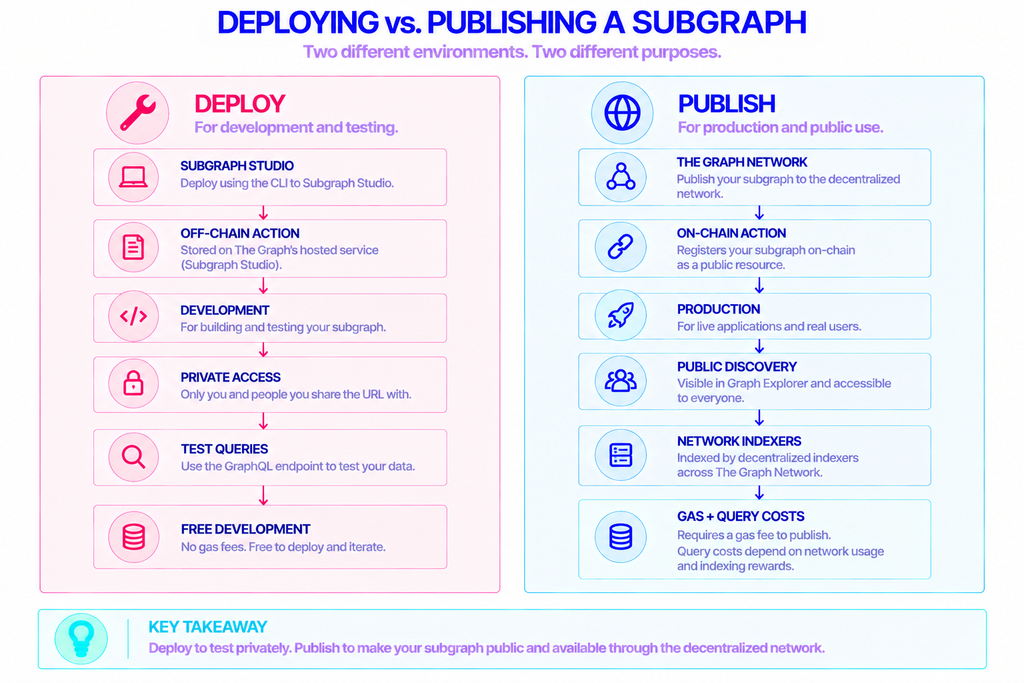
| Deploy (Subgraph Studio) | Publish (The Graph Network) | |
|---|---|---|
| Action type | Off-chain, CLI only | On-chain transaction |
| Visibility | Private | Public in Graph Explorer |
| Who indexes it | One Upgrade Indexer | Decentralized indexers |
| Rate limits | Yes | None |
| Cost | Free | Gas, plus optional curation |
| Best for | Development and staging | Live applications |
When the subgraph is ready, you publish it. From Studio, click Publish and pick a network. From the CLI — version 0.73.0 and later — you can run the build again and then publish:
bash
graph codegen && graph build
graph publish
A window opens to connect your wallet, add metadata, and complete the on-chain deployment. To attract indexers to pick up your subgraph, the docs recommend curating at least 3,000 GRT, which is enough to draw roughly 3 indexers, and you can do that in the same transaction as publishing to save gas. Once live, your subgraph is queryable by anyone, with the first 100,000 queries per month free on The Graph Network.
Can You Run a Subgraph Locally?
Yes, and many teams do before touching Studio. The indexing software, Graph Node, is open source, so you can run the whole stack on your own machine — a local Graph Node instance, an IPFS node for subgraph files, and a Postgres database for the indexed data.
The piece Graph Node always needs is a connection to the chain it indexes. You point it at an endpoint for your target network, and it reads blocks and events from there. If you would rather not run and sync that infrastructure yourself, you can connect Graph Node to a hosted endpoint from a provider like NOWNodes and keep your attention on the subgraph logic. Local setups give you fast iteration and full control; the trade-off is that you are now responsible for keeping those services running.
Final Thoughts
Building a subgraph comes down to three ideas: tell The Graph which contract and events to watch, shape the data into entities you want to query, and choose between a private deploy for testing and a public publish for production. The commands are short, and most of your real effort goes into the schema and mappings.
Start in Subgraph Studio, get a subgraph indexing and returning clean queries, and only publish to the network once it behaves the way your app needs. From there, GraphQL does the rest — your frontend asks for exactly the fields it wants, and the data is already waiting.
FAQ
How Much Does It Cost to Query a Subgraph on The Graph Network?
Each account gets 100,000 free queries per month on The Graph Network. Beyond that, querying is usage-based and paid in advance, so you are billed for the volume your application actually sends rather than a fixed subscription.
How Long Does a Subgraph Take to Index?
It depends on your start block, how active the contract is, and the network. A subgraph that indexes from a recent block and watches a quiet contract can sync in minutes, while one replaying years of history on a busy chain can take hours or longer. Setting a later start block is the simplest way to speed up initial syncing when you do not need the full history.
Can I Edit a Subgraph After Publishing It?
Yes. You deploy a new version to Subgraph Studio, test it, and then publish that version to the network. Using semantic version labels keeps your releases organized, and consumers can point their queries at the updated version once it is live.
Do I Need GRT to Deploy a Subgraph?
No. Deploying to Subgraph Studio for testing is free and requires no GRT. The token only comes into play when you publish to the decentralized network, where curation signal in GRT helps attract indexers to serve your subgraph.