
More than 90,000 tokens have been issued on the XRPL, and the vast majority are abandoned, never traded, or outright scams, according to token market data from XRPL.to. For anyone auditing an asset, vetting a trust line, or building an analytics tool, the practical question is simple: how do you tell a live token from a dead one? The fastest answer is a single API call. Run the gateway_balances method against an issuer, look at what is still in circulation, and confirm it on an XRP explorer. This guide walks that process from the ground up — what a dead token actually is, why the check matters, and how to run it without maintaining any infrastructure of your own.
What Is a “Dead Token” on XRP?
Let’s start with the basics before touching the API. A token on the XRPL is not the same thing as XRP. XRP is the native asset, capped at 100 billion units. Everything else — every stablecoin, memecoin, and fiat-backed IOU — is an issued token created by an ordinary account. Anyone can mint one, which is exactly why so many pile up.
Dead token (XRPL): an issued currency that is no longer economically active — its issuer has gone quiet, almost nothing remains in circulation, no one is trading it, and in some cases the issuer has frozen it. The token still exists on-ledger, but it no longer functions as a usable asset.
The reason there are tens of thousands of these comes down to how issuance works. Issued tokens have also been called “IOUs” or “trust line tokens,” and the official XRPL documentation describes them as balances one account owes another. Creating a token costs the issuer almost nothing, so the ledger accumulates them faster than the market can ever use them.
How Tokens Get Issued in the First Place
To hold an issued token, a wallet has to opt in by opening a trust line to the issuer. That opt-in is what stops random tokens from landing in your wallet uninvited — but it also has a cost. Each account locks a 1 XRP base reserve just to exist, plus 0.2 XRP for every trust line it opens, per the current reserve requirements (both figures were reduced in December 2024).
Here’s why that matters for dead tokens. When a project fails, holders often abandon the trust line rather than pay attention to it, and the issuer stops doing anything at all. The token doesn’t get deleted — it just goes silent. Multiply that by thousands of failed projects and you get a ledger crowded with husks.
The Signals That a Token Is Dead
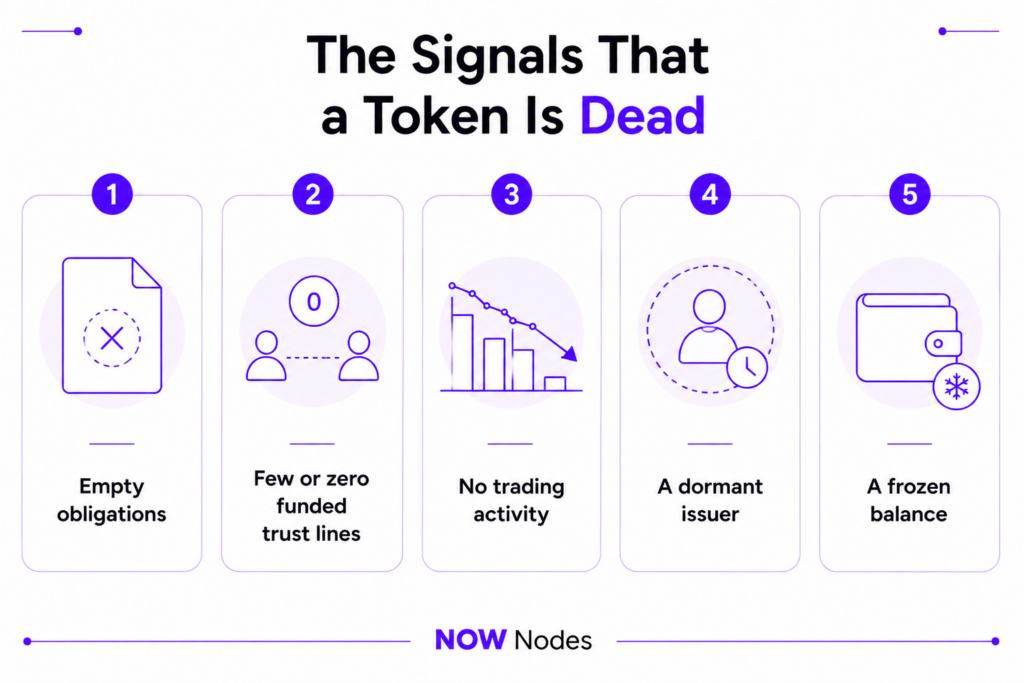
A dead token gives off a recognizable pattern. No single signal is proof on its own, but together they tell the story:
- Empty obligations — nothing the issuer created is still held by outside accounts.
- Few or zero funded trust lines — nobody holds a balance, or the handful who do hold dust.
- No trading activity — no order books, no active liquidity pool, no recent transactions.
- A dormant issuer — the issuing account hasn’t transacted in months or years.
- A frozen balance — the issuer has locked the token, so holders can’t move it anyway.
The good news is that the first signal — obligations — is a single API call away, and it’s the strongest one to lead with.
Why Tracking Issued Tokens Matters (and Who Relies on It)
This isn’t a purely academic exercise. Knowing what an issuer actually has in circulation is a routine need for several groups, and getting it wrong has real consequences.
Stablecoin and gateway operators need it for auditing: the total they’ve issued has to match the reserves backing it, and obligations is where that number lives. Exchanges and compliance teams use it for due diligence before listing an asset or approving a deposit. Analysts building dashboards pull it to monitor liquidity across the market. And everyday holders should run a quick check before opening a trust line to something they found on social media — because a lot of what’s out there is bait.
That last point is worth dwelling on, because the scale of junk on-ledger is a documented problem. In a May 2026 alert to his followers, Ripple’s veteran CTO David Schwartz put it plainly:
“There has been a huge escalation lately in airdrop and giveaway scams targeting XRPL users. Any such posts you see are likely scams.” — David Schwartz, via Bitcoin.com
The takeaway is that a large share of issued tokens are not just inactive but deliberately deceptive. Being able to identify dead tokens on the ledger — quickly, from live data — is a basic defensive skill, not a niche one.
Meet gateway_balances — The Core Method
The tool that answers most of these questions is a single API command called gateway_balances. This is critical to understand, so here’s the plain definition.
gateway_balances: an XRPL API method that calculates the total balances issued by a given account. It can optionally exclude amounts held by the issuer’s own operational wallets, so you see only what’s genuinely in the hands of third parties.
According to the official reference, a successful response returns three fields that matter for our purposes. Learn to read these three and you can classify almost any token.
| Field | What it tells you | Dead-token signal |
|---|---|---|
obligations | Total of each currency the issuer put into circulation, held by outside accounts | Empty or negligible = strong sign the token is dead |
balances | Amounts held by the specific operational (hot) wallets you name in the request | Useful for excluding the issuer’s own holdings |
assets | Tokens the issuer holds that were issued by others | A clean issuer normally shows none |
One caution before you build against it: the official docs note that some public API providers disable gateway_balances because it can be processing-heavy. You need a provider that keeps it enabled — which is where the next section comes in.
How to Identify Dead Tokens with gateway_balances
Here’s the practical part. You don’t need to sync your own server to run this check — you can query the XRPL directly through a hosted endpoint. NOWNodes keeps gateway_balances enabled and gives you API access on a free tier, so the whole flow takes a few minutes.
Step 1: Get an Endpoint and API Key
Sign up at NOWNodes and generate a key from your dashboard. The free START plan covers 100,000 requests per month at 15 requests per second across five networks — plenty for auditing tokens or testing a script. Your XRP endpoint follows a simple format:
POST https://xrp.nownodes.io
Header: api-key: YOUR_API_KEY
Keep that key server-side. Never paste it into public repositories or frontend code where anyone can lift it.
Step 2: Query the Issuer
Send a gateway_balances request with the issuer’s address in the account field. Setting ledger_index to validated guarantees you’re reading finalized data, and strict mode makes the method reject anything that isn’t a proper address.
json
{
  "method": "gateway_balances",
  "params": [
    {
      "account": "rISSUERADDRESSGOESHERE00000000000",
      "ledger_index": "validated",
      "strict": true
    }
  ]
}
If the issuer runs operational wallets you want to exclude, add a hotwallet array listing those addresses. For a dead-token check you usually don’t need it — you want the raw circulation number.
Step 3: Read the Response
This is where the token reveals itself. A living token comes back with real numbers in obligations:
json
{
  "result": {
    "account": "rISSUERADDRESSGOESHERE00000000000",
    "obligations": { "USD": "1997134.20229482" },
    "ledger_index": 102609804,
    "validated": true
  }
}
A dead token looks different. Because obligations is omitted when it’s empty, the response comes back with no obligations object at all:
json
{
  "result": {
    "account": "rDEADISSUERADDRESS0000000000000000",
    "ledger_index": 102609804,
    "validated": true
  }
}
That empty result is your headline signal: nothing this issuer created is still held by anyone else. The validated: true flag confirms the data is final and trustworthy, not a guess from an in-progress ledger. It’s a fast, unambiguous first filter — but for a confident verdict, pair it with an explorer.
Cross-Check with an XRP Explorer
The API tells you the circulation number. An XRP explorer fills in the context around it — how many people ever held the token, when the issuer last did anything, and whether any market exists. Every major XRP explorer is free and needs no account.
| Explorer | Best for | Link |
|---|---|---|
| XRPScan | Trust lines, holders, AMMs, issuer activity | xrpscan.com |
| Bithomp | Per-token pages with supply, holders, and markets | bithomp.com |
| XRPL Explorer (official) | Live balances and ledger state | livenet.xrpl.org |
On any of these, pull up the issuing account or the specific token and check four things: the number of funded trust lines, the holder count, the date of the last transaction, and whether a DEX order book or liquidity pool still exists. A token with a dead issuer, a shrinking holder count, and no market is about as clear a verdict as you’ll get.
Watch for Frozen Tokens
There’s one more state that makes a token effectively dead for its holders: a freeze. An issuer can lock a trust line so the balance can’t move, and since May 5, 2025 the Deep Freeze feature lets them go further — a deep-frozen holder can only send the currency straight back to the issuer. It’s designed for compliance on regulated assets, but the practical effect is the same as death for anyone holding the balance.
An explorer surfaces these freeze flags on the trust line. If you see a global freeze or a deep freeze on a token you were considering, treat it as a hard stop — the asset isn’t yours to move.
A Quick Checklist for Spotting Dead Tokens
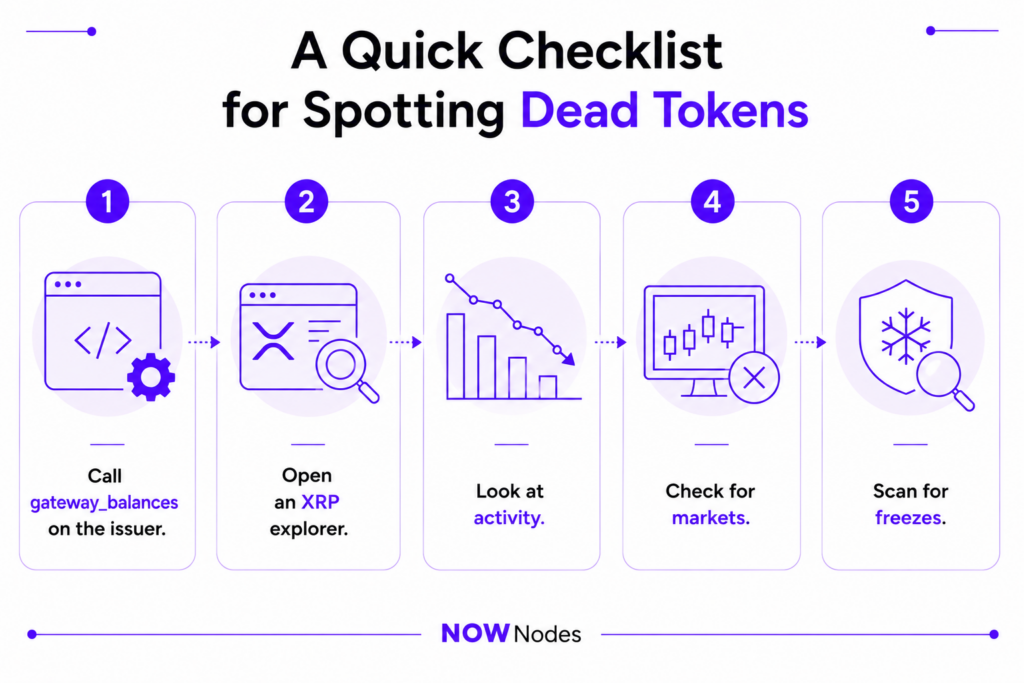
Put the two tools together and you have a repeatable process. Run it in order and you’ll rarely be wrong:
- Call
gateway_balanceson the issuer. No obligations returned? Strong dead signal. - Open an XRP explorer. Check funded trust lines and holder count — near zero confirms it.
- Look at activity. No recent transactions from the issuer means a dormant project.
- Check for markets. No order book and no liquidity pool means no one is trading it.
- Scan for freezes. A global or deep freeze makes the token dead on arrival for holders.
If a token fails most of these, it’s dead — and if you were about to open a trust line to it, you just saved yourself 0.2 XRP and a headache.
Conclusion
Identifying dead tokens on the ledger isn’t guesswork once you know where to look. The gateway_balances method gives you the single most telling number — what’s actually in circulation — and an XRP explorer confirms the story with trust lines, holders, activity, and freeze status. Together they turn a vague “is this real?” into a clear, data-backed answer in a couple of minutes.
The only piece you need is reliable access to live data, and that no longer means running heavy infrastructure. With NOWNodes, you point a request at an endpoint, read the response, and move on — with gateway_balances enabled and a free tier to start. In a market where most issued tokens are abandoned or worse, being able to tell the living from the dead is one of the more useful checks you can run.
FAQ
What is a dead token on the XRPL?
It’s an issued token that’s no longer economically active — the issuer has gone quiet, little or nothing remains in circulation, and no one is trading it. The token still exists on-ledger, but it’s effectively a husk. With more than 90,000 tokens issued and most of them abandoned or scams, dead tokens are the norm, not the exception.
How do I identify dead tokens on the ledger quickly?
Run the gateway_balances method against the issuer’s address. If the response returns no obligations, nothing the issuer created is still held by outside accounts — a strong sign the token is dead. Confirm it on an XRP explorer by checking trust lines, holders, and trading activity.
What does the gateway_balances method actually return?
Three fields matter: obligations (the total in circulation held by third parties), balances (amounts held by operational wallets you specify), and assets (tokens the issuer holds that were issued by others). For a dead-token check, an empty obligations field is the number to watch.
Which XRP explorer is best for checking tokens?
XRPScan and Bithomp are the most detailed for token research — both show trust lines, holders, and markets, and Bithomp has dedicated per-token pages. The official explorer at livenet.xrpl.org is a solid choice for live balances and ledger state. All are free and need no account.
Can a token be alive but frozen?
Yes, and it’s an important edge case. An issuer can freeze a trust line so holders can’t move the balance, and the Deep Freeze feature (live since May 5, 2025) tightens that further. A frozen token may still show circulation, but for the holder it’s just as unusable as a dead one — so always scan for freeze flags.
Why are there so many dead tokens on the XRPL?
Because issuing a token costs the creator almost nothing, and holding one only requires a trust line. Projects launch, fail, and get abandoned, but the tokens they created are never removed — they just go dormant. The result is a ledger with far more dead tokens than live ones.
Do I need to run my own infrastructure to check this?
No. You can query the XRPL through a hosted endpoint like NOWNodes, which keeps gateway_balances enabled and offers a free START plan with 100,000 requests per month. You get an API key, point requests at the XRP endpoint, and read the results — no server to sync or maintain.
Does an empty obligations field always mean the token is dead?
It’s the strongest single signal, but not absolute proof — a brand-new issuer that hasn’t distributed anything yet would also show empty obligations. That’s why the reliable method is to combine the API result with an explorer check on issuer activity and markets before calling a token dead.