
Node synchronization is the process a client uses to download a chain’s data, verify it against consensus rules, and keep its local copy aligned with the network’s current head. Until that process finishes, the client is a spectator. It cannot validate transactions, cannot report a correct balance, and cannot attest to blocks.
This guide moves from the basics to the operational details: what node synchronization does, which modes exist in 2026, how long each takes, and how to check progress. The numbers come from client documentation and Ethereum Foundation announcements rather than recycled blog posts — which matters, because the storage math changed substantially over the past eighteen months.
What Synchronization Actually Does
Node synchronization — the process by which a client downloads block data and state from peers, verifies it against the protocol’s consensus rules, and keeps its local database aligned with the network’s canonical head.
Every client that joins a network starts with nothing but a genesis configuration and a list of bootstrap peers. From there, synchronization runs through four broad stages. It discovers peers, downloads and verifies headers, fetches the data those headers commit to, and finally switches into live mode where it follows new blocks as they arrive.
The critical word is verifies. A client does not simply copy data from a stranger and trust it. Each header links to its parent by hash, each state root is cryptographically committed in a header, and any range of state data can be proven against that root. This is what separates running your own infrastructure from querying someone else’s.
Two Clients, One Node
Here’s the part most older guides get wrong. Since the Merge in September 2022, a full node on Ethereum requires two separate programs running side by side: an execution client that handles transactions and state, and a consensus client that handles block gossip and fork choice.
Execution clients include Geth, Nethermind, Besu, Erigon, and Reth. Consensus clients include Lighthouse, Prysm, Teku, Nimbus, and Lodestar. The two talk over an authenticated Engine API connection, and neither can finish synchronizing alone.
The go-ethereum documentation states it plainly: Geth cannot sync without being connected to a consensus client. The consensus client supplies the target header; the execution client verifies the path to it.
Why Synchronization Matters
A fully synced client is the only way to check the chain’s rules for yourself. Everything else — a hosted endpoint, a block explorer, a wallet backend — involves trusting that somebody else reported honestly. For most applications that tradeoff is acceptable. For some it is not.
Node synchronization also determines what questions your infrastructure can answer. A snap-synced client knows current balances but not what an account held in 2019. An archive client knows both. Choosing how to sync Ethereum is really choosing which queries you will be able to serve later.
Who Needs a Fully Synced Client
| Who | Why synchronization matters | Typical mode |
|---|---|---|
| Validators / stakers | Missed attestations cost rewards; an out-of-sync client earns nothing | Snap + checkpoint |
| Exchanges & custodians | Deposit crediting must be independently verified | Snap or archive |
| dApp and wallet teams | Consistent read latency and no third-party rate limits | Snap |
| Indexers & analytics | Historical state at arbitrary blocks | Archive |
| L2 and rollup operators | Reconstructing state from posted data | Archive or full |
The Sync Modes, From Lightest to Heaviest
Node synchronization modes trade three things against each other: time, disk, and trust assumptions. There is no universally correct answer — only the right answer for a given workload.
Snap — the Default
Snap sync starts from a recent block supplied by the consensus client rather than from genesis. It downloads headers, then block bodies and receipts, and in parallel pulls contiguous chunks of state data and rebuilds the Merkle trie locally.
The clever part is what it doesn’t download. Instead of requesting the state trie node by node, snap sync fetches only the leaves and regenerates the intermediate nodes on the local machine. Nethermind’s documentation reports this makes initial synchronization up to ten times faster than the older fast sync approach.
Snap sync ends with a phase called state healing, which repairs entries that went stale while the download was running. This phase has no progress bar, and it must outpace the chain’s growth — on slow disks it sometimes never does. That single fact explains most “my sync is stuck at 99%” reports.
Full — Execute Everything
A full sync re-executes every block from genesis, independently reproducing every state transition. It is the strictest option available and the slowest by a wide margin. Only the most recent 128 block states are retained; older states are represented as checkpoints and regenerated on request.
Archive — Keep Every Historical State
Archive mode disables state pruning entirely, so every historical state stays on disk. Geth’s traditional hash-based archive exceeded 12 TB; the newer path-based archive scheme brings that down dramatically. Nethermind’s docs note that a mainnet archive sync takes several days regardless of client.
What Happened to Fast Sync and Light Sync
Fast sync is gone, and the reason is a good lesson in systems engineering. Péter Szilágyi, then lead developer of go-ethereum, diagnosed it in the Geth v1.10.0 release announcement:
“In the case of fast sync, the unforeseen bottleneck was latency, caused by Ethereum’s data model.”
His breakdown was brutal and specific. With roughly 675 million state trie nodes to fetch, even batching 384 requests at a time required about 1.75 million round-trips. Adding network latency, peer disk reads, and bandwidth, fast sync spent “a whopping 6.3 hours doing nothing, just waiting for data” — and that was under generous assumptions about peers and connection quality.
Light sync is also unavailable on the execution layer. Geth’s documentation confirms it offers no execution-layer light client as a sync mode today; the recommended lightweight setup is beacon light sync paired with snap sync.
| Mode | Starts from | Verifies every block | Approx. mainnet disk | Practical use |
|---|---|---|---|---|
| Snap | Recent checkpoint | No | ~0.9–1.3 TB (EL) | Default for almost everyone |
| Full | Genesis | Yes | Similar to snap | Maximum verification |
| Archive | Genesis | Yes | Multiple TB | Historical queries, indexing |
| Fast | Recent checkpoint | No | — | Removed |
| Light (EL) | Headers only | No | Minimal | Not available |
The Consensus Layer Syncs Differently
Proof of stake changed the security model for bootstrapping, and with it the sync strategy. Because validator signatures are cheap to produce, a new client cannot simply follow the heaviest chain — it needs an anchor point that it trusts.
Checkpoint Sync
Checkpoint sync fetches a recent finalized state from a trusted source, then verifies forward from there. It is the fastest way to sync Ethereum’s consensus layer by an enormous margin: Geth’s documentation notes a consensus client should complete this in a few minutes. Public endpoints are listed at eth-clients.github.io/checkpoint-sync-endpoints.
This introduces a weak subjectivity assumption — you trust that the checkpoint is on the canonical chain. In practice, cross-checking the state root against two independent providers reduces that risk to near zero, and it is standard operating procedure for staking teams.
Optimistic Sync
Optimistic sync downloads blocks before the execution client has validated them, then verifies retroactively. A client in this state is explicitly forbidden from attesting or proposing, because it cannot yet guarantee its view of the head is correct. This is why a freshly started validator shows as “optimistic” for a while before it starts earning.
How Long Does Eth Syncing Take?
Eth syncing duration depends far more on hardware than on client choice, but published benchmarks give a useful baseline. Nethermind documents a mainnet sync on a 16-vCPU, 64 GB cloud instance with roughly 40k IOPS: attestation-ready in 2 hours 3 minutes, full sync complete in 7 hours 3 minutes, broken down as 1h 58m for snap sync phase one, 4 minutes for state sync, and the remainder for old headers, bodies, and receipts.
Other clients land in a similar range on comparable hardware. Erigon’s OtterSync shifts roughly 98% of the work from CPU to network bandwidth, which is how it spins up archive nodes in hours rather than days.
The Three Bottlenecks
Disk is almost always the constraint. Client teams consistently report that HDDs and budget SSDs cannot keep up — sustained random write performance matters more than sequential throughput or raw capacity.
Bandwidth is second. Geth’s guidance recommends at least 25 Mbps download and an ISP without a data cap, since a synchronizing client moves hundreds of gigabytes.
Restarts are the underrated third. Nethermind warns that a single restart during fast sync can add up to two hours, because the client must rebuild its caches by reading millions of values back from disk. Shut clients down gracefully.
How to Check Sync Status with eth_syncing
The eth_syncing RPC method is the standard way to check progress. It returns false when the client is fully synced, and an object while synchronization is in progress:
bash
curl -X POST -H "Content-Type: application/json" \
  --data '{"jsonrpc":"2.0","method":"eth_syncing","params":[],"id":1}' \
All clients return three fields: startingBlock (where the import began), currentBlock (where it is now), and highestBlock (the estimated network head). Individual clients add their own fields — Geth reports snap sync counters such as synced accounts and healed bytecodes.
One caveat trips up almost everyone doing eth syncing checks for the first time. eth_syncing can return false while state healing is still running, because block import has caught up even though the state is incomplete. Watch the client logs for “state heal in progress” alongside the RPC response before declaring victory.
History Expiry Rewrote the Storage Math
This is the biggest change to node synchronization in years, and it is why older guides give misleading disk numbers. As of July 8, 2025, all execution clients support partial history expiry under EIP-4444, letting them drop block bodies and receipts from before the Merge.
Matt Garnett of the Ethereum Foundation framed the reasoning bluntly in the official announcement. His point was that clients stopped doing the thing that all that data supposedly enables:
“Clients have not fully validated the chain from genesis for over 5 years.”
The savings are concrete. Geth’s own documentation publishes a mainnet database inspection before and after running geth prune-history: 1.27 TiB down to 936 GiB, a reduction of roughly 350 GB from a single offline command. The Foundation’s guidance puts the expected range at 300–500 GB and notes a node now fits comfortably on a 2 TB disk.
Support arrived in Geth v1.16.0, Nethermind 1.32.2, Besu 25.7.0, Erigon v3.0.12, and Reth v1.5.0. New clients can skip the download entirely with flags like Geth’s --history.chain postmerge. The Fusaka upgrade, activated on mainnet on December 3, 2025, continued this direction with PeerDAS, which lets clients verify blob availability by sampling instead of downloading everything.
The same problem exists everywhere, and the solutions rhyme. Bitcoin Core shipped AssumeUTXO in version 28.0 in October 2024, letting a client load a UTXO set snapshot and become usable in roughly 90 minutes instead of the ten-plus hours a traditional initial block download takes — while still validating every block in the background.
Solana takes a different approach because its data volumes are far larger. Validators download a snapshot rather than replaying history, and an unpruned ledger runs into the hundreds of terabytes. Operators use --limit-ledger-size to cap local storage and rely on separate archival infrastructure for history.
Common Sync Failures and Fixes
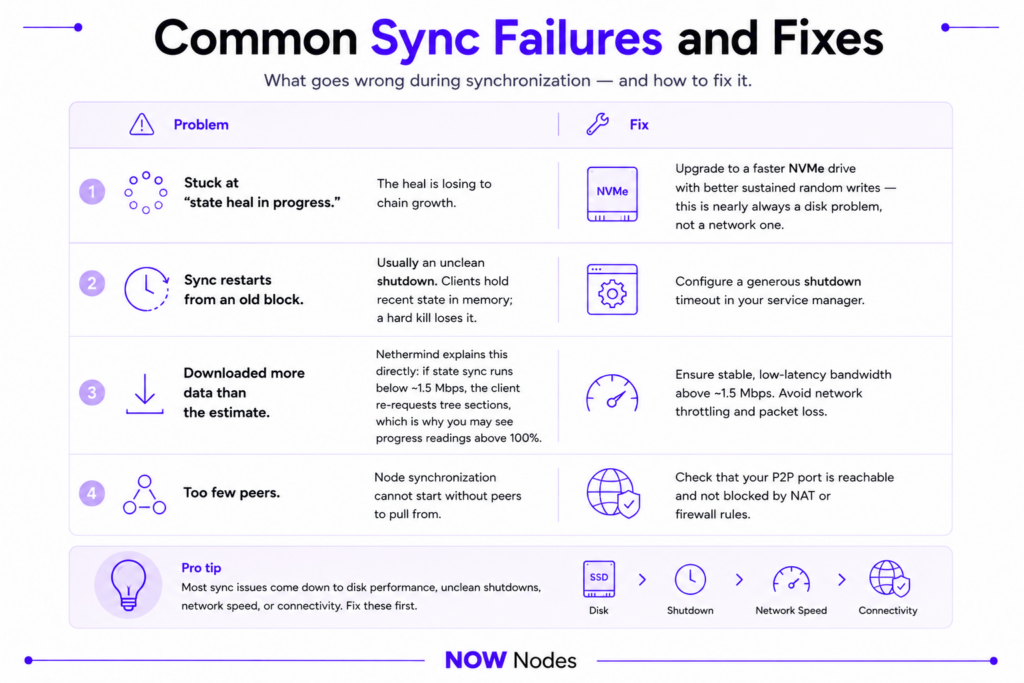
Stuck at “state heal in progress.” The heal is losing to chain growth. Upgrade to a faster NVMe drive with better sustained random writes — this is nearly always a disk problem, not a network one.
Sync restarts from an old block. Usually an unclean shutdown. Clients hold recent state in memory; a hard kill loses it. Configure a generous shutdown timeout in your service manager.
Downloaded more data than the estimate. Nethermind explains this directly: if state sync runs below roughly 1.5 Mbps, the client re-requests tree sections, which is why you may see progress readings above 100%.
Too few peers. Node synchronization cannot start without peers to pull from — check that your P2P port is reachable and not blocked by NAT or firewall rules.
When Running Your Own Client Isn’t Worth It
Node synchronization is solvable, but it is not free. Realistically you are looking at a 2 TB NVMe drive, 32 GB of RAM, uncapped bandwidth, and ongoing attention to client releases, disk growth, and graceful restarts. For a team shipping a product, the work needed to sync Ethereum and keep it synced competes directly with roadmap work.
NOWNodes removes that step by providing API access to already-synced infrastructure across 120+ networks, including Ethereum, Bitcoin, Solana, Polygon, Arbitrum, and Tron. You get an endpoint and an API key instead of a sync queue, with a free tier of 100k requests per month for evaluation.
The honest tradeoff: hosted access means trusting a provider’s data, which is fine for most applications and wrong for a few. Validators should run their own clients. A dashboard reading balances usually should not.
Conclusion
Node synchronization has quietly become one of the better-engineered parts of the stack. Snap sync replaced a design that spent six hours idling on network latency, checkpoint sync reduced consensus-layer bootstrapping from days to minutes, and history expiry cut hundreds of gigabytes from every full node in a single release cycle.
What hasn’t changed is the tradeoff underneath. Choosing how to sync Ethereum means deciding how much verification you want to do yourself, and what you are willing to spend in disk, bandwidth, and attention to get it. Snap sync suits nearly everyone; archive mode suits teams that need historical state; hosted infrastructure suits teams whose product isn’t the node. Pick deliberately, size the disk generously, and shut the client down gracefully.
FAQ
How long does it take to sync Ethereum from scratch?
On well-provisioned hardware, expect the execution client to be attestation-ready in roughly 2 hours and fully synced in about 7 hours, per Nethermind’s published benchmarks. The consensus client finishes in minutes using checkpoint sync. Slow disks can stretch node synchronization to days or prevent completion entirely.
How much disk space do I actually need in 2026?
Budget 2 TB of NVMe. A pruned execution client lands near 0.9–1.3 TB, the consensus client adds 80–200 GB, and blob storage adds another 100–150 GB. Running prune-history reclaims 300–500 GB.
Can I still run a light client on Ethereum?
Not on the execution layer. Geth offers no execution-layer light client mode; the closest option is beacon light sync combined with snap sync.
Do I need both an execution and a consensus client?
Yes. Since the Merge, neither can synchronize alone — the consensus client supplies the target header and the execution client verifies the chain leading to it.