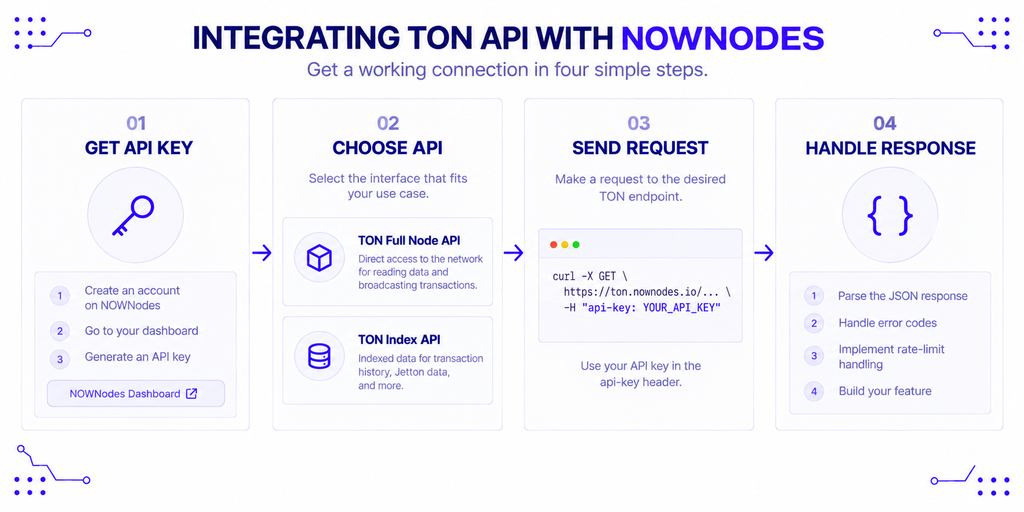
Integrating The Open Network (TON) into a Web3 wallet means wiring up two separate layers, and mixing them up is the most common reason a first integration stalls. One layer is TON Connect, the protocol that lets your app talk to a user’s existing wallet. The other is the TON wallet API, the HTTP interface your backend uses to read balances and push signed transactions to the chain.
This guide is written for teams building wallets, Telegram Mini Apps, exchanges, or dApp front ends on TON. It covers what each layer does, why a wallet can’t run without them, the quirks that make TON different from Ethereum, and the actual steps — manifest, SDK, connect button, transaction, backend auth — to ship a working integration.
What Is TON Connect, and How Is It Like WalletConnect?
TON Connect is the standard wallet-connection protocol for The Open Network. It links your app to a user’s wallet over an end-to-end encrypted session, so your app can read the connected address, request signatures, and send transactions without ever touching the user’s private keys.
If you’ve shipped WalletConnect on Ethereum, the mental model transfers directly: TON Connect is TON’s equivalent. A user scans a QR code or taps a universal link, approves the session in their wallet, and your app receives their address. TON Connect even ships an optional WalletConnect compatibility path for teams standardizing on one connection flow across chains.
One limit matters up front. TON Connect moves connection requests and signatures — it does not fetch blockchain data. The official documentation is explicit that it doesn’t provide deeper blockchain integrations, so reading a balance or building a transfer is a separate job.
What the Wallet API Handles That TON Connect Doesn’t
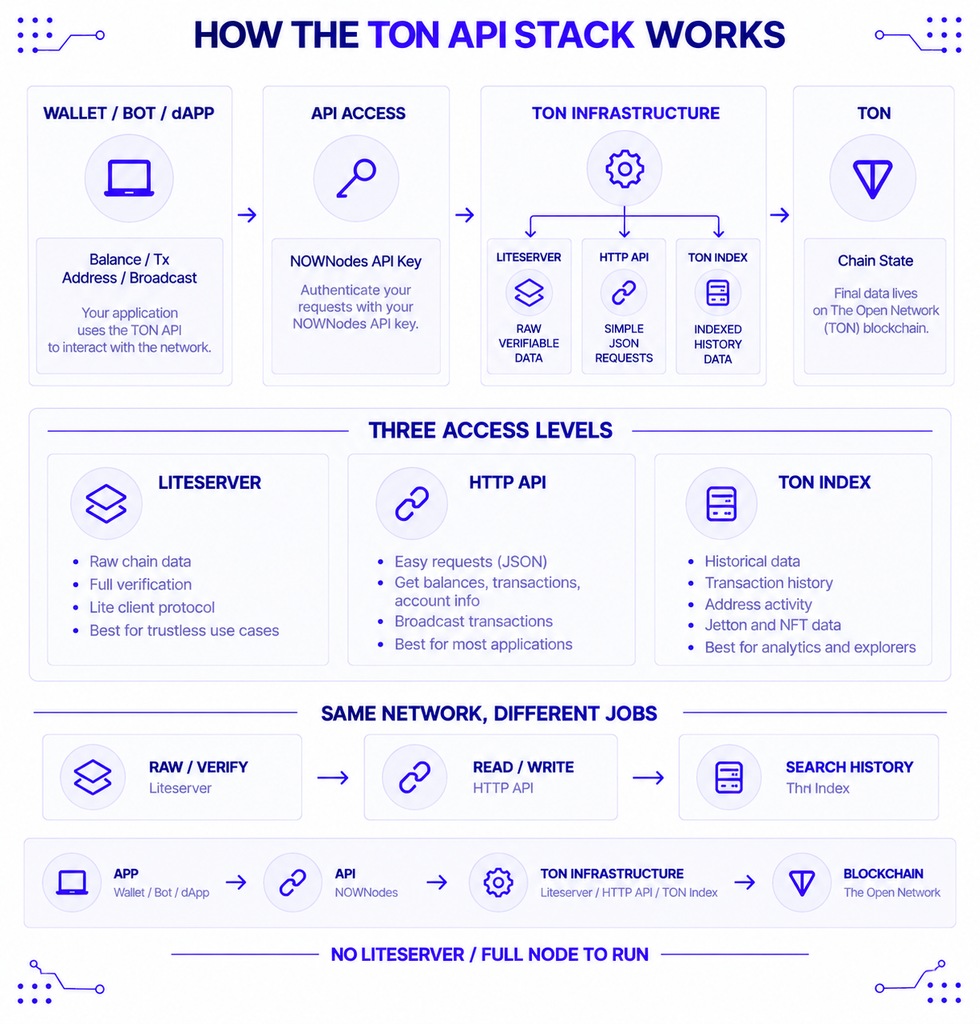
The TON wallet API is the HTTP interface your app calls to read chain state and broadcast signed transactions. It plays the same role an Ethereum JSON-RPC endpoint plays for an EVM wallet: fetch a balance, look up a transaction, submit a signed message. You point it at a network endpoint, authenticate with an API key, and skip running a liteserver or full node yourself.
TON’s API is not one service but a few layers. Liteservers give cryptographically verifiable access to raw chain data. TON Center’s HTTP API wraps that into simple JSON calls. An indexed layer adds the historical queries a wallet actually needs, like the full transaction list for one address — something a liteserver can’t produce on its own.
Here’s the division of labor in one view:
| TON Connect | Wallet API (HTTP) | |
|---|---|---|
| Purpose | Connect to an existing wallet, request signatures | Read chain state, broadcast signed transactions |
| Touches private keys? | No — signing stays in the user’s wallet | No — you submit already-signed messages |
| Returns blockchain data? | No | Yes: balances, history, contract state |
| Ethereum analogy | WalletConnect | JSON-RPC endpoint |
| Needed for a standalone wallet? | Only to act as a signer for third-party dApps | Always |
A wallet built from scratch needs the API for every read and every broadcast. It only needs TON Connect if it also wants to sign requests coming from third-party dApps.
Why a Wallet Needs Managed Access to TON
Without an API, a wallet has one alternative: run and sync its own liteserver or full node. That means maintaining chain state, handling TON’s asynchronous and sharded consensus, and patching the software against protocol updates — a job most wallet teams have no reason to own.
There’s also a hard throttle on casual access. Without an API key, TON Center limits you to 1 request per second and returns a 429 once you exceed it. Keyed plans raise that — 10 requests per second on Free, 25 on Plus, and 100 on Advanced — so an API key isn’t optional for anything past a manual test.
This is where a managed provider fits. NOWNodes offers TON node access behind a single API key, so your team can query balances and broadcast transactions without deploying the underlying infrastructure, and plan tiers set the request capacity instead of your own hardware. The API never sees a key or seed — it only receives already-signed messages.
Who Integrates TON into Their Apps?
Self-custody wallets are the most direct case. Tonkeeper and MyTonWallet sit on these interfaces to show balances, build transactions, and track history, and Trust Wallet now supports TON natively too. Telegram’s built-in wallet is the highest-volume example, given its reach into Telegram’s user base.
Trust Wallet’s own launch framed it as a milestone:
“Super excited to be one of the first major wallets to integrate TON,” — Eric Chang, Head of Product at Trust Wallet.
The wallet had previously offered only wrapped TON on BEP-20 and ERC-20 networks before adding support on the native chain.
Beyond wallets, Telegram Mini Apps and bots use the same methods to accept payments and read state. DeFi front ends depend on the indexed layer for trade history and pool data. Exchanges, custodians, and explorers pull from the same balance and transaction endpoints, just at higher volume with extra monitoring on top.
Why TON Wallets Work Differently (The Smart-Contract Model)
TON’s data model is the real source of integration difficulty, and it’s worth grasping before you write code. On TON, a wallet isn’t a plain address — it’s a smart contract. Every account you interact with is a deployed contract, not just a key pair with a balance attached.
That one fact cascades. A TON address doesn’t exist on-chain until its wallet contract is deployed, so “creating a wallet” means preparing a contract deployment, not only generating keys. Key derivation also diverges from the BIP-39 path most chains share, so the same seed phrase can produce different addresses in different TON wallets — a mnemonic isn’t portable the way it is on Ethereum or Bitcoin.
Underneath sits TON’s storage format, where on-chain data is packed into cells, each holding a limited number of bits and references to other cells. An API hides this for basic balance and transaction reads, but custom message construction eventually meets cell serialization directly.
What Does a TON Address Look Like?
A TON address comes in two shapes, and sending to the wrong form is a classic bug. The raw form is workchain:hex — for example, 0:2cf3…e8b1, where 0 is the base workchain. The user-friendly form is a 48-character base64url string with a built-in checksum, and it’s what wallets and explorers display.
The first two letters of the user-friendly form tell you the type. EQ… is bounceable and UQ… is non-bounceable. As a rule, use the non-bounceable UQ form for depositing to a user’s wallet and the bounceable EQ form for smart contracts where you want funds returned if the call fails.
Here is the same account in all three forms (illustrative, not a live address):
Raw:            0:2cf3b1a0…e8b1
Bounceable:     EQAs87Gg…JKZq
Non-bounceable: UQAs87Gg…JKZp
One practical constraint: the TON Connect SDK rejects raw 0:<hex> addresses in a transaction request. Convert first with the toUserFriendlyAddress helper that ships in the TON Connect packages.
How to Integrate TON Connect into a Web3 App
A dApp or wallet-facing integration comes down to five steps. The examples below use @tonconnect/ui-react, the recommended package for React and Next.js apps.
1. Host a connection manifest
Wallets fetch a tonconnect-manifest.json file to learn your app’s name, icon, and policy URLs, then show that metadata to the user before approving the session. The minimum is three fields:
json
{
  "url": "https://yourapp.com",
  "name": "Your App",
  "iconUrl": "https://yourapp.com/icon-180.png"
}
Hosting rules are strict. The file must be reachable by a public GET over HTTPS, with no CORS restriction, no auth gate, and no Cloudflare-style challenge in front of it. The icon must be a PNG or ICO (SVG is not supported); a 180×180 PNG is the safe choice. If a wallet can’t fetch the manifest, the connect flow fails with MANIFEST_NOT_FOUND_ERROR (code 2) or MANIFEST_CONTENT_ERROR (code 3).
2. Install the SDK and mount the provider
There are three dApp-facing packages: @tonconnect/ui-react for React, @tonconnect/ui for vanilla JS, and @tonconnect/sdk for headless or server-side flows. Install the React kit and wrap your app in the provider:
bash
npm i @tonconnect/ui-reactjsx
import { TonConnectUIProvider } from '@tonconnect/ui-react';

export function App() {
  return (
    <TonConnectUIProvider manifestUrl="https://yourapp.com/tonconnect-manifest.json">
      <YourApp />
    </TonConnectUIProvider>
  );
}
3. Add a connect button and read the address
Drop in the prebuilt button, which toggles between “Connect Wallet” and the connected state on its own. Then read the live address with a hook:
jsx
import { TonConnectButton, useTonAddress } from '@tonconnect/ui-react';

function Header() {
  const address = useTonAddress();
  return (
    <header>
      <TonConnectButton />
      {address && <span>Connected as {address}</span>}
    </header>
  );
}
4. Send a transaction
A transaction is a validUntil deadline, a network id, and a list of messages. Amounts are denominated in nanograms — the smallest unit, formerly called nanotons — where 1 Gram equals 1,000,000,000 nanograms, so 0.1 Gram is 100000000.
jsx
import { useTonConnectUI, useTonAddress } from '@tonconnect/ui-react';

function PayButton() {
  const [tonConnectUi] = useTonConnectUI();
  const address = useTonAddress();

  const pay = () =>
    tonConnectUi.sendTransaction({
      validUntil: Math.floor(Date.now() / 1000) + 300,
      network: '-239', // mainnet; use '-3' for testnet
      messages: [{ address, amount: '100000000' }], // 0.1 Gram
    });

  return <button onClick={pay}>Send 0.1 Gram</button>;
}
5. Authenticate the user on your backend (ton_proof)
A connected address alone doesn’t prove the user controls it. For logged-in sessions, request ton_proof during the connect call and verify the signature server-side. With the headless SDK, pass a nonce under request:
js
connector.connect(
  { universalLink, bridgeUrl },
  { request: { tonProof: nonce } },
);
Your backend then checks the returned proof against the nonce before issuing a session token. This is the step that turns “wallet connected” into “user authenticated.”
How Do You Add TON to Trust Wallet?
You don’t add a custom network — TON is a built-in asset in Trust Wallet, not something you register by pasting an endpoint and chain ID. Trust Wallet added native TON support, so you simply open the app, enable or receive the TON asset, and copy your receive address.
That difference trips up people coming from EVM chains. TON is not EVM-compatible, so the “add a custom network” flow doesn’t apply. MetaMask, for the same reason, can’t hold native TON at all; it only supports a wrapped version via a token contract. For native TON, you need a TON-capable wallet like Tonkeeper, MyTonWallet, or Trust Wallet.
Best Practices and Common Pitfalls
Keep signing on the client and the key out of everything else. The wallet signs and serializes a transaction locally before the API is ever involved, so a private key or seed phrase should never pass through an API call, a request header, or a log line. If a library asks for a seed to “help build” a transaction, treat that as a warning, not a convenience.
A few more that save real debugging time:
- Test on testnet first. Point the same code at network
-3and a testnet wallet; a malformed message or wrong address format fails the same way, but only mainnet costs real funds. - Handle the 429 explicitly. Catch the rate-limit response and back off rather than letting a burst of balance checks fail silently.
- Keep the API key server-side. Never hardcode it into a published mobile binary, where it can be extracted from the package.
- Validate address format before broadcasting. Mixing raw and user-friendly forms is a frequent source of failed or misdirected transfers.
- Confirm method coverage per provider. Not every endpoint exposes every indexed method, so check the specific call your feature needs before building around it.
Conclusion
Integrating TON into a wallet is mostly about respecting the split between the two layers. TON Connect handles the connection and the signature; the TON wallet API handles the reads and the broadcast. Get the manifest hosted correctly, keep signing on the client, send amounts in nanograms, and use the user-friendly address form, and the remaining work is small next to understanding TON’s smart-contract account model. Build against testnet, verify users with ton_proof where sessions matter, and the mainnet switch is largely a change of endpoint and network id.
FAQ
Does the Toncoin-to-Gram rename affect my TON integration?
No, it’s a presentation-layer change only. The native token was renamed from Toncoin to Gram, with the ticker changing from TON to GRAM, while the network is still called TON / The Open Network. Balances, addresses, and smart contracts are unchanged, and no token swap or migration is required. In code you only update labels and tickers.
Do I need TON Connect if I’m building a standalone wallet rather than a dApp?
Not for core wallet functions. TON Connect exists for connecting to an existing wallet and requesting signatures. A standalone wallet reads balances and broadcasts transactions through the wallet API, and only needs TON Connect if it also acts as a signer for third-party dApps. Note that TON Connect has no SDK for wallets — wallet developers implement the protocol directly from the specification.
Can MetaMask hold native TON?
No. MetaMask is EVM-only, and TON is not EVM-compatible, so MetaMask can hold only a wrapped version of the token through a contract address. For native TON, use a TON-specific wallet such as Tonkeeper, MyTonWallet, or Trust Wallet.
How many messages can a single TON Connect transaction include?
It depends on the connected wallet. Each wallet advertises its own per-call limit on the SendTransaction feature entry, so read maxMessages from the wallet’s feature list before batching multiple transfers into one request.
What does the “-239” network value mean when sending a TON transaction?
It identifies the target network in the sendTransaction call. -239 is TON mainnet and -3 is testnet. Set it explicitly so a transaction built for testnet never lands on mainnet by accident.