
The best Polkadot wallet for most people is Nova Wallet on mobile or Talisman on desktop, paired with a Ledger device if you hold a large amount of DOT. That short answer covers the majority of use cases. The longer answer depends on how you actually use your tokens — passive holding, staking, governance voting, or jumping between parachains all pull toward different choices.
This guide walks through six wallets that are active and well-supported in 2026, what each one does well, and how to match one to your needs.
What Is a Polkadot Wallet?
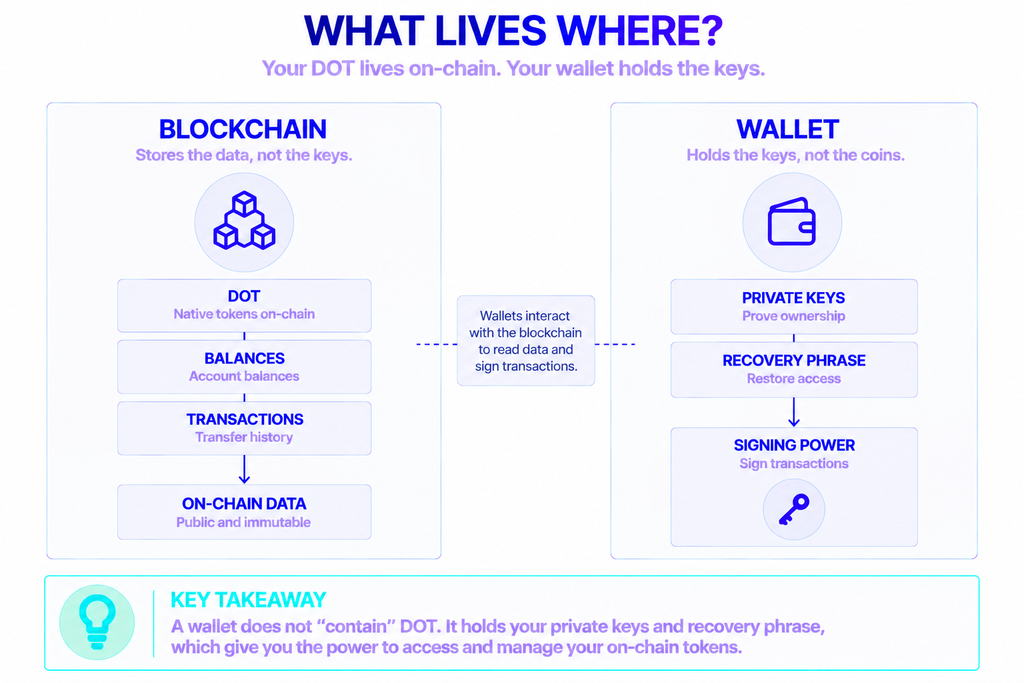
A Polkadot wallet is software or hardware that stores the private keys controlling your DOT and lets you sign transactions on the network. It does not hold your coins the way a bank holds cash. The tokens live on-chain; the wallet holds the keys that prove the tokens are yours.
Most Polkadot wallets are non-custodial. That means you — and only you — hold the keys and the recovery phrase. No company can freeze your funds or recover your account if you lose that phrase. This is the trade-off at the center of self-custody: full control in exchange for full responsibility.
Wallets split into two broad types. Hot wallets stay connected to the internet as mobile apps or browser extensions, which makes them convenient for everyday use and dApp access. Cold wallets, such as hardware devices, keep keys offline and are built for long-term storage.
Why Can’t You Just Use MetaMask for DOT?
Polkadot is a standalone layer-0 network, not an Ethereum chain, so wallets built only for Ethereum don’t support it natively. MetaMask, for instance, is built around Ethereum and EVM chains and doesn’t hold DOT — you need a Polkadot-compatible wallet instead.
There’s also an address format difference. Polkadot uses the SS58 address standard rather than Ethereum’s 0x format, and native accounts work across the relay chain and every parachain. A wallet built for the Polkadot SDK understands this; a generic EVM wallet does not.
The bigger reason is what DOT actually does. Beyond sending and receiving, DOT holders can stake to help secure the network, vote in on-chain governance, and move assets between parachains using XCM (cross-consensus messaging). A proper Polkadot wallet exposes these functions directly. A basic storage app leaves them out.
Who needs one? Anyone holding DOT for more than a quick trade: long-term holders who want cold storage, stakers chasing rewards, governance participants, and developers testing parachain apps all rely on a wallet that speaks Polkadot natively.
Best Polkadot Wallets in 2026
The table below compares the six options covered in this guide. Details for each follow underneath.
| Wallet | Type | Platforms | Staking | Hardware support | Best for |
|---|---|---|---|---|---|
| Nova Wallet | Hot (mobile) | iOS, Android | Yes (pools + direct) | Ledger, Polkadot Vault | Mobile users, staking |
| Talisman | Hot (extension) | Browser | Yes | Ledger | Desktop dApp users |
| SubWallet | Hot (extension + mobile) | Browser, iOS, Android | Yes (pools + direct) | Ledger, Keystone, Vault | Multi-chain power users |
| Ledger | Cold (hardware) | Device + Ledger Live | Yes (via Ledger Live) | — | Large, long-term holdings |
| Polkadot Vault | Cold (air-gapped) | Old phone + companion app | Via companion wallet | — | DIY cold storage |
| Polkawallet | Hot (mobile) | iOS, Android | Yes | QR signer | Mobile-only, legacy users |
Nova Wallet — Best Mobile Polkadot Wallet
Nova Wallet is the standout mobile choice for DOT in 2026. It’s a non-custodial app for iOS and Android, built and maintained by Novasama Technologies and listed among Polkadot’s official wallet recommendations.
Its staking support is the main draw. Nova handles both nomination pools and direct staking in one flow, with 1-click governance voting, a built-in dApp browser, and WalletConnect v2. The scale tells the story: as of its latest treasury proposal, Nova Wallet’s nomination pool holds 10,281 nominators — around 26.9% of all nomination pool stakers on Polkadot.
For hardware users, Nova pairs with a range of cold devices, including Polkadot Vault, Parity Signer, and Ledger Nano X, Stax, and Flex. That makes it a practical third-party front-end for a Ledger Nano while keeping your keys on the device.
Talisman — Best Desktop Extension
Talisman is the go-to browser extension for people who manage DOT from a computer and interact with Web3 apps. Per Polkadot’s docs, it’s a non-custodial extension that handles your portfolio across Polkadot and Ethereum applications, with support for 150+ Polkadot SDK-based and EVM networks, NFT management, Ledger support, a fiat on-ramp, and portfolio tracking.
The strength here is reach across two ecosystems at once. Talisman handles Substrate-based accounts and EVM accounts side by side, so you can hold DOT, connect to parachain dApps, and interact with Ethereum apps from one extension. Its Ledger integration means you can approve transactions on a hardware device while using Talisman as the interface.
SubWallet — Best for Multi-Chain Users
SubWallet is a non-custodial wallet available as both a browser extension and a mobile app, and it covers the widest network range of the hot wallets here. It manages multi-chain assets across 150+ networks with 380+ tokens, all behind a single master password.
Its feature set runs deep: XCM transfers, NFT management, light-client support, EVM dApps, MetaMask compatibility, custom endpoints, a fiat on-ramp, and phishing detection. On the security side, it works with Ledger and Keystone hardware wallets as well as Polkadot Vault. If you juggle DOT, Kusama, parachains, and EVM chains in one place, SubWallet is the most complete option.
Ledger — Best Hardware Wallet for DOT
For holdings you don’t touch often, a hardware wallet is the safest home for your keys. Ledger is the most widely used option for DOT, keeping private keys offline on a secure chip and signing transactions without exposing them to an internet-connected device.
Ledger isn’t only cold storage. Ledger Live supports Polkadot directly, so you can manage, transact, and stake DOT from the app while the hardware device secures your assets. Nomination — choosing validators — runs through Ledger Live’s own interface. You can also connect a Ledger to a software wallet like Talisman, SubWallet, or Nova and use the device purely to approve transactions.
A hardware wallet suits large balances and passive holders. The trade-off is convenience: it’s slower for frequent dApp interactions than a hot wallet.
Polkadot Vault — Best DIY Cold Storage
Polkadot Vault, formerly known as Parity Signer, turns a spare smartphone into an air-gapped cold wallet. You wipe the device, keep it permanently offline, and it signs transactions by scanning QR codes with a companion hot wallet. The keys never leave the offline phone.
It’s a strong free option if you already have an old handset and want cold-storage-grade security without buying hardware. Setup takes more care than a plug-in device, and you’ll pair it with a companion wallet such as Nova or SubWallet to broadcast transactions. For hands-on users who want maximum isolation at zero cost, it’s hard to beat.
Polkawallet — A Mobile Option for Legacy Users
Polkawallet is a non-custodial mobile wallet for iOS and Android that supports Polkadot, Kusama, and parachains including Acala and Karura, with staking and cross-chain features. It was one of the earliest DOT mobile wallets and remains available.
That said, it has been overtaken by Nova and SubWallet, which now see more active development and broader network support. If you already use Polkawallet, it still works for core tasks. If you’re choosing fresh, the other mobile options are the safer bet.
A note on Fearless Wallet: Earlier wallet guides, including older versions of this one, recommended Fearless Wallet. As of early 2026 the project has drawn serious community warnings over a reported vulnerability, unresolved reports of lost funds, and an unresponsive support channel. We’ve left it off this list until its status is clearer. Treat any wallet with an inactive support team cautiously, regardless of past reputation.
Which Polkadot Wallet Connects With a Ledger Nano?
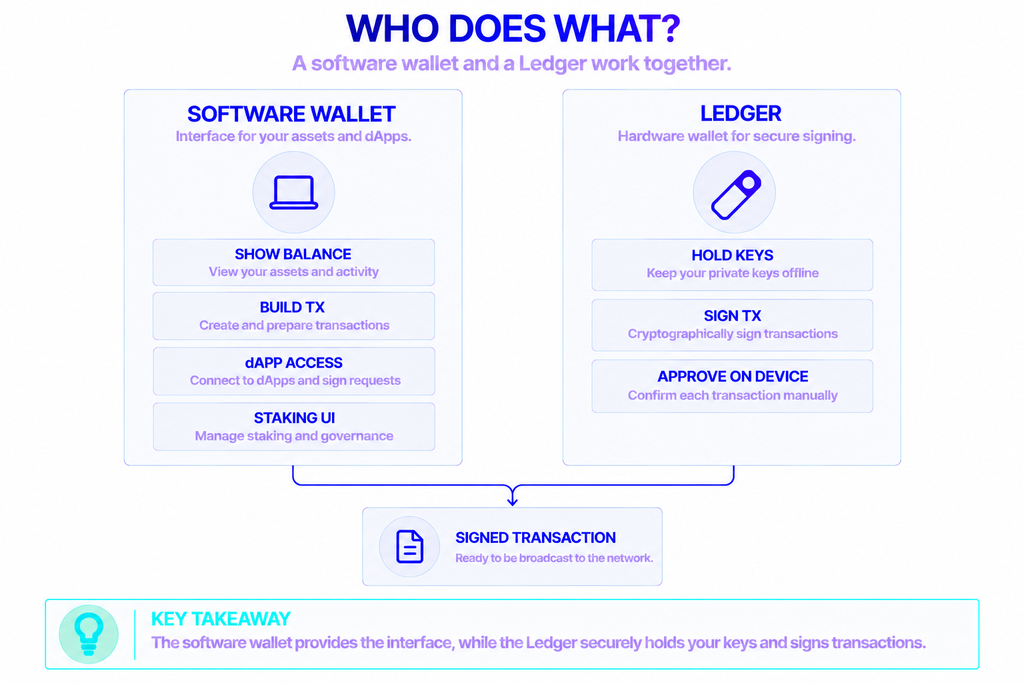
If your priority is pairing a software wallet with a Ledger Nano, Nova Wallet, Talisman, and SubWallet all support it. Each uses the Ledger as a signing device: the interface lives in the app, but transactions are approved on the hardware, so your keys stay on the Nano.
Here’s the practical difference between them:
- Nova Wallet — best if you’re mobile-first and stake often. It supports Ledger Nano X alongside Stax and Flex, with staking built in.
- Talisman — best if you work from a desktop browser and use both Polkadot and Ethereum apps.
- SubWallet — best if you hold assets across many chains and want one extension for all of them.
You can also skip a third-party front-end entirely and manage DOT through Ledger Live, which handles storage and staking on its own. The third-party wallets add richer dApp, governance, and parachain features on top of the same hardware security.
How to Choose the Best Polkadot Wallet
There’s no single best wallet — there’s the best wallet for how you use DOT. Four questions narrow it down fast.
What’s your main activity? For passive holding, a hardware wallet wins. For active staking and governance, a feature-rich hot wallet like Nova or SubWallet makes daily use easier.
How large is your balance? The more you hold, the stronger the case for cold storage. A common setup is a hardware device for the bulk of your DOT plus a hot wallet with a small balance for everyday transactions.
Mobile or desktop? Nova and Polkawallet are mobile-first. Talisman is desktop-only. SubWallet covers both and syncs between them.
How much control do you want over security? Non-custodial wallets put you fully in charge, which means guarding your recovery phrase matters more than any feature list. Write it down, store it offline, and never enter it into a website.
Is There a Difference for UK Users?
Polkadot wallets are non-custodial software, so the same apps work in the UK as everywhere else — there’s no separate “best Polkadot wallet UK” app. What differs is the on-ramp. If you want to buy DOT with GBP, that happens through an exchange or a wallet’s built-in fiat on-ramp provider, which has to support UK customers and comply with local rules. The wallet itself is the same worldwide; just check that your chosen funding method covers the UK before you buy.
Running Your Own Polkadot Connection
Every wallet here reaches Polkadot through a network endpoint. Most default to public infrastructure, which is fine for casual use but can slow down or rate-limit under heavy load.
Developers building wallets, dApps, or trading tools often want faster, more reliable access than shared public endpoints provide. That’s where dedicated infrastructure helps. NOWNodes offers access to Polkadot and 120+ other networks through a single API, so a project can connect to the chain without running its own validators. You can browse the full blockchain list to see what’s covered.
For an everyday holder, this is invisible — your wallet handles it. For anyone building on Polkadot, reliable endpoint access is the difference between an app that stays responsive and one that stalls when traffic spikes.
Conclusion
The best Polkadot wallet in 2026 comes down to fit. Nova Wallet leads for mobile users and stakers, Talisman is the cleanest desktop extension, and SubWallet covers the widest multi-chain ground. For serious long-term holdings, a Ledger device — on its own or paired with one of those apps — remains the safest choice, with Polkadot Vault as a free air-gapped alternative.
Match the wallet to your actual use, keep your recovery phrase offline, and favor wallets with active development and responsive support. The right setup is the one you’ll use safely, not the one with the longest feature list.
FAQ
Is Polkadot supported on Trust Wallet?
Yes. Trust Wallet supports DOT storage and sending, and it integrates with Ledger hardware. It isn’t a native Polkadot wallet, though, so it skips features like nomination pools and governance voting — for those, use a Polkadot-native wallet.
What is the minimum amount of DOT needed for a wallet?
There’s no minimum to hold DOT in a compatible wallet; you can store a fraction of a token. Keep a small amount of spare DOT on hand to cover transaction fees. Staking directly as a nominator has carried higher thresholds in the past, which is why nomination pools exist — they let you stake much smaller amounts.
Are Polkadot wallets free?
The software wallets in this guide — Nova, Talisman, SubWallet, Polkadot Vault, and Polkawallet — are free to download and use. You only pay network transaction fees. Hardware wallets like Ledger cost money, since they’re physical devices you buy.
Can one wallet hold DOT and tokens from other chains?
Yes. SubWallet and Talisman both manage assets across 150+ networks, including Ethereum and EVM chains, from a single wallet. Nova Wallet also supports parachain assets and multiple ecosystems. This is useful if you’d rather not run a separate app for every chain.
What happens if I lose my phone or hardware wallet?
Your funds are safe as long as you have your recovery phrase. Because these wallets are non-custodial, you restore your account on a new device by entering that phrase. Without it, lost access is permanent — no company can recover it for you. Back it up offline and store it somewhere secure.