

There is no single best wallet for Hyperliquid that fits every user. The right pick depends on how you trade, whether you touch HyperEVM, and how much you care about keeping keys offline. For most people trading perps on the Hyperliquid app, an EVM wallet like Rabby or MetaMask is enough. If you trade from your phone, Phantom now connects to Hyperliquid directly, and if you’re protecting a large balance, a hardware wallet belongs underneath whatever you use.
This guide compares the main options, explains what a wallet actually does when it talks to Hyperliquid, and walks through connecting and funding an account.
What Does a Wallet Do on Hyperliquid?
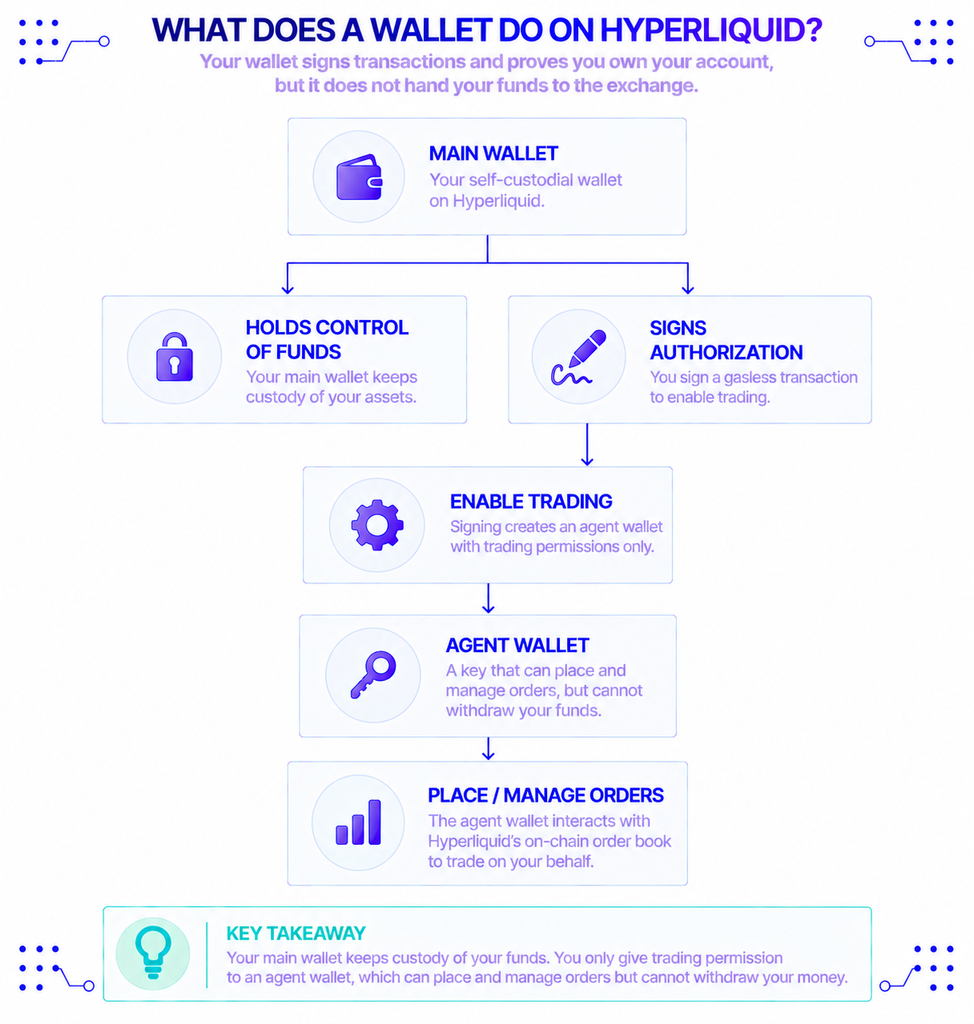
A wallet on Hyperliquid signs your transactions and proves you own your account. It does not hand your funds to the exchange.
Hyperliquid is a decentralized exchange for perpetual futures, built on its own layer-1 blockchain. A perpetual future, or “perp,” is a derivative that tracks an asset’s price with no expiry date. The chain has two parts: HyperCore, the on-chain order book and matching engine, and HyperEVM, an Ethereum-compatible layer where smart contracts run. Hyperliquid has become the leading on-chain venue for this kind of trading — it processed more than $1.57 trillion in perpetual futures volume in the year to mid-2025, according to The Block.
Your wallet connects to the trading interface and signs messages. When you click “Enable Trading,” you sign a gasless transaction that creates an agent wallet — a key that can place and manage orders but cannot withdraw your money, per Hyperliquid’s docs. Your main wallet keeps custody. The agent only holds trading permission.
That design matters for how you pick a wallet. Since the exchange never takes custody, the weak point is you signing the wrong thing, which is where wallet behavior starts to count.
Why Your Wallet Choice Matters
The wallet you use changes how safely you sign, which networks you can reach, and how easily you move money in and out.
Signing is the first factor. A wallet that shows a readable preview of each transaction lets you catch a malicious signature before it goes through, while a wallet that only shows raw data leaves you guessing. Network coverage is the second. Trading on the Hyperliquid app works with most EVM wallets, but holding HyperEVM tokens or using its apps means your wallet has to support chain ID 999.
Key storage is the last one, and it’s the biggest. A browser extension keeps your private keys on your computer, where malware can reach them. A hardware wallet keeps them on a separate device that signs offline. For a small trading balance the difference is minor; for a serious position, it’s the whole point.
Who Needs Which Kind of Wallet?
Match the wallet to how you actually use Hyperliquid, not to a leaderboard.
- Active perps traders on desktop: Rabby or MetaMask, connected straight to the Hyperliquid app.
- Mobile traders: Phantom, which now runs Hyperliquid perps natively, or a Hyperliquid-focused trading app.
- HyperEVM and DeFi users: a wallet that supports chain ID 999 out of the box, or one that accepts a custom network.
- Large or long-term holders: a hardware wallet paired with an extension, so keys stay offline.
- Builders: not a consumer wallet at all, but a reliable endpoint and a throwaway test account.
Most people fall into more than one of these, which is why a hardware wallet plus a good extension covers the widest range.
Which Wallets Work Best With Hyperliquid?
The strongest options in 2026 are Rabby, MetaMask, Phantom, and a hardware wallet used alongside one of them. Here is how they compare before the details.
| Wallet | Type | HyperEVM (chain 999) | Best for | Main trade-off |
|---|---|---|---|---|
| Rabby | Browser + mobile | Built in | DeFi users who want clear signing | Smaller ecosystem than MetaMask |
| MetaMask | Browser + mobile | Add manually | The default EVM experience | You configure the network yourself |
| Phantom | Mobile + browser | Native perps integration | Mobile and Solana users | Perps availability varies by region |
| Ledger | Hardware | Via MetaMask or Rabby | Securing large balances | Costs money, slower to sign |
| Dexari / Based | Mobile app | Hyperliquid-focused | Trading on the go | Narrower than a general wallet |
Rabby
Rabby is an open-source EVM wallet from the DeBank team, and Hyperliquid’s own documentation points to it. It treats HyperEVM as a built-in network, so there’s nothing to add by hand. Before you approve anything, Rabby simulates the transaction and shows what will change in your account, which is a real defense against a draining signature. The catch is a smaller user base and fewer third-party integrations than MetaMask.
MetaMask
MetaMask is the most widely supported EVM wallet, and it connects to the Hyperliquid app with no setup. To use HyperEVM, you add it as a custom network (chain ID 999, RPC https://rpc.hyperliquid.xyz/evm) or import it in one click from Chainlist. It also pairs with Ledger and Trezor, so you can keep keys on hardware while using a familiar interface. The downside is that it shows less about each signature than Rabby does, so you carry more of the checking yourself.
Phantom
Phantom started as a Solana wallet and now works across several chains. In July 2025 it added perpetual trading powered by Hyperliquid, letting you trade perps with up to 40x leverage inside the app while keeping custody of your funds. The rollout began with users in the EU, so whether you see it depends on your region. For someone who trades mostly from a phone, it’s the smoothest way in.
Hardware Wallets (Ledger, Trezor, OneKey)
A hardware wallet keeps your private keys on a physical device and signs transactions offline. You still connect through MetaMask or Rabby, but the signature happens on the device, so malware on your computer cannot move funds on its own. Ledger and Trezor are the common choices; OneKey is an open-source alternative that advertises Hyperliquid support. The cost is convenience, since every signature needs the device in hand.
Mobile-First Hyperliquid Apps
Apps such as Dexari and Based are built specifically around Hyperliquid, with a wallet bundled in. They trade some of the flexibility of a general-purpose wallet for a cleaner trading screen and faster order entry. If Hyperliquid is most of what you do, that focus helps; if you hold assets across many chains, a general wallet is more practical.
How to Connect a Wallet and Fund Your Account
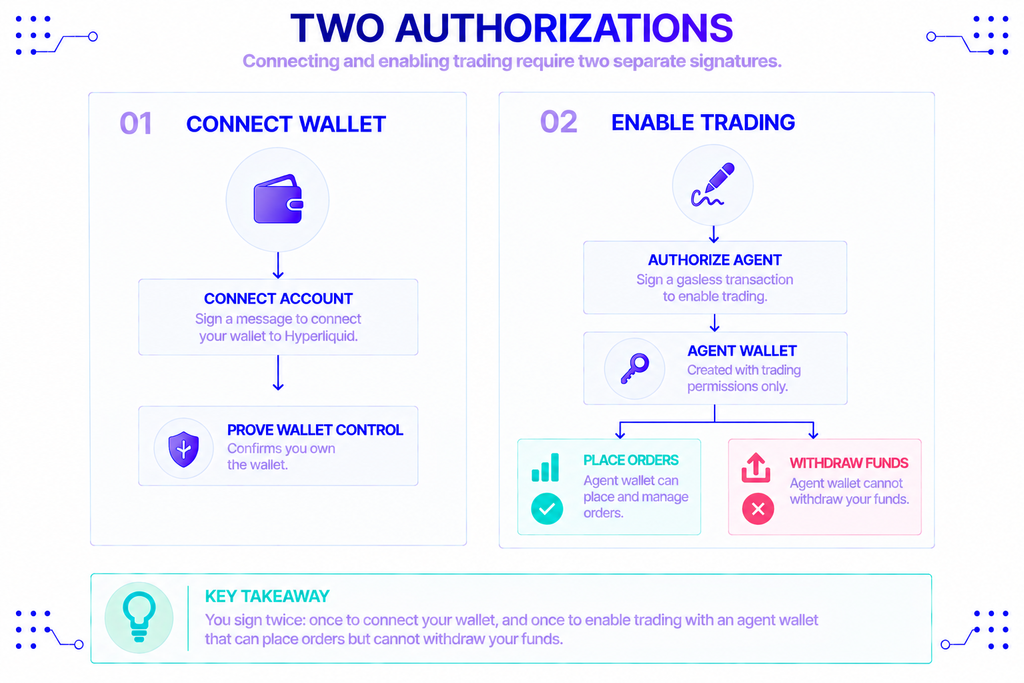
Connecting takes two signatures, and funding means sending USDC to your Hyperliquid deposit address.
- Open the Hyperliquid app, click Connect, choose your wallet, and approve the connection.
- Click Enable Trading and sign the gasless transaction. This creates the agent wallet that signs your orders without touching withdrawals.
- Deposit USDC. Hyperliquid accepts USDC on Arbitrum, Ethereum, Base, and Polygon, routed to your deposit address; cross-chain transfers use Circle’s CCTP. The balance arrives as USDC on HyperCore.
- If your funds sit on a chain Hyperliquid doesn’t take directly, bridge to Arbitrum first, then deposit.
Trading collateral on Hyperliquid is USDC. You can deposit BTC, ETH, or SOL as well, but you’ll convert them to USDC before you can trade with them.
Building on HyperEVM: Network Settings and Infrastructure
To hold HyperEVM tokens or use its apps, your wallet needs the network’s exact settings.
- Network name: Hyperliquid
- Chain ID: 999
- RPC URL:
https://rpc.hyperliquid.xyz/evm - Gas token: HYPE
- Explorers: Hyperscan, Purrsec
If a token doesn’t appear after you switch to HyperEVM, add its contract address by hand, since assets there don’t always auto-detect. The simplest path for most wallets is the one-click import from Chainlist rather than typing the fields in.
An application is a different problem. Anything that reads balances, tracks open positions, or submits orders needs a steady connection to the chain, and a single shared endpoint can rate-limit or fall behind when traffic spikes. One option is to run that infrastructure yourself. Another is to use a provider: NOWNodes gives API access to Hyperliquid through an endpoint (hype.nownodes.io), so a team can query chain data and broadcast transactions without operating a setup of its own. Hyperliquid is one of the networks it covers, and usage scales across its plans.
Security and Risks to Watch
The real risks on Hyperliquid are signing something malicious and landing on a fake site, not the exchange running off with your coins.
- Never share your seed phrase. No wallet, bridge, or support agent needs it, and anyone who asks is trying to drain you.
- Check the URL every time. Phishing clones of trading apps are common. Bookmark the real address and confirm it before you connect.
- Read the signature. The agent-wallet signature is gasless and can’t withdraw funds, but a malicious site can ask you to sign something else entirely. A wallet that previews transactions earns its place here.
- Split your funds. Keep long-term holdings on a hardware wallet and trade from a smaller, separate wallet.
- Treat HyperEVM apps as code. Smart contracts there carry the usual risk, and an audit lowers the odds of a bug without removing them.
The Bottom Line
For most users, the best wallet for Hyperliquid is the one that signs clearly and reaches HyperEVM without friction, which points to Rabby, with MetaMask as the familiar fallback and Phantom for anyone trading on a phone. If you’re protecting a real balance, put a hardware wallet underneath whichever extension you pick, so a compromised computer can’t sign on its own.
Builders work from a different checklist. The wallet matters less than a dependable connection to the chain, and a provider such as NOWNodes covers that side with API access to Hyperliquid, which leaves you free to focus on the application itself.
FAQ
Does Hyperliquid have its own wallet?
No. Hyperliquid is non-custodial and works with standard wallets you already use, plus an email-login option on the official app. The agent wallet it creates when you enable trading is a trading key, not a separate wallet you fund.
Do I need HYPE tokens to use a wallet on Hyperliquid?
For perps trading on HyperCore, no — orders are gasless and settled in USDC. You need HYPE only to pay gas when you transact on HyperEVM, the smart-contract layer of the chain.
Is Rabby or MetaMask better for HyperEVM?
Rabby is simpler because it includes HyperEVM as a built-in network and previews each signature. MetaMask works just as well once you add the network (chain ID 999) yourself. Both are safe as long as you download them from their official sites.
Can I use a hardware wallet with Hyperliquid?
Yes. Connect a Ledger, Trezor, or OneKey through MetaMask or Rabby, and the signing happens on the device instead of your computer. This is the recommended setup for large or long-term balances.
Does the wallet I choose change my trading fees?
No. Fees on Hyperliquid are set by the protocol, not the wallet. Your choice affects security and convenience, not the cost of a trade.