
A Base blockchain explorer is a search tool that lets you look up any transaction, wallet, or smart contract on Base, Coinbase’s Ethereum layer-2 network, and see exactly what happened on-chain. The default one is BaseScan, built by the Etherscan team, but it isn’t the only option. This guide covers what a Base explorer actually does, how BaseScan compares to alternatives like Blockscout and Routescan, and how to read what you find.
What Is a Base Block Explorer?
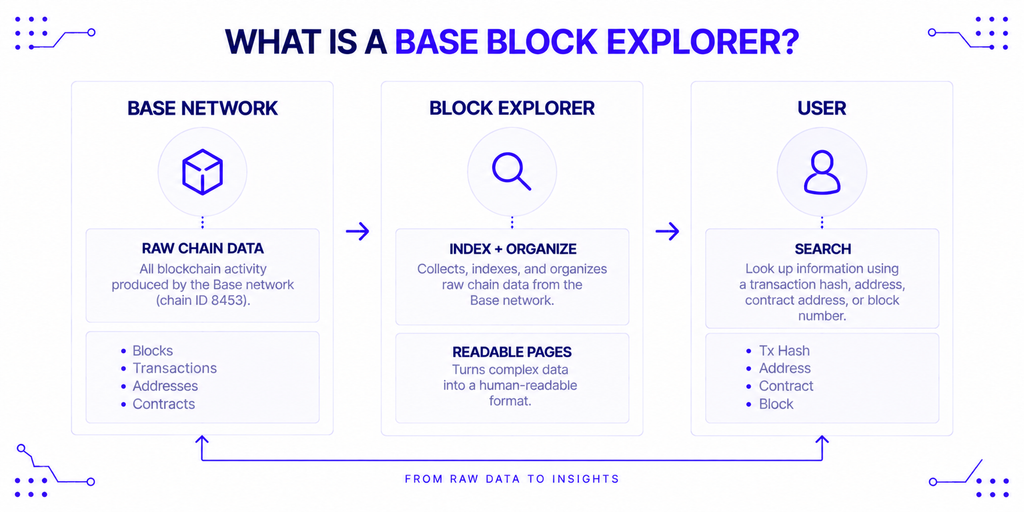
A block explorer is a search engine for blockchain data. Instead of querying a node directly with raw RPC calls, you type in a transaction hash, wallet address, or contract address, and the explorer returns a readable page showing what actually happened.
For Base specifically, that means pulling data from the Base chain — identified by chain ID 8453 — and presenting it as blocks, transactions, token transfers, and verified contract code. Base produces a new block roughly every 2 seconds, so an explorer is also the easiest way to watch that activity without running your own infrastructure. If the concept is new to you, NOWNodes’ plain-language explainer on block explorers covers the basics that apply to any chain, not just Base.
Why You Need One to Use Base
Crypto assets don’t live in your wallet app; they live on-chain, and a wallet only shows you its own interpretation of that data. If a transaction fails, gets stuck, or simply looks wrong, the explorer is the one place you can check the actual record independent of any single app’s interface.
This matters more on an L2 than it sounds. Base processed more than 7.48 billion transactions since its August 2023 launch, and a single day now sees roughly 545,000 transactions in a one-hour window alone, according to Chainspect’s live tracker. At that volume, “my wallet says it failed” and “it actually failed on-chain” are not always the same statement, and an explorer is how you tell them apart.
Who Actually Uses BaseScan and Similar Tools
Different people reach for a Base explorer for different reasons, but they all boil down to verification.
- Everyday users check whether a deposit, swap, or bridge transaction went through, and how much they paid in gas.
- Developers read verified contract source code, decode function calls, and debug why a transaction reverted.
- Traders and researchers look up a token’s contract address to confirm it’s legitimate before interacting with it, rather than trusting a link from social media.
- Security-conscious users double-check a contract address against the official source before signing anything.
A trader spot-checking a token and a developer tracing a failed contract call are both “using a Base explorer,” but they’re pulling very different data out of the same tool.
BaseScan: Base’s Default Explorer
BaseScan is what Coinbase Wallet and Base’s own documentation link to by default, which makes it the closest thing Base has to an official explorer, even though it’s operated separately by the Etherscan team. It launched alongside Base in August 2023 and has tracked the network since.
What You Can Do on BaseScan
Beyond basic transaction and address lookups, BaseScan supports contract verification for Solidity (single-file, multi-file, and standard JSON input) and Vyper contracts, plus imports from Sourcify. Once a contract is verified, anyone can read its source code, call its public functions directly from the browser, and see decoded event logs instead of raw hex data.
Its free API tier allows 100,000 calls a day at 3 requests per second, which is enough for a small dApp or a personal script. Since late 2024, BaseScan has also been part of Etherscan’s unified API v2, which covers 50+ EVM chains through a single API key — useful if your product touches Base alongside Ethereum, Arbitrum, or another Etherscan-family chain.
How to Verify a Contract on BaseScan
- Deploy your contract and note the deployed address.
- Go to the contract’s page on BaseScan and open the “Verify and Publish” tab.
- Select the compiler version and optimization settings that match your deployment.
- Paste your source code (or upload the standard JSON input) and submit.
- Once verified, BaseScan compiles your code and compares the bytecode against what’s on-chain.
Skipping this step doesn’t stop your contract from working, but it does stop anyone else from reading what it does before they interact with it — which is exactly the kind of transparency an explorer exists to provide.
Alternatives to BaseScan
BaseScan being the default doesn’t make it the only reasonable choice. The right pick depends on whether you need self-hosting, multi-chain coverage, or OP Stack-specific data that BaseScan doesn’t surface as directly.
| Explorer | Best for | Notable trade-off |
|---|---|---|
| BaseScan | Default lookups, contract verification, most tutorials assume it | Free API capped at 3 req/sec; paid tiers start at $49/month |
| Blockscout | Open-source deployments, self-hosting, deep OP Stack detail | Requires more setup to run yourself; UI is less polished than BaseScan’s |
| Routescan | Products spanning Base and 160+ other EVM chains | Built for multi-chain scale, which is overkill for a Base-only app |
Blockscout is fully open source under GPLv3 and can be self-hosted, which matters for teams that don’t want to depend on a third party for their own product’s explorer. It also indexes L1-to-L2 bridge deposits and withdrawals natively, which is genuinely useful on an OP Stack chain like Base where bridging is a core user flow. Routescan takes a different angle: it’s Etherscan-API-compatible but spans over 160 EVM networks under one key, which pays off if Base is one of several chains your product supports rather than the only one.
None of these is objectively “better” in isolation. A solo developer verifying one contract has no reason to self-host Blockscout, and a team running infrastructure across a dozen chains has little use for BaseScan’s Base-only view.
How to Read a Transaction on BaseScan or Blockscout
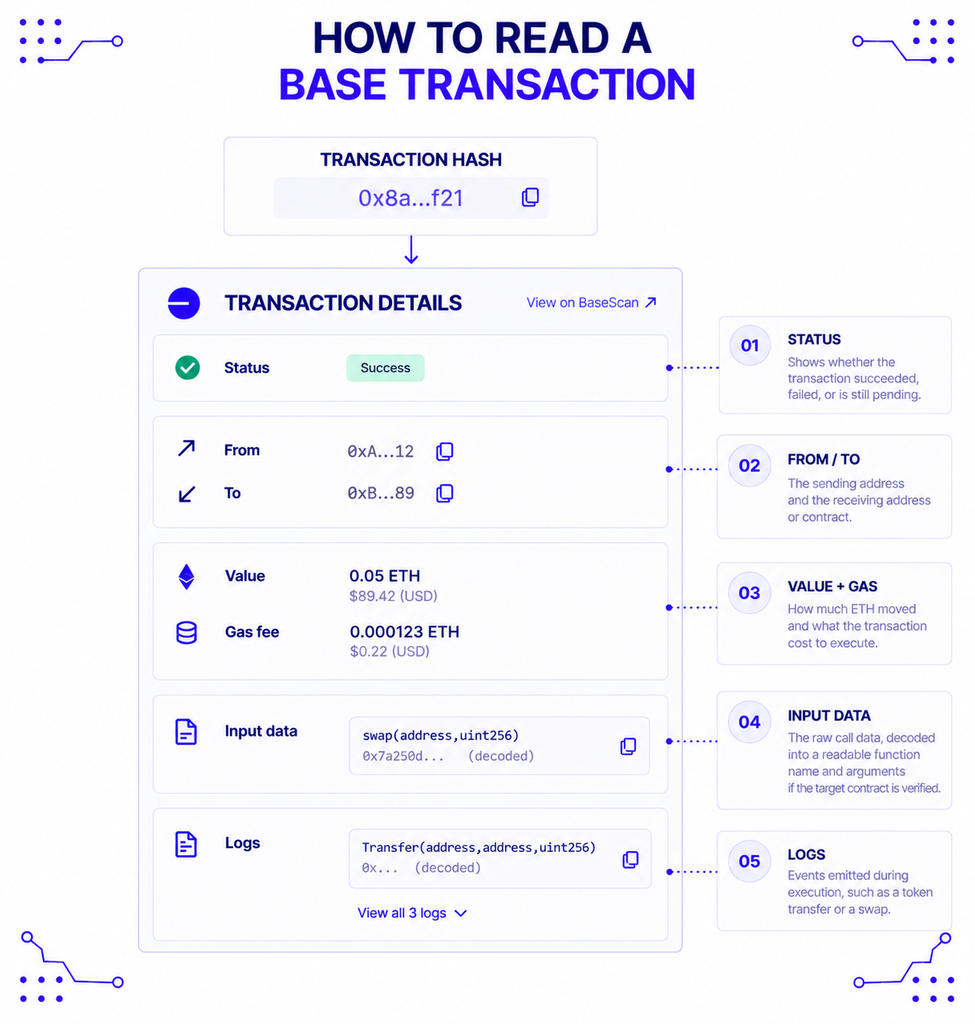
Once you’ve pasted a transaction hash into any of the explorers above, the result page follows a similar pattern:
- Status — confirms whether the transaction succeeded, failed, or is still pending.
- From / To — the sending address and the receiving address or contract.
- Value and gas fee — how much ETH moved and what the transaction cost to execute.
- Input data — the raw call data, decoded into a readable function name and arguments if the target contract is verified.
- Logs — events emitted during execution, such as a token transfer or a swap.
A failed transaction still shows up with a status of “Fail,” along with a reason string if the contract provided one — which is usually the fastest way to figure out why something didn’t go through, faster than guessing from a wallet’s generic error message.
How Base’s Explorer Differs From Ethereum’s
Because Base is an OP Stack optimistic rollup rather than Ethereum itself, its explorers surface a few things Etherscan doesn’t need to. Base blocks arrive on a 2-second cycle, but the network also runs a preconfirmation layer called Flashblocks that produces sub-blocks every 200 milliseconds, which is why activity on Base can appear to confirm almost instantly even though final settlement takes longer.
That settlement gap is the part worth understanding. Base transactions typically reach full finality — the point where they’re settled on Ethereum and effectively irreversible — in around 13 minutes, according to Chainspect. A Base explorer that supports L1-to-L2 tracking will show both states: the fast L2 confirmation and the slower point where that transaction is actually anchored to Ethereum.
Decentralization is the other place Base explorers matter more than people expect. Base currently runs a centralized sequencer, though it reached L2Beat’s Stage 1 maturity rating with a security council structure in place. Jesse Pollak, the Coinbase executive who leads Base, addressed this directly in an interview with Fortune’s Crypto Playbook: “We don’t want to re-create the old systems with new tech. From day one, we’ve focused on decentralization. Not just talk — we’ve taken real steps.” An explorer is how anyone can independently check that claim against the actual chain, rather than taking a company’s word for it.
Where the Explorer Data Actually Comes From
Every block explorer, BaseScan included, is built on top of node infrastructure that reads and indexes the chain in the first place. An explorer doesn’t generate data; it queries a node (or a cluster of them) constantly and organizes what comes back into a searchable interface.
This is also the layer developers touch directly when they’re not just browsing an explorer but building something on top of Base. NOWNodes provides RPC, WebSocket, and archive access to Base, so a team building a wallet, a bot, or its own lightweight Base explorer can query on-chain data without running and syncing a Base node itself. For anyone specifically building explorer-style features — balances, transaction history, address activity — NOWNodes’ Blockbook API exposes that data through a single indexed endpoint instead of requiring a custom indexer.
Understanding how RPC nodes work makes the relationship clearer: a public explorer like BaseScan is essentially a polished front end sitting on infrastructure that’s conceptually the same as what any developer can access directly through a provider. NOWNodes’ guide on running a Base full node walks through what that underlying infrastructure actually involves, for anyone curious what BaseScan is querying behind the scenes.
Limitations to Keep in Mind
A block explorer shows you what’s on-chain, but it isn’t the chain itself, and that distinction matters in a couple of ways. First, the explorer’s own indexing can lag by a block or two during high load, so a transaction that’s already confirmed might take a few extra seconds to appear.
Second, explorers display metadata — token names, project tags, “verified” badges — that comes from off-chain sources or self-reported submissions, not from the protocol itself. A token showing a familiar name and logo isn’t automatically the real project; always cross-check a contract address against an official source, such as Base’s own documentation, before interacting with it. And because BaseScan and similar tools are run by third parties, an outage on their end doesn’t mean Base itself is down — it just means that particular window into the chain is temporarily unavailable.
Conclusion
BaseScan is the right starting point for almost anyone working with Base: it’s the default, it’s what documentation and wallets link to, and its contract verification covers the common cases. Reach for Blockscout when you need to self-host or want deeper OP Stack-native bridge tracking, and consider Routescan when Base is one chain among many in a broader multi-chain product. Whichever you use, the explorer’s real job is the same — giving you an independent, verifiable view of what actually happened on-chain, separate from any single wallet or app’s interpretation of it.
FAQ
What’s the difference between BaseScan and Etherscan?
Etherscan is Ethereum’s explorer; BaseScan is the equivalent for Base, built and operated by the same team. They’re separate products with separate data, though both are now accessible through Etherscan’s unified multichain API using a single key.
Can I use these tools to recover a lost or stuck transaction?
No. A block explorer only lets you view transaction status and details — it can’t cancel, speed up, or reverse anything. To resolve a stuck transaction, you typically need to resubmit it from your wallet with a higher gas fee, using the same nonce.
Is it safe to interact with a contract directly through BaseScan’s “Write Contract” feature?
It’s technically possible once a contract is verified, but it bypasses your wallet’s normal transaction preview. Most users are better off interacting through a proper dApp interface and using the explorer only to verify the contract address beforehand.
Do these tools show pending transactions before they’re confirmed?
Yes, transactions typically appear as “pending” once they reach the network, before showing a final success or fail status. Given Base’s roughly 2-second block time, that pending window is usually brief compared to Ethereum mainnet.