
A DigiByte explorer is a website that lets you look up any block, transaction, or address on the DigiByte network and see what happened, without running a node yourself. Paste in a transaction ID and it shows whether the payment confirmed, how many blocks sit on top of it, and where the coins went. NOWNodes, DigiExplorer, CryptoID, Blockchair, and the official DigiByte stats dashboard all cover DGB, and each suits a different job.
DigiByte adds a block every 15 seconds and secures the chain with five mining algorithms, according to DigiByte’s official site. That pace makes a DigiByte explorer more useful than on slower chains: a payment can go from sent to confirmed in about the time it takes to open a lookup page. This guide covers what an explorer shows, who relies on one, what is unusual about DGB data, and how the main tools compare.
What Is a Block Explorer for DGB?
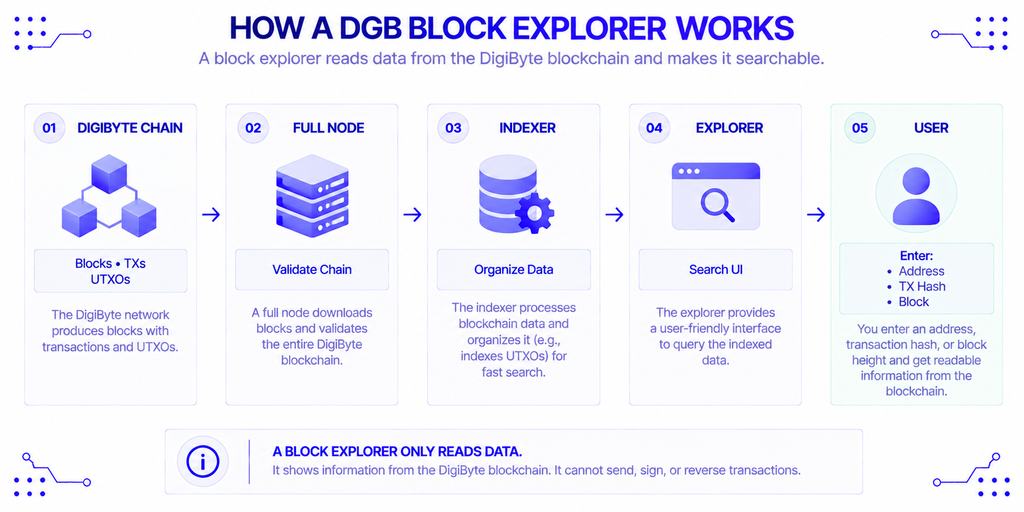
A block explorer for DGB is a search interface built on an indexed copy of the DigiByte blockchain. You enter a block height, a transaction hash, or an address, and it returns the matching records in a readable layout. It only reads the chain. It cannot send, sign, or reverse anything.
Behind the search bar sits a full node plus an indexer. The node validates blocks, and the indexer reorganizes that data so a question like “what is this address holding?” returns instantly instead of forcing a scan of the whole ledger. That matters because DigiByte is a UTXO chain, like Bitcoin: a balance is the sum of unspent outputs, not one stored number (UTXO vs account model).
The network launched in January 2014 with a cap of 21 billion DGB, and the block reward shrinks by about 1% every month, per the DigiByte Core README. Every one of those rewards, and every transfer since, is visible to anyone with a DigiByte explorer.
Why Do You Need a Block Explorer for DGB?
You need one to verify. A wallet tells you what it believes happened; an explorer shows what the network recorded. When a deposit doesn’t arrive, that difference is the whole diagnosis.
Three situations come up most often:
- A missing deposit. The transaction ID shows whether the coins were broadcast, confirmed, or never sent.
- A pending payment. Zero confirmations means the transaction is still in the mempool, the network’s waiting room for unconfirmed transfers.
- An audit. Anyone can check that a project’s treasury address holds what it claims, or trace how funds moved between wallets.
That last point ties into how DigiByte describes itself. Founder Jared Tate put it bluntly in a 2019 interview with Cointelegraph: “There is no budget to cut or employees to fire. The network runs itself” (Cointelegraph). A chain with no central operator has no support desk to ask, so the public ledger, read through a DigiByte explorer, is the source of truth.
Who Uses a DGB Block Explorer?
The audience runs from someone checking one payment to teams reconciling thousands of them. Typical users of a DigiByte explorer include:
- Holders and traders confirming a send or a deposit to an exchange.
- Merchants watching an address for an incoming payment before releasing goods.
- Miners checking which algorithm found recent blocks and how difficulty is moving.
- Developers testing wallet or payment code against real transaction data.
- Analysts studying rich lists, address activity, and supply distribution.
A merchant and an exchange both use a DigiByte explorer, but they need different things. The merchant wants a fast page and a clear confirmation count. The exchange needs an API it can query on a schedule, which is where the comparison later in this guide gets practical.
What Makes DigiByte Data Different to Read?
DigiByte follows Bitcoin’s transaction model but changes several things an explorer displays. Knowing them saves confusion the first time you open a block page.
Five Algorithms, One Chain
DigiByte’s blocks are mined by five algorithms: SHA-256, Scrypt, Skein, Qubit, and Odocrypt. Each one aims for a 20% share of blocks, and each carries its own difficulty, retargeted after every block (Guarda Academy). Difficulty on a single-algorithm chain moves slowly. Here it can shift block by block, so a difficulty chart looks busier than you might expect.
The official DigiByte stats dashboard, which was created by Tate, tracks hashrate and mining algorithms alongside nodes and supply. That makes it the natural place for network-level questions, while address and transaction lookups belong to a full DigiByte explorer.
Three Address Formats
DGB addresses come in three visible flavors, and an explorer accepts all of them:
| Prefix | Type | What to know |
|---|---|---|
D | Legacy | Original format, widest wallet support |
S | SegWit-era script address | Used for multi-signature and wrapped setups |
dgb1 | Bech32 (native SegWit) | Lowercase only, roughly 25% smaller transactions |
Prefixes come from the DigiByte Core technical specifications. The 25% saving is DigiByte developer Josiah Spackman’s estimate in his write-up on Bech32, and a side benefit is error detection: a wallet can flag a mistyped character before you send.
DigiAssets on the Ledger
DigiByte also supports DigiAssets, which are on-chain tokens for things like deeds, tickets, and collectibles. A general-purpose DigiByte explorer generally shows the underlying DGB transaction, not the decoded asset. For that, the open-source DigiAssets Block Explorer parses asset data, though it needs its own server and database.
Which Block Explorers Are Worth Using for DGB in 2026?
Five tools cover most needs. The table lines them up by the job they do best.
| Explorer | Best for | Standout feature |
|---|---|---|
| NOWNodes | Developers who want lookups and an API on one backend | Free Blockbook-based explorer, same indexer as the API |
| DigiExplorer | Quick manual lookups and testing | Separate mainnet and testnet sites |
| CryptoID (Chainz) | Address analytics | Free API with rich-list and balance queries |
| Blockchair | Comparing DGB with other chains | Multi-chain search plus API |
| DigiByte.io stats | Network health | Hashrate, algorithms, node distribution, supply |
Features change, so treat this as a starting point and confirm on each site. Every one of these tools is free to use for lookups, and the differences show up mostly in API access and depth.
NOWNodes
NOWNodes runs a DigiByte block explorer that displays the current best block height, mempool size, and sync status. It sits on the same Blockbook indexer that serves the API, so what you see in the browser is what an application would get back programmatically. The limit is scope: it covers DGB mainnet only.
DigiExplorer
DigiExplorer is a dedicated DGB browser with a recent-blocks view, and it runs a separate testnet instance. The split is useful, because testnet coins carry no value and mixing the two networks is an easy mistake to make. It suits manual checking better than automation.
CryptoID (Chainz)
CryptoID has run explorers for many chains for years. Its free API covers balances, rich-list rank, and block and transaction queries, with a request of one call every 10 seconds. Without a free key, balance data can lag by up to six hours, so anything time-sensitive needs the key.
Blockchair
Blockchair is a multi-chain explorer with API support, so it fits analysts who compare DigiByte against Bitcoin or Litecoin from one interface. The trade-off is that a general tool won’t go as deep on DGB-specific data as a chain-focused one.
How to Look Up a DGB Transaction
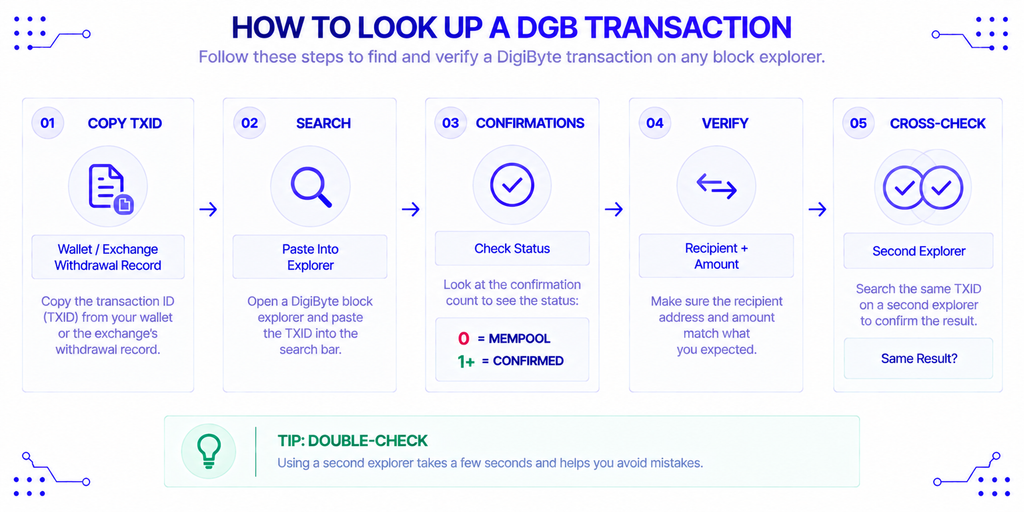
The workflow is the same on every DigiByte explorer:
- Copy the transaction ID from your wallet or the exchange’s withdrawal record.
- Paste it into the search bar. Most tools detect whether it is a transaction, address, or block.
- Read the confirmation count. Zero means it is still in the mempool.
- Check the recipient address and amount against what you expected.
- If the result looks off, repeat the search on a second explorer.
Step 5 is worth the ten seconds. With 15-second blocks, six confirmations take roughly 90 seconds, but exchanges set their own thresholds, so check the deposit page instead of assuming.
How Do You Choose the Right Explorer?
Start from the task, not the interface. A one-off payment check needs nothing more than DigiExplorer or Blockchair. Someone studying holders and address activity gets more from CryptoID’s rich-list data, and a miner watching difficulty and algorithm share belongs on the stats dashboard.
Builders face a different question: where does the data come from once a lookup becomes an application feature? That is an infrastructure decision, and it is worth understanding before you depend on any DigiByte explorer’s API.
Where Do Explorers Get Their DGB Data?
Every DigiByte explorer runs a full node and an indexer over it. You can operate both yourself, though a synced DGB node with an index database takes real disk space and upkeep. The alternative is to query someone else’s.
NOWNodes provides that layer for DigiByte. Its DigiByte node page lists RPC, Blockbook, and WebSocket access plus archive mode, and the free Start plan includes 100,000 API requests. The Blockbook API, currently available on 30+ networks, is the read-optimized interface for balances, transactions, blocks, and address history. It is the same kind of indexed data that explorers display, delivered as JSON for an application to consume.
What Risks and Limits Should You Know?
No single DigiByte explorer is the final word. Indexers occasionally trail the chain tip, so a confirmed transaction can look pending on one site and settled on another. Cross-check before acting on a surprising result.
Never enter a seed phrase or private key into an explorer or a “wallet checker.” Legitimate tools ask only for a public address, transaction ID, or block reference, and anything more is phishing.
Privacy deserves a plain statement too. Addresses and amounts are public, and DigiByte’s Dandelion++ protocol hides the originating IP of a transaction, not the transaction itself (Guarda Academy). Anyone who links your identity to an address can follow its history in any explorer.
Conclusion
A DigiByte explorer turns a fast, multi-algorithm chain into something you can check yourself. Casual users are well served by any free lookup site, analysts get more from CryptoID or Blockchair, and miners should keep the stats dashboard open. Developers should look at what sits behind the explorer, because a service that pairs a public explorer with a documented Blockbook API, as NOWNodes does, lets one data source cover both manual checks and application code.
Whichever tool you pick, verify important payments on two explorers, and never hand over keys. The ledger will tell you what happened.
FAQ
Can a block explorer show who owns a DigiByte address?
No. Addresses are pseudonymous, so an explorer shows balances and history but not names. Ownership becomes visible only if someone publicly links an address to themselves.
How long does a DGB transaction take to confirm?
The network targets one block every 15 seconds, so a first confirmation usually arrives within seconds to a couple of minutes. Delays are more often an indexer lag than a chain problem.
Why does my transaction show as unconfirmed?
It is in the mempool waiting to be included in a block. Wait a minute, refresh, and check a second explorer before assuming something went wrong.
Is there a testnet version for DigiByte?
Yes. DigiExplorer runs a separate testnet site, and testnet DGB has no market value. It exists so developers can test wallets and payment flows without spending real coins.
Do explorers display DigiAssets?
Only partly. Most show the underlying DGB transaction, while decoding the asset itself requires a DigiAssets-aware tool such as the open-source DigiAssets Block Explorer.