
A Nano wallet doesn’t actually store your XNO — it stores the keys that prove the coins are yours and let you move them. Everything else, from your balance to your full transaction record, lives on the network and can be read back at any time. This guide starts with what a Nano wallet is and why the coin works the way it does, then walks up to the exact methods developers use to pull that data into their own software. By the end you’ll know where wallet information comes from, how everyday users read it inside a Nano wallet, and how to query it directly in code.
What an XNO Wallet Actually Stores
Let’s start simple. An XNO wallet is software or hardware that manages one thing: a cryptographic key pair made up of a public address you share and a private key you never do. The coins themselves never sit inside the app — they exist as entries on the ledger, and the wallet just holds the credentials that authorize spending.
That distinction has a very practical payoff. Lose your phone but keep your recovery phrase, and your funds are untouched, because the balance was never on the device to begin with. Restore that phrase in any compatible app and the same account — same address, same history — comes right back.
That’s also why a Nano wallet can be rebuilt on any device without asking a central server for permission. The account lives on a public ledger, so switching apps or recovering a lost phone just means importing the same key and letting the network resupply the balance and history.
Why Nano Storage Works Differently From Bitcoin or Ethereum
Here’s the part that shapes everything else. Nano runs on a block-lattice structure, where every account keeps its own chain instead of sharing one global ledger. When you send XNO, you publish a send block on your chain and the recipient publishes a matching receive block on theirs.
Because each account updates on its own, transfers settle in parallel rather than waiting in a queue behind everyone else. Confirmation usually lands in under a second, and there are no fees — the network reaches agreement through Open Representative Voting (ORV), a balance-weighted vote among representatives instead of energy-hungry mining. Nano’s creator, Colin LeMahieu, summed up the goal in a CCN interview: “Nano is strongly positioned, offering instantaneous and fee-less transactions, something that will always be in demand.”
The design also keeps the footprint remarkably small. Independent sustainability rankings put a single Nano transaction at roughly 0.111 watt-hours — a rounding error next to a proof-of-work transfer. Supply is fixed at 133,248,297 XNO, fully distributed at launch, with no mining, no staking rewards, and no inflation.
Block-lattice: a data structure where each account operates an individual chain and updates it asynchronously, rather than competing for space in one shared blockchain. See the Nano documentation for the full protocol design.
Who Relies on XNO Accounts — and Why
Feeless, sub-second settlement suits a specific crowd. Micropayment and tipping platforms lean on it because sending fractions of a cent only makes sense when no fee eats the payment. People sending money across borders use it to move value in seconds instead of days, without a cut disappearing to intermediaries.
Merchants and point-of-sale tools like it for the same reason card rails struggle with tiny purchases — the cost per transaction is effectively zero. And developers building exchanges, payment processors, or bots read account data constantly, which is exactly where the retrieval methods later in this guide come in. In every one of these cases the Nano wallet is just the front door — the useful part is the information read back from the ledger: who paid, how much, and when.
Types of XNO Wallets and How to Choose One
Before you can read any wallet information, you need somewhere to keep the keys. Options run from quick mobile apps to offline hardware, and the right choice depends on how much you hold and how often you spend. Here’s the short version.
| Wallet type | Examples | Best for |
|---|---|---|
| Mobile | Natrium, Nautilus | Everyday spending and quick access |
| Web / desktop | Nault | Power users, representative changes, Ledger pairing |
| Multi-asset | Cake Wallet, Stack Wallet, Trust Wallet | Holding XNO next to other coins |
| Hardware | Ledger (paired via Nault) | Long-term cold storage |
| Paper | Nano Paper Wallet | Gifts and deep cold storage |
Most of these are non-custodial and open source, meaning you hold the keys and anyone can inspect the code. A simple rule keeps you safe: keep spending money in a mobile app and park larger amounts on hardware you physically control. The community maintains a fuller, up-to-date list on the Nano Hub wallets page, but whichever you pick, the underlying account data is identical — only the interface changes. Backing up matters more than the brand: the recovery phrase, not the app, is what actually restores a Nano wallet, so write it down and keep it offline.
What Data a Nano Account Holds
Every account on the ledger exposes the same consistent set of fields. Knowing them makes the whole retrieval step obvious, and these are the ones that matter most:
- Balance — the confirmed, spendable amount, stored in raw (the smallest unit, where 1 XNO = 10^30 raw).
- Receivable — funds sent to you but not yet claimed by a receive block. This was previously called “pending.”
- Representative — the account you’ve delegated your voting weight to.
- Frontier and block count — the latest block hash on your chain and how many blocks it contains.
- History — the complete send and receive record for the account.
One quirk trips up newcomers. A Nano wallet will show incoming funds as receivable until your app publishes the matching receive block — the money is yours and safe, but it isn’t spendable until that block lands. Nearly every modern wallet does this automatically in the background, so most users never notice.
How to Check XNO Account Details Without Code
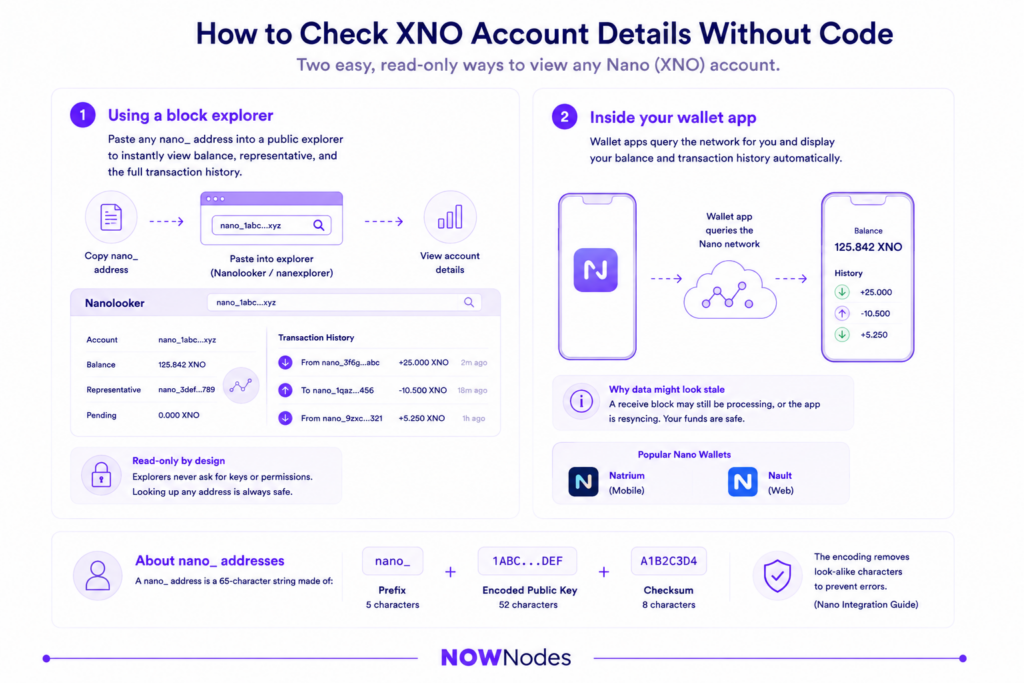
For everyday holders, reading the information in a Nano wallet takes a few seconds and no technical setup at all. There are two easy routes, and both are read-only.
Using a block explorer
Paste any nano_ address into a public explorer such as Nanolooker or nanexplorer, and you’ll instantly see the current balance, the chosen representative, and every transaction on that account chain. Explorers are read-only, so looking up an address — yours or anyone else’s — never exposes a single key.
nano_ address: a 65-character string made of the nano_ prefix, a 52-character encoded public key, and an 8-character checksum. The encoding deliberately drops look-alike characters to prevent transcription errors, as described in the Nano integration guide.
Inside your wallet app
Your wallet already handles this for you. Open Natrium or Nault and the app quietly queries the network, then renders your balance and history on screen. If a figure ever looks stale, it usually means a receive block is still processing or the app is mid-resync — not that anything is lost.
How to Retrieve Account Data Programmatically
This is where the original “retrieving wallet information” question really lives: pulling ledger data into an app, an exchange, or a payment bot. Software never reads the ledger directly. Instead, it sends commands to a full node over HTTP and gets JSON back, and you can either run that node yourself or connect through a hosted endpoint and skip the sync entirely — a route you can set up in a few minutes.
Each request is a small JSON payload with an action field naming the command, sent to the endpoint with your API key in the header. From there, three commands cover almost everything you’ll reach for.
Reading a balance
The account_balance command is the lightest call there is. Hand it an address and it returns the confirmed balance plus any receivable amount.
bash
curl --location 'https://nano.nownodes.io/' \
--header 'api-key: <your-api-key>' \
--header 'Content-Type: application/json' \
--data '{
  "action": "account_balance",
  "account": "nano_1ipx847tk8o46pwxt5qjdbncjqcbwcc1rrmqnkztrfjy5k7z4imsrata9est"
}'
You’ll get back balance and receivable as strings in raw, which your code then converts to XNO for display. The call defaults to confirmed-only results, so you never act on a block the network hasn’t finalized — critical for anything touching real money.
Pulling full account details
When a single number isn’t enough, account_info returns the frontier, open block, representative block, balance, last-modified timestamp, and block count in one response. Set representative, weight, and receivable to true and it also hands back the account’s representative, its voting weight, and its receivable balance.
json
{
  "action": "account_info",
  "account": "nano_3t6k35gi95xu6tergt6p69ck76ogmitsa8mnijtpxm9fkcm736xtoncuohr3",
  "representative": "true",
  "weight": "true",
  "receivable": "true"
}
For production integrations, add "include_confirmed": "true" and read the confirmed_* fields in the reply. Those reflect only blocks the network has already cemented, which is the safe basis for crediting a user or releasing goods.
Getting transaction history
account_history walks the account chain from the newest block backwards. Set count to the number of entries you want, or to -1 to pull everything down to the opening block.
json
{
  "action": "account_history",
  "account": "nano_1ipx847tk8o46pwxt5qjdbncjqcbwcc1rrmqnkztrfjy5k7z4imsrata9est",
  "count": "5"
}
Each entry names the type (send or receive), the counterparty account, the amount, a timestamp, and the block hash. To page through a long record, feed the previous hash from one response into the head parameter of the next call.
Getting live updates instead of polling
Calling account_history on a loop to spot new transactions works, but it’s wasteful. A leaner pattern is to subscribe to confirmation notifications over a WebSocket, so the network pushes a message the instant a block confirms and your Nano wallet or backend updates in real time. For lower-volume setups, an HTTP callback that fires on each confirmation does the same job without holding an open connection.
A word of caution the official docs stress: a couple of these commands can surface unconfirmed blocks, so anything that must be exact should read the confirmed fields. If you’d rather not maintain the infrastructure, a provider like NOWNodes exposes these same commands through one endpoint — its free plan covers 100,000 requests, enough for testing and small projects — with the complete command reference in the XNO documentation.
Keeping Your Keys and Data Safe
A few habits protect your funds and your integrations at once. Never share your seed phrase or private key — no explorer, endpoint, or app needs them to read public account information, and anything that asks for them is trying to drain your account. Reading data only ever requires the public nano_ address.
For anything that moves value, trust confirmed data and nothing else. Because Nano’s read commands can return unconfirmed blocks, exchanges and payment processors should always check the confirmed_* fields before crediting an account. And if you’re holding a meaningful amount, keep it behind a hardware Nano wallet rather than a hot app on a connected phone.
Conclusion
Retrieving Nano wallet information comes down to one idea: the wallet holds the keys, the network holds the data, and a small set of commands reads it back. Everyday users get everything they need from a block explorer or their Nano wallet, while developers reach for account_balance, account_info, and account_history to pull the same facts into their own software.
The block-lattice design that makes those reads fast and feeless is the same thing that keeps Nano practical for real payments. Whether you’re glancing at a balance or wiring up an exchange, the process is the same — start from the public address, trust only confirmed blocks, and keep your keys to yourself.
FAQ
How do I find my Nano wallet address?
Open your wallet app and copy the account address shown on the main screen — it’s the string beginning with nano_. That public address is what you share to receive XNO and what you paste into an explorer to check an account, and sharing it never puts your funds at risk.
How do I find my Nano wallet address?
With a non-custodial wallet, you hold the private key, so only you can move the funds — the tradeoff is that you’re responsible for the backup. A custodial option, such as an exchange account, holds the keys for you, which is convenient but means you’re trusting a third party with your coins.
How do I find my Nano wallet address?
Yes. Multi-asset wallets like Cake Wallet, Stack Wallet, and Trust Wallet let you keep XNO in the same app as Bitcoin, Ethereum, and other coins. Single-asset apps like Natrium focus on Nano only, which some users prefer for simplicity.
How do I find my Nano wallet address?
The most common reason is an unclaimed receive block: an explorer may show funds as receivable that your wallet hasn’t pocketed yet, or one view is simply mid-sync. Once the receive block confirms, both figures line up.
How do I find my Nano wallet address?
No — for a quick manual lookup, a public block explorer is enough and requires nothing. An API key only comes into play when your own software needs to read account data automatically through a node endpoint.