
The fastest way to check a Solana wallet balance is to paste the wallet’s public address into an explorer like Solscan — you’ll see the SOL total and every token in seconds, no login required. But that’s only one of several routes, and the right one depends on whether you’re a curious holder, a trader watching positions, or a developer wiring balance checks into an app. This guide walks through all of them, starting with the two-click method and ending with the API call that powers dashboards and bots. By the end you’ll know exactly which tool fits your situation and how to avoid the small mistakes that trip people up.
What “Checking a SOL Balance” Actually Means
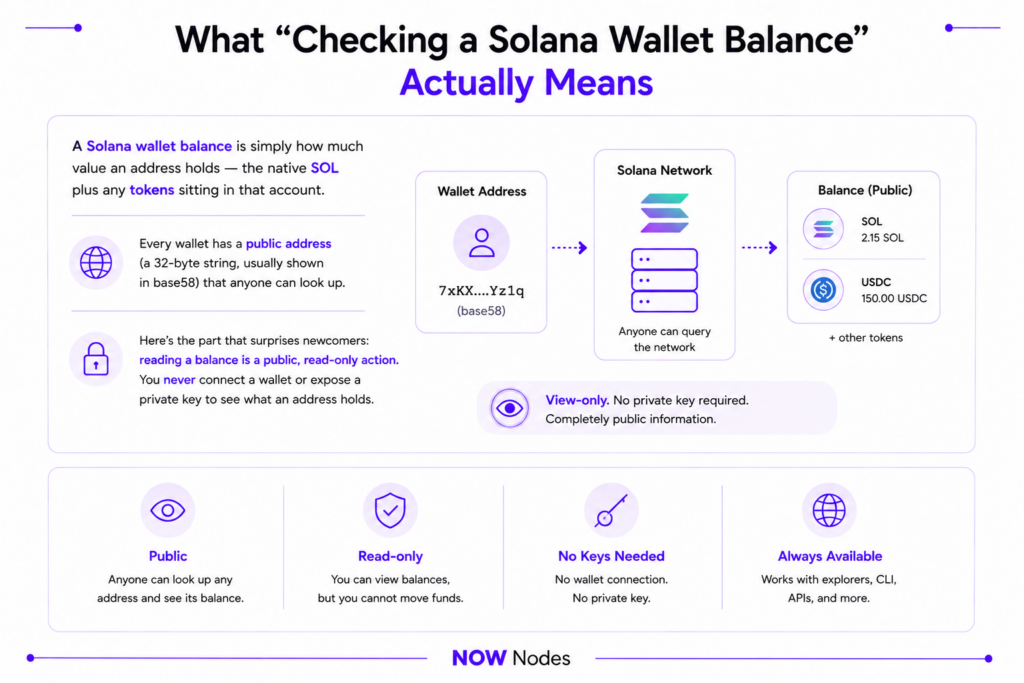
A Solana wallet balance is simply how much value an address holds — the native SOL plus any tokens sitting in that account. Every wallet has a public address (a 32-byte string, usually shown in base58) that anyone can look up. Here’s the part that surprises newcomers: reading a balance is a public, read-only action. You never connect a wallet or expose a private key to see what an address holds.
That’s why explorers work the way they do. They query the network on your behalf and show the result, whether the address is yours or not. All Solana state lives out in the open, which is exactly what makes a quick balance check possible.
SOL, Lamports, and the Numbers That Matter
Before you read a raw balance, you need to know the unit it comes back in. Solana’s smallest unit is the lamport, and one SOL equals exactly 1,000,000,000 lamports (10⁹). The unit is named after Leslie Lamport, the Turing Award–winning computer scientist whose work underpins modern distributed systems.
This is critical because the network reports balances in lamports, not SOL. When you use the raw getBalance API, a result of 1500000000 means 1.5 SOL — you divide by a billion to get the human number. For context, a standard Solana transaction costs a base fee of just 5,000 lamports (0.000005 SOL), which is why micro-transactions are viable here.
Native Balance Versus Token Balance
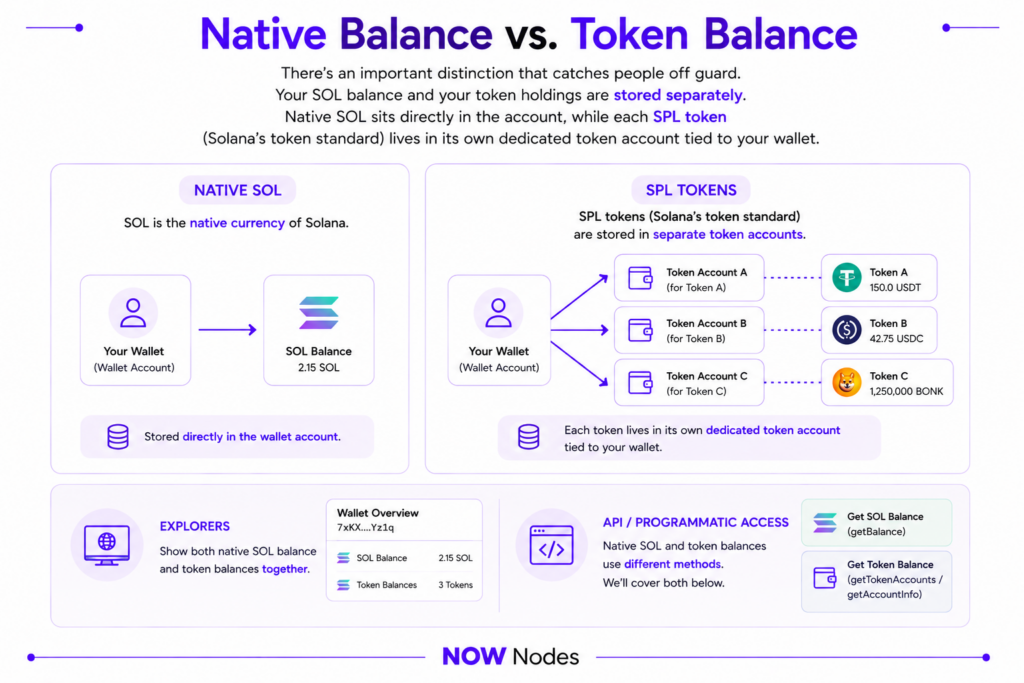
There’s an important distinction that catches people off guard. Your SOL balance and your token holdings are stored separately. Native SOL sits directly in the account, while each SPL token (Solana’s token standard) lives in its own dedicated token account tied to your wallet.
So “checking a balance” can mean two different things. Explorers blur the line by showing both at once, but when you query programmatically, native SOL and token balances use different methods. We’ll cover both below.
Why Check a Wallet Balance?
The obvious reason is peace of mind: confirming a transfer landed, or checking you have enough SOL to cover fees before you act. For everyday users, a SOL balance checker is a five-second sanity check. Miss it, and you risk a failed transaction because the account couldn’t cover its rent or fee.
But the heavier use comes from people doing it thousands of times a day. Traders and bot operators monitor positions in real time. Developers build wallets, payment flows, portfolio trackers, and analytics dashboards that read balances constantly. Auditors and on-chain analysts pull balances across many addresses to follow the money.
That volume is where reliability stops being optional. Reading one balance from a public endpoint is trivial; reading a million is a different problem. As Leslie Lamport famously put it back in 1987, “A distributed system is one in which the failure of a computer you didn’t even know existed can render your own computer unusable.” When your app depends on a shared, rate-limited endpoint you don’t control, that’s the failure mode you’re exposed to — and it’s the reason serious projects move to dedicated access.
5 Ways to Check a SOL Balance
There’s more than one way to check Solana wallet balance data, ordered here from no-code to developer-grade. Pick the one that matches how hands-on you want to be.
| Method | Best for | Code needed | Setup time |
|---|---|---|---|
| Block explorer | Anyone, one-off checks | None | Seconds |
| Wallet app | Your own funds | None | Already installed |
| Solana CLI | Power users, scripting | Command line | ~5 min |
| JavaScript (web3.js / Kit) | App developers | Yes | ~10 min |
| cURL / JSON-RPC | Any language, quick tests | Minimal | ~2 min |
Method 1 — A Block Explorer (The Fastest SOL Balance Checker)
An explorer is the simplest tool there is. Open Solscan, Solana Explorer, or the newer Orb explorer, paste any wallet address into the search bar, and hit enter. The overview shows the SOL balance up top, a full token list below, and recent transaction history.
These tools are free, read-only, and need no account. That makes an explorer the go-to SOL balance checker for a quick look at any address — your own or someone else’s. The only limitation is that it’s manual: great for one wallet, impractical for automating checks across hundreds.
Method 2 — Your Wallet App
If the balance you want is your own, you already have the answer. Wallets like Phantom and Solflare display your SOL and token balances the moment you open them, and they refresh automatically. Here’s why this counts as a “method” worth naming: many people reach for an explorer when their own wallet already shows the number.
The trade-off is scope. A wallet only shows accounts you’ve imported, so it’s no help for looking up an arbitrary address. For that, you’re back to an explorer or the API.
Method 3 — The Solana CLI
Developers and power users often want the balance in a terminal, where it can feed a script. Solana’s official command-line tool does this in one line. Once the Solana CLI is installed, run:
bash
solana balance 83astBRguLMdt2h5U1Tpdq5tjFoJ6noeGwaY3mDLVcri --url https://sol.nownodes.io/YOUR_API_KEYThe --url flag points the CLI at whichever endpoint you want to query. You can use a public cluster URL, but a dedicated endpoint (more on that shortly) is what keeps results fast and consistent when you’re running checks in bulk.
Method 4 — JavaScript With web3.js or Kit
For anything you’re building — a dApp, a tracker, a Telegram bot — JavaScript is the common path. The classic @solana/web3.js library exposes a getBalance method through its Connection class:
javascript
const { Connection, PublicKey, LAMPORTS_PER_SOL } = require("@solana/web3.js");

const connection = new Connection("https://sol.nownodes.io/YOUR_API_KEY");
const address = new PublicKey("83astBRguLMdt2h5U1Tpdq5tjFoJ6noeGwaY3mDLVcri");

(async () => {
  const lamports = await connection.getBalance(address);
  console.log(`Balance: ${lamports / LAMPORTS_PER_SOL} SOL`);
})();
Two things to notice. You wrap the address string in a PublicKey before querying, and you divide the raw lamport result by LAMPORTS_PER_SOL to get a readable SOL figure. Worth knowing for 2026: web3.js 2.0 has been rebranded as @solana/kit, a faster, modular successor. The Connection-based code above still works widely, but new projects are encouraged to adopt Kit.
Method 5 — cURL and a Direct JSON-RPC Call
Sometimes you just want the raw number with no libraries at all. Every method above ultimately calls the same thing: the getBalance JSON-RPC method, which the official Solana docs define as returning “the lamport balance for a single account address at the requested commitment.” You can hit it directly with cURL from any language or terminal:
bash
curl https://sol.nownodes.io/YOUR_API_KEY -X POST -H "Content-Type: application/json" -d '{
  "jsonrpc": "2.0",
  "id": 1,
  "method": "getBalance",
  "params": ["83astBRguLMdt2h5U1Tpdq5tjFoJ6noeGwaY3mDLVcri"]
}'
The response returns the balance in the result.value field, in lamports:
json
{ "jsonrpc": "2.0", "result": { "context": { "slot": 350000000 }, "value": 1500000000 }, "id": 1 }Here, 1500000000 lamports is 1.5 SOL. This approach is language-agnostic and perfect for a fast test or a lightweight backend.
How to Check Balances With NOWNodes
The last three methods all need one thing: an endpoint to send the request to. Public endpoints exist, but they’re shared, rate-limited, and prone to slowing down exactly when traffic spikes. For a one-off check that’s fine. For an app that reads balances continuously, a stale or throttled response means a wrong number on screen or a failed job.
- Sign up at nownodes.io and pick a plan — the free START tier gives you 100,000 requests per month at up to 15 requests per second.
- Open your dashboard and click Add a New Key to generate your API key.
- Use your Solana endpoint —
https://sol.nownodes.io/YOUR_API_KEY— dropping the key into the URL, or passing it as anapi-keyheader againsthttps://sol.nownodes.io. - Plug it into any method above — the
--urlflag in the CLI, theConnectionstring in JavaScript, or the cURL target.
Because every route uses the same getBalance method under the hood, you only swap the endpoint — no rewrite required.
Checking SPL Token Balances
Native SOL is only half the picture. If a wallet holds USDC, a memecoin, or any other token, those balances live in separate SPL token accounts — and they need their own methods.
To list every token a wallet holds, use getTokenAccountsByOwner, passing the owner address and the SPL Token program ID (TokenkegQfeZyiNwAJbNbGKPFXCWuBvf9Ss623VQ5DA):
bash
curl https://sol.nownodes.io/YOUR_API_KEY -X POST -H "Content-Type: application/json" -d '{
  "jsonrpc": "2.0",
  "id": 1,
  "method": "getTokenAccountsByOwner",
  "params": [
    "OWNER_ADDRESS",
    { "programId": "TokenkegQfeZyiNwAJbNbGKPFXCWuBvf9Ss623VQ5DA" },
    { "encoding": "jsonParsed" }
  ]
}'
If you already know the specific token account you care about, getTokenAccountBalance returns just that one balance — complete with the raw amount, the decimals, and a ready-to-read uiAmount. That’s the cleaner call when you’re tracking a single asset rather than a whole portfolio.
Common Mistakes to Avoid
A few small errors account for most confused balance checks. Knowing them upfront saves a lot of head-scratching.
The most common is forgetting the lamports-to-SOL conversion — seeing 2000000000 and panicking before realizing it’s just 2 SOL. Next is querying the wrong cluster: an address can hold different balances on mainnet, devnet, and testnet, so a “missing” balance is often just a wrong endpoint. Finally, remember that staked SOL and the rent-exempt minimum aren’t spendable balance. The Solana documentation notes that “every account must hold a minimum lamport balance proportional to its data size to remain onchain,” so a small slice of any balance is effectively reserved.
Conclusion
You now have five reliable ways to check a Solana wallet balance, from the two-click explorer to a raw getBalance call. For a quick look, an explorer or your wallet app is all you need. For anything you’re building or automating, the CLI, JavaScript, and cURL methods give you the same data programmatically — and they all lean on a single endpoint to do it.
That endpoint is the piece that decides whether your balance checks stay fast and accurate under load. If you’re moving past one-off lookups into real usage, NOWNodes gives you dedicated Solana access with a free tier to start, so the number you read is the number that’s actually onchain.
FAQ
How do I check a SOL wallet balance for free?
Paste the wallet’s public address into a free explorer like Solscan or Solana Explorer. You’ll see the SOL balance and all token holdings instantly, with no account or wallet connection needed.
What is the fastest SOL balance checker?
A block explorer is the fastest option for a one-off check — just search the address. For automated or repeated checks across many wallets, the getBalance API through a dedicated endpoint is faster and more reliable.
Why is my Solana balance shown in a huge number?
Because the network reports balances in lamports, the smallest unit of SOL. One SOL equals 1,000,000,000 lamports, so divide the raw figure by a billion to get the SOL amount.
Can I check a wallet balance without connecting my wallet?
Yes. Reading a balance is a public, read-only action. Explorers and the API only need the public address — you never expose a private key or seed phrase to check a balance.
How do I check the SPL token balance of a wallet?
Use the getTokenAccountsByOwner method to list all tokens a wallet holds, or getTokenAccountBalance for a single token account. Explorers also show token balances automatically alongside SOL.
Why does my balance look different on devnet and mainnet?
Solana runs separate clusters — mainnet, devnet, and testnet — and a wallet can hold a different balance on each. If a balance looks wrong, confirm your tool or endpoint is pointed at the right cluster.
Do I need my own endpoint to check a balance?
Not for a single lookup — public tools work fine. But if you’re building an app or checking balances at volume, a dedicated endpoint like NOWNodes avoids the rate limits and slowdowns of shared public access.
What method actually returns a Solana balance?
All routes call getBalance, the JSON-RPC method that returns an account’s lamport balance. Wallets, explorers, the CLI, and web3.js all wrap this same underlying call.