
Ethereum runs on roughly 14,000 independent nodes scattered across the world, and every one of them is a machine that checks the chain’s rules for itself instead of trusting someone else’s word. Here’s the part most people miss: you don’t need to stake a single ETH to run one. A node and a validator are two different jobs, and the first is open to anyone with a spare computer and a stable connection.
This guide moves from the basics to the technical details — what an Ethereum node actually is, the types you can run, the exact hardware you’ll need in 2026, and how to get access without spinning up servers yourself. We’ll keep the numbers precise and current, because the storage picture in particular has shifted a lot in the past year.
By the end, you’ll know whether running your own node makes sense for your project, or whether managed access is the smarter move. Let’s start with the foundation.
What Is an Ethereum Node?
An Ethereum node is a computer running Ethereum client software that connects to other nodes, keeps a copy of the blockchain, and verifies every block and transaction against the network’s rules.
Ethereum node: a machine running Ethereum client software that stores blockchain data, independently validates blocks and transactions, and relays them to other nodes — together forming the peer-to-peer network that is Ethereum. (ethereum.org)
Think of the network as one shared ledger that thousands of machines hold copies of at once. When a new block arrives, your node checks it against the consensus rules and rejects anything that doesn’t add up. That independent verification is the whole point — it’s what lets you interact with Ethereum without trusting a third party to tell you the truth.
Node vs. Validator — the Difference That Trips People Up
This is the single most common mix-up, so let’s clear it up early. A validator proposes and attests to blocks and needs 32 ETH staked to do it. A node simply verifies the chain and needs zero ETH.
The gap between the two is wider than most people expect. As of April 2026, Ethereum had roughly 896,000 active validators but only about 14,300 independent execution nodes — validators outnumber nodes by more than 60 to 1. That happens because staking pools run thousands of validator keys on shared infrastructure, while each physical machine still counts as a single node.
Here’s why it matters: validators have money at stake and could, in theory, misbehave. Nodes have no financial incentive, which makes them the neutral judges that catch bad blocks. Ethereum needs both to stay honest.
The Two-Client Setup Since the Merge
Since Ethereum switched to proof-of-stake in 2022, a full node runs two pieces of software at once. The execution client — Geth, Nethermind, Erigon, Besu, or Reth — handles transactions and smart contracts. The consensus client — Prysm, Lighthouse, Teku, Nimbus, or Lodestar — manages the proof-of-stake logic.
The two talk to each other over an authenticated connection. This split is why running a node feels more involved than it once did, and it’s a friction point the Ethereum community is actively working to smooth out, as we’ll see shortly.
The Types of Ethereum Nodes
Not every node does the same job. There are three main types, and picking the right one saves you a lot of wasted storage and setup time.
Full Node
A full node downloads and verifies every block, executes every transaction, and keeps recent state — roughly the last 128 blocks’ worth. It can serve data to wallets and dApps, enforce the consensus rules, and operate without trusting anyone.
For most people running infrastructure for personal use, a small team, or a single application, this is the default choice. It gives you the full security guarantees of Ethereum without the extreme storage cost of the next type.
Archive Node
An archive node does everything a full node does, then keeps every historical state going back to the genesis block. That means it can answer a question like “what was this wallet’s exact balance at block 12,000,000?” — something a full node simply can’t.
This is critical for block explorers, analytics platforms, and auditing tools, but it’s overkill for everyday use. The trade-off is storage, and it’s a big one, which we’ll quantify in the hardware section.
Light Node
A light node is the lightweight option. It downloads only block headers rather than full transaction data, then asks full nodes for specific details when it needs them.
Light nodes suit resource-constrained devices where storage and bandwidth are tight. They trade some independence for a much smaller footprint, leaning on full nodes to do the heavy verification.
| Node type | What it stores | Best for | Rough storage need |
|---|---|---|---|
| Full node | All blocks + recent state | Personal use, dApps, small teams | 2–4 TB |
| Archive node | All blocks + full state history | Explorers, analytics, auditing | 2.8–12+ TB |
| Light node | Block headers only | Phones, low-power devices | A few GB |
Why Run Your Own Ethereum Node?
So why take this on at all, when you could just use a public endpoint? A few reasons, and they’re more practical than ideological.
Running your own node gives you privacy, since no third party logs your queries. It removes rate limits, and it’s a direct contribution to Ethereum’s decentralization. For developers, it means full control over how you interact with the network, without depending on someone else’s uptime.
Ethereum co-founder Vitalik Buterin has spent years arguing that this kind of self-sovereign access should be easier, not harder. Commenting in early 2026 on a proposal to merge Ethereum’s two client programs into one, he wrote on X that the goal is to make “the self-sovereign way of using Ethereum have good UX” — and that, for many people, that means running your own node. The friction he’s describing is real, which is exactly why plenty of teams reach for managed access instead of building from scratch.
Who Actually Runs Ethereum Nodes
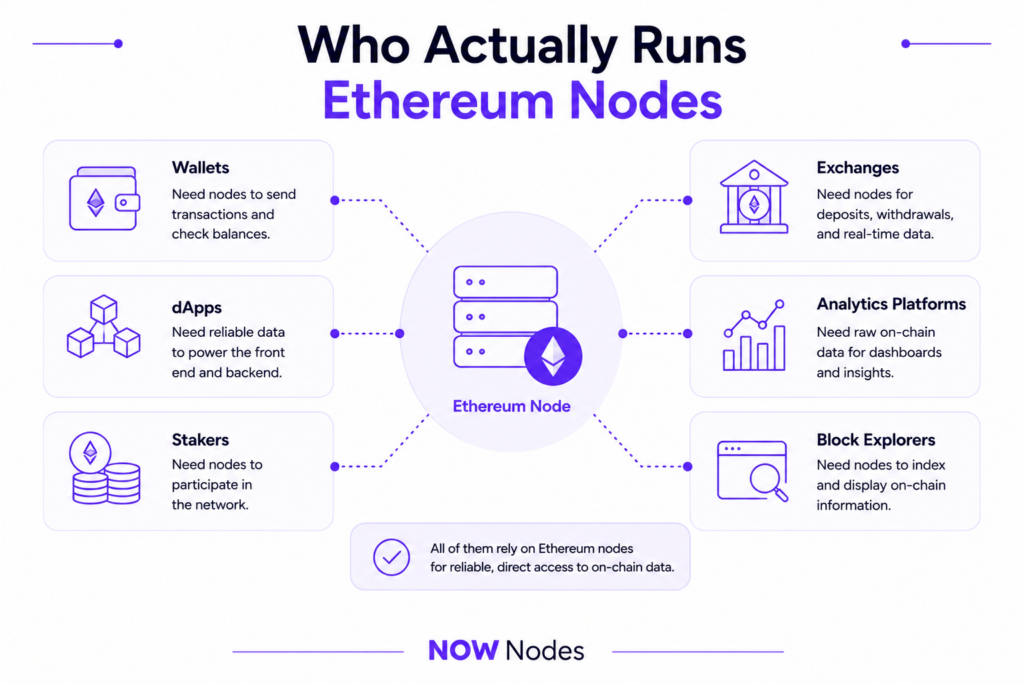
The list is broad: wallets, dApps, stakers, exchanges, analytics platforms, and block explorers all need reliable, direct access to on-chain data. An ETH node is the layer feeding every balance check, contract call, and transaction they push out.
For a solo developer testing a contract, a node is a learning tool and a privacy win. For a business serving thousands of users, it’s core infrastructure, and the reliability bar is much higher.
Ethereum Node Hardware Requirements
This is where planning matters most, because the wrong spec means a node that syncs for days and then falls over. Ethereum node hardware requirements depend on the node type, but a few numbers hold across the board in 2026.
Ethereum Full Node Hardware Requirements
For a full node running an execution and a consensus client together, here’s what a stable 2026 setup looks like:
| Component | Minimum | Recommended |
|---|---|---|
| CPU | 4 cores / 8 threads | Modern 8-core / 16-thread |
| RAM | 16 GB | 32 GB |
| Storage | 2 TB NVMe SSD | 4 TB NVMe SSD |
| Bandwidth | ~25 Mbps | 50+ Mbps |
A few things to flag. The storage must be a solid-state drive — a spinning hard drive can’t keep up with the constant random reads and writes, and cheaper SATA SSDs wear out faster than NVMe. RAM below 16 GB risks out-of-memory crashes during chain reorganizations. And expect real data usage: a full node can move over 2 TB per month, so steer clear of any internet plan with a data cap.
Why Storage Is the Real Bottleneck
Disk space, not CPU or RAM, is what usually catches node operators out. A Geth full node needs roughly 1.3–2 TB today and grows by around 14 GB per week as the chain does.
But the picture improved in 2025. Partial History Expiry rolled out across execution clients on July 8, 2025, letting nodes drop pre-Merge block bodies and receipts — freeing up about 300–500 GB and putting 2 TB drives comfortably back in play. The flip side is blob data: after the Fusaka upgrade went live on mainnet on December 3, 2025, and blob capacity was raised further, consensus clients now need extra transient storage. Budget an additional 100–224 GB depending on your configuration.
The practical rule is simple. Buy a 2 TB NVMe minimum, and 4 TB if you want a couple of years of headroom. Keep the drive under about 70% full so there’s room for pruning and the occasional surge.
Ethereum Archive Node Hardware Requirements
Archive nodes are a different beast. A legacy Geth archive node needs 12+ TB of NVMe storage, while Erigon’s optimized data structures bring a full archive down to roughly 2.8–3.5 TB. Geth’s newer path-based archive mode (v1.16 and up) trims this to about 2 TB, with the catch that historical proofs only work for recent blocks.
Unless your product genuinely needs deep historical queries, don’t run an archive node. And even when you do need that data, archive access from NOWNodes lets you query historical state on demand without hosting a 12 TB machine yourself — for most teams, the storage and cost jump rarely pays off otherwise.
How to Run an Ethereum Node
There are two realistic paths, and the right one depends on your skill level and how much you want to maintain. Let’s take the simple one first.
Option 1 — Managed Access with NOWNodes
If you want Ethereum node access without buying hardware or babysitting a sync, a provider handles the infrastructure for you. With NOWNodes, the process takes minutes:
- Sign up at nownodes.io with just an email — no KYC required.
- Open your dashboard and click “Add New Key” to generate an API key.
- Copy your Ethereum endpoint URL.
- Plug it into your app using web3.js or ethers.js, or connect a wallet to it directly.
The free START plan covers 100,000 requests per month, which is plenty for testing and smaller projects. This route skips the hardware cost, the multi-day sync, and the ongoing maintenance entirely — you’re reading from and writing to Ethereum almost immediately. If you’d rather rehearse the mechanics first, a testnet environment lets you practice without risking real funds.
What makes NOWNodes a fit here is breadth as much as convenience. Alongside Ethereum mainnet and testnet, it covers 120+ blockchain networks from a single account, offers both shared and dedicated nodes, and includes Ethereum archive access. There’s no KYC to sign up, and the infrastructure is geo-balanced for stable performance worldwide. For a wallet, exchange, or analytics product that touches more than one chain, that unified access layer is often the bigger draw than any single endpoint.
Option 2 — Run It Yourself
Running your own node gives you maximum control and full independence, at the cost of setup and upkeep. Here’s the high-level flow:
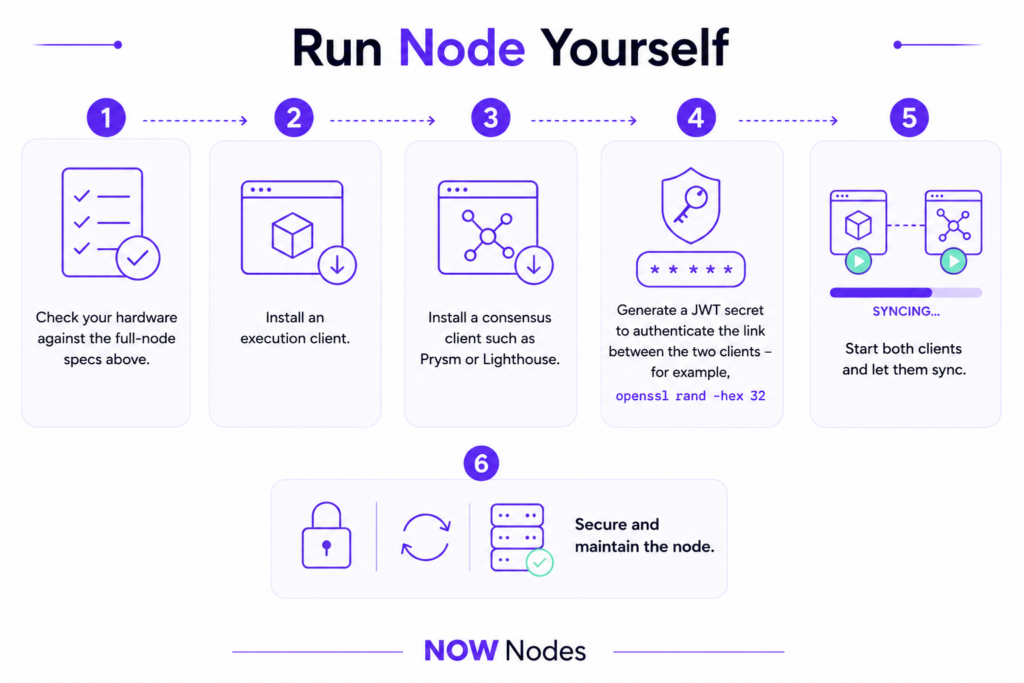
- Check your hardware against the full-node specs above.
- Install an execution client. Geth is the most common — download the latest release from the official go-ethereum repository and follow its documentation.
- Install a consensus client such as Prysm or Lighthouse.
- Generate a JWT secret to authenticate the link between the two clients — for example,
openssl rand -hex 32. - Start both clients and let them sync. This can take a couple of days depending on your hardware and connection.
- Secure and maintain the node: firewall it, keep clients updated, and watch your disk space.
One tip worth taking straight from the client teams: run a minority client where you can. It’s better for the network’s resilience, and it lowers the odds that a single client bug takes your node down with it.
Here’s how the two paths compare at a glance:
| Run it yourself | Managed access | |
|---|---|---|
| Setup time | Hours to days | Minutes |
| Upfront cost | Hardware + rig | None |
| Maintenance | Ongoing (yours) | Handled for you |
| Control | Full | High, without the overhead |
| Best for | Learning, full sovereignty | Shipping products fast |
How Much Does It Cost to Run an Ethereum Node?
Cost is usually the deciding factor between the two paths, so let’s put real numbers on it.
Running your own node means paying for hardware, electricity, and bandwidth. A capable machine — an 8-core CPU, 32 GB of RAM, and a 4 TB NVMe drive — runs several hundred dollars up front, a full-node rig draws roughly 80–120 W around the clock, and you’ll need an uncapped connection. On dedicated server infrastructure, an entry-level full node typically runs $140–300 per month, with production setups climbing higher.
Managed access flips the model. There’s no hardware or DevOps overhead — you pay for request volume, and providers like NOWNodes start free at 100,000 requests per month. For many teams, that difference is the whole argument: self-hosting makes sense when you need total control, and managed access makes sense when you’d rather ship.
Conclusion
An Ethereum node is your own independent window into the network — a machine that verifies the chain for itself and answers to no one. Running one is open to anyone, no staking required, and in 2026 the hardware bar is manageable: a 2 TB NVMe drive, 16–32 GB of RAM, and a solid connection will run a full node.
The honest takeaway is the same one experienced operators keep landing on. Match the path to your situation. If you want control, privacy, and a hands-on setup, run your own ETH node and respect the storage math. If you’d rather focus on your product than on sync times and disk alerts, managed access gets you there faster. Either way, the network gets a little stronger every time someone chooses to verify instead of trust.
FAQ
What is an Ethereum node?
It’s a computer running Ethereum client software that stores the blockchain, verifies every block and transaction against the network’s rules, and relays them to other nodes. It’s what lets you interact with Ethereum without trusting a third party.
Do I need ETH to run an Ethereum node?
No. Running a node requires zero ETH — only a computer, an internet connection, and the willingness to keep it online. Staking 32 ETH is required to run a validator, which is a separate role.
What are the hardware requirements for an Ethereum full node?
In 2026, a stable full node needs a 4-core-plus CPU, at least 16 GB of RAM (32 GB recommended), a 2 TB NVMe SSD (4 TB to future-proof), and an uncapped connection of 25 Mbps or more. Storage is the main bottleneck, since a Geth full node uses 1.3–2 TB and grows about 14 GB per week.
How long does it take to sync an Ethereum node?
Syncing a full node from scratch usually takes anywhere from several hours to a couple of days, depending on your hardware, client choice, and internet speed. Fast NVMe storage and a stable connection make the biggest difference.
What’s the difference between a full node and an archive node?
A full node keeps recent state (about the last 128 blocks) and needs 2–4 TB of storage. An archive node keeps every historical state since genesis, which is essential for explorers and analytics but demands far more disk — from ~2.8 TB on Erigon to 12+ TB on a legacy Geth archive.
How much does it cost to run an Ethereum node?
Self-hosting on dedicated infrastructure typically runs $140–300 per month for an entry-level full node, plus upfront hardware and electricity if you host it at home. Managed access flips the model — providers like NOWNodes start free with 100,000 requests per month.
Is it better to run my own node or use a provider?
It depends on your goals. Run your own node for maximum control, privacy, and independence, if you’re prepared to handle setup and maintenance. Use a provider when you want to skip the hardware, sync, and upkeep and get reliable access in minutes.