
Solana Pay is an open standard for requesting a crypto payment through a URL or QR code, so a wallet can read it and a customer can pay in a couple of taps. It handles one payment at a time. Recurring charges, like a monthly subscription, use a different mechanism built on token delegation. This guide covers both: how to accept a single payment on Solana, and how to let a customer authorize repeat charges without handing over control of their wallet.
What Is Solana Pay?
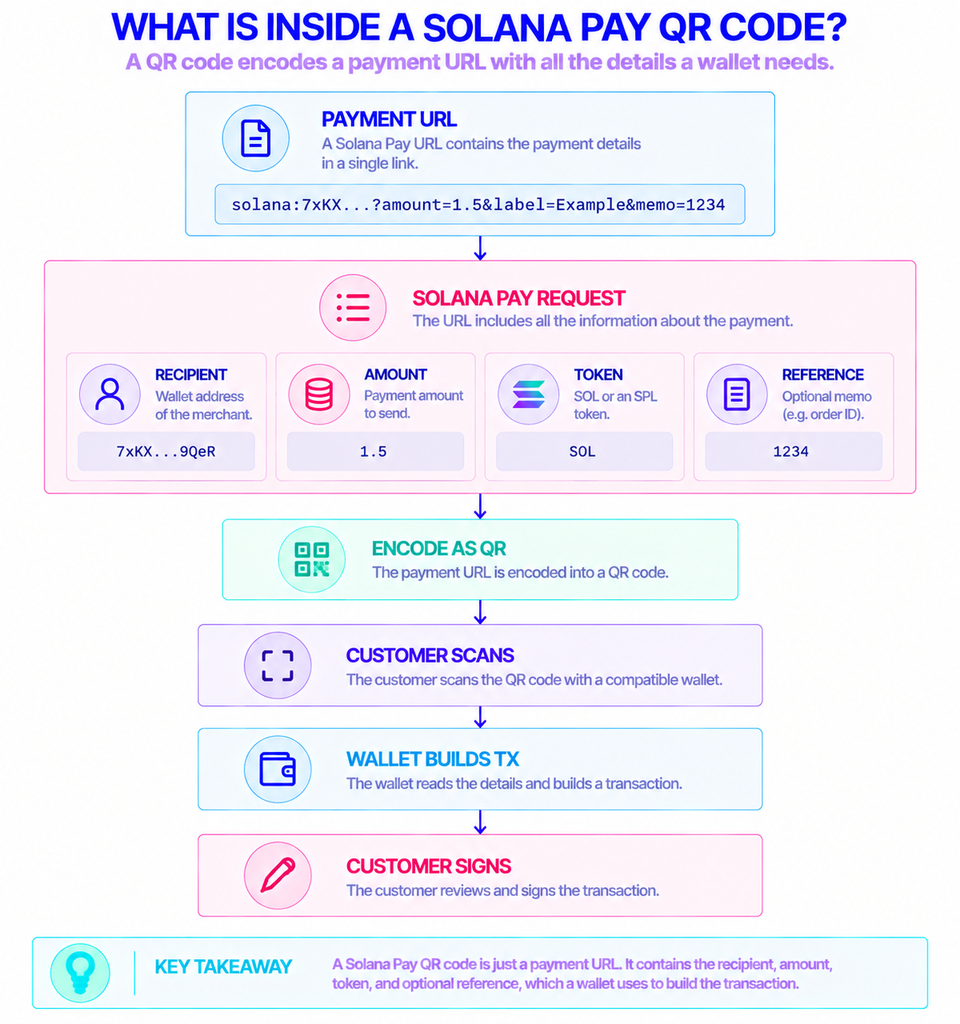
Solana Pay is a specification for encoding a payment request inside a URL that starts with solana:. A wallet reads that URL, shows the customer what they are about to pay, and submits the transaction to the network. It does not add new blockchain features. It reuses Solana’s existing signing and transfer rules and agrees on a common format so any compatible wallet behaves the same way.
Because the request is just a URL, it fits inside a QR code. A shop can print one next to the register, a website can show one at checkout, and an invoice can carry one in an email. The reference implementation is the open-source @solana/pay JavaScript library, which generates these requests, renders the QR codes, and helps you match an incoming payment back to the right order.
What’s the Difference Between a Transfer Request and a Transaction Request?
Solana Pay defines two request types, and the choice shapes how much control you have over the payment.
A transfer request is the simpler one. It is a non-interactive request to move SOL or an SPL token straight to your address. You set the recipient (your public key) and usually an amount, plus optional fields like spl-token for the mint, a reference key, and a human-readable label and message. The wallet builds the transfer from those parameters alone.
A transaction request is interactive and more flexible. Instead of describing a transfer, the URL points to an endpoint you control. The wallet calls that endpoint, sends the customer’s public key, and your server returns a fully built transaction encoded in base64. The wallet then asks the customer to sign it. This lets you do things a plain transfer can’t, like splitting a payment, adding a fee, minting a receipt NFT, or gating the purchase behind a rule. The full field list is in the Solana Pay specification.
Why Accept Payments on Solana in the First Place?
The practical reasons are cost and speed. Solana’s base fee is 5,000 lamports per signature, which is 0.000005 SOL, a fraction of a cent at typical prices (Solana docs). For a merchant that usually means the network cost of accepting a payment is negligible, even on small purchases where card fees would eat the margin.
Settlement is also fast. Solana produces a new block roughly every 400 milliseconds, and a payment is usually safe to treat as confirmed within about half a second, with full deterministic finality taking longer (Helius). The Alpenglow consensus upgrade, rolling out across the network in 2026, is designed to push median finality down to around 150 milliseconds, closing most of the remaining gap with traditional card authorization.
There is a trade-off worth naming. Crypto payments are final once they land, so there is no built-in chargeback. That protects the merchant from fraudulent reversals, but it also means refund logic is your responsibility, not the network’s.
Who Actually Uses Solana Pay?
The standard was built for commerce, so the users are mostly people selling something.
- In-person merchants show a QR code at the point of sale. The customer scans it with a mobile wallet and the funds arrive directly, with no card terminal or acquiring bank in the middle.
- Online stores embed a payment request at checkout. Shopify merchants, for example, can accept Solana Pay through an app that originally launched to enable USDC payments, so customers pay in a dollar-pegged stablecoin rather than a volatile asset.
- Creators and services use it for tipping, donations, paywalls, and one-off invoices, where the appeal is low fees and instant receipt.
A common thread is stablecoins. Since a transfer request can specify any SPL token mint, most real-world checkout flows accept USDC instead of SOL, which removes price swings between the moment a customer pays and the moment a merchant books the revenue.
How Do You Set Up a Solana Payment Request?
At a high level, accepting a single payment follows the same sequence whether it is in a shop or on a web page. Here is the flow using the @solana/pay library.
- Create a unique reference. Generate a fresh keypair and use its public key as a
reference. This is not a signer; it is a marker attached to the transaction so you can find it later. One reference per order keeps your payments distinct. - Build the request URL. Encode your recipient address, the amount, the token mint (for USDC or another SPL token), the reference, and a label and message. The library’s
encodeURLturns these into asolana:URL. - Render the QR code. Pass the URL to
createQR, which produces a scannable code. The default size is 512 pixels, and you can set the background and foreground colors. - Show it to the customer. They scan it with a compatible wallet, review the amount, and approve. The wallet signs and submits the transfer.
- Confirm and fulfill. Watch the chain for a transaction carrying your reference, verify the amount and recipient, then release the goods.
The reference trick matters because your server never receives the transaction signature directly. The customer’s wallet submits the transaction, not you.
How Do You Confirm a Payment Went Through?
You confirm a payment by watching for the reference key you attached, then checking the transaction details. The library’s findReference helper looks up a transaction by its reference, and under the hood it uses the standard getSignaturesForAddress method. Once you have the signature, you validate that the recipient, amount, and token mint match what you expected before marking the order paid.
How certain you need to be depends on the purchase. Solana exposes commitment levels, processed, confirmed, and finalized, that trade speed for certainty. A coffee can ship on confirmed; a high-value transfer is better held until finalized. Polling works for low volume, but a busy checkout is better served by a persistent connection that pushes updates as they happen, which is where a WebSocket or streaming interface fits.
This is the layer where infrastructure choice starts to matter, since both submitting transactions and monitoring for confirmations run through a Solana node endpoint.
How Do Recurring Payments Work on Solana?
Solana Pay does not do subscriptions. A payment request is a one-time event: the customer approves one transfer and nothing more happens on its own. Recurring billing needs a way for a merchant to pull a payment later, on a schedule, with the customer’s prior consent and no second signature each time.
On Solana that consent comes from token delegation. A token owner can approve another account to move a limited amount of their tokens. The official Subscriptions Delegation Program builds a structured billing system on top of this idea, with code published in the solana-program/subscriptions repository and an audit by Cantina.
The design works around one Solana rule: a token account can only have a single approved authority at a time. To avoid clashes, the program gives each user-and-token pair a program-controlled “Subscription Authority” that the user approves once. That authority can’t move funds on its own. Every charge has to match an active authorization the user created, with its own limits.
Fixed, Recurring, or Subscription Plan: Which Model?
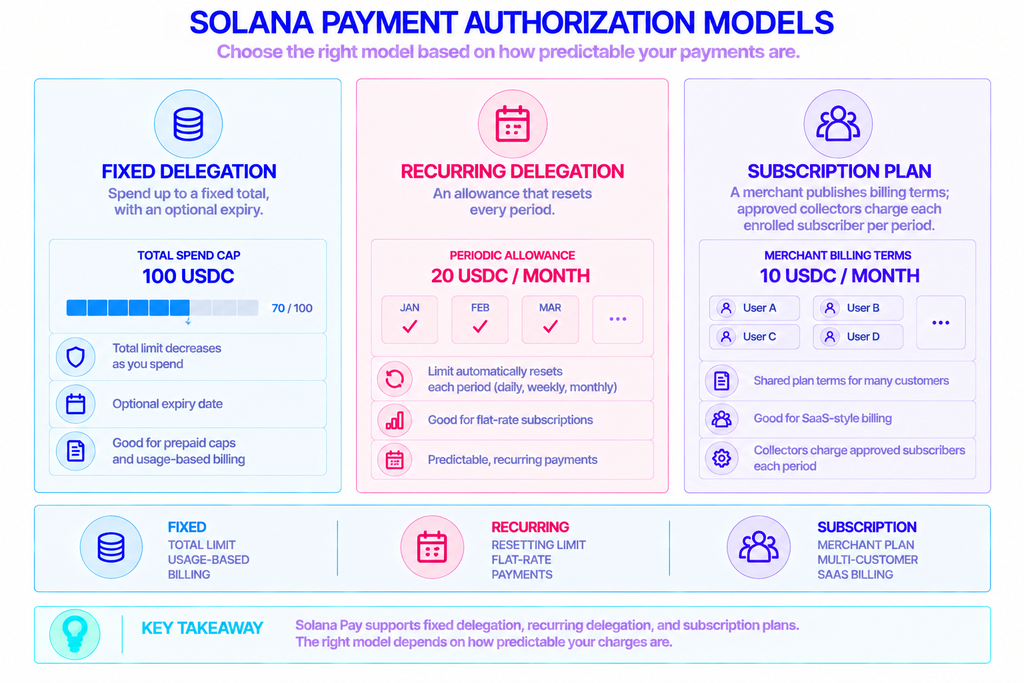
The program supports three authorization models, and the right one depends on how predictable the charges are.
| Model | What it allows | Good for |
|---|---|---|
| Fixed delegation | Spend up to a fixed total, with an optional expiry | Prepaid caps, metered or usage-based billing |
| Recurring delegation | An allowance that resets every period (daily, weekly, monthly) | Flat-rate subscriptions |
| Subscription plan | A merchant publishes billing terms; approved collectors charge each enrolled subscriber per period | SaaS-style billing across many customers |
In code, these map to calls like transferFixed, transferRecurring, and transferSubscription. The program also supports Token-2022 transfer hooks, so tokens with extra on-chain logic still work inside a subscription.
What Are the Limits and Risks?
The controls are deliberately tight, which is what makes delegated billing safe to offer customers.
- A per-period cap.
amountPerPeriodsets the most a collector can pull in one period. The allowance resets when the next period begins, so a charge that exceeds the remaining allowance is rejected. - A hard expiry.
expiryTsis a firm stop. After it passes, transfers fail, and the documentation notes there is no grace period. - Revocation at any time. The user can cancel the delegation whenever they want, which closes the authorization and returns its rent.
- No built-in scheduler. Each charge still has to be submitted by a signer. The program enforces the rules, but something off-chain, a backend service, has to actually trigger each period’s transfer. That service needs reliable network access to keep billing on time.
That last point is the main operational difference from a card subscription. The blockchain guarantees the limits, not the timing. You run the clock.
Reliable Solana Access for Payments and Billing
Every part of this, broadcasting a signed payment, watching for the reference, and submitting recurring charges on schedule, depends on a connection to the Solana network. Running and syncing your own validator to do that is heavy, so most teams use a managed endpoint instead.
This is where NOWNodes fits. It provides Solana RPC endpoints for reading state and sending transactions, WebSocket subscriptions for watching address activity without constant polling, and gRPC streaming for continuous updates with commitment-level choices (processed, confirmed, or finalized) that line up directly with how you confirm a payment. For a recurring-billing backend, that steady access is what keeps collectors charging on time across many subscribers.
For an early integration, free public endpoints let you prototype a checkout flow without an API key, within a modest rate limit, before moving to a plan with higher throughput. The same account reaches 120+ networks, which helps if you later accept payments on more than one chain. NOWNodes supplies the infrastructure access; signing, custody, and the payment logic stay in your application and your customers’ wallets.
Conclusion
Think of it as two tools for two jobs. Solana Pay is for taking a payment right now: a URL or QR code, a wallet, and a transfer that settles in well under a second for a tiny fee. Recurring payments are a separate pattern built on token delegation, where a customer approves capped, time-limited, revocable charges and a backend submits each one on schedule.
If you only need to accept one-off payments, start with a transfer request and the @solana/pay library. If you are building subscriptions, look at the Subscriptions Delegation Program and pick the fixed, recurring, or plan model that matches your billing. Either way, the integration lives or dies on a dependable connection to the network, so treat your Solana endpoint as part of the payment stack, not an afterthought.
FAQ
Which Wallets Support Solana Pay?
Major Solana wallets, including Phantom and Solflare, can scan Solana Pay QR codes and handle both transfer and transaction requests. Any wallet that implements the specification will read a solana: URL the same way, which is the point of having a shared standard.
Is There a Solana Pay App for In-Person Payments?
Yes. Solana Pay ships with an open-source Point of Sale reference app built on the @solana/pay library, which a merchant can run to generate payment QR codes at a register. It is a starting template rather than a packaged commercial product, so many businesses adapt it or use a third-party checkout built on the same standard.
Do Merchants Need to Hold SOL to Accept Solana Payments?
For incoming transfers, the customer’s wallet pays the network fee, so a merchant can receive funds without holding SOL first. You do need a small SOL balance once your own service signs transactions, such as building transaction requests or submitting recurring charges, since the signer covers the per-signature fee.
How Is Solana Pay Different From Stripe or a Card Processor?
A card processor sits between buyer and seller, authorizes the charge, and can reverse it later, in exchange for a percentage fee. Solana Pay has no intermediary: the payment moves directly wallet-to-wallet and settles with finality, for a flat network fee measured in fractions of a cent. The flip side is that there are no automatic chargebacks and no processor handling disputes, so refunds and fraud checks are your responsibility.