
On BNB Smart Chain, “creating a coin” almost always means deploying a token: a smart contract that follows the BEP-20 standard. You can write and launch one on the test network in under half an hour using free tools, then move it to the live chain when it works. This guide walks through the whole path, with the settings and code updated for how the network actually looks in 2026.
Quick answer:
- A “coin” usually means a chain’s native asset (like BNB). What you build on BNB Smart Chain is a token, created through a BEP-20 smart contract.
- The practical tools are MetaMask, the Remix IDE, and OpenZeppelin’s audited ERC-20 code.
- Deploy on the BSC testnet first (chain ID 97) using free test BNB, then repeat on mainnet (chain ID 56) when you’re confident.
Is a Coin the Same as a Token on BNB Smart Chain?
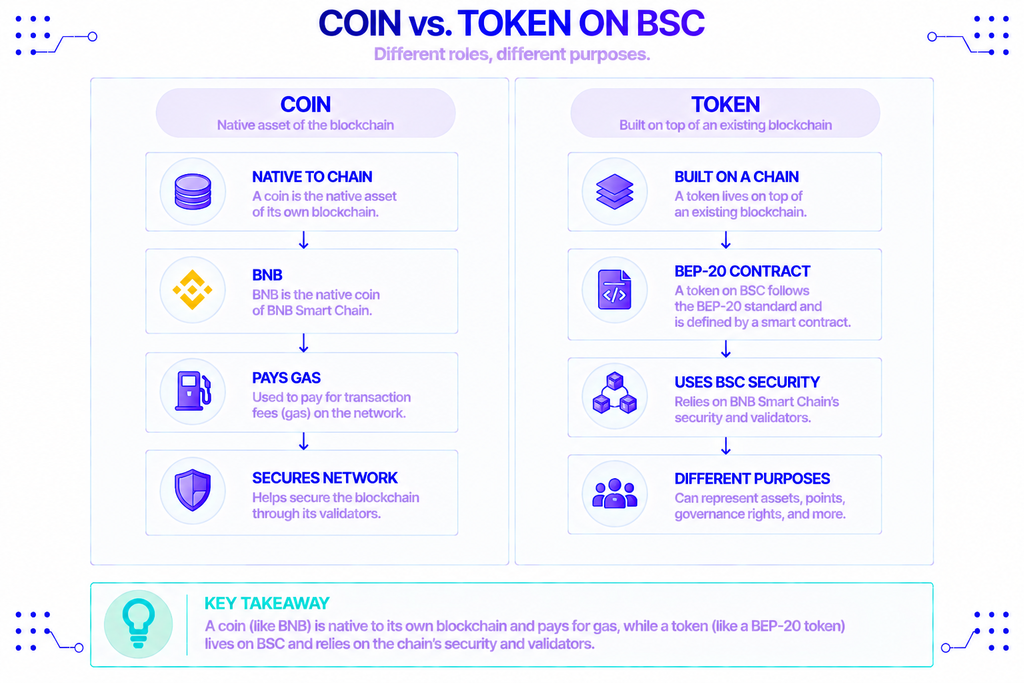
No, and the difference decides how you build. A coin is the native asset of its own blockchain. BNB is a coin because it is native to BNB Smart Chain and pays for gas there. Bitcoin and ether work the same way on their networks.
A token lives on top of an existing chain and relies on that chain’s security and validators. When people search for how to create a coin on Binance Chain, they almost always want a token, because building a standalone blockchain with its own validators is a different and far larger project.
So the real task is issuing a token on BNB Smart Chain. That token is defined by a smart contract, and on this network the contract follows the BEP-20 standard. The rest of this guide covers exactly that.
What Is BNB Smart Chain (and Where Did BNB Beacon Chain Go)?
BNB Smart Chain (BSC) is a layer-1 blockchain that runs the Ethereum Virtual Machine (EVM), the same execution environment Ethereum uses. Its native coin is BNB, and its mainnet identifies itself to wallets with chain ID 56.
EVM compatibility is the reason this is approachable. It means standard Ethereum tooling works with little change: the same Solidity language, the same Remix editor, the same JSON-RPC methods such as eth_getBalance. You point those tools at a BSC endpoint instead of an Ethereum one and keep your workflow.
One thing changed since older guides were written. “BNB Chain” used to be two chains: the BNB Beacon Chain for staking and governance, and BNB Smart Chain for smart contracts. Under an initiative called BNB Chain Fusion, the Beacon Chain was shut down on November 19, 2024, and its functions were folded into BSC. Today there is effectively one chain, and the current token standard is BEP-20. The older BEP-2 standard belonged to the retired Beacon Chain.
Speed and cost are the other reasons BSC is popular for token launches. After the Maxwell hardfork in June 2025, the network produces a block every 0.75 seconds. BNB Chain described the result as “0.75-second blocks and 1.875s finality,” and average gas fees fell sharply over the same period, which keeps deployment and transfers cheap.
What Is the BEP-20 Token Standard?
BEP-20 is the token standard for BNB Smart Chain. A standard is just a shared set of functions every compliant token implements, so wallets, explorers, and exchanges know how to read balances and move the token without custom code for each one.
BEP-20 is a near-identical cousin of Ethereum’s ERC-20. Both define the same core behavior: a name, a symbol, how many decimal places the token uses, a total supply, and functions to transfer tokens and approve others to spend them. Because the interfaces match, code written for ERC-20 compiles and runs on BSC with essentially no changes.
| ERC-20 | BEP-20 | |
|---|---|---|
| Network | Ethereum | BNB Smart Chain |
| Native gas coin | ETH | BNB |
| Mainnet chain ID | 1 | 56 |
| Core interface | name, symbol, decimals, totalSupply, transfer, approve | Same |
| Typical deploy fee | Higher, varies with Ethereum gas | Low, fractions of a cent in normal conditions |
The practical takeaway: you can reuse OpenZeppelin’s battle-tested ERC-20 contract to make a BEP-20 token. There is no separate library to learn.
What You Need Before You Start
This is a short list, and all of it is free for testing:
- MetaMask or another EVM wallet, installed as a browser extension.
- Test BNB (tBNB) for gas on the testnet, claimed from the official faucet.
- The Remix IDE, a browser-based Solidity editor that needs no installation.
- A little familiarity with Solidity. You don’t need to be an expert; the contract below is short.
You do not need to install a compiler or run any infrastructure. Remix handles compilation in the browser, and your wallet connects to the chain through a public endpoint.
How to Deploy a BEP-20 Token on the BSC Testnet
Here is the full sequence. Do it on the testnet first so a mistake costs nothing.
Step 1: Add the BSC Testnet to MetaMask
Open MetaMask, go to the network menu, and choose Add a network manually. Enter these values:
| Field | Value |
|---|---|
| Network name | BNB Smart Chain Testnet |
| RPC URL | https://data-seed-prebsc-1-s1.bnbchain.org:8545 |
| Chain ID | 97 |
| Currency symbol | tBNB |
| Block explorer | https://testnet.bscscan.com |
Save it and switch MetaMask to the new network. If transactions later fail for no obvious reason, the first thing to check is that the chain ID reads 97 and not 56; mixing the two is the most common setup mistake.
Step 2: Get Test BNB From the Faucet
You need a small amount of tBNB to pay for the deployment. Go to the official BNB Chain faucet at bnbchain.org/en/testnet-faucet, paste your wallet address, and request funds. The faucet currently drips 0.3 tBNB per address every 24 hours, which is more than enough to deploy and test a token.
Test BNB has no real value. It exists only to let you pay gas on the testnet exactly as you would with real BNB on mainnet.
Step 3: Write the Token Contract in Remix
Open remix.ethereum.org, create a new file in the contracts folder, and name it MyToken.sol. Paste in the following:
solidity
// SPDX-License-Identifier: MIT
pragma solidity ^0.8.20;

import { ERC20 } from "@openzeppelin/contracts/token/ERC20/ERC20.sol";
import { Ownable } from "@openzeppelin/contracts/access/Ownable.sol";

contract MyToken is ERC20, Ownable {
    constructor(uint256 initialSupply)
        ERC20("My Token", "MYT")
        Ownable(msg.sender)
    {
        _mint(msg.sender, initialSupply * 10 ** decimals());
    }
}
A few notes on what this does. It imports OpenZeppelin’s ERC-20 implementation, which is widely audited, so you are not writing token logic from scratch. ERC20("My Token", "MYT") sets the name and symbol; change these to your own. Ownable(msg.sender) makes the deploying wallet the owner, which matters if you later add owner-only functions like minting more supply.
The _mint line creates your initial supply and sends it to your wallet. Multiplying by 10 ** decimals() handles the 18 decimal places automatically, so you pass a plain number. Deploy with initialSupply set to 1000000 and you get one million tokens, not a figure with eighteen trailing zeros.
OpenZeppelin Contracts is on version 5.x, which requires Solidity 0.8.20 or newer and relies on the language’s built-in overflow checks, so there is no SafeMath import to add.
Step 4: Compile the Contract
Open the Solidity Compiler tab in Remix. Set the compiler version to 0.8.20 or higher to match the pragma, then click Compile MyToken.sol. Remix fetches the OpenZeppelin imports automatically. A green check means it compiled; fix any version mismatch before moving on.
Step 5: Deploy to the Testnet
Go to the Deploy & Run Transactions tab. In the Environment dropdown, select Injected Provider – MetaMask. MetaMask will prompt you to connect; approve it, and confirm the network shows as the BSC testnet.
Enter your initialSupply (for example, 1000000) next to the Deploy button, click it, and confirm the transaction in MetaMask. After a few seconds the contract appears under Deployed Contracts with its address. Copy that address.
Step 6: Add the Token to Your Wallet and Verify It
In MetaMask, open the tokens list and choose Import tokens, then paste the contract address. The symbol and decimals fill in automatically, and your balance shows the supply you minted.
To confirm everything landed on-chain, paste the contract address into testnet.bscscan.com. You will see the deployment transaction, the token’s supply, and your wallet as the holder. That is a working BEP-20 token.
Moving From Testnet to Mainnet
Mainnet uses the same code. What changes is small but important.
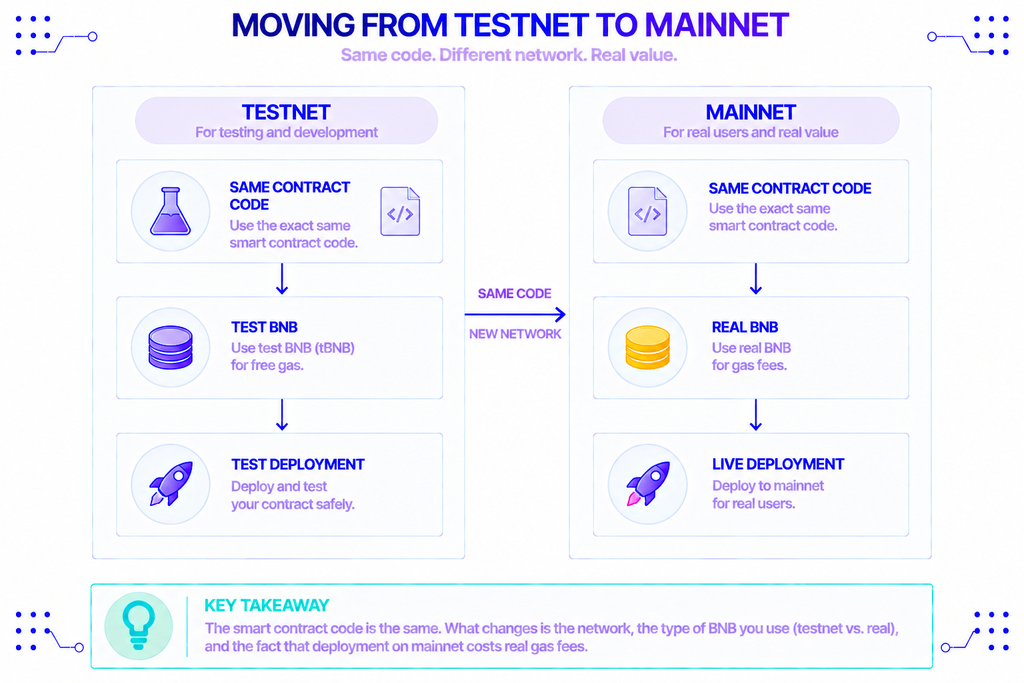
Switch MetaMask to BNB Smart Chain mainnet (chain ID 56), fund your wallet with real BNB for gas, and deploy the identical contract. The bytecode is the same; only the network and the cost differ. Deployment on mainnet costs a small amount of real BNB rather than free tBNB.
Before a real launch, two steps are worth the effort. Verify your contract’s source on BscScan so anyone can read and trust it, and consider a professional audit if the token will hold meaningful value or add custom logic beyond a basic transfer. If you plan to trade it, you will also need to create liquidity on a decentralized exchange such as PancakeSwap.
One caution that sits outside the code: a token can carry legal weight. Depending on where you operate and how you distribute it, a token may fall under securities, tax, or anti-money-laundering rules. That is a question for a qualified advisor, not a smart contract.
Do You Need a BSC Full Node to Launch a Token?
No. Deploying a token only requires a wallet connected to the chain through an endpoint, which is exactly what the public RPC URL in Step 1 provides. Running a BSC full node means syncing and storing the entire blockchain yourself and keeping that machine online, which is far more than token deployment needs.
Public endpoints are fine for a tutorial, but they are rate-limited and shared, so they can be slow or unreliable once an application depends on them. A token on its own is mostly static; the connection matters more when you build the app around it, such as a dApp reading balances, a backend broadcasting transactions, or a dashboard tracking transfers.
At that point, managed access is the usual answer. A provider like NOWNodes gives you a BNB Smart Chain endpoint and an API key without the work of running infrastructure, so you can focus on the product. For heavier or production workloads, dedicated nodes offer isolated capacity, and the available plans scale from free prototyping tiers upward. The token still deploys the same way; this only changes how your software talks to the chain.
Conclusion
Creating a coin on Binance Chain, in practice, means writing a short BEP-20 contract and deploying it to BNB Smart Chain. The fastest safe route is the testnet: add chain ID 97 to MetaMask, claim free tBNB, deploy OpenZeppelin’s ERC-20 contract through Remix, and confirm it on the testnet explorer. Mainnet is the same process with real BNB and a few extra safeguards like verification and, where it matters, an audit.
The contract is the easy part. What takes real thought is what the token is for, how it is distributed, and the infrastructure the application around it depends on once it goes live.
FAQ
How much does it cost to create a token on BNB Smart Chain?
On the testnet it is free, since you pay gas with faucet tBNB that has no value. On mainnet you pay a small amount of real BNB for gas, which is usually a fraction of a cent to a few cents under normal network conditions. Added costs like a contract audit or exchange liquidity are separate and depend on your project.
Is creating a BEP-20 token the same as creating a smart contract on BSC?
Yes. A BEP-20 token is a smart contract; the standard just defines the functions that make the contract behave like a token. When you deploy the contract in Remix, you are creating a smart contract on BSC that happens to follow BEP-20.
What is the difference between BEP-2 and BEP-20?
BEP-2 was the token standard on the old BNB Beacon Chain, which was retired in November 2024. BEP-20 is the current standard on BNB Smart Chain and is the one to use for any new token.
Can I create a token on BNB Smart Chain without coding?
Yes, token-generator tools can deploy a basic BEP-20 contract through a form. The trade-off is control and trust: you often can’t inspect exactly what you’re deploying, and some generators charge fees or insert functions you didn’t expect. Writing a short, auditable contract yourself avoids those surprises.
What is chain ID 56?
Chain ID 56 identifies BNB Smart Chain mainnet to EVM wallets and applications. The testnet uses chain ID 97. Setting the wrong one sends your transaction to the wrong network, so it is worth double-checking before you deploy.